
AskFormulas
AskFormulas generates and validates Excel and Google Sheets formulas with guaranteed accuracy.
Visit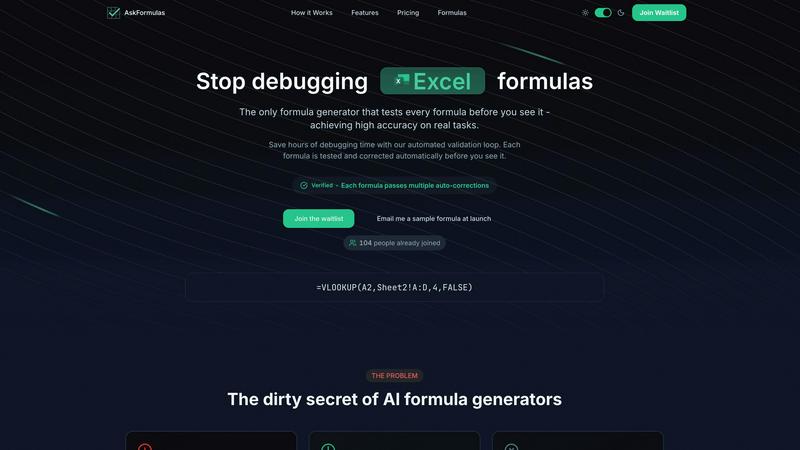
About AskFormulas
AskFormulas is a precision-engineered AI tool designed to solve the critical problem of broken spreadsheet formulas, a common flaw in existing AI formula generators which suffer from 40-60% error rates. Its core innovation is a proprietary, automated validation loop that guarantees a "Verified" formula every time. The platform operates by allowing users to describe their calculation need in plain English. The AI then generates the appropriate formula, tests it against synthetic data in a secure sandbox environment, and performs iterative auto-corrections on errors like #REF! and #VALUE! until it functions perfectly, achieving an accuracy rate exceeding 95%. Built for seamless integration into modern data stacks, AskFormulas offers full-stack compatibility with both Microsoft Excel and Google Sheets, featuring a one-click syntax switch. It is engineered for professionals who depend on accurate and efficient data manipulation, including financial analysts building complex models, revenue managers automating reports, SMB owners lacking deep Excel expertise, and any user tired of wasting hours debugging faulty formulas. With features like formula history tracking and one-click copy, AskFormulas transforms formula creation from an error-prone task into a reliable, efficient, and integrated workflow component.
Features of AskFormulas
Proprietary Validation Loop
This is the core technological differentiator of AskFormulas. Every user request passes through a rigorous, automated 3-step process: natural language parsing, execution on synthetic test data in a secure sandbox, and iterative auto-corrections. This loop continuously tests and fixes errors like #REF! or #VALUE! until the formula is fully functional, guaranteeing a verified output with over 95% accuracy before the user ever sees it, directly addressing the high failure rates of other generators.
Full-Stack Spreadsheet Compatibility
AskFormulas is built for heterogeneous data environments, offering native support for both Microsoft Excel and Google Sheets. A simple one-click toggle allows users to switch between platforms, and the system automatically adjusts the formula syntax (e.g., converting VLOOKUP structures for Excel or implementing ARRAYFORMULA for Sheets). This ensures seamless integration regardless of an organization's primary spreadsheet software, making it a versatile tool for any tech stack.
Intelligent Error Detection & Auto-Correction
Beyond simple generation, the platform proactively identifies and resolves formula errors. When the validation sandbox detects a common error like #REF!, #VALUE!, or #N/A, the system doesn't just report it; it intelligently diagnoses the cause—such as an incorrect range reference—and automatically applies corrections through multiple iterations until a working formula is produced, saving users from manual debugging.
Integrated Workflow Tools
AskFormulas enhances productivity with built-in utilities designed for continuous use. This includes a one-click copy function for instant pasting into live spreadsheets and an automatic formula history that saves the user's last 10 generated formulas. This creates a personal, retrievable formula library, streamlining workflow and ensuring no work is lost, which is critical for audit trails and repetitive task automation.
Use Cases of AskFormulas
Financial Modeling & Analysis
Financial analysts building complex discounted cash flow (DCF) models, variance analyses, or consolidation reports can describe logic in plain English. AskFormulas generates and validates intricate formulas involving XLOOKUP, INDEX/MATCH, and nested IF statements, ensuring absolute accuracy in calculations that underpin critical investment decisions and financial forecasts, directly impacting data integrity.
Automated Business Reporting
Revenue operations managers, sales analysts, and marketing teams can automate weekly and monthly reports. By requesting formulas to summarize data, calculate conversion rates, or segment customer cohorts, they receive verified formulas that work immediately in their Google Sheets or Excel reports, eliminating hours of manual formula writing and debugging, and enabling faster, reliable insights.
SMB Operations & Administration
Small business owners or office managers who lack deep technical expertise in spreadsheet functions can use AskFormulas to create invoices, calculate payroll taxes, manage inventory, or track expenses. The plain-English interface and guaranteed verified formulas democratize advanced data manipulation, allowing them to build efficient systems without needing to learn complex formula syntax.
Data Cleaning & Preparation
Data analysts and scientists preparing datasets for analysis often spend significant time on data cleaning tasks. AskFormulas can quickly generate validated formulas for tasks like extracting substrings with LEFT/RIGHT/MID, converting text to dates, removing duplicates, or conditional formatting, accelerating the data preparation phase and ensuring clean, analysis-ready data.
Frequently Asked Questions
How accurate are the generated formulas?
AskFormulas guarantees an accuracy rate exceeding 95% for real-world tasks. This high reliability is achieved through our proprietary validation loop, which automatically tests and iteratively corrects every formula in a secure sandbox environment before presenting it to the user as "Verified." This process directly targets and eliminates the 40-60% error rates common in other AI formula generators.
Does it work with both Excel and Google Sheets?
Yes, AskFormulas is built for full-stack compatibility. It natively supports both Microsoft Excel and Google Sheets. Users can switch between the two platforms with a single click, and the system will automatically adjust the formula syntax to be correct for the selected environment, ensuring seamless integration into any existing data workflow.
How does the validation loop work?
The validation loop is a 3-step automated process. First, your natural language request is parsed into formula intent. Second, the generated formula is executed against synthetic template data in a secure, isolated sandbox. Third, if any errors (like #REF!) are detected, the system performs automatic corrections and retests the formula. This loop continues until the formula passes all tests and is marked as "Verified."
What happens if my formula request is very complex?
AskFormulas is designed to handle a wide range of formula complexities, from simple sums to advanced nested functions and array formulas. The AI is trained to understand context, and the validation loop is particularly crucial for complex requests, as it systematically tests and corrects logic errors, range issues, and syntax problems that are common in intricate formulas, ensuring a working result.
Pricing of AskFormulas
AskFormulas offers simple, transparent pricing tiers to suit different user needs. All plans include the core benefit of validated, verified formulas.
- Starter Plan ($9/month): Designed for individual users, this plan includes 500 formulas per month, access to all formula types, formula history, and email support.
- Pro Plan ($19/month): For power users, this popular plan offers 2,000 formulas per month, priority support, export features, and all Starter benefits.
- Team Plan ($39/month): Built for small teams of up to 5 members, this plan provides 6,000 formulas per month and includes a team workspace, admin controls, SSO integration, audit logs, and dedicated support alongside all Pro features.
Enterprise-level pricing is available upon request for organizations with larger needs.
Explore more in this category:
Similar to AskFormulas

No-code 2D game editor: visual node logic, drag-and-drop scenes, live preview. Exports to Windows, macOS, Linux, Android, iOS, Web.

Free collection of online developer utilities, code formatters, and digital converters designed to streamline your daily workflow.

Online tally counter for tracking attendance, workouts, inventory, visitors, sports scores, habits, and everyday counting tasks.

The #1 Native Form Builder Plugin for Framer - No Code, No Embeds, No External Platforms.

A free launch checklist for SaaS, apps, AI tools and more. Every step says why it matters and when you can skip it.


