
poseup
PoseUp's AI API instantly enhances photo poses and corrects posture for professional results.
Visit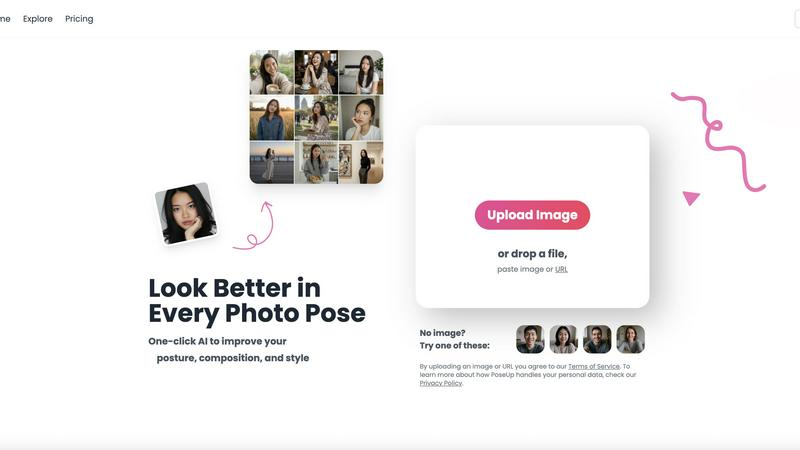
About poseup
PoseUp is an advanced, AI-powered photo enhancement platform engineered to transform both amateur and professional photography through automated pose, posture, and composition correction. At its core is a sophisticated AI engine that performs deep analysis on uploaded images to intelligently adjust human subjects. It fixes suboptimal stances, aligns body posture, and recomposes the frame for maximum visual impact, all with a single click. The platform is built for seamless integration into modern digital workflows, supporting standard image formats including JPG, PNG, WEBP, and HEIC. It serves a broad user base, from social media creators and influencers seeking perfect selfies to professional photographers and businesses needing polished portrait shots without extensive manual post-production. Its primary value proposition lies in its powerful backend technology coupled with technical simplicity, delivering professional-grade photo optimization that eliminates the dependency on manual editing skills or complex software suites like Photoshop. With accessible entry via free credits, PoseUp makes advanced AI photo correction a universally available tool for enhancing visual content across various scenes, from casual lifestyle and outdoor adventures to professional headshots.
Features of poseup
One-Click AI Pose Enhancement
PoseUp's flagship feature is its one-click AI enhancement engine. This sophisticated system automatically analyzes uploaded photos to detect human subjects, then intelligently adjusts poses, corrects posture, and optimizes overall composition. The process requires no manual input or editing skills, leveraging a powerful backend to deliver professional-grade results instantly. It supports a wide range of standard image formats, ensuring compatibility with most digital photography workflows and devices.
Automated Posture & Composition Correction
The platform utilizes advanced computer vision algorithms to perform detailed posture and compositional analysis. It identifies suboptimal body alignment, slouching, or awkward angles and makes precise adjustments to create a more confident and aesthetically pleasing stance. Simultaneously, it evaluates the rule of thirds, subject placement, and background elements to recompose the frame for maximum visual impact and balance, elevating the overall quality of the photograph.
Multi-Scene Style Optimization
PoseUp's AI is trained to understand and enhance photos across diverse contexts and genres. Whether the input is a casual lifestyle shot, an outdoor adventure photo, a professional headshot, or a fitness image, the engine applies context-aware enhancements. This ensures that the pose corrections and stylistic adjustments are appropriate for the scene, maintaining authenticity while improving the subject's presentation and the photo's professional appeal.
Seamless Format & Workflow Integration
Built with integration in mind, PoseUp supports a comprehensive suite of standard image formats including JPG, PNG, WEBP, and HEIC, accommodating images from smartphones, DSLRs, and web sources. The platform is designed for a frictionless user experience, allowing quick upload via drag-and-drop, paste, or URL. This focus on compatibility and ease-of-use makes it a versatile tool that fits effortlessly into content creation, social media, and professional photography pipelines.
Use Cases of poseup
Social Media Content Creation
For influencers, bloggers, and everyday social media users, PoseUp is an indispensable tool for curating a perfect feed. It automatically enhances selfies and portrait shots by correcting posture and improving composition, ensuring every photo posted projects confidence and style. This saves hours of manual editing and helps maintain a consistent, high-quality aesthetic across platforms like Instagram, TikTok, and LinkedIn.
Professional Portrait Photography
Photographers can use PoseUp to streamline their post-production workflow. Instead of manually correcting minor pose imperfections in each shot, they can batch-process selects through the AI. This provides clients with flawlessly composed proofs faster, reduces editing time significantly, and allows photographers to focus more on creative direction and client interaction rather than tedious retouching tasks.
Business & Professional Branding
Professionals and businesses needing polished headshots for websites, company profiles, or marketing materials can leverage PoseUp to ensure a consistent and authoritative image. The AI corrects posture to convey confidence and optimizes composition for a corporate look, eliminating the cost and time associated with professional reshoots. This is ideal for remote teams or individuals creating their own branding assets.
Personal Photo Album Enhancement
Individuals looking to improve personal or family photos can use PoseUp to revitalize their memories. The tool can correct awkward group poses, align posture in vacation photos, and enhance composition in candid shots, transforming everyday snapshots into frame-worthy portraits. It's particularly useful for preparing photos for digital albums, prints, or special occasions without needing advanced photo editing knowledge.
Frequently Asked Questions
What image formats does PoseUp support?
PoseUp is engineered for broad compatibility and supports all major image formats used in digital photography and web content. This includes JPG, PNG, WEBP, and HEIC files. This ensures you can upload images directly from your smartphone, digital camera, or downloaded from the web without needing to convert them first, facilitating a smooth integration into your existing workflow.
How does the AI pose correction technology work?
The technology is based on advanced computer vision and deep learning models. When you upload an image, the AI engine first detects human subjects and their key body points. It then analyzes the pose, posture, and composition against a trained dataset of aesthetically optimal stances. The system makes intelligent, pixel-level adjustments to align the subject's posture, improve bodily proportions, and recompose the frame according to photographic best practices, all automatically.
Is there a free trial or any free usage available?
Yes, PoseUp offers accessible entry to its platform through free credits. New users can get started and experience the core AI enhancement features without an initial payment. This allows you to test the technology's effectiveness with your own photos and understand its integration potential into your personal or professional content creation process before committing to a paid plan.
What is the maximum image size or resolution PoseUp can process?
Based on the provided information, PoseUp currently supports images up to 5MB in size. This constraint is in place to ensure fast processing times and stable performance across the platform. For best results, it is recommended to use high-quality images that are under this size limit, which typically accommodates resolutions well-suited for web and social media use.
Explore more in this category:
Similar to poseup

Free AI attractiveness test and face analysis with private, on-device photo processing.

Turn any image into editable layers with AI.

Private browser-based watermark tools for photos and PDFs, with eleven free workflows and local media processing.

Prompt-based image editing and generation for backgrounds, objects, text, products, posters, outpainting, styles, and Qwen Image workflows.

Generate and edit production-ready images with Seedream 5.0 Pro and Lite for ecommerce, marketing, social media, infographics, and branded content.

Turn any photo into a real Apple Live Photo that animates when you wake your iPhone. Restyle it and choose the motion - customizable.

SnapMerge combines the best expressions from similar group photos into one natural final image.

Private browser-based AI image generation and editing with text-to-image, targeted edits, and multi-image references.