
AI Photo Generator vs Shrinkpad
Side-by-side comparison to help you choose the right product.

AI Photo Generator
Generate stunning, photorealistic images from text or photos with AI Photo Generator, designed for fast, intuitive workflows with no design skills.
Last updated: March 11, 2026

Shrinkpad
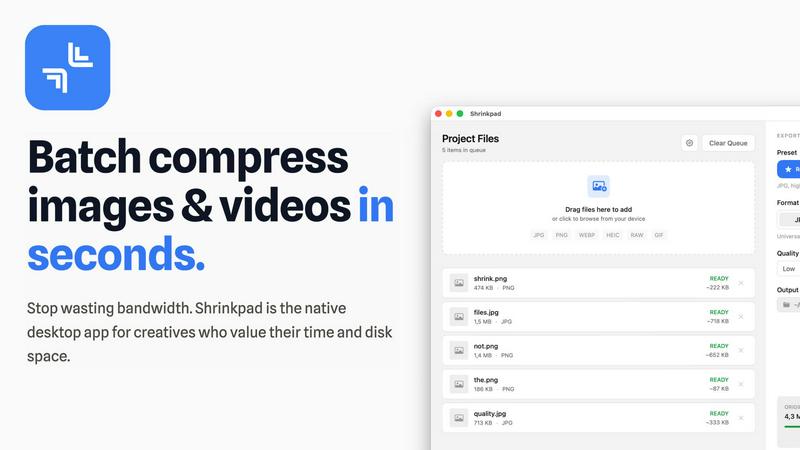
Shrinkpad is a native Mac app that batch compresses images and videos locally for faster, integrated workflows.
Last updated: February 28, 2026
Visual Comparison
AI Photo Generator

Shrinkpad
Feature Comparison
AI Photo Generator
Prompt-to-Masterpiece
The Prompt-to-Masterpiece feature allows users to input detailed natural language prompts to generate images that closely align with their creative vision. This functionality ensures that every aspect, from lighting to composition, is tailored to meet the user's expectations, resulting in artwork that looks meticulously crafted.
Infinite Style Library
With an extensive library of styles, AI Photo Generator caters to diverse artistic preferences. Users can choose from ultra-realistic photography, vibrant anime styles, classic oil paintings, and futuristic 3D renders. This variety enables users to find the perfect aesthetic for any project, enhancing creative flexibility.
Seamless Photo Transformation
The platform allows users to upload existing images for restyling, providing the capability to enhance and transform personal photos. Users can easily convert casual selfies into professional-grade images, making it ideal for creating polished content for social media or professional profiles.
Lightning-Fast Processing
AI Photo Generator is engineered for speed, ensuring that users receive generated images in mere seconds. This lightning-fast processing capability means users can iterate quickly, test different ideas, and refine their visuals without long waiting times, significantly enhancing workflow efficiency.
Shrinkpad
Native macOS & Apple Silicon Optimization
Shrinkpad is built exclusively for macOS, utilizing Apple's Core Graphics, VideoToolbox, and AVFoundation frameworks for maximum performance and system integration. It is fully optimized for Apple Silicon (M1/M2/M3 chips), leveraging multi-threaded processing to compress thousands of images and videos in minutes. This deep integration with the macOS tech stack ensures unparalleled speed and stability compared to cross-platform or web-based tools.
Intelligent, Automated Quality Analysis
The application automatically analyzes the visual complexity of each asset to apply the perfect, format-specific compression ratio. This eliminates the guesswork from manual quality sliders, preventing artifacts while achieving maximum file size reduction. The intelligent algorithm ensures perceptual quality is maintained, making it ideal for batch processing where individual file inspection is impractical.
Comprehensive Format Support
Shrinkpad supports over 30 image formats—including JPG, PNG, WEBP, AVIF, HEIC, and professional RAW files—alongside all major video formats like MP4 and MOV. This extensive compatibility allows users to process mixed-media batches containing photos and videos together in a single operation, with the app automatically applying the optimal compression settings for each file type.
Advanced Folder Mode & Batch Processing
With its advanced Folder Mode, you can drag and drop an entire project directory onto Shrinkpad. It will automatically scan subfolders, detect all supported media files, and ignore non-media assets, readying hundreds or thousands of files for compression in one click. This feature, combined with auto-renaming and metadata stripping options, completely automates the optimization of exported assets from tools like Figma or Photoshop.
Use Cases
AI Photo Generator
Content Creation
Content creators can utilize AI Photo Generator to produce unique, eye-catching visuals for thumbnails, blog posts, and social media. The platform helps generate copyright-free images that enhance engagement and attract audience attention, making it invaluable for digital marketing strategies.
Marketing Campaigns
Marketers and entrepreneurs can harness the power of AI Photo Generator to create visually stunning ads and promotional materials. The ability to generate high-quality images on a budget allows businesses to maintain a professional appearance without incurring high design costs.
Personal Branding
Users looking to establish a strong personal brand can use the platform to generate professional-grade portraits and graphics. This capability is especially useful for individuals creating profiles on social media platforms or personal websites, allowing them to present themselves in the best light.
Product Visualization
E-commerce businesses can leverage AI Photo Generator to create realistic product images that showcase their offerings attractively. By generating product scenes tailored to specific branding requirements, businesses can enhance their online presence and improve conversion rates.
Shrinkpad
Optimizing Web and Mobile Application Assets
Software developers and web designers use Shrinkpad to drastically reduce the size of image and video assets within app bundles and websites. By batch-compressing icons, screenshots, hero images, and promotional videos locally, they achieve faster load times, improved Largest Contentful Paint (LCP) scores, and smaller download sizes for end-users, directly impacting performance metrics and user experience.
Managing Photographer and Creator Media Libraries
Photographers and content creators dealing with large volumes of high-resolution photos and video footage utilize Shrinkpad to reclaim terabytes of disk space. The tool allows them to create optimized, web-ready versions of their portfolios or social media content from original RAW files and 4K videos in a single, automated batch process, all while keeping master files untouched and private.
Streamlining Design-to-Development Workflows
Design teams exporting assets from UI/UX tools like Figma, Sketch, or Adobe Photoshop can export everything at 2x or 4x resolution and use Shrinkpad as a final optimization step. It handles bulk compression, renaming, and format conversion, delivering production-ready assets to developers without manual, time-consuming export sessions for each screen density or format.
Preparing Assets for Presentations and Documents
Professionals preparing decks, reports, or client presentations containing numerous high-resolution screenshots and embedded videos can use Shrinkpad to compress these files en masse. This ensures the final document file size remains manageable for email distribution and cloud storage without sacrificing on-screen visual fidelity.
Overview
About AI Photo Generator
AI Photo Generator (aiphotogenerator.dev) is an innovative platform that leverages cutting-edge neural networks to transform text prompts and existing images into stunning digital artwork. The platform aims to democratize creativity, allowing users with no design expertise to create professional-quality visuals effortlessly. With AI Photo Generator, users can convert simple ideas into high-impact images suitable for various applications, from marketing materials to personal projects. The platform prides itself on its ability to produce images that resonate with the user's vision, thanks to its advanced AI models that interpret natural language prompts. Whether you are a content creator, marketer, or entrepreneur, AI Photo Generator offers tools that cater to your creative needs, making high-end design accessible and fast.
About Shrinkpad
Shrinkpad is a native macOS application engineered for high-performance, batch compression of images and videos directly on your local machine. It leverages Apple's native frameworks, including Core Graphics, VideoToolbox, and AVFoundation, to process media files without ever requiring an internet connection or cloud upload. This architecture ensures complete data privacy and eliminates server-dependent bottlenecks. The app is built for a tech-savvy audience, including software developers needing to optimize app bundles, web designers reducing page load times, photographers managing large libraries, and content creators handling mixed-media projects. Its core value proposition is delivering a powerful, automated compression workflow that integrates seamlessly into the macOS ecosystem, offering significant storage savings—up to 90%—while maintaining perceptual quality through intelligent, format-specific algorithms. By handling hundreds of files in a single drag-and-drop operation, Shrinkpad replaces tedious, manual export and optimization steps with a streamlined, local-first tool.
Frequently Asked Questions
AI Photo Generator FAQ
How does AI Photo Generator work?
AI Photo Generator utilizes advanced neural network algorithms to interpret natural language prompts or images. Users input their creative ideas, and the AI generates corresponding visuals, streamlining the design process.
Is there a free version of AI Photo Generator?
Yes, AI Photo Generator offers a free plan that allows users to experiment with text-to-image and image-to-image generation without any initial investment. This makes it accessible for anyone looking to try out the platform.
Can I use the generated images for commercial purposes?
Absolutely! The images generated through AI Photo Generator can be used for commercial purposes, making it an excellent option for businesses and marketers looking to create unique visuals.
What types of images can I generate with AI Photo Generator?
Users can generate a wide array of images, including realistic photographs, stylized artwork, and illustrations in various genres. The platform's extensive style library ensures that users can find the perfect visual for any project.
Shrinkpad FAQ
What file formats does Shrinkpad support?
Shrinkpad supports a wide array of image and video formats. For images, it handles JPG, PNG, WEBP, AVIF, HEIC, SVG, and over 30 formats including professional RAW files from camera manufacturers. For video, it supports major formats like MP4, MOV, and more. This allows for true mixed-media batch processing in a single workflow.
Does Shrinkpad support video compression?
Yes, Shrinkpad fully supports batch video compression. It utilizes macOS's native VideoToolbox and AVFoundation frameworks to efficiently compress video files like MP4 and MOV formats directly on your machine. You can process videos individually or mix them with image files in the same batch queue for a unified optimization workflow.
Are my files uploaded to the cloud?
No. Shrinkpad operates on a strict privacy-first principle. All compression processing is executed locally on your Mac using Apple's native frameworks. Your original files, intermediates, and optimized outputs never leave your device, ensuring complete data privacy and security, which is crucial for handling sensitive or proprietary assets.
Can I use Shrinkpad on multiple devices?
Licensing depends on the plan you purchase. The Personal plan includes a license for use on one device. The Team plan includes licenses for up to 10 devices, making it suitable for small studios or teams where multiple members need to use the application across different Macs.
Alternatives
AI Photo Generator Alternatives
AI Photo Generator is a cutting-edge creative platform that leverages advanced neural networks to transform text and images into professional-quality digital art. As part of the image and photo category, it empowers users to create stunning visuals without requiring technical design skills. However, users often seek alternatives due to various factors such as pricing, feature sets, or specific platform compatibility needs. When choosing an alternative, it’s essential to consider factors like ease of use, the diversity of styles offered, speed of image generation, and how well the tool integrates with existing workflows.
Shrinkpad Alternatives
Shrinkpad is a native macOS application for local batch compression of images and videos, falling squarely into the media optimization and productivity software category. Users often seek alternatives for various reasons, including budget constraints, the need for cross-platform compatibility on Windows or Linux, or specific feature requirements not covered by a single tool. When evaluating alternatives, key technical considerations include the processing engine's architecture—whether it's a native app, a cross-platform framework, or a web service—and its impact on performance and privacy. Integration capabilities with your existing tech stack, such as CLI support for CI/CD pipelines or compatibility with specific file formats like AVIF or ProRes, are also critical. The ideal solution should align with your workflow's scale, security requirements, and quality benchmarks. Ultimately, the choice hinges on balancing processing power, platform support, and data sovereignty. A tool that compresses locally using hardware-accelerated frameworks offers a different value proposition than a cloud-based API or a multi-platform utility built on Electron.