
Amovera vs Phishly
Side-by-side comparison to help you choose the right product.

Amovera
Amovera is a unified wedding planning platform with a privacy-first, one-time payment model for managing all your event details.
Last updated: April 13, 2026

Phishly
Phishly is an AI Chrome extension that instantly detects phishing emails in Gmail.
Visual Comparison
Amovera

Phishly
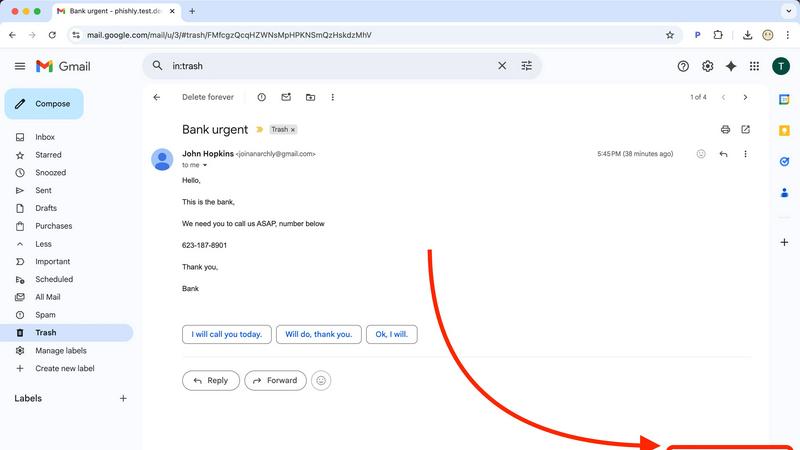
Feature Comparison
Amovera
Unified Guest List & RSVP Manager
This feature provides a centralized database for managing all guest information. It generates unique, trackable RSVP links for each guest or household, which can be embedded into digital invitations or a wedding website. The system automatically updates RSVP statuses, meal choices, and other responses in real-time, syncing seamlessly with the seating chart and budget tracker modules. This eliminates manual entry errors and provides a single source of truth for all guest-related data.
Dynamic Seating Chart Builder
The seating planner is an interactive, drag-and-drop tool that allows for visual arrangement of tables and guests. Built on a responsive canvas, it integrates directly with the live guest list, pulling in confirmed attendees and their details. Users can define table shapes and capacities, with the tool providing visual cues for conflicts or overfills. This feature exports to print-ready PDFs or shareable digital views, ensuring seamless handoff to venue coordinators.
Integrated Budget Tracker & Analytics
This module functions as a dedicated financial dashboard for wedding planning. Users can create a master budget, input estimated and actual costs per vendor category, and log expenses. The tool automatically calculates totals, remaining balances, and provides visual spending breakdowns through charts. Its integration with the vendor management section allows for direct linking of contacts to expenses, creating a fully auditable financial trail from quote to payment.
Collaborative Vendor & Task Management Hub
This feature combines a centralized vendor contact directory with a multi-user task management system. Each vendor entry can store contact details, contracts, notes, and payment schedules. The integrated task list allows couples to assign to-dos, set deadlines with reminders, and track progress. Built for real-time collaboration, both partners can update statuses and add notes simultaneously, ensuring coordinated workflow without conflicts or duplication of effort.
Phishly
Native Gmail Integration via Chrome Extension
The Phishly Chrome extension embeds a "Scan with Phishly" button directly into the Gmail web interface, creating a frictionless security workflow. This deep integration allows users to analyze any open email without ever leaving their inbox or copying/pasting content. It respects Gmail's existing API and UI framework, providing a native-feeling experience that enhances productivity by delivering instant security insights within the primary communication platform used by millions.
AI-Powered Multi-Indicator Analysis Engine
At its core, Phishly utilizes a sophisticated AI engine that concurrently analyzes multiple vectors of a potential phishing attack. It scrutinizes domain reputation and subtle spoofing techniques, parses email headers for sender impersonation, evaluates the linguistic markers of urgency and social engineering, and inspects embedded links for redirects or obfuscation. This multi-layered analysis, presented as a unified risk score, offers a more comprehensive assessment than simple link checkers or blocklists.
Privacy-First, On-Demand Scanning Architecture
Phishly is built on a strict privacy-first protocol. Unlike systems that scan all incoming mail automatically, Phishly only activates when a user explicitly clicks the scan button or pastes content into the web tool. This on-demand model ensures user consent and control, with no background monitoring or data logging. This architecture is crucial for compliance-conscious users and aligns with modern data minimization principles, making it a trustworthy component in any privacy-oriented tech stack.
Clear, Actionable Risk Assessment Dashboard
Following analysis, Phishly presents findings through a clear, tri-color risk assessment (Safe, Medium Risk, High Risk) accompanied by detailed, plain-language explanations. This dashboard breaks down which specific indicators triggered the alert—such as a mismatched sender domain or a suspicious link pattern—educating the user while providing the context needed to make an informed decision. This feature transforms the tool from a simple blocker into an educational resource.
Use Cases
Amovera
Coordinating a Distributed Planning Team
For couples where one partner handles the budget and vendor communications while the other manages the guest experience and design, Amovera's real-time collaborative environment is essential. Both users can access and edit the same live budget, update the guest list from their respective families, and check off tasks from a shared checklist from any device, ensuring perfect synchronization without constant check-ins.
Managing a Large, Complex Guest List
When planning a wedding with hundreds of guests across multiple events (e.g., rehearsal dinner, ceremony, reception), manual tracking becomes untenable. Amovera's system categorizes guests by event, tracks RSVPs via personalized links, and automatically populates the seating chart. This use case highlights the platform's ability to handle scale and complexity while providing clear, actionable analytics on attendance.
Maintaining Financial Oversight and Control
Couples determined to stick to a strict budget utilize the integrated tracker to prevent cost overruns. By inputting quotes from the vendor hub directly into the budget module and logging payments as they occur, they gain real-time visibility into their financial status. The analytics help identify areas of overspending early, allowing for proactive adjustments.
Creating a Cohesive Visual and Logistical Plan
For design-focused couples, the moodboard tool allows for the aggregation of inspiration images, color palettes, and links. This visual plan integrates with the task list (e.g., "order flowers matching moodboard sample") and vendor manager (linking to the florist's contact info). This use case demonstrates how Amovera connects creative vision with practical execution.
Phishly
Securing Small Business & Startup Communications
Small businesses and startups often lack dedicated cybersecurity staff but are frequent targets of phishing due to perceived weaker defenses. Phishly integrates directly into their standard Gmail/Google Workspace environment, providing enterprise-grade detection without the cost or complexity. Team members can instantly verify suspicious invoices, payment requests, or impersonation attempts from "management," preventing financial loss and data breaches with a single click.
Empowering Freelancers & Remote Contractors
Freelancers and independent contractors manage their own security while communicating with multiple clients via email. A phishing attack compromising their account can lead to identity theft, loss of work, and damaged professional reputation. Phishly acts as a personal security analyst, allowing them to scrutinize project briefs, contract attachments, and payment notifications from new or unfamiliar clients before engaging, ensuring safe business operations.
Enhancing Developer and IT Professional Workflows
Developers and IT pros are high-value targets for credential theft and supply chain attacks. Phishly fits neatly into their existing browser-centric workflow. When receiving emails about repository access, system alerts, or SaaS account updates, they can use the integrated tool to perform a quick security audit, complementing their technical knowledge with AI analysis to catch sophisticated spoofs they might otherwise miss in a busy inbox.
Verifying Personal Account and Financial Emails
Individuals face a constant barrage of phishing attempts mimicking banks, utility providers, and popular services like Netflix or PayPal. The Phishly web tool allows anyone to copy the content of a worrying email—such as an "urgent" password reset or a too-good-to-be-true offer—and paste it for an instant, impartial analysis. This use case is critical for preventing personal financial fraud and identity theft.
Overview
About Amovera
Amovera is a comprehensive, cloud-based wedding planning platform engineered to consolidate the entire planning workflow into a single, unified interface. It is designed for modern couples seeking to replace the chaotic sprawl of spreadsheets, documents, and disparate apps with a cohesive, privacy-focused solution. The platform's core architecture is built around a centralized database, ensuring that all modules—from guest management to budget tracking—are interoperable and update in real-time. This eliminates data silos and version control issues common with manual methods. Its primary value proposition is a one-time payment model for lifetime access, a direct contrast to freemium or subscription-based competitors that often monetize user data. With native support for English and German, and a responsive web application compatible with all modern browsers, Amovera provides a scalable, secure environment for planning any wedding size, prioritizing user experience and data ownership above all.
About Phishly
Phishly is an AI-powered cybersecurity tool engineered to provide immediate, accessible phishing detection for modern email workflows. It operates as a lightweight Chrome extension, integrating directly into the Gmail interface, and as a standalone web application for broader email analysis. The core value proposition lies in its seamless integration and developer-friendly, no-fuss architecture. It eliminates the complexity and overhead of enterprise-grade security suites, offering a precise, on-demand scanning utility. The platform is specifically designed for individuals, freelancers, and small to medium-sized businesses that require robust phishing protection without the need for complex deployment, configuration, or dedicated IT resources. By leveraging machine learning models trained on phishing indicators—such as domain spoofing, malicious link patterns, urgent social engineering language, and sender address anomalies—Phishly delivers clear, actionable risk assessments. Its commitment to privacy is foundational; the tool only processes emails explicitly submitted by the user, ensuring no passive scanning or data retention. This makes it a perfect fit for tech-savvy users who prioritize both security and privacy within their existing tech stack.
Frequently Asked Questions
Amovera FAQ
What is Amovera's technology stack and compatibility?
Amovera is a responsive web application built on a modern cloud infrastructure, ensuring compatibility with all major web browsers (Chrome, Safari, Firefox, Edge) on desktops, tablets, and smartphones. No software installation is required; access is provided instantly via a secure login. The platform is designed for full functionality across devices, with data syncing in real-time.
How does the real-time collaboration feature work technically?
The platform utilizes a conflict-free replicated data type (CRDT) architecture for its core planning modules. This allows both partners to have simultaneous read/write access to features like the guest list, task manager, and budget. Changes made by one user are instantly propagated to the other's session, with clear visual indicators, preventing data conflicts and ensuring a unified planning state.
Can I export my data for use in other systems?
Yes, data portability is a core principle. Amovera provides comprehensive export functionality. You can download your guest list with all associated details (names, RSVP status, meal choices) as a CSV file. Seating charts and budget reports can be exported as PDF documents. This ensures you retain full ownership and can archive or migrate your data as needed.
How does Amovera ensure data privacy and security?
Amovera employs a privacy-by-design framework. Unlike free tools, our business model does not rely on selling user data to third-party vendors. Your information is stored on secure, encrypted servers. We implement strict access controls and comply with data protection principles. You will never receive spam from vendors as a result of using our platform.
Phishly FAQ
How does Phishly integrate with my existing email setup?
Phishly offers dual integration paths. For Gmail users, the primary method is the Chrome browser extension, which adds functionality directly into the Gmail web interface. For emails from other clients or for non-Gmail accounts, users can utilize the standalone web application by copying and pasting the full email header and body content. This ensures compatibility across virtually any email ecosystem without requiring server-side changes or IMAP/POP3 access.
What specific AI models or indicators does Phishly analyze?
Phishly's AI engine is trained to detect a composite of technical and psychological phishing indicators. Technically, it analyzes sender address spoofing (like lookalike domains), suspicious URL structures and redirects, and anomalous header information. Linguistically, it assesses the email's content for hallmarks of social engineering, including urgent calls to action, threats of account closure, too-good-to-be-true offers, and impersonation of authority figures to bypass logical scrutiny.
Is my email data stored or used for training after a scan?
No. Phishly operates on a strict, privacy-by-design principle. Emails are processed in real-time for the sole purpose of generating the phishing risk assessment. Once the analysis is complete and the result is delivered to your browser, the email content is not stored on Phishly's servers, logged for future use, or utilized to train the AI models. Each scan is a discrete, ephemeral event designed to protect your confidentiality.
What is the difference between the Chrome extension and the web tool?
The Chrome extension provides seamless, one-click integration for users of Gmail on the Chrome browser, embedding the scan function directly into your workflow. The web tool is a versatile fallback and alternative for several scenarios: when using other browsers (like Firefox or Edge), when checking emails from non-Gmail accounts (e.g., Outlook, Yahoo), or when you only have access to the email's text content rather than direct browser access to the inbox. Both interfaces connect to the same powerful AI backend.