
audiovideogenerator vs Melograph
Side-by-side comparison to help you choose the right product.

audiovideogenerator
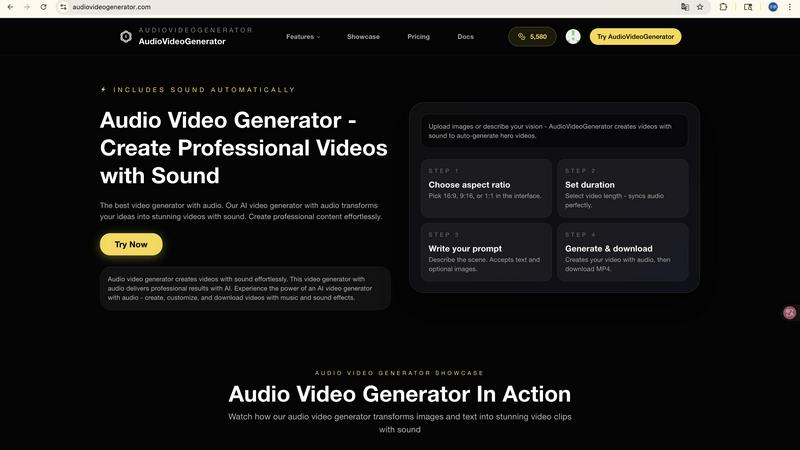
Audiovideogenerator creates professional AI videos with integrated sound for seamless content production.

Melograph effortlessly turns your music tracks into eye-catching videos with customizable templates in minutes.
Last updated: February 28, 2026
Visual Comparison
audiovideogenerator
Melograph

Feature Comparison
audiovideogenerator
Multi-Model AI Video Generation Engine
The platform is architected around a versatile model stack, allowing users to select the optimal AI for their project. Choices include Veo 3.1 for cinematic, longer-form content (3-8 minutes), Sora 2 for advanced narrative generation (2-5 minutes), and Wan 2.5 for faster, shorter clips (1-3 minutes). This compatibility with industry-leading models ensures users can leverage cutting-edge capabilities for different resolutions, durations, and stylistic needs, all within a single unified interface.
Automated Audio Synchronization & Generation
This is the platform's signature capability. Beyond simple video generation, the AI automatically scores the visual output with contextually appropriate background music, inserts precise sound effects for on-screen actions, and can blend in ambient audio tracks. The synchronization engine ensures audio cues align perfectly with visual transitions and events, delivering a cohesive audiovisual product without manual timeline editing or external audio software.
Multi-Modal Input Processing (Text, Image, Audio)
AudioVideoGenerator supports flexible input modalities to fit various workflow origins. Users can generate videos from text prompts (Text-to-Video), animate and enhance static images with motion and sound (Image-to-Video), or use an audio file as the foundational narrative to drive visual creation (Audio-to-Video). This multi-modal approach provides extensive integration points for existing assets and creative processes.
Platform-Optimized Export & Aspect Ratio Handling
The tool is designed for practical deployment across digital channels. It automatically formats generated videos with correct aspect ratios and specifications for major platforms like Instagram, TikTok, and YouTube. This ensures seamless compatibility and eliminates the need for post-generation cropping or reformatting, allowing for direct publishing or integration into marketing automation stacks.
Melograph
User-Friendly Interface
Melograph's interface is designed with musicians in mind, requiring no prior editing skills. Users can select templates and customize their videos with ease, making the process accessible and efficient.
Premium Templates
Choose from a wide selection of high-quality, audio-reactive templates that reflect various styles. Whether you're looking for something minimalistic or vibrant, Melograph has options that align with your artistic vision.
Instant Audio Visualization
Upload your audio and instantly see the waveform react in real-time. This feature enhances engagement by providing instant feedback on how your music will be visually represented.
Quick Export Options
Generate high-quality MP4 exports in 1080p directly from your browser without any lengthy rendering times. This feature ensures that your videos are ready for posting across different platforms with ease.
Use Cases
audiovideogenerator
Scalable Social Media Content Production
Generate a high volume of platform-specific video content for channels like Instagram Reels, TikTok, and YouTube Shorts. The AI handles both visual creation and audio scoring, producing engaging clips with trending music and effects that are optimized for mobile viewing and algorithm discovery, enabling consistent content calendars without a production team.
Automated Product Marketing & Demo Videos
Rapidly produce professional product showcases and demonstration videos. By inputting product images or descriptive text, marketers can generate dynamic videos complete with promotional background music and sound effects that highlight key features, ideal for e-commerce sites, social ads, and sales presentations.
Dynamic Educational & Tutorial Content
Transform static educational materials, slides, or script outlines into engaging video lessons. The AI creates visual explanations and automatically pairs them with a fitting auditory track, enhancing knowledge retention. This is perfect for online course creators, corporate trainers, and educators needing to scale content production.
Brand Narrative & Event Highlight Reels
Craft compelling brand story videos or fast-turnaround recaps of corporate events, webinars, or conferences. Using a combination of uploaded images, audio clips from the event, or text descriptions, the platform can generate emotionally resonant videos with synchronized music that captures key moments and strengthens brand identity.
Melograph
Independent Artists
Indie musicians can use Melograph to create visually appealing content for their tracks, enhancing their online presence and attracting more listeners without the need for extensive editing skills.
DJs and Live Performances
DJs can generate dynamic visuals to accompany their live sets or promotional materials, creating an immersive experience for their audience and showcasing their unique style.
Music Producers
Producers can easily visualize their beats and demos, providing an engaging way to share their work with potential clients or collaborators through social media.
Record Labels
Labels can utilize Melograph to produce consistent and professional-looking content for their artists, promoting new releases effectively while maintaining a cohesive brand identity across platforms.
Overview
About audiovideogenerator
AudioVideoGenerator is a sophisticated, AI-powered platform engineered to streamline the creation of professional-grade video content with fully integrated, synchronized audio. It functions as a comprehensive content generation stack, eliminating the traditional separation between video editing and audio post-production. The platform's core value proposition lies in its ability to automatically generate not only the visual narrative but also a complete auditory experience—including background music, sound effects, and ambient audio—that is perfectly timed to the on-screen action. This is achieved through a multi-model architecture that supports leading AI video generation technologies, including Google's Veo 3.1, OpenAI's Sora 2, and Wan 2.5, providing users with flexibility based on desired video length, quality, and style. It is built for a technical user base encompassing content creators, digital marketers, educators, and product teams who require high-throughput, scalable video production without compromising on audiovisual polish. By offering direct pathways from Text, Image, or Audio inputs to a finished video file, AudioVideoGenerator significantly reduces production timelines, technical overhead, and resource costs, making professional video creation accessible and integrable into modern content workflows.
About Melograph
Melograph is a cutting-edge web-based music visualizer maker designed for musicians, producers, and content creators who want to create captivating visuals effortlessly. This tool simplifies the process of generating stunning audio-reactive videos, allowing users to focus on their music instead of getting bogged down by complex video editing software. With an intuitive interface, Melograph offers a variety of premium templates tailored to different musical styles, including chill, cinematic, retro, and futuristic themes. Users can easily upload their audio tracks, customize their video by adding artist names and song titles, and export high-quality videos in minutes. Perfect for indie artists, DJs, and record labels, Melograph streamlines the visual creation process, enabling users to produce professional-looking content that is ready for sharing on social media and other platforms without the usual time investment associated with traditional editing.
Frequently Asked Questions
audiovideogenerator FAQ
What AI models does AudioVideoGenerator support and how do I choose?
AudioVideoGenerator integrates several state-of-the-art models: Wan 2.5 for fast 1-3 minute videos, Veo 3.1 Fast for quick cinematic outputs, the standard Veo 3.1 for high-quality 3-8 minute videos, and Sora 2 for advanced 2-5 minute narratives. Your choice depends on project requirements: use Wan 2.5 for speed and social clips, Veo 3.1 for premium quality, and Sora 2 for complex storytelling. The interface provides guidance on each model's best-use scenarios.
How does the automatic audio generation and synchronization work?
The platform's AI analyzes the generated video frames for content, mood, pacing, and on-screen actions. It then selects music from a licensed library that matches the emotional tone, generates or inserts realistic sound effects for visible events (like a door closing or applause), and ensures all audio elements are perfectly timed to the visual cuts and transitions. This all happens algorithmically, requiring no manual audio editing from the user.
What input formats are supported for the Image-to-Video and Audio-to-Video features?
For Image-to-Video, common raster formats like JPG, PNG, and WebP are supported. For Audio-to-Video (A2V), you can upload standard audio files such as MP3, WAV, or M4A. The AI uses the audio's waveform, pacing, and content as a creative directive to generate corresponding visuals, making it ideal for turning podcasts, music tracks, or voiceovers into visual content.
Can I use the generated videos commercially for client work or advertising?
Yes, videos created with AudioVideoGenerator are typically licensed for commercial use, including in client projects, advertising campaigns, and social media marketing. It is essential to review the platform's specific Terms of Service for detailed licensing rights, usage limitations, and attribution requirements to ensure full compliance for your particular commercial application.
Melograph FAQ
Do I need editing experience to use Melograph?
No, you do not need any editing experience. Melograph is designed for simplicity, allowing anyone to create amazing visuals by just selecting a template and adding text.
Will Melograph work for platforms like TikTok or Instagram Reels?
Yes, Melograph's export formats are optimized for various social media platforms, including TikTok, Instagram Reels, and YouTube Shorts, making it easy to share your content.
Can I use Melograph for multiple songs?
Absolutely. Melograph allows you to create visuals for multiple tracks, making it a versatile tool for artists looking to promote their entire catalog.
What do I get after making a payment?
After payment, you unlock access to all premium templates, export credits, and features that enhance your visual content creation experience, without any watermark on your exports.