
BarBrain vs MeetingMind
Side-by-side comparison to help you choose the right product.

BarBrain
BarBrain is an API-first inventory platform that integrates with your POS to automate beverage and food counting for hospitality.
Last updated: April 4, 2026

MeetingMind
MeetingMind is a macOS AI assistant that auto-records and summarizes Zoom meetings into searchable notes.
Last updated: March 1, 2026
Visual Comparison
BarBrain

MeetingMind
Feature Comparison
BarBrain
Parallel Multi-Device Counting
BarBrain's architecture is built for collaborative efficiency, allowing teams to conduct inventory counts simultaneously on multiple iOS and Android smartphones or tablets. This distributed counting model, powered by real-time cloud sync, drastically reduces the time required for physical stocktaking. The system ensures data consistency across all devices, eliminating the traditional bottleneck of a single person or device and enabling complete inventory audits to be finished in a fraction of the traditional time.
Extensive Pre-Loaded Product Catalog
The platform integrates a massive, industry-specific database containing over 30,000 pre-defined products, including spirits, wines, AFGs, food items, and housekeeping supplies. This extensive catalog accelerates initial setup and ongoing counting by providing standardized product information. For custom or unique items, the system offers full customization capabilities, allowing operators to build a perfectly tailored digital inventory that matches their specific stock, ensuring comprehensive coverage.
Automated Inventory & Variance Reporting
Upon completion of a count, BarBrain's backend processing engine automatically generates a detailed, finalized inventory report. This eliminates hours of manual data entry, cross-referencing, and spreadsheet calculation. The report provides clear insights into stock levels, usage, and, crucially, identifies variance and potential shrinkage in real-time, offering operators immediate, actionable financial data to control costs and reduce waste.
Intuitive Fill-Level Slider for Open Items
Understanding the nuance of partial consumption, BarBrain features a unique UI component: a fill-level slider. This allows staff to accurately record the remaining quantity of open food and beverage products—like a half-used bottle of olive oil or a partial bottle of whiskey—with a single tap. This granular tracking is essential for precise cost-per-dish/drink calculations and provides a true picture of on-hand inventory that simple unit counting cannot achieve.
MeetingMind
Automatic Zoom Detection & Recording
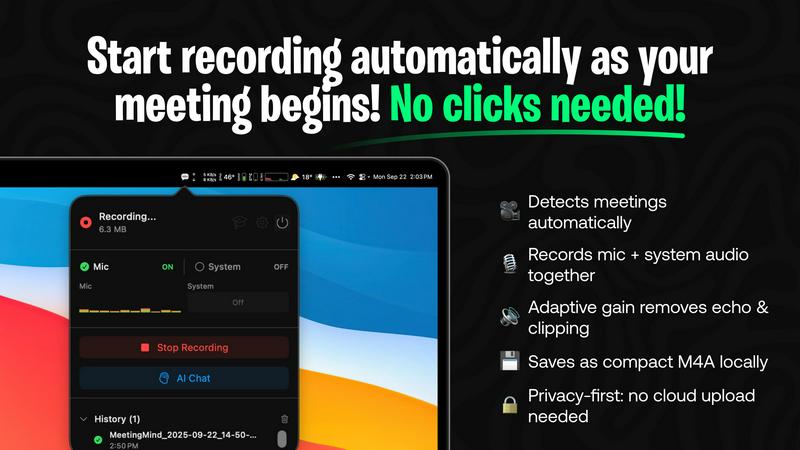
The application operates as a lightweight menu bar utility that continuously monitors system activity. Using advanced heuristics, it automatically detects when the user joins or starts a Zoom meeting, initiating recording without any manual clicks. It captures a high-fidelity audio stream by recording both the user's microphone input and the system's audio output simultaneously, employing adaptive gain control for optimal clarity. This hands-free operation is the foundation of its seamless integration into the user's workflow.
On-Device or Cloud AI Processing
MeetingMind offers unparalleled flexibility in its AI processing backend. Users can opt for complete privacy by running open-source large language models (LLMs) locally via an Ollama integration, ensuring no meeting data ever leaves their Mac. Alternatively, for more powerful summarization, they can connect to cloud-based models through the OpenRouter gateway. This hybrid architecture allows teams to balance performance requirements with stringent data security and compliance policies.
Interactive AI Chat & Live Transcription
During and after the meeting, users can interact with the captured content through an integrated AI chat interface. This allows for real-time querying of the discussion, such as asking for clarifications on points made or requesting immediate summaries of specific topics. The live transcription appears in the app with speaker attribution, creating an interactive transcript that serves as a live knowledge base for the ongoing conversation.
Markdown Export & Structured Output
All meeting intelligence is processed and exported in well-formatted markdown (.md) files. The AI doesn't just transcribe; it structures the output to include a concise summary, a bulleted list of key takeaways, clearly defined action items with potential owners, and the full, timestamped transcript. This format ensures immediate usability in note-taking apps like Obsidian or Notion, and for version control in developer workflows, making the information easy to search, share, and archive.
Use Cases
BarBrain
Independent Bars & Restaurants
For single-location owner-operators, BarBrain replaces error-prone spreadsheets and clipboards. It provides an affordable, professional-grade system to gain control over liquor costs and food margins without requiring dedicated staff or IT expertise. The quick setup and intuitive mobile interface allow the owner or manager to conduct fast, accurate counts themselves, leading to direct, measurable savings and preventing revenue leakage from unaccounted-for waste or shrinkage.
Multi-Location Restaurant & Bar Groups
BarBrain's centralized cloud dashboard offers corporate or regional managers a unified, real-time view of inventory performance across all venues. This enables standardized counting procedures, consolidated reporting, and easy benchmarking between locations. The platform's scalability ensures consistent data collection, allowing leadership to identify best practices, spot outliers with high variance, and make bulk purchasing decisions based on accurate, aggregated data from all sites.
Hotels & Resorts (F&B Operations)
Hotels with complex F&B offerings, including multiple restaurants, bars, banqueting, and minibars, require a robust inventory solution. BarBrain is compatible with tracking a full range of products, from fine dining ingredients to housekeeping amenities. Its ability to handle high product volume and provide detailed consumption reports helps large hospitality operations manage costs across diverse revenue centers and maintain strict budgetary control.
Nightclubs & High-Volume Venues
In fast-paced environments with high product turnover and often less formalized controls, BarBrain provides essential oversight. The speed of parallel counting minimizes operational disruption during off-hours. Real-time variance flags help management quickly identify discrepancies that could indicate spillage, over-pouring, or other issues, allowing for immediate corrective action to protect profitability in a margin-sensitive business.
MeetingMind
Daily Engineering Stand-ups and Sprint Meetings
For software development teams conducting daily syncs or sprint planning on Zoom, MeetingMind automatically captures detailed technical discussions, feature decisions, and bug reports. The AI-generated action items ensure every ticket and TODO is clearly documented and assigned. Engineers can later query the transcript to recall specific implementation details or API decisions without relying on fragmented manual notes.
Client Consultations and Sales Demos
Professionals in consulting, sales, or agency roles use MeetingMind to fully focus on the client interaction during Zoom calls. The tool faithfully records every client requirement, concern, and feedback. Post-meeting, the AI summary highlights client pain points and agreed-upon next steps, enabling the rapid creation of accurate follow-up emails, proposals, and project briefs directly from the structured markdown output.
Remote Academic Research and Interviews
Researchers and students conducting qualitative interviews or collaborative research meetings over Zoom benefit from the verbatim, speaker-attributed transcript. The local processing option via Ollama is crucial for handling sensitive, unpublished research data confidentially. The searchable transcripts facilitate thematic analysis and easy citation of sources directly from the recorded conversation.
Executive Briefings and Strategic Planning
For leadership teams and board meetings where strategic direction is set, capturing nuance and context is vital. MeetingMind records the entire high-level discussion, and the AI chat feature allows executives to ask complex questions post-meeting to surface insights across different discussion threads. The concise summary and action items provide a clear, authoritative record for aligning the entire organization.
Overview
About BarBrain
BarBrain is a purpose-built, cloud-native inventory management platform engineered exclusively for the hospitality sector. It directly addresses the critical inefficiencies of manual stocktaking and generic warehouse software by providing a specialized tool that understands the unique operational flows of bars, restaurants, hotels, and multi-location groups. The platform's core value proposition is delivering verifiable, real-time financial control by digitizing and automating the entire inventory lifecycle. Built with a modern tech stack for seamless integration and accessibility, BarBrain enables operators to conduct inventory counts in minutes instead of hours, leveraging parallel counting on multiple iOS and Android devices. It goes beyond simple stock tracking by automatically calculating exact pour costs, identifying variance and waste, and generating comprehensive audit reports. This provides management with the precise data needed to protect margins, optimize supplier orders, and make informed purchasing decisions. Designed for scalability, its architecture supports everything from single independent venues to large enterprise operations, ensuring reliable, accurate numbers are always at the operator's fingertips without the need for complex training or bloated feature sets.
About MeetingMind
MeetingMind is a sophisticated, AI-native meeting intelligence application built exclusively for macOS. It functions as an autonomous meeting recorder and analyzer, specifically engineered to integrate seamlessly with the Zoom conferencing platform. The core value proposition is its ability to capture every detail of a meeting without user intervention, freeing professionals to engage fully in the discussion. It automatically detects when a Zoom meeting starts and begins recording both microphone and system audio, generating real-time, speaker-attributed transcripts. The application leverages a powerful, on-device AI stack, offering users a choice between local processing via Ollama models or cloud-based inference through OpenRouter. This ensures sensitive meeting data can remain entirely private on the user's Mac. The output is transformed into clean, searchable markdown documents containing full transcripts, AI-generated summaries, and extracted action items. Designed for individual professionals, remote teams, and organizations that rely on Zoom for daily collaboration, MeetingMind turns ephemeral conversations into structured, actionable knowledge assets, ensuring critical insights are never lost.
Frequently Asked Questions
BarBrain FAQ
What devices and operating systems are compatible with BarBrain?
BarBrain is built as a cross-platform mobile application, ensuring broad compatibility. It is fully functional on both iOS (iPhone, iPad) and Android smartphones and tablets. The system operates on a cloud-based architecture, meaning all data is synchronized in real-time across devices and accessible from any web browser for management reporting, requiring no complex on-premise software installation.
How does BarBrain handle our existing product list and supplier information?
The platform offers multiple pathways for integration. You can leverage the extensive pre-loaded catalog of over 30,000 items for quick addition. For custom products, you can manually enter them or utilize bulk import tools via CSV files to migrate existing lists. The system also allows you to input and manage supplier details, streamlining the ordering process by keeping all vendor information centralized within the inventory ecosystem.
Can BarBrain integrate with our existing Point of Sale (POS) or accounting systems?
BarBrain is designed with API-led connectivity in mind, focusing on seamless data exchange. While direct, pre-built integrations depend on specific partners, the platform can facilitate data export in standardized formats (like CSV) that can be imported into most accounting software (e.g., QuickBooks, Xero) for financial reconciliation. For POS integration, it enables variance analysis by comparing theoretical usage (from sales data) against actual physical inventory counts.
Is training required for our staff to use BarBrain effectively?
BarBrain is engineered for intuitive use, requiring minimal formal training. The mobile counting interface is designed for simplicity, often requiring just a single tap or slider adjustment per item. Most teams become proficient after one guided inventory cycle. Furthermore, BarBrain provides onboarding support and resources to ensure your staff can leverage the platform's full capabilities efficiently from the start.
MeetingMind FAQ
How does the automatic Zoom detection work?
MeetingMind runs as a background service on your macOS system. It uses a combination of system-level APIs to detect audio session changes and process names associated with Zoom meetings. When it identifies a meeting is active, it automatically initiates the recording process for both microphone and system audio, requiring zero manual intervention from the user after the initial setup and permission grants.
What are the differences between local (Ollama) and cloud (OpenRouter) AI?
The local Ollama option runs open-source LLMs directly on your Mac's hardware (CPU/GPU). This provides 100% data privacy as no information is transmitted externally, but it requires sufficient system resources and may have slower processing times for very long meetings. The cloud OpenRouter option sends the transcript to a selected, powerful cloud model for processing, offering faster and often more sophisticated summaries, but the data leaves your device.
Is there a free version available?
Yes, MeetingMind offers a fully-featured free tier that includes 60 minutes of recording time per day. This includes automatic Zoom detection, live transcription, AI summaries using the chosen backend, and local processing. It is designed to be perpetually free, perfect for daily short meetings like stand-ups. An unlimited, one-time purchase upgrade is available for users requiring longer recording sessions.
What are the system requirements and compatibility?
MeetingMind is a native macOS application available on the Mac App Store. It requires macOS 14.0 (Sonoma) or later. The application is specifically engineered for compatibility with the Zoom conferencing application. For optimal performance with the local Ollama AI feature, a Mac with Apple Silicon (M-series chips) is recommended due to their superior neural engine capabilities for efficient AI inference.
Alternatives
BarBrain Alternatives
BarBrain is a specialized inventory management platform built for the hospitality industry, specifically bars and restaurants. It falls into the productivity and management software category, designed to replace manual counting and generic warehouse tools with a system that understands pours, recipes, and perishables. Users often explore alternatives to BarBrain to find a solution that better aligns with their specific tech stack, budget, or operational scale. Common drivers include the need for different pricing models, deeper integrations with existing POS or accounting systems, or a feature set tailored to a different segment of the food service industry. When evaluating an alternative, prioritize solutions with robust API access and native integrations for seamless data flow. Look for platforms that offer real-time analytics, granular cost tracking, and a user experience designed for the high-speed, detail-oriented environment of hospitality. The right tool should fit your existing operational workflow without requiring extensive customization or training.
MeetingMind Alternatives
MeetingMind is a macOS-native AI meeting assistant in the productivity and management category. It specializes in auto-recording and transcribing Zoom meetings, using on-device or cloud AI to generate searchable summaries and action items directly from your desktop. Users often explore alternatives for various reasons, including budget constraints, the need for cross-platform compatibility beyond macOS, or specific feature requirements like integration with other video conferencing tools like Teams or Google Meet. Some may seek different AI models, more extensive team collaboration features, or a different approach to data privacy and storage. When evaluating alternatives, key considerations should include the supported operating systems and conferencing platforms, the underlying transcription and AI technology stack, data processing location (local vs. cloud), and the flexibility of the output formats. It's also crucial to assess how well a tool integrates into your existing workflow and tech ecosystem.