
Caller vs FilexHost
Side-by-side comparison to help you choose the right product.

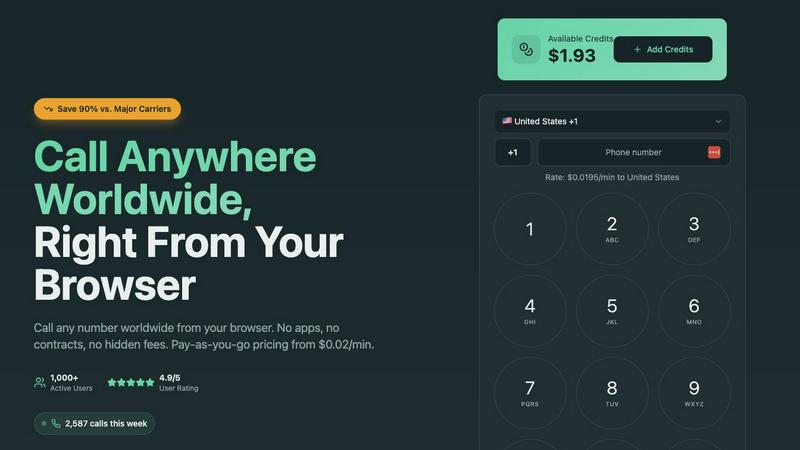
Caller enables instant browser-based international calls with transparent pay-as-you-go rates from $0.02/min.
Last updated: March 1, 2026

FilexHost
Effortlessly host and share any file with instant URLs using FilexHost's simple drag-and-drop interface.
Last updated: February 27, 2026
Visual Comparison
Caller
FilexHost

Feature Comparison
Caller
Browser-Based WebRTC Calling
Caller's core technology is built on the WebRTC framework, allowing users to initiate and receive voice calls directly from their web browser without any plugins or downloads. This ensures maximum compatibility across devices and operating systems, from laptops to tablets. The architecture leverages secure peer-to-peer-like connections optimized by global media servers, ensuring low-latency, high-definition audio that bypasses the limitations and costs of traditional Public Switched Telephone Network (PSTN) routing.
Transparent Pay-As-You-Go Billing
The platform operates on a pure usage-based billing model with no monthly subscriptions, contracts, or hidden fees. Users pre-pay for credits that never expire and are charged only for completed call minutes at published rates starting from $0.02 per minute. This financial model, powered by a real-time billing API, provides complete cost control and transparency, making it ideal for variable usage patterns and for businesses looking to optimize communication expenses with precise, auditable spending.
Global Number Provisioning API
Beyond outbound calling, Caller offers an API-driven service for provisioning dedicated virtual phone numbers in countries like the US and UK. Users can acquire local, toll-free, or mobile numbers to use as a professional caller ID or for establishing a business presence. This feature integrates seamlessly with the core calling stack, enabling instant activation and management of numbers directly from the user dashboard for use in outbound communication strategies.
Enterprise-Grade Security & Encryption
All communication on the Caller platform is secured with bank-level SSL/TLS 1.2+ encryption, ensuring that both signaling (call setup) and media (audio streams) are protected from interception. This end-to-end security model safeguards sensitive business conversations and payment transactions. The platform's infrastructure is designed with privacy-by-design principles, requiring no personal phone verification for outbound calls, which enhances user anonymity and simplifies onboarding.
FilexHost
Instant Subdomains
With FileXHost, users receive instant subdomains for their uploaded files, allowing them to share links like your-file.filex.host without any setup. This feature enhances accessibility and makes sharing files effortless.
Free SSL Encryption
Every link generated through FileXHost comes with free SSL encryption, ensuring that the files shared are secure. This feature is essential for maintaining privacy and protecting sensitive data during transmission.
Smart View Modes
FileXHost offers intelligent view modes that allow files to be rendered directly in the browser or presented as a download page. This flexibility caters to various user preferences and enhances the overall experience for both the host and the recipient.
Optional Password Protection
For users who need an extra layer of security, FileXHost provides optional password protection and expiry settings for shared files. This means that sensitive information can be safeguarded while still allowing easy access to authorized users.
Use Cases
Caller
Distributed Tech Team Collaboration
Remote engineering and development teams use Caller for daily stand-ups, pair programming sessions, and urgent discussions with international colleagues or clients. The browser-based nature eliminates compatibility issues across different OS environments (Linux, macOS, Windows) and allows developers to jump into a call directly from a shared link or their workflow tool (like Slack or a project management dashboard) without context-switching to a separate app.
Global Customer Support & Sales Outreach
Sales and support teams leverage Caller to make cost-effective outbound calls to customers and prospects in over 200 countries. The clear HD audio quality ensures professional conversations, while the pay-as-you-go model aligns perfectly with variable call volumes. Teams can use dedicated international numbers as their caller ID to build local trust and increase answer rates, all managed through a centralized web interface.
Freelancer & Digital Nomad Operations
Freelancers, consultants, and digital nomads who travel frequently use Caller as their primary communication tool. It provides a consistent, reliable calling interface accessible from any browser worldwide, avoiding expensive international roaming charges and SIM card swaps. They can maintain a professional presence by using a dedicated number from their home country while calling clients or service providers globally at local-rate prices.
Automated System Integration & Alerting
Developers integrate Caller's capabilities into custom applications and automated systems for voice-based alerts and notifications. Using its API, systems can programmatically initiate calls to deliver critical alerts (e.g., system downtime, security breaches, or appointment reminders) to on-call personnel or end-users. This use case highlights the platform's utility as a programmable communication layer within a larger software stack.
FilexHost
Sharing Client Reports
Professionals can effortlessly share client reports and presentations without worrying about email attachment limits. FileXHost allows for instant sharing with secure links, enabling quick access for clients and stakeholders.
Hosting Landing Pages
Developers can use FileXHost to host landing pages or mock APIs without the hassle of server configurations. The platform supports HTML rendering, making it ideal for testing and showcasing projects.
Distributing Digital Products
Creators can distribute digital products such as eBooks, videos, or software through FileXHost. The simplicity of uploading and sharing files makes it an efficient platform for selling or sharing content without complications.
Collaborating on Projects
Teams can collaborate on projects by sharing documents and data files through FileXHost. Its support for various file types and smart rendering ensures that all team members can view and interact with files as intended, enhancing collaboration.
Overview
About Caller
Caller is a modern, browser-based Voice over IP (VoIP) platform engineered to replace traditional telephony and complex communication stacks. It provides a pure web application for making high-definition voice calls to any phone number globally, eliminating the need for physical hardware, mobile apps, or desktop software installations. Built on a cloud-native architecture, Caller leverages WebRTC (Web Real-Time Communication) protocols to facilitate real-time audio streaming directly within any modern web browser like Chrome, Firefox, or Edge. The platform is designed for developers, remote teams, freelancers, and businesses that require seamless, scalable, and cost-effective international communication integrated directly into their workflow. Its core value proposition lies in its frictionless setup, transparent pay-as-you-go pricing model, and enterprise-grade audio infrastructure, offering up to 90% savings compared to legacy carriers while maintaining professional call quality and robust security with SSL/TLS encryption.
About FilexHost
FileXHost is a robust, high-speed file hosting and sharing solution designed for users who require an effortless way to upload and distribute various file types. Whether you're dealing with documents, media files, spreadsheets, or entire websites, FileXHost simplifies the process through its intuitive "Drop & Share" workflow. Users can simply drag their files into the interface, receive an instant secure URL, and share it with others—no server setups, DNS configurations, or login requirements for recipients. This makes FileXHost an ideal solution for professionals, developers, and creators who need a seamless and efficient method of file delivery. With features like free SSL encryption and smart rendering, FileXHost enhances the viewing experience, ensuring that each file is presented exactly as intended, whether it is viewed directly in the browser or downloaded.
Frequently Asked Questions
Caller FAQ
What technology does Caller use for browser-based calling?
Caller is built on the standardized WebRTC (Web Real-Time Communication) API, which is natively supported by all major modern browsers. This technology handles the real-time capture and encoding of audio directly in the browser, establishes a secure peer-to-peer connection (facilitated by STUN/TURN servers for network traversal), and manages the streaming of high-definition voice data over UDP for optimal performance and low latency, eliminating the need for any external software.
Do I need a phone number or SIM card to use Caller?
No, you do not need a personal phone number or SIM card to make outbound calls with Caller. You simply sign up with an email address, add credits, and start calling. Your caller ID can be set to a private number or to a dedicated virtual number purchased through Caller's number provisioning service. This makes it ideal for privacy and for users who want a separate business line.
How does the pay-as-you-go credit system work?
You pre-purchase credits into your Caller account wallet via secure payment methods. These credits have no expiration date. When you make a call, the platform's billing system deducts credits in real-time based on the per-minute rate of the destination country and the exact duration of the connected call. You only pay for completed minutes, and you can track your remaining balance and usage history in your account dashboard at any time.
Can I use Caller on my mobile device?
Yes, Caller is fully functional on mobile devices. Because it is a web application built on WebRTC, it works within the mobile web browsers (like Safari on iOS or Chrome on Android) on smartphones and tablets. There is no native app to download from an app store; you simply navigate to the Caller website, log in, and the calling interface will be optimized for your mobile screen, providing the same features and call quality.
FilexHost FAQ
What is FileXHost?
FileXHost is a file hosting and sharing service that allows users to upload and distribute various file types easily. It emphasizes speed, security, and user experience through its simple drag-and-drop interface and instant link generation.
Is it really free?
Yes, FileXHost offers a free plan that allows users to host up to 1,000 files with a maximum size of 25MB per file. This plan is ad-supported and includes an expiry of up to 7 days for shared files.
What file types are supported?
FileXHost supports a wide range of file types including PDFs, images (JPG, PNG, WEBP), spreadsheets (XLSX, CSV), media files (MP4, MP3), and ZIP archives. This versatility makes it suitable for various use cases.
How do I update my site?
To update your site or shared files, simply re-upload the new version of the file. FileXHost will generate a new link, and you can choose to share this updated link as needed, ensuring that your recipients always access the latest version.
Alternatives
Caller Alternatives
Caller is a browser-based international calling platform, operating within the productivity and management software category. It enables instant voice calls globally without app downloads, using a pay-as-you-go model for cost-effective communication. Users often explore alternatives to find solutions that better align with their specific tech stack, such as native mobile app integration, API access for custom workflows, or bundled subscription models. Needs can vary based on required call features, compliance standards, and existing communication infrastructure. When evaluating an alternative, prioritize core technical compatibility: does it integrate with your CRM or support systems? Assess the underlying infrastructure for call quality and uptime guarantees. Finally, scrutinize the pricing architecture for transparency and scalability against your projected usage patterns.
FilexHost Alternatives
FilexHost is a user-friendly file hosting and sharing platform designed to streamline the process of uploading and distributing files of any type. It falls under the category of productivity and management tools, emphasizing ease of use with its drag-and-drop functionality. Users often seek alternatives to FilexHost due to various reasons, including pricing structures, specific feature sets, or compatibility with different platforms and workflows. When searching for alternatives, it's essential to consider factors such as storage capacity, file size limits, security features, and user experience. Additionally, understanding the target audience's needs—whether they are professionals, developers, or casual users—can help in selecting a service that best fits their requirements for efficient file management and sharing.