
Caller vs Perkoon
Side-by-side comparison to help you choose the right product.

Caller
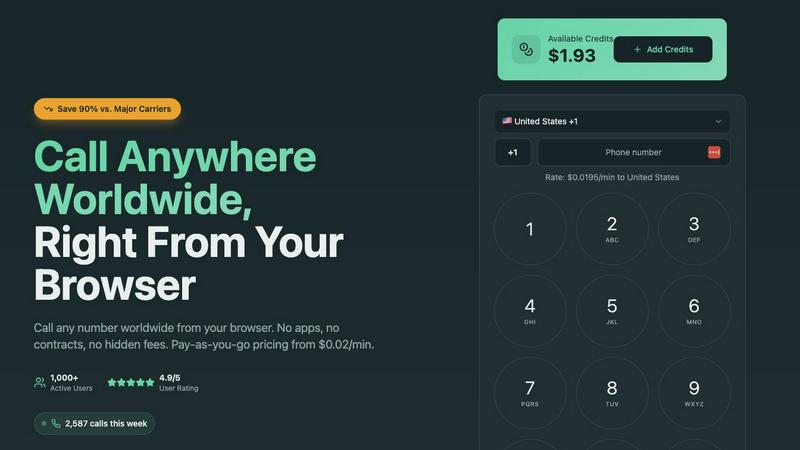
Caller enables instant browser-based international calls with transparent pay-as-you-go rates from $0.02/min.
Last updated: March 1, 2026

Perkoon enables free, unlimited peer-to-peer file transfers without signup, keeping your files private and secure.
Last updated: March 4, 2026
Visual Comparison
Caller
Perkoon

Feature Comparison
Caller
Browser-Based WebRTC Calling
Caller's core technology is built on the WebRTC framework, allowing users to initiate and receive voice calls directly from their web browser without any plugins or downloads. This ensures maximum compatibility across devices and operating systems, from laptops to tablets. The architecture leverages secure peer-to-peer-like connections optimized by global media servers, ensuring low-latency, high-definition audio that bypasses the limitations and costs of traditional Public Switched Telephone Network (PSTN) routing.
Transparent Pay-As-You-Go Billing
The platform operates on a pure usage-based billing model with no monthly subscriptions, contracts, or hidden fees. Users pre-pay for credits that never expire and are charged only for completed call minutes at published rates starting from $0.02 per minute. This financial model, powered by a real-time billing API, provides complete cost control and transparency, making it ideal for variable usage patterns and for businesses looking to optimize communication expenses with precise, auditable spending.
Global Number Provisioning API
Beyond outbound calling, Caller offers an API-driven service for provisioning dedicated virtual phone numbers in countries like the US and UK. Users can acquire local, toll-free, or mobile numbers to use as a professional caller ID or for establishing a business presence. This feature integrates seamlessly with the core calling stack, enabling instant activation and management of numbers directly from the user dashboard for use in outbound communication strategies.
Enterprise-Grade Security & Encryption
All communication on the Caller platform is secured with bank-level SSL/TLS 1.2+ encryption, ensuring that both signaling (call setup) and media (audio streams) are protected from interception. This end-to-end security model safeguards sensitive business conversations and payment transactions. The platform's infrastructure is designed with privacy-by-design principles, requiring no personal phone verification for outbound calls, which enhances user anonymity and simplifies onboarding.
Perkoon
Peer-to-Peer File Transfers
Perkoon utilizes advanced peer-to-peer technology to enable direct file transfers between users' browsers. This eliminates size limits and ensures that files are sent securely without ever passing through central servers, providing a truly private experience.
Encrypted Cloud Storage
For instances when the recipient is offline, Perkoon offers a secure cloud storage option where files are temporarily held. This feature is encrypted to enhance security, and users are only charged for the storage costs, ensuring transparency in pricing.
AI Integration and Automation
Perkoon is designed with the modern user in mind, featuring built-in tools that allow AI agents to interact directly with the service. This eliminates the need for outdated screen-scraping techniques, making file transfers more efficient and user-friendly.
Unique Referral Program
Perkoon has implemented an innovative referral program that rewards users for sharing the service with others. When you refer someone who signs up and makes a transfer, both you and the new user receive bonus storage, fostering a community of users who benefit from each other's participation.
Use Cases
Caller
Distributed Tech Team Collaboration
Remote engineering and development teams use Caller for daily stand-ups, pair programming sessions, and urgent discussions with international colleagues or clients. The browser-based nature eliminates compatibility issues across different OS environments (Linux, macOS, Windows) and allows developers to jump into a call directly from a shared link or their workflow tool (like Slack or a project management dashboard) without context-switching to a separate app.
Global Customer Support & Sales Outreach
Sales and support teams leverage Caller to make cost-effective outbound calls to customers and prospects in over 200 countries. The clear HD audio quality ensures professional conversations, while the pay-as-you-go model aligns perfectly with variable call volumes. Teams can use dedicated international numbers as their caller ID to build local trust and increase answer rates, all managed through a centralized web interface.
Freelancer & Digital Nomad Operations
Freelancers, consultants, and digital nomads who travel frequently use Caller as their primary communication tool. It provides a consistent, reliable calling interface accessible from any browser worldwide, avoiding expensive international roaming charges and SIM card swaps. They can maintain a professional presence by using a dedicated number from their home country while calling clients or service providers globally at local-rate prices.
Automated System Integration & Alerting
Developers integrate Caller's capabilities into custom applications and automated systems for voice-based alerts and notifications. Using its API, systems can programmatically initiate calls to deliver critical alerts (e.g., system downtime, security breaches, or appointment reminders) to on-call personnel or end-users. This use case highlights the platform's utility as a programmable communication layer within a larger software stack.
Perkoon
Transferring Large Files
Whether you are sending high-resolution videos, large datasets, or extensive presentations, Perkoon allows you to transfer files of any size without hassle. The P2P technology ensures that these files are sent quickly and securely.
Collaborating with Teams
For teams working remotely, Perkoon provides an efficient way to share files among team members. With its easy-to-use interface and direct file transfers, collaboration becomes seamless, enabling teams to focus on their projects rather than on file-sharing complications.
Sending Files to Clients
Freelancers and businesses can use Perkoon to send important documents to clients without worrying about data privacy or size limitations. The service guarantees that files remain confidential and secure during the transfer process.
AI-Assisted File Management
Developers and tech enthusiasts can leverage Perkoon’s AI integration to automate file transfer processes. This allows for smoother workflows and minimizes the need for manual interventions, making it an ideal solution for tech-savvy users.
Overview
About Caller
Caller is a modern, browser-based Voice over IP (VoIP) platform engineered to replace traditional telephony and complex communication stacks. It provides a pure web application for making high-definition voice calls to any phone number globally, eliminating the need for physical hardware, mobile apps, or desktop software installations. Built on a cloud-native architecture, Caller leverages WebRTC (Web Real-Time Communication) protocols to facilitate real-time audio streaming directly within any modern web browser like Chrome, Firefox, or Edge. The platform is designed for developers, remote teams, freelancers, and businesses that require seamless, scalable, and cost-effective international communication integrated directly into their workflow. Its core value proposition lies in its frictionless setup, transparent pay-as-you-go pricing model, and enterprise-grade audio infrastructure, offering up to 90% savings compared to legacy carriers while maintaining professional call quality and robust security with SSL/TLS encryption.
About Perkoon
Perkoon is a revolutionary file transfer service designed to simplify the way you send files. It caters to users who are frustrated with traditional file-sharing platforms that impose artificial limits, require mandatory sign-ups, and often treat user data as a product. With Perkoon, you can send files effortlessly from point A to point B, ensuring a hassle-free experience. The service operates on a peer-to-peer (P2P) model for real-time transfers, allowing you to send files directly between browsers without the need for accounts or central servers. This not only ensures privacy but also means that users can send files of any size for free. When recipients are offline, Perkoon offers secure cloud storage as a paid option. Notably, Perkoon integrates seamlessly with AI tools, providing automation capabilities without requiring complex screen-scraping methods. With its straightforward command-line interface (CLI), Perkoon stands out as a powerful solution for both individuals and AI systems, maintaining a strong focus on user privacy and data security.
Frequently Asked Questions
Caller FAQ
What technology does Caller use for browser-based calling?
Caller is built on the standardized WebRTC (Web Real-Time Communication) API, which is natively supported by all major modern browsers. This technology handles the real-time capture and encoding of audio directly in the browser, establishes a secure peer-to-peer connection (facilitated by STUN/TURN servers for network traversal), and manages the streaming of high-definition voice data over UDP for optimal performance and low latency, eliminating the need for any external software.
Do I need a phone number or SIM card to use Caller?
No, you do not need a personal phone number or SIM card to make outbound calls with Caller. You simply sign up with an email address, add credits, and start calling. Your caller ID can be set to a private number or to a dedicated virtual number purchased through Caller's number provisioning service. This makes it ideal for privacy and for users who want a separate business line.
How does the pay-as-you-go credit system work?
You pre-purchase credits into your Caller account wallet via secure payment methods. These credits have no expiration date. When you make a call, the platform's billing system deducts credits in real-time based on the per-minute rate of the destination country and the exact duration of the connected call. You only pay for completed minutes, and you can track your remaining balance and usage history in your account dashboard at any time.
Can I use Caller on my mobile device?
Yes, Caller is fully functional on mobile devices. Because it is a web application built on WebRTC, it works within the mobile web browsers (like Safari on iOS or Chrome on Android) on smartphones and tablets. There is no native app to download from an app store; you simply navigate to the Caller website, log in, and the calling interface will be optimized for your mobile screen, providing the same features and call quality.
Perkoon FAQ
Is Perkoon really free?
Yes, Perkoon offers a free peer-to-peer transfer service that incurs no costs. The only charge applies to the cloud storage feature, which is used when the recipient is offline.
How does P2P transfer work?
P2P transfers allow files to be sent directly from one user's browser to another's. This means files do not go through a central server, ensuring both privacy and speed.
Can I use Perkoon with my AI applications?
Absolutely! Perkoon is designed to integrate with AI applications seamlessly. You can utilize its API for automation without resorting to outdated screen-scraping methods.
What happens if the recipient is offline?
If the recipient is offline, Perkoon will hold the file in encrypted cloud storage until they become available. You can choose to use this feature at a nominal fee, ensuring that your files are safe and accessible later.
Alternatives
Caller Alternatives
Caller is a browser-based international calling platform, operating within the productivity and management software category. It enables instant voice calls globally without app downloads, using a pay-as-you-go model for cost-effective communication. Users often explore alternatives to find solutions that better align with their specific tech stack, such as native mobile app integration, API access for custom workflows, or bundled subscription models. Needs can vary based on required call features, compliance standards, and existing communication infrastructure. When evaluating an alternative, prioritize core technical compatibility: does it integrate with your CRM or support systems? Assess the underlying infrastructure for call quality and uptime guarantees. Finally, scrutinize the pricing architecture for transparency and scalability against your projected usage patterns.
Perkoon Alternatives
Perkoon is a peer-to-peer file transfer service designed to streamline the process of sharing files without unnecessary complications. It stands out in the productivity and management category by offering free, unlimited transfers that prioritize user privacy and data security. As users increasingly seek hassle-free solutions, they often explore alternatives that may better suit their specific needs, whether due to pricing concerns, feature sets, or platform compatibility. When searching for a suitable alternative to Perkoon, it's essential to consider various factors such as ease of use, security protocols, and integration capabilities with existing workflows. Users should look for services that maintain a strong focus on privacy, offer powerful functionality, and provide seamless compatibility across different devices and operating systems to ensure a smooth file transfer experience.