
Coloring Book Engine vs SimpleDraw
Side-by-side comparison to help you choose the right product.

Coloring Book Engine
Coloring Book Engine locally integrates AI and GPU workflows to produce publish-ready books and videos.
Last updated: February 28, 2026

SimpleDraw
Create precise floor plans and scale drawings effortlessly online with SimpleDraw’s user-friendly, free web tool.
Last updated: March 1, 2026
Visual Comparison
Coloring Book Engine

SimpleDraw
Feature Comparison
Coloring Book Engine
BYOK AI Integration & Local GPU Processing
CBE is built on a hybrid processing architecture. You integrate your own API keys for AI-driven ideation and sketch generation, maintaining control over costs and data. For production tasks like line art cleaning, colorization previews, and video rendering, the engine utilizes your local DirectML-compatible GPU. This split ensures sensitive artwork never leaves your machine for core processing, while still providing access to powerful cloud-based AI models for creative brainstorming.
Batch Production & Project Workspace
The software is engineered for scale with a centralized project workspace that supports batch operations. You can generate, import, and manage dozens of coloring pages within a single project file. This system allows for efficient organization of entire book series, enabling creators to apply consistent styling, layouts, and exports across multiple pages simultaneously, dramatically reducing repetitive manual work.
KDP-Ready Export & Print Optimization
CBE handles the technical specifications required for platforms like Amazon KDP (Kindle Direct Publishing). It automates the configuration of correct trim sizes, bleed areas, and margins. A key technical feature is its advanced line art processing, which uses local GPU algorithms to transform fuzzy AI-generated edges into crisp, print-sharp black lines, ensuring professional physical book quality directly from the export module.
Integrated Marketing Asset Creation
Beyond book files, the engine includes a native video rendering module. It transforms your static coloring pages into animated coloring videos and short-form clips, perfectly formatted for social media platforms like YouTube Shorts and TikTok. This feature uses the local GPU to render previews with real-world color palettes, simulating how colors actually appear on paper, not just on screen.
SimpleDraw
Accurate Measurements & Scale Drawing
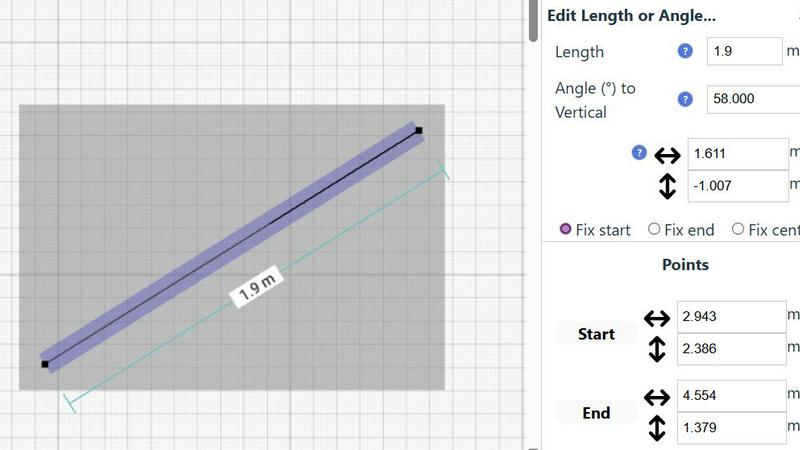
SimpleDraw offers precise measurements and smart alignment tools, ensuring that all drawings maintain accuracy and are to scale. This feature is crucial for users who demand precision in their designs, whether for personal projects or professional plans.
Specialized Floor Plan Creator
The dedicated Floor Plan Mode allows users to create detailed floor plans effortlessly. Users can draw walls, add windows and doors with a single click, and view real-time measurements as they adjust their designs, making it an invaluable tool for home renovations and space planning.
Smart Alignment System
This feature assists users in placing points and lines exactly where they need them. By using visual cues, SimpleDraw guides users to achieve precise placements, enhancing the overall drawing experience and reducing errors during the layout process.
Comprehensive Measurement System
SimpleDraw includes a comprehensive measurement system with customizable options for displaying measurements in either metric or standard US units. Contextual measurements appear dynamically as users work, allowing for precise adjustments and ensuring that the final output matches the user's expectations.
Use Cases
Coloring Book Engine
Independent Artist & Solo Publisher
For the individual creator, CBE consolidates the entire publishing stack. An artist can start with an AI-assisted sketch using their own API key, refine the line art locally on their GPU, compile a print-ready PDF with proper bleed, and generate promotional videos-all within one application. This eliminates the need for separate subscriptions to AI services, design software, and video editors, streamlining the solo operation.
Small Publishing Studio or Team
The Organization license is structured for collaborative workflows within a small team or studio. Multiple licensed seats allow team members to work on different projects or aspects of a single large project within the shared CBE environment. The batch workflow and consistent export settings ensure brand and quality consistency across all publications managed by the team.
AI-Free Traditional Artwork Packaging
For traditional artists who avoid AI-generated content, CBE serves as a powerful packaging and production engine. Artists can import their hand-drawn sketches, utilize the software's local GPU tools for line cleaning and enhancement, then leverage the layout, KDP export, and video creation modules to professionally prepare and market their entirely original artwork.
Rapid Series and Niche Catalog Development
Creators focusing on building a large catalog or a series within a specific niche benefit from the batch workflow and AI-assisted ideation. The ability to rapidly generate thematic sketches, process them in bulk, and output uniformly styled books enables quick scaling. This use case is ideal for entrepreneurs targeting multiple specific interests or seasonal markets on publishing platforms.
SimpleDraw
Kitchen & Bathroom Floor Plans
Users can plan renovations for kitchens and bathrooms with accurate measurements, visualizing layouts before starting any physical work. This helps in making informed decisions about design and functionality.
Room Layouts & Furniture Planning
Designing layouts for bedrooms, living rooms, or offices is made simple with SimpleDraw. Users can visualize whether furniture will fit in their desired spaces before making purchases, streamlining the planning process.
House & Apartment Plans
Create comprehensive floor plans for home projects, ideal for both personal use and rental listings. SimpleDraw's tools enable users to design every aspect of their living spaces, from room dimensions to furnishings.
Community-Driven Development
Engage with the SimpleDraw community to influence future features and improvements. This collaborative approach ensures the tool evolves based on real user feedback, making it more responsive to the needs of its users.
Overview
About Coloring Book Engine
Coloring Book Engine (CBE) is a comprehensive, desktop-based production suite engineered for the modern coloring book creator. It functions as a complete, integrated toolkit that moves beyond simple PDF generation to facilitate the entire commercial publishing pipeline. The software is architected for artists, independent publishers, and entrepreneurial hobbyists who demand professional-grade output without the complexity of managing disparate applications. Its core value proposition lies in a highly optimized, batch-oriented workflow that accelerates production from initial concept to final, print-ready files and marketing assets. A defining technical feature is its BYOK (Bring Your Own Key) AI integration framework, which allows users to plug in their preferred AI service APIs (like OpenAI or Anthropic) for ideation and sketching, ensuring data privacy and avoiding locked-in subscription costs. Furthermore, CBE leverages local GPU acceleration for core rendering tasks such as line art refinement and coloring video generation, keeping sensitive project data on-device. This powerful combination of flexible cloud AI and local processing provides an unparalleled, end-to-end solution for scaling a coloring book business efficiently and securely.
About SimpleDraw
SimpleDraw is an innovative, free online platform designed to empower users in creating precise and accurate scale drawings. Whether you're a casual user, a DIY enthusiast, or a professional architect, SimpleDraw caters to your drawing needs with its intuitive interface and specialized tools. The platform allows you to craft detailed floor plans, elevations, and other technical drawings without the necessity of extensive training or prior software experience. Its primary value proposition lies in the seamless blend of simplicity and efficiency, enabling users to realize their creative visions with just a few clicks. With no sign-up or software installation required, you can start drawing immediately in your web browser. This focus on ease of use, combined with a robust set of features, positions SimpleDraw as the ideal choice for anyone looking to create accurate scale drawings quickly and effectively.
Frequently Asked Questions
Coloring Book Engine FAQ
Is Coloring Book Engine a desktop app or a cloud service?
Coloring Book Engine is a native desktop application for Windows. The majority of its processing, especially for GPU-accelerated tasks like line art cleaning and video rendering, occurs locally on your machine. It integrates with cloud-based AI services only when you choose to supply your own API keys for the ideation and sketching phase, giving you control over what data is processed externally.
What exactly does it speed up for coloring book creators?
CBE dramatically accelerates the end-to-end production pipeline. It eliminates context-switching between multiple tools by combining AI ideation, line art refinement, page layout, print-ready PDF export, and social media video creation into one optimized workspace. The batch processing capability allows you to apply changes and generate exports for dozens of pages simultaneously, turning a process that could take days into a matter of hours.
Is this a subscription?
No. Coloring Book Engine operates on a one-time, lifetime license model for the software itself. You pay once for your chosen license (Personal or Organization) and receive the application with free bug-fix updates. The only ongoing costs are pay-as-you-go fees for your own AI API usage when you utilize those optional features, aligning costs directly with your production volume.
Can I use this tool without AI?
Absolutely. CBE supports a complete AI-free workflow. You can import your own hand-drawn or digitally created artwork directly into the engine. From there, you can use all the local processing features: clean up lines, layout your book, export KDP-ready PDFs, and create coloring videos- all without ever connecting to an external AI service.
SimpleDraw FAQ
Is SimpleDraw really free to use?
Yes, SimpleDraw is a completely free online tool that requires no sign-up or software installation, allowing users to start drawing immediately.
What types of drawings can I create with SimpleDraw?
You can create a variety of drawings including floor plans, room layouts, elevations, and architectural designs tailored to your specific needs and projects.
Do I need any prior experience to use SimpleDraw?
No, SimpleDraw is designed for users of all skill levels. Its intuitive interface allows beginners to create detailed drawings without the need for extensive training or prior software experience.
Can I collaborate with others using SimpleDraw?
While SimpleDraw currently focuses on individual use, users are encouraged to join the community and share feedback, which can help inform future collaborative features and enhancements.
Alternatives
Coloring Book Engine Alternatives
Coloring Book Engine is a specialized desktop application within the design tools category, focusing on the end-to-end production of commercial coloring books and promotional assets. It distinguishes itself with a local workflow, batch processing, and a BYOK (Bring Your Own Key) model for AI integration, offering creators control over their tech stack and data privacy. Users may explore alternatives for various reasons, including budget constraints, specific feature requirements like different export formats or platform compatibility, or a preference for subscription-based cloud services versus a one-time desktop purchase. The need for integrated video creation tools or different AI model support can also drive the search. When evaluating other solutions, consider the core workflow: does it support batch processing for efficiency? Check export capabilities for print-on-demand platforms and digital distribution. Crucially, examine the AI integration model—whether it's proprietary, BYOK, or absent—as this impacts cost, privacy, and flexibility. Finally, assess if the tool is a standalone desktop app, a web service, or part of a larger creative suite.
SimpleDraw Alternatives
SimpleDraw is a free, web-based tool designed for creating precise and accurate scale drawings, which places it firmly in the realm of design tools. Its user-friendly interface caters to a wide audience, from casual users to professional designers seeking to draft detailed floor plans and technical drawings without extensive training. As users increasingly seek alternatives, reasons often include the desire for enhanced features, different pricing structures, or specific platform compatibility that better suits their needs. When searching for an alternative to SimpleDraw, users should consider the essential features that align with their project requirements. Key factors to evaluate include the accuracy of scale drawings, the availability of specialized modes like floor plan creation, and the robustness of editing capabilities. Additionally, the ease of use and integration with existing workflows or software platforms can significantly influence the decision-making process in selecting the right tool for their design needs.