
DocuExtractor vs Dokta
Side-by-side comparison to help you choose the right product.

DocuExtractor
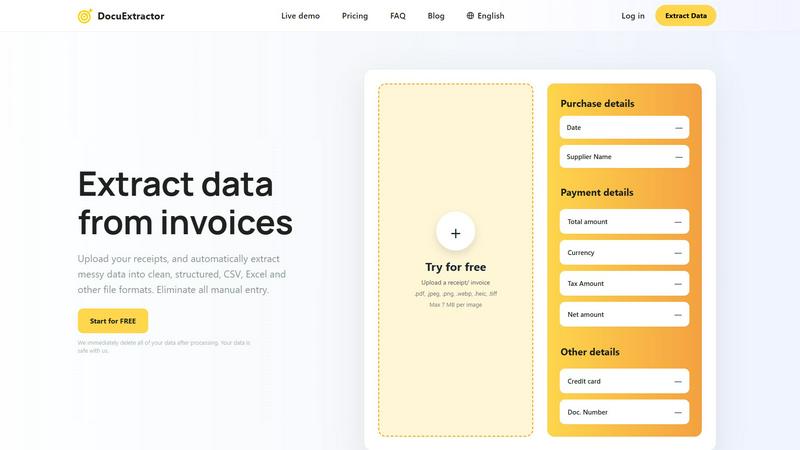
DocuExtractor AI instantly converts receipts and invoices into structured CSV or Excel data.
Last updated: February 28, 2026

Dokta is an AI-powered document hub that automates invoicing, payments, and cash flow for SMBs by integrating with your existing workflow.
Last updated: April 4, 2026
Visual Comparison
DocuExtractor
Dokta

Feature Comparison
DocuExtractor
Advanced AI-Powered Extraction Engine
At the heart of DocuExtractor is a multi-layered AI engine that integrates state-of-the-art OCR, Deep Learning, and LLM technologies. This stack doesn't just read text; it understands document context, layout, and semantics. The Deep Learning models are specifically trained on financial documents to recognize diverse formats and handwriting, while the LLM component interprets and categorizes extracted data (like distinguishing a "total amount" from a "tax amount") with exceptional precision, delivering the platform's hallmark 99.6% accuracy rate.
Batch Processing & Multi-Format Compatibility
DocuExtractor is built for efficiency at scale, offering robust batch processing capabilities that allow users to upload hundreds of documents simultaneously. The platform maintains high compatibility, accepting a wide range of file formats including PDF, JPG, PNG, WebP, HEIC, and TIFF, with a maximum size of 7MB per image. This feature ensures seamless integration into existing digital workflows, enabling the rapid digitization of large backlogs of paper-based or digital financial records without manual intervention.
Enterprise-Grade Security & Data Privacy
Security is a foundational component of the DocuExtractor architecture. The platform operates on a strict data privacy model where all uploaded documents and extracted data are automatically and permanently deleted from its servers immediately after processing is complete. This commitment ensures that sensitive financial information never resides on the platform long-term, providing peace of mind and compliance-ready security for businesses of all sizes, from solo practitioners to large enterprises.
Customizable Output & Preset Templates
The platform offers flexible output configuration to fit various software compatibility needs. Users can choose to export their structured data directly into CSV or Excel formats. To streamline the process further, DocuExtractor provides intelligent preset templates for common documents like receipts and invoices, which auto-map standard fields. For unique requirements, users can define custom data fields, ensuring the extracted output aligns perfectly with their specific accounting software or internal database schemas.
Dokta
AI-Powered Document Analysis Engine
Dokta's foundational feature is its advanced AI processing pipeline. Utilizing Claude (Anthropic) for intelligence and robust OCR, the system can ingest photos, scans, or PDFs and return a fully analyzed document in under 60 seconds. It automatically classifies the document type (invoice, quote, contract), extracts critical data fields like amounts, due dates, client details, and tax information, and structures this data for immediate use within the platform, requiring zero manual input for data extraction.
Automated Invoice & Quote Lifecycle Management
This feature provides a complete, integrated workflow for sales documentation. Users can generate professional invoices and quotes within the platform. For freelancers, it supports Time & Materials (TJM) contracts with automatic monthly invoicing. A key integration is the online quote acceptance system; sent quotes include a direct link for client approval, enabling one-click conversion of an accepted quote into a formal invoice, streamlining the deal-to-cash cycle.
Real-Time Cash Flow & Anomaly Dashboard
Dokta aggregates financial data from all processed documents to deliver a comprehensive, real-time overview of business health. The dashboard visualizes key metrics like invoiced vs. collected revenue, overdue payments, and VAT liabilities over a 12-month period. Furthermore, its integrated anomaly detection system monitors for risks such as changed IBANs, duplicate invoices, inconsistent VAT, and missing numbering, providing proactive financial governance.
Intelligent Client & Supplier Database
The platform automatically constructs and enriches a relational database of business contacts from every document processed. It uses SIRET numbers (French business registry) to auto-complete company information. For each client or supplier, Dokta maintains a complete history of interactions and implements a payment scoring system, offering valuable insights into payment behaviors and centralizing all entity-related data without manual CRM entry.
Use Cases
DocuExtractor
Automated Accounts Payable Processing
Finance teams can revolutionize their AP workflow by using DocuExtractor to automatically process incoming vendor invoices. The AI extracts key details such as supplier name, invoice number, date, line items, net amount, tax, and total. This structured data is instantly exported to CSV/Excel, ready for direct import into accounting software like QuickBooks, Xero, or NetSuite, drastically reducing processing time, improving accuracy, and accelerating payment cycles.
Expense Management and Receipt Digitization
For accountants and individual professionals, manually logging expense receipts is a tedious task. DocuExtractor automates this by extracting merchant information, date, payment method, and itemized totals from a batch of mixed-format receipts (JPG, PDF, etc.). The clean, categorized output simplifies expense reporting, reconciliation, and audit trails, saving several hours per week and ensuring no deductible expense is missed due to manual entry errors.
Bank Statement and Financial Report Analysis
Financial analysts and bookkeepers can use DocuExtractor to convert unstructured bank statements or PDF financial reports into structured data. The AI accurately pulls transaction dates, descriptions, amounts, and balances. This converted data can then be easily analyzed in spreadsheet software, used for cash flow forecasting, or integrated into financial models, turning static documents into dynamic, actionable datasets without manual transcription.
Audit Preparation and Data Migration
During audits or system migrations, organizations often need to digitize and structure years of historical financial documents. DocuExtractor's batch processing and high-accuracy engine are ideal for this large-scale, one-time project. It can process thousands of legacy invoices, receipts, and statements, creating a clean, searchable, and verifiable digital database that ensures compliance, simplifies audit trails, and facilitates smooth data migration to new systems.
Dokta
Freelance IT Developer / Consultant
For freelancers working on TJM or retainer contracts, Dokta automates the entire billing cycle. The platform can be configured to automatically generate monthly invoices based on contract terms, track their payment status, and send polite, professional payment reminders. This allows the developer to focus purely on coding while ensuring cash flow is managed systematically and reliably, directly from their document hub.
Creative Project Freelancer (Designer, Photographer)
Dokta streamlines the project-based workflow from proposal to payment. The freelancer creates a quote in Dokta and sends it via a client-facing acceptance link. Upon client approval, the quote is converted to an invoice with a single click. The platform then tracks this invoice, manages deadlines, and automates follow-ups, ensuring the creative professional can manage all client-facing financial documents within one integrated system.
Auto-Entrepreneur / Micro-Enterprise
This user benefits from Dokta's simplicity and compliance-focused features. The platform ensures invoices are correctly formatted, tracks all receipts and payments in one place, and provides clear visibility into turnover relative to tax thresholds. Automated alerts for URSSAF (French social charge) deadlines help prevent missed payments, making administrative compliance straightforward and integrated into daily document activity.
Growing Small Business (SMB)
For small teams, Dokta acts as a unified document and financial command center. It handles incoming supplier invoices, outgoing client invoices, and contracts. The real-time cash flow dashboard gives leadership an instant snapshot of financial health, while automated payment reminders improve collection rates. The ability to export clean CSV data for their accountant simplifies period-end reconciliation, integrating document management with broader financial oversight.
Overview
About DocuExtractor
DocuExtractor is an enterprise-grade, AI-powered document processing platform engineered to automate the extraction of structured financial data from unstructured sources. It serves as a critical operational tool for accountants, bookkeepers, finance departments, and AP/AR specialists by transforming complex documents like receipts, invoices, bank statements, and PDFs into clean, analysis-ready CSV or Excel files. The platform's core value proposition lies in its sophisticated tech stack, which synergistically combines advanced Optical Character Recognition (OCR), Deep Learning (DL) models, and Large Language Models (LLMs) to achieve an industry-leading 99.6% field-level accuracy. This integration eliminates the labor-intensive and error-prone process of manual data entry, saving professionals significant hours per week and ensuring data integrity. Built for seamless compatibility with modern financial workflows, DocuExtractor supports batch processing, handles over 45 languages with auto-detection, and is architected with enterprise security protocols, including automatic data deletion post-processing. Its scalable infrastructure reliably processes over 500,000 documents monthly, making it a robust solution for both individual practitioners and large-scale corporate operations seeking to instantly digitize and structure their financial data.
About Dokta
Dokta is an AI-native document management platform engineered to automate the administrative backbone for freelancers, solo entrepreneurs, auto-entrepreneurs, and SMBs. It functions as a central nervous system for business documents, leveraging a sophisticated tech stack to eliminate manual data entry and process fragmentation. At its core, Dokta's AI engine, powered by Claude (Anthropic), performs OCR and intelligent classification to read, categorize, and extract key data from any uploaded invoice, quote, or contract in under 60 seconds. The platform then manages the entire document lifecycle: from creating professional invoices and quotes, tracking payments, and automating reminders, to managing contracts, deadlines, and generating actionable tasks. It integrates these workflows by automatically building a searchable client and supplier database from document interactions and provides real-time cash flow dashboards. With a focus on European compliance, data is 100% GDPR-compliant and hosted on AWS in Paris, featuring AES-256 encryption. Dokta's value proposition is clear: replace hours of weekly manual admin with a seamless, integrated system that turns documents into actionable business intelligence.
Frequently Asked Questions
DocuExtractor FAQ
What is the accuracy rate of DocuExtractor's data extraction?
DocuExtractor achieves an industry-leading field-level accuracy rate of 99.6%. This high precision is the result of our integrated tech stack, which combines advanced OCR for text recognition, specialized Deep Learning models trained on financial documents to understand layouts and handwriting, and Large Language Models (LLMs) for contextual understanding and semantic data categorization, ensuring reliable and trustworthy output.
How does DocuExtractor ensure the security of my documents?
Security is paramount. DocuExtractor is built with enterprise-grade security protocols. Our most critical privacy feature is automatic data deletion: all uploaded documents and the resulting extracted data are permanently and automatically purged from our servers immediately after processing is complete and you download your results. Your sensitive financial data is not stored, sold, or used for training our models.
What file formats and languages does DocuExtractor support?
DocuExtractor offers broad compatibility for seamless integration into diverse workflows. Supported file formats include PDF, JPEG, PNG, WebP, HEIC, and TIFF. For global operations, our platform supports document processing in over 45 languages. The AI includes automatic language detection, so you can process a batch of documents in multiple languages without needing to specify the language for each file.
Can I process multiple documents at once, and is there a free tier?
Yes, DocuExtractor is designed for efficiency and includes robust batch processing capabilities, allowing you to upload and process hundreds of documents simultaneously to save time. Furthermore, we offer a "Start for FREE" tier, which allows users to try the platform and process documents with core features at no cost, making it easy to evaluate its compatibility and effectiveness within your specific workflow before committing to a paid plan.
Dokta FAQ
How does Dokta ensure the security and privacy of my documents?
Dokta is built with a security-first architecture. All data is hosted on Amazon Web Services (AWS) in their Paris region, ensuring it remains within the European Union. The platform is fully compliant with GDPR regulations. Documents and data are protected using AES-256 encryption, both in transit and at rest. This technical stack provides enterprise-grade security tailored to the compliance needs of European freelancers and businesses.
What AI model does Dokta use, and how accurate is the data extraction?
Dokta utilizes Claude, Anthropic's advanced AI model, as the intelligence layer for document understanding and data extraction. Combined with high-performance OCR, this stack enables highly accurate classification and parsing of complex document layouts. The system is specifically trained on financial and administrative documents, achieving rapid analysis in under 60 seconds with minimal error, though users always have a final validation step to confirm extracted data.
Can Dokta integrate with my existing accounting software or other tools?
While Dokta is designed as a comprehensive, standalone platform, it offers robust export functionality to ensure compatibility with your existing workflow. You can export all financial data, including invoices, client lists, and transaction records, as a clean CSV file. This format is universally accepted by all major accounting software packages (like Sage, QuickBooks, etc.), allowing for seamless data transfer during bookkeeping or tax preparation periods.
What happens if I exceed my monthly document limit on my plan?
Each Dokta plan includes a set number of documents that can be processed per month. If you exceed this limit, the platform will notify you. You will then have the option to upgrade to a higher-tier plan that offers a larger document volume. This scalable model ensures you only pay for the capacity you need, allowing the platform to grow in tandem with your business's document processing requirements.
Alternatives
DocuExtractor Alternatives
DocuExtractor is an AI-powered document conversion platform in the productivity and management category. It automates the extraction of structured financial data from receipts, invoices, and PDFs into CSV or Excel, using a sophisticated tech stack of OCR, Deep Learning, and LLMs for high accuracy. Users often explore alternatives for various reasons, including specific budget constraints, the need for different feature sets like custom API integrations, or compatibility with particular operating systems and existing software ecosystems. The search for a tool that aligns perfectly with an organization's workflow and technical requirements is common. When evaluating alternatives, key considerations should include the underlying AI and OCR technology's accuracy, the platform's ability to handle batch processing and multiple file formats, and its security protocols. Integration capabilities with current financial software and the overall scalability of the solution are also critical technical factors for long-term viability.
Dokta Alternatives
Dokta is an AI-powered document management platform designed for freelancers, solo entrepreneurs, and SMBs. It automates the lifecycle of business documents like invoices, quotes, and contracts, extracting data, tracking payments, and managing deadlines to reduce administrative overhead. Users often seek alternatives to Dokta for various reasons, including specific budget constraints, the need for different feature sets, or integration requirements with their existing tech stack. Some may require deeper compatibility with certain accounting software, a different pricing model, or a platform hosted outside of the European AWS infrastructure. When evaluating alternatives, key considerations should include the platform's API availability and webhook support for custom automations, its data extraction accuracy and supported file formats, and compliance with regional data sovereignty laws like GDPR. The ideal solution should seamlessly fit into your current workflow without creating new silos of information.