
DocuExtractor vs LuxSign
Side-by-side comparison to help you choose the right product.

DocuExtractor
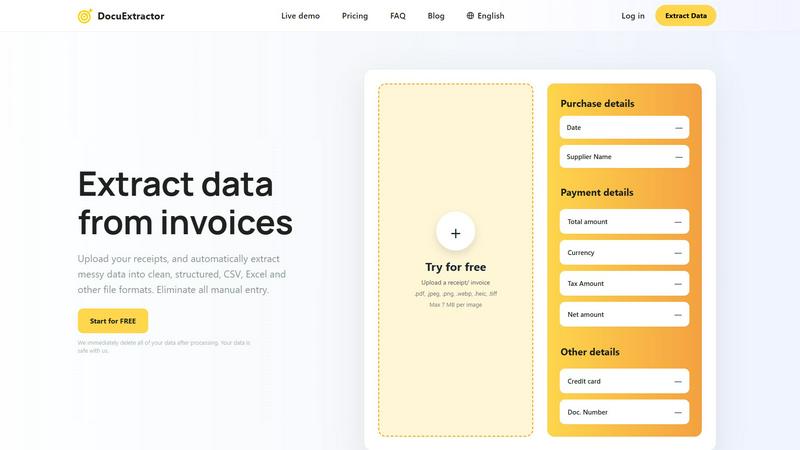
DocuExtractor AI instantly converts receipts and invoices into structured CSV or Excel data.
Last updated: February 28, 2026

LuxSign enables secure, legally binding electronic signatures for documents across the EU, all hosted in Luxembourg.
Last updated: February 27, 2026
Visual Comparison
DocuExtractor
LuxSign

Feature Comparison
DocuExtractor
Advanced AI-Powered Extraction Engine
At the heart of DocuExtractor is a multi-layered AI engine that integrates state-of-the-art OCR, Deep Learning, and LLM technologies. This stack doesn't just read text; it understands document context, layout, and semantics. The Deep Learning models are specifically trained on financial documents to recognize diverse formats and handwriting, while the LLM component interprets and categorizes extracted data (like distinguishing a "total amount" from a "tax amount") with exceptional precision, delivering the platform's hallmark 99.6% accuracy rate.
Batch Processing & Multi-Format Compatibility
DocuExtractor is built for efficiency at scale, offering robust batch processing capabilities that allow users to upload hundreds of documents simultaneously. The platform maintains high compatibility, accepting a wide range of file formats including PDF, JPG, PNG, WebP, HEIC, and TIFF, with a maximum size of 7MB per image. This feature ensures seamless integration into existing digital workflows, enabling the rapid digitization of large backlogs of paper-based or digital financial records without manual intervention.
Enterprise-Grade Security & Data Privacy
Security is a foundational component of the DocuExtractor architecture. The platform operates on a strict data privacy model where all uploaded documents and extracted data are automatically and permanently deleted from its servers immediately after processing is complete. This commitment ensures that sensitive financial information never resides on the platform long-term, providing peace of mind and compliance-ready security for businesses of all sizes, from solo practitioners to large enterprises.
Customizable Output & Preset Templates
The platform offers flexible output configuration to fit various software compatibility needs. Users can choose to export their structured data directly into CSV or Excel formats. To streamline the process further, DocuExtractor provides intelligent preset templates for common documents like receipts and invoices, which auto-map standard fields. For unique requirements, users can define custom data fields, ensuring the extracted output aligns perfectly with their specific accounting software or internal database schemas.
LuxSign
Multiple Signature Methods
LuxSign provides flexibility in how users can sign documents. You can draw your signature using a mouse, type your name, or upload an image of your signature. This versatility ensures that users can choose the method that suits them best, making the signing process quick and efficient.
Advanced Security
Security is paramount at LuxSign. The platform employs industry-standard encryption for documents during upload, storage, and transmission. This ensures that sensitive information remains protected at all times, and secure servers housed in Luxembourg guarantee compliance with EU data protection regulations.
Complete Audit Trail
LuxSign offers a comprehensive audit trail that logs every action taken on a document. This includes timestamps, IP addresses, and signer information, providing transparency and aiding in compliance verification. This feature is crucial for organizations that need to ensure accountability and traceability in their document signing processes.
Collaboration Workspaces
For teams needing to work together on documents, LuxSign includes collaboration workspaces. These shared environments allow team members to organize documents in folders, manage member access, and collaborate seamlessly on signing workflows. This feature enhances teamwork and streamlines the document management process.
Use Cases
DocuExtractor
Automated Accounts Payable Processing
Finance teams can revolutionize their AP workflow by using DocuExtractor to automatically process incoming vendor invoices. The AI extracts key details such as supplier name, invoice number, date, line items, net amount, tax, and total. This structured data is instantly exported to CSV/Excel, ready for direct import into accounting software like QuickBooks, Xero, or NetSuite, drastically reducing processing time, improving accuracy, and accelerating payment cycles.
Expense Management and Receipt Digitization
For accountants and individual professionals, manually logging expense receipts is a tedious task. DocuExtractor automates this by extracting merchant information, date, payment method, and itemized totals from a batch of mixed-format receipts (JPG, PDF, etc.). The clean, categorized output simplifies expense reporting, reconciliation, and audit trails, saving several hours per week and ensuring no deductible expense is missed due to manual entry errors.
Bank Statement and Financial Report Analysis
Financial analysts and bookkeepers can use DocuExtractor to convert unstructured bank statements or PDF financial reports into structured data. The AI accurately pulls transaction dates, descriptions, amounts, and balances. This converted data can then be easily analyzed in spreadsheet software, used for cash flow forecasting, or integrated into financial models, turning static documents into dynamic, actionable datasets without manual transcription.
Audit Preparation and Data Migration
During audits or system migrations, organizations often need to digitize and structure years of historical financial documents. DocuExtractor's batch processing and high-accuracy engine are ideal for this large-scale, one-time project. It can process thousands of legacy invoices, receipts, and statements, creating a clean, searchable, and verifiable digital database that ensures compliance, simplifies audit trails, and facilitates smooth data migration to new systems.
LuxSign
Real Estate Transactions
Real estate professionals can use LuxSign to facilitate the signing of contracts and agreements efficiently. The ability to send documents to multiple signers ensures that transactions can be completed swiftly, reducing delays in closing deals.
Legal Contracts
Law firms can leverage LuxSign to manage their legal documentation, ensuring that all contracts are signed securely and in compliance with regulatory requirements. The complete audit trail helps maintain accountability and compliance for legal organizations.
Human Resources
HR departments can utilize LuxSign for onboarding paperwork, employment contracts, and policy acknowledgments. The platform's features enable quick document signing, which can streamline the hiring process and improve employee experience.
Financial Services
Financial institutions can use LuxSign to manage agreements and contracts with clients securely. The platform's compliance with eIDAS SES standards ensures that all electronic signatures are legally valid, facilitating smooth business transactions.
Overview
About DocuExtractor
DocuExtractor is an enterprise-grade, AI-powered document processing platform engineered to automate the extraction of structured financial data from unstructured sources. It serves as a critical operational tool for accountants, bookkeepers, finance departments, and AP/AR specialists by transforming complex documents like receipts, invoices, bank statements, and PDFs into clean, analysis-ready CSV or Excel files. The platform's core value proposition lies in its sophisticated tech stack, which synergistically combines advanced Optical Character Recognition (OCR), Deep Learning (DL) models, and Large Language Models (LLMs) to achieve an industry-leading 99.6% field-level accuracy. This integration eliminates the labor-intensive and error-prone process of manual data entry, saving professionals significant hours per week and ensuring data integrity. Built for seamless compatibility with modern financial workflows, DocuExtractor supports batch processing, handles over 45 languages with auto-detection, and is architected with enterprise security protocols, including automatic data deletion post-processing. Its scalable infrastructure reliably processes over 500,000 documents monthly, making it a robust solution for both individual practitioners and large-scale corporate operations seeking to instantly digitize and structure their financial data.
About LuxSign
LuxSign is an advanced electronic signature platform designed specifically for businesses that prioritize security and compliance. Developed in Luxembourg, it offers a robust, cloud-based solution that ensures end-to-end encryption of all documents, with data storage strictly within the country's borders for full GDPR compliance. LuxSign is tailored for organizations that need to manage contracts and agreements efficiently while meeting regulatory standards across the European Union. By adhering to eIDAS SES standards, LuxSign guarantees the legal validity of signatures for contracts throughout the EU. The platform's user-friendly interface allows for seamless document management, making it ideal for professionals, small teams, and large enterprises alike. With features like parallel or sequential signing workflows, drag-and-drop functionality for signature placement, and automated notifications, LuxSign enhances productivity while maintaining the highest security measures.
Frequently Asked Questions
DocuExtractor FAQ
What is the accuracy rate of DocuExtractor's data extraction?
DocuExtractor achieves an industry-leading field-level accuracy rate of 99.6%. This high precision is the result of our integrated tech stack, which combines advanced OCR for text recognition, specialized Deep Learning models trained on financial documents to understand layouts and handwriting, and Large Language Models (LLMs) for contextual understanding and semantic data categorization, ensuring reliable and trustworthy output.
How does DocuExtractor ensure the security of my documents?
Security is paramount. DocuExtractor is built with enterprise-grade security protocols. Our most critical privacy feature is automatic data deletion: all uploaded documents and the resulting extracted data are permanently and automatically purged from our servers immediately after processing is complete and you download your results. Your sensitive financial data is not stored, sold, or used for training our models.
What file formats and languages does DocuExtractor support?
DocuExtractor offers broad compatibility for seamless integration into diverse workflows. Supported file formats include PDF, JPEG, PNG, WebP, HEIC, and TIFF. For global operations, our platform supports document processing in over 45 languages. The AI includes automatic language detection, so you can process a batch of documents in multiple languages without needing to specify the language for each file.
Can I process multiple documents at once, and is there a free tier?
Yes, DocuExtractor is designed for efficiency and includes robust batch processing capabilities, allowing you to upload and process hundreds of documents simultaneously to save time. Furthermore, we offer a "Start for FREE" tier, which allows users to try the platform and process documents with core features at no cost, making it easy to evaluate its compatibility and effectiveness within your specific workflow before committing to a paid plan.
LuxSign FAQ
Is LuxSign compliant with GDPR?
Yes, LuxSign is fully GDPR compliant. All documents are encrypted and stored in Luxembourg, adhering to local data protection laws to ensure your privacy.
Can I sign documents on mobile devices?
Absolutely! LuxSign is optimized for mobile and tablet use, allowing you to sign documents anytime and anywhere with a touch-friendly interface.
What file formats does LuxSign support?
LuxSign supports various file formats, including PDF, DOC, and DOCX. You can easily upload files up to 10MB and the system will handle automatic conversion as necessary.
What happens if I need more than four signers?
If you require more than four signers, LuxSign's Business plan offers collaboration workspaces and advanced features that can accommodate larger teams and complex signing workflows. You can contact sales for tailored solutions.
Alternatives
DocuExtractor Alternatives
DocuExtractor is an AI-powered document conversion platform in the productivity and management category. It automates the extraction of structured financial data from receipts, invoices, and PDFs into CSV or Excel, using a sophisticated tech stack of OCR, Deep Learning, and LLMs for high accuracy. Users often explore alternatives for various reasons, including specific budget constraints, the need for different feature sets like custom API integrations, or compatibility with particular operating systems and existing software ecosystems. The search for a tool that aligns perfectly with an organization's workflow and technical requirements is common. When evaluating alternatives, key considerations should include the underlying AI and OCR technology's accuracy, the platform's ability to handle batch processing and multiple file formats, and its security protocols. Integration capabilities with current financial software and the overall scalability of the solution are also critical technical factors for long-term viability.
LuxSign Alternatives
LuxSign is a highly secure electronic signature platform that operates from Luxembourg, specifically designed for businesses that prioritize compliance and data privacy. This platform adheres to eIDAS SES standards, ensuring that signatures are legally valid across all EU member states. Users often seek alternatives to LuxSign due to factors such as pricing structures, specific feature sets, platform integration capabilities, or unique business requirements that LuxSign may not fully address. When searching for an alternative to LuxSign, consider essential factors such as compliance with relevant regulations, the ease of integration with existing systems, and the overall user experience. Evaluate features that align with your organization's needs, such as signing workflow flexibility, document management capabilities, and support for collaboration. Selecting an electronic signature platform that meets both your technical requirements and budget constraints is crucial for optimal operational efficiency.