
DocuExtractor vs Receipt Generator
Side-by-side comparison to help you choose the right product.

DocuExtractor
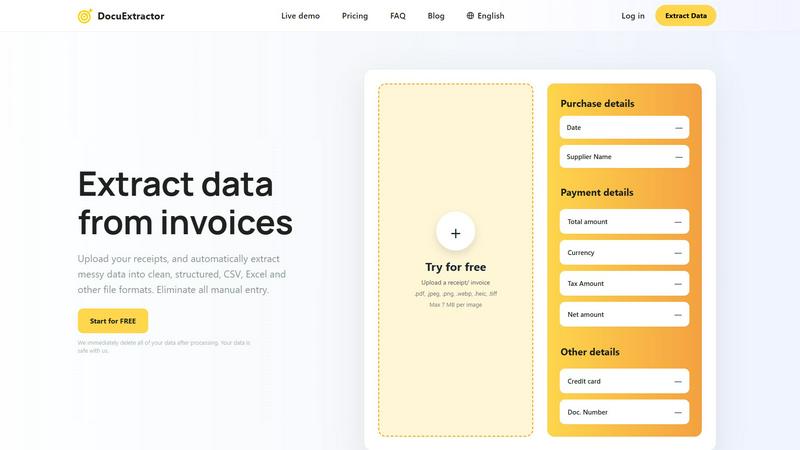
DocuExtractor AI instantly converts receipts and invoices into structured CSV or Excel data.
Last updated: February 28, 2026

Receipt Generator
Create and customize realistic receipts in seconds with 400+ templates for business, creative, and personal use, all for free.
Last updated: April 4, 2026
Visual Comparison
DocuExtractor
Receipt Generator

Feature Comparison
DocuExtractor
Advanced AI-Powered Extraction Engine
At the heart of DocuExtractor is a multi-layered AI engine that integrates state-of-the-art OCR, Deep Learning, and LLM technologies. This stack doesn't just read text; it understands document context, layout, and semantics. The Deep Learning models are specifically trained on financial documents to recognize diverse formats and handwriting, while the LLM component interprets and categorizes extracted data (like distinguishing a "total amount" from a "tax amount") with exceptional precision, delivering the platform's hallmark 99.6% accuracy rate.
Batch Processing & Multi-Format Compatibility
DocuExtractor is built for efficiency at scale, offering robust batch processing capabilities that allow users to upload hundreds of documents simultaneously. The platform maintains high compatibility, accepting a wide range of file formats including PDF, JPG, PNG, WebP, HEIC, and TIFF, with a maximum size of 7MB per image. This feature ensures seamless integration into existing digital workflows, enabling the rapid digitization of large backlogs of paper-based or digital financial records without manual intervention.
Enterprise-Grade Security & Data Privacy
Security is a foundational component of the DocuExtractor architecture. The platform operates on a strict data privacy model where all uploaded documents and extracted data are automatically and permanently deleted from its servers immediately after processing is complete. This commitment ensures that sensitive financial information never resides on the platform long-term, providing peace of mind and compliance-ready security for businesses of all sizes, from solo practitioners to large enterprises.
Customizable Output & Preset Templates
The platform offers flexible output configuration to fit various software compatibility needs. Users can choose to export their structured data directly into CSV or Excel formats. To streamline the process further, DocuExtractor provides intelligent preset templates for common documents like receipts and invoices, which auto-map standard fields. For unique requirements, users can define custom data fields, ensuring the extracted output aligns perfectly with their specific accounting software or internal database schemas.
Receipt Generator
Extensive Template Library
Receipt Generator offers an extensive library of over 400 professionally designed receipt templates. Users can choose from a variety of categories including retail, food services, and pharmacies, ensuring they find the perfect fit for their needs.
AI "Place in Scene" Feature
This innovative feature allows users to generate photorealistic images of their receipts on any surface without needing to print them. Ideal for content creators and inventory documentation, this capability enhances the visual appeal of receipts.
Full Customization Options
Users have complete control over their receipts. They can customize every detail, from line items and prices to payment methods and store information, ensuring the receipts reflect their unique requirements.
Instant Download Capabilities
Receipt Generator prioritizes user experience with instant download options. Users can export their finished receipts as high-resolution PNG or PDF files in just one click, eliminating the need for email signups or waiting time.
Use Cases
DocuExtractor
Automated Accounts Payable Processing
Finance teams can revolutionize their AP workflow by using DocuExtractor to automatically process incoming vendor invoices. The AI extracts key details such as supplier name, invoice number, date, line items, net amount, tax, and total. This structured data is instantly exported to CSV/Excel, ready for direct import into accounting software like QuickBooks, Xero, or NetSuite, drastically reducing processing time, improving accuracy, and accelerating payment cycles.
Expense Management and Receipt Digitization
For accountants and individual professionals, manually logging expense receipts is a tedious task. DocuExtractor automates this by extracting merchant information, date, payment method, and itemized totals from a batch of mixed-format receipts (JPG, PDF, etc.). The clean, categorized output simplifies expense reporting, reconciliation, and audit trails, saving several hours per week and ensuring no deductible expense is missed due to manual entry errors.
Bank Statement and Financial Report Analysis
Financial analysts and bookkeepers can use DocuExtractor to convert unstructured bank statements or PDF financial reports into structured data. The AI accurately pulls transaction dates, descriptions, amounts, and balances. This converted data can then be easily analyzed in spreadsheet software, used for cash flow forecasting, or integrated into financial models, turning static documents into dynamic, actionable datasets without manual transcription.
Audit Preparation and Data Migration
During audits or system migrations, organizations often need to digitize and structure years of historical financial documents. DocuExtractor's batch processing and high-accuracy engine are ideal for this large-scale, one-time project. It can process thousands of legacy invoices, receipts, and statements, creating a clean, searchable, and verifiable digital database that ensures compliance, simplifies audit trails, and facilitates smooth data migration to new systems.
Receipt Generator
Small Business Transactions
Small business owners can use Receipt Generator to create professional receipts for their transactions, helping them maintain accurate records and provide customers with detailed documentation of their purchases.
Expense Reporting
Freelancers and content creators can utilize the tool to generate receipts for business expenses. This simplifies the process of tracking expenses and preparing for tax season, ensuring all necessary documentation is readily available.
Visual Content Creation
Content creators can leverage the AI "Place in Scene" feature to produce visually appealing mockups of receipts. This is particularly useful for social media posts, blogs, and portfolio presentations, enhancing the overall aesthetic of their work.
Inventory Management
Resellers and retailers can use Receipt Generator to document inventory purchases with detailed receipts. This aids in keeping accurate stock records and provides a professional touch to inventory management processes.
Overview
About DocuExtractor
DocuExtractor is an enterprise-grade, AI-powered document processing platform engineered to automate the extraction of structured financial data from unstructured sources. It serves as a critical operational tool for accountants, bookkeepers, finance departments, and AP/AR specialists by transforming complex documents like receipts, invoices, bank statements, and PDFs into clean, analysis-ready CSV or Excel files. The platform's core value proposition lies in its sophisticated tech stack, which synergistically combines advanced Optical Character Recognition (OCR), Deep Learning (DL) models, and Large Language Models (LLMs) to achieve an industry-leading 99.6% field-level accuracy. This integration eliminates the labor-intensive and error-prone process of manual data entry, saving professionals significant hours per week and ensuring data integrity. Built for seamless compatibility with modern financial workflows, DocuExtractor supports batch processing, handles over 45 languages with auto-detection, and is architected with enterprise security protocols, including automatic data deletion post-processing. Its scalable infrastructure reliably processes over 500,000 documents monthly, making it a robust solution for both individual practitioners and large-scale corporate operations seeking to instantly digitize and structure their financial data.
About Receipt Generator
Receipt Generator is a powerful online tool designed for creating realistic receipts in seconds. With over 400 store-specific templates, including popular retailers like Walmart, Target, and Starbucks, users can easily customize every detail of their receipts. This includes items, prices, dates, and payment methods, allowing for a tailored fit for various business needs. The platform is particularly useful for small business owners, freelancers, content creators, and resellers worldwide, making it accessible for anyone in need of professional-looking receipts without the hassle of printing. One of the standout features of Receipt Generator is the AI "Place in Scene" functionality, which allows users to generate photorealistic images of their receipts on any surface, enhancing visual projects and inventory documentation. With no account required to start and lightning-fast performance for instant downloads, Receipt Generator is the go-to solution for anyone looking to create high-quality receipts efficiently.
Frequently Asked Questions
DocuExtractor FAQ
What is the accuracy rate of DocuExtractor's data extraction?
DocuExtractor achieves an industry-leading field-level accuracy rate of 99.6%. This high precision is the result of our integrated tech stack, which combines advanced OCR for text recognition, specialized Deep Learning models trained on financial documents to understand layouts and handwriting, and Large Language Models (LLMs) for contextual understanding and semantic data categorization, ensuring reliable and trustworthy output.
How does DocuExtractor ensure the security of my documents?
Security is paramount. DocuExtractor is built with enterprise-grade security protocols. Our most critical privacy feature is automatic data deletion: all uploaded documents and the resulting extracted data are permanently and automatically purged from our servers immediately after processing is complete and you download your results. Your sensitive financial data is not stored, sold, or used for training our models.
What file formats and languages does DocuExtractor support?
DocuExtractor offers broad compatibility for seamless integration into diverse workflows. Supported file formats include PDF, JPEG, PNG, WebP, HEIC, and TIFF. For global operations, our platform supports document processing in over 45 languages. The AI includes automatic language detection, so you can process a batch of documents in multiple languages without needing to specify the language for each file.
Can I process multiple documents at once, and is there a free tier?
Yes, DocuExtractor is designed for efficiency and includes robust batch processing capabilities, allowing you to upload and process hundreds of documents simultaneously to save time. Furthermore, we offer a "Start for FREE" tier, which allows users to try the platform and process documents with core features at no cost, making it easy to evaluate its compatibility and effectiveness within your specific workflow before committing to a paid plan.
Receipt Generator FAQ
How does Receipt Generator ensure receipt authenticity?
Receipt Generator uses thermal-style fonts and authentic layouts that mimic real receipts, ensuring that the generated documents look genuine and professional.
Is there a limit on how many receipts I can create?
With the free tier, there are certain limitations, but pro plans offer unlimited downloads, allowing for the creation of as many receipts as needed without restrictions.
Can I customize my receipts beyond just text?
Yes, users can customize fonts, colors, spacing, and even the texture of the paper in their receipts, allowing for a tailored presentation that fits their brand or personal style.
Do I need to create an account to use Receipt Generator?
No, Receipt Generator does not require an account to start using the service. Users can begin creating receipts immediately without any signup process.
Alternatives
DocuExtractor Alternatives
DocuExtractor is an AI-powered document conversion platform in the productivity and management category. It automates the extraction of structured financial data from receipts, invoices, and PDFs into CSV or Excel, using a sophisticated tech stack of OCR, Deep Learning, and LLMs for high accuracy. Users often explore alternatives for various reasons, including specific budget constraints, the need for different feature sets like custom API integrations, or compatibility with particular operating systems and existing software ecosystems. The search for a tool that aligns perfectly with an organization's workflow and technical requirements is common. When evaluating alternatives, key considerations should include the underlying AI and OCR technology's accuracy, the platform's ability to handle batch processing and multiple file formats, and its security protocols. Integration capabilities with current financial software and the overall scalability of the solution are also critical technical factors for long-term viability.
Receipt Generator Alternatives
Receipt Generator is a cutting-edge online receipt creation tool that falls under the productivity and management category. With an extensive library of over 400 store-specific templates, it allows users to generate customized receipts quickly and efficiently. Whether for personal use or business needs, users often seek alternatives to address specific requirements, such as pricing structures, additional features, or compatibility with various platforms. When evaluating alternatives, it's essential to consider factors like ease of use, template variety, customization options, and the ability to integrate with other tools. Users should also assess the performance speed and the overall user experience to ensure that the chosen solution meets their unique needs efficiently.