
Dokie AI vs Image3D AI
Side-by-side comparison to help you choose the right product.

Dokie AI
Dokie AI leverages Claude Opus 4.6 to generate and enhance professional PPT slides from text, PDFs, or YouTube in minutes.
Last updated: March 19, 2026

Image3D AI
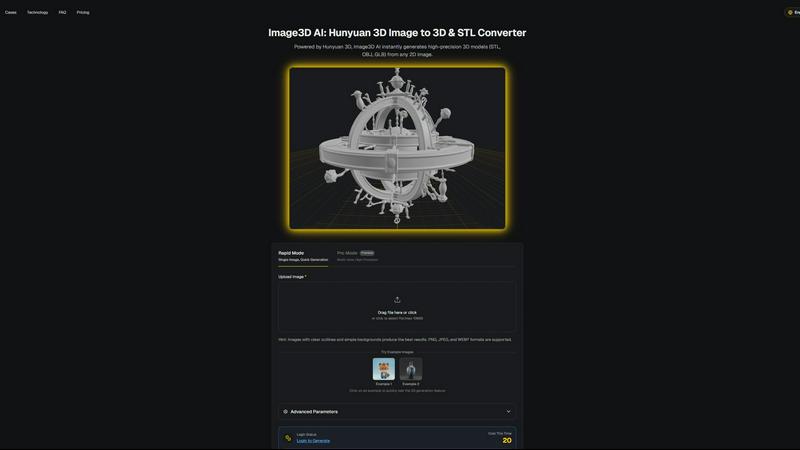
Image3D AI instantly converts 2D images into production-ready 3D models for printing and game engines.
Last updated: March 1, 2026
Visual Comparison
Dokie AI

Image3D AI
Feature Comparison
Dokie AI
AI-Powered Generation from Scratch
This core feature allows users to input a plain text description of their presentation topic. Dokie AI's engine, built on Claude Opus 4.6, then autonomously generates a complete, structured slide deck. It intelligently determines the narrative flow, creates compelling content for each slide, selects appropriate and professional layouts, and incorporates relevant visual elements and data charts. This end-to-end generation eliminates the blank canvas problem and provides a fully-formed first draft in minutes, compatible with standard presentation software.
Intelligent Slide Beautification & Redesign
Beyond creation, Dokie AI offers a powerful enhancement engine. Users can upload existing PowerPoint files, and the AI will analyze and redesign them. It fixes inconsistent layouts, applies cohesive and professional color schemes and typography, improves visual balance, and suggests better imagery—all while strictly preserving the original user-provided content. This feature acts as an automated design assistant, upgrading the visual polish of any deck without manual redesign work.
Multi-Format Document Conversion Suite
Dokie AI functions as a versatile conversion hub for presentation assets. It supports batch conversion from multiple source formats into editable PowerPoint slides. This includes converting PDF documents while preserving structure, transforming Word documents into slide-ready content, extracting key points and visuals from YouTube videos, and even parsing HTML web pages. This interoperability feature streamlines content repurposing across different mediums and file types within a unified workflow.
Automated Speaker Notes & Reverse Prompt Engineering
The platform includes tools to support presentation delivery and analysis. It can automatically generate detailed speaker notes and talking points for each slide in a deck, aiding in rehearsal and confident delivery. Conversely, its unique Reverse Prompt feature can analyze an uploaded presentation and extract the underlying prompt or content structure that could have generated it, providing valuable insights for iteration and understanding AI-generated content frameworks.
Image3D AI
Hunyuan 3D Engine Integration
At the core of Image3D AI is its integration with Tencent's Hunyuan 3D engine, a cutting-edge AI model specifically trained for 3D reconstruction. This technology enables the platform to perform sophisticated depth estimation and geometry inference from a single 2D image, generating detailed, high-precision 3D models. This backend engine is what allows for the rapid, sub-60-second conversion times and the production of models with clean topology suitable for professional applications, setting it apart from basic conversion tools.
Multi-Format Export for Seamless Integration
Image3D AI is engineered for compatibility, offering export in industry-standard 3D file formats including STL, OBJ, and GLB. This ensures generated models can be directly imported into downstream software stacks without conversion hassles. STL files are optimized for 3D printing slicers, OBJ files are universally compatible with 3D editing suites like Blender and Maya, and GLB files are the modern standard for web-based viewing, AR applications, and game engines like Unity and Unreal Engine.
Dual Generation Modes (Rapid & Pro)
The platform provides two distinct operational modes to match project requirements and resource constraints. Rapid Mode is designed for speed and simplicity, generating a 3D model from a single image quickly. Pro Mode utilizes multi-view input for a physically accurate reconstruction, delivering higher precision and detail for complex objects. This flexibility allows users to optimize the balance between generation speed and model fidelity based on their specific use case.
PBR Material Support
For game development and realistic rendering workflows, Image3D AI supports Physically Based Rendering (PBR) materials. When generating models, the AI can infer and apply realistic material properties, resulting in assets that are visually accurate and ready for real-time rendering in modern game engines. This feature eliminates the need for manual material setup, further accelerating the asset creation pipeline for developers and digital artists.
Use Cases
Dokie AI
Startup Pitch Deck Development
Founders and entrepreneurs can rapidly prototype and iterate on investor pitch decks. By describing their business model, market analysis, and solution, Dokie AI generates a professionally structured deck with compelling narratives and data visualization placeholders. This accelerates the fundraising process, allowing teams to focus on refining the message rather than slide design, ensuring a credible first impression with potential investors.
Marketing & Sales Proposal Automation
Marketing teams and sales professionals can use Dokie AI to quickly generate client proposals, campaign overviews, and sales presentations. The tool can convert existing product briefs (Word/PDF) or webinar content (YouTube) into client-ready slide decks. The AI beautification feature ensures all outgoing materials maintain brand-consistent, high-quality design, scaling the production of polished sales collateral without a design team.
Academic & Corporate Training Material Creation
Educators and corporate trainers can efficiently create lecture slides, workshop materials, and training modules. By inputting lesson outlines or converting textbook excerpts (PDF), they receive structured educational decks. The automatic speaker notes generation is particularly valuable for creating instructor guides, making the preparation of comprehensive training materials significantly faster and more consistent.
Technical & Conference Presentation Design
Engineers, researchers, and conference speakers often have dense content but lack design skills. Dokie AI helps structure complex technical information into clear, visually engaging slides. The beautification tool can take a text-heavy, manually created research presentation and apply professional design principles to improve readability and audience engagement, ensuring the visual delivery matches the quality of the content.
Image3D AI
Game Development & Rapid Prototyping
Game developers can use Image3D AI to rapidly generate 3D assets from concept art or reference images, drastically speeding up the prototyping phase. The tool's ability to produce models with PBR material support means these assets can be directly imported into engines like Unity or Unreal Engine for immediate testing and iteration, streamlining the pre-production workflow and enabling faster creative validation.
3D Printing & Maker Projects
For 3D printing enthusiasts and professionals, Image3D AI acts as a powerful image-to-STL converter. It transforms logos, sketches, or product photos into watertight, print-ready 3D meshes. The platform's focus on generating clean geometry ensures the resulting STL files are optimized for slicing software, reducing the need for manual repair and preparation before sending a model to the printer.
E-commerce & AR Product Visualization
E-commerce businesses can leverage Image3D AI to convert standard 2D product photos into interactive 3D models. These models can be embedded on product pages for 360-degree viewing or used in Augmented Reality (AR) applications to allow customers to visualize products in their own space. This enhances online shopping experiences, reduces return rates, and provides a significant competitive advantage.
Architectural Visualization & Design
Architects and designers can quickly generate basic 3D massing models or detailed site elements from sketches, floor plans, or inspiration images. This capability saves considerable modeling time from scratch, allowing for faster client presentations, early-stage design exploration, and efficient integration of concept models into more detailed BIM or CAD software workflows.
Overview
About Dokie AI
Dokie AI is a next-generation, AI-native presentation platform engineered to automate the entire slide creation and enhancement workflow. It transcends traditional template-based tools by leveraging a true generative AI stack, powered by Anthropic's Claude Opus 4.6 model, to handle the complex interplay of content structuring, intelligent layout selection, typographic hierarchy, and visual design. The platform is architected for business professionals, educators, marketers, and startup founders who require polished, professional presentations but lack dedicated design resources or time. Its core value proposition lies in its multi-modal operation: users can generate a complete deck from a text prompt, upload and beautify an existing PowerPoint or PDF, convert documents and videos into slide format, or automatically generate structured speaker notes. This makes Dokie AI a comprehensive, API-like solution for presentation tasks, seamlessly integrating into various content production pipelines to deliver designer-quality output with minimal user input, fundamentally changing the economics and speed of professional presentation development.
About Image3D AI
Image3D AI is a professional-grade platform that revolutionizes the 3D asset creation pipeline by converting static 2D images into production-ready 3D models in seconds. Powered by Tencent's advanced Hunyuan 3D engine, it performs complex technical inference to generate high-precision 3D geometry and textures from a single input image. This AI-powered tool fundamentally democratizes high-fidelity 3D generation, making it accessible to professionals and enthusiasts without requiring deep expertise in traditional 3D modeling software like Blender or Maya. Its core value proposition lies in its seamless integration into diverse, tech-heavy workflows, offering multi-format export capabilities that ensure immediate compatibility with industry-standard tools. Whether for rapid prototyping in game development, creating watertight meshes for 3D printing, generating assets for AR/VR experiences, or building interactive 3D models for e-commerce, Image3D AI bridges the gap between 2D concepts and 3D reality with unprecedented speed, precision, and workflow efficiency.
Frequently Asked Questions
Dokie AI FAQ
What AI model does Dokie AI use?
Dokie AI is powered by Anthropic's Claude Opus 4.6, a state-of-the-art large language model known for its advanced reasoning and instruction-following capabilities. This integration allows Dokie AI to perform deep content understanding, logical structuring, and context-aware design generation that surpasses simpler template-matching systems, providing truly intelligent presentation creation.
Can I edit the presentations generated by Dokie AI?
Yes, absolutely. Dokie AI outputs standard PowerPoint (.pptx) files that are fully compatible with Microsoft PowerPoint, Google Slides, Apple Keynote, and other presentation software. You retain complete editorial control and can modify any aspect of the content, design, or layout after generation, allowing for seamless integration into your existing review and customization workflow.
What file formats can Dokie AI accept for conversion?
Dokie AI supports a wide range of input formats for its conversion tools. This includes PDF documents, Microsoft Word (.docx) files, YouTube video URLs, and HTML web pages. This multi-format compatibility is designed to fit into diverse content ecosystems, allowing users to transform existing assets from virtually any common source into a structured presentation.
How does the Beautify feature handle my original content?
The AI Beautify PPT feature is designed to be non-destructive. It strictly preserves all your original text, data, and core imagery. The AI's role is solely to enhance the visual design layer: it reorganizes layouts for better flow, applies professional color palettes and fonts, improves spacing and alignment, and may suggest aesthetic background or icon elements. Your informational content remains intact and unaltered.
Image3D AI FAQ
What image formats are supported for conversion?
Image3D AI supports common raster image formats including PNG, JPEG, and WEBP. For optimal results, uploaded images should be under 10MB in size. The platform works best with high-contrast images that have clear subject outlines and simple, uncluttered backgrounds to aid the AI in accurate geometry inference.
What is the difference between Rapid Mode and Pro Mode?
Rapid Mode is designed for speed, generating a 3D model from a single input image in about 60 seconds. It's ideal for logos, sketches, or simple objects. Pro Mode requires multiple views (e.g., front, side, back) of an object to perform a more accurate, physically-based 3D reconstruction. This mode yields higher precision and detail, making it suitable for converting complex real-world objects like shoes or consumer products.
Which 3D file format should I download?
The choice depends on your downstream application. Download the STL format for 3D printing, as it is the standard mesh format for slicer software. Choose OBJ for further editing in traditional 3D software like Blender, Maya, or 3ds Max, as it supports textures and is widely compatible. Select GLB for web display, AR experiences, or game engines, as it is a compact, single-file format that contains the model, textures, and material data.
How can I improve the quality of my generated 3D model?
To maximize conversion quality, start with a high-quality source image that has good lighting, clear edges, and a simple background. For object reconstruction, using Pro Mode with multiple, consistent views will yield the most accurate result. Understanding the tool's parameters, such as selecting the "Geometry" mode for 3D printing (which focuses on mesh integrity over textures), can also tailor the output to your specific workflow needs.
Alternatives
Dokie AI Alternatives
Dokie AI is a specialized AI presentation generator operating within the design tools and productivity software category. It leverages advanced language models like Claude Opus 4.6 to automate the end-to-end creation and beautification of professional slide decks, moving beyond static templates to true content-aware design. Users often explore alternatives for various technical and operational reasons. These can include budget constraints, specific feature requirements not covered by the core offering, or the need for deeper integration with an existing tech stack, such as a particular cloud storage service, project management platform, or enterprise software ecosystem. Platform compatibility, whether desktop versus web-based or mobile support, is another common driver for evaluation. When assessing an alternative, key technical considerations should include the underlying AI model's capabilities for content and design coherence, the depth and flexibility of API access for custom workflows, and the tool's export compatibility with standard formats like PowerPoint or Google Slides. The efficiency of the workflow automation and the quality of the final visual output are also critical benchmarks for comparison.
Image3D AI Alternatives
Image3D AI is a professional-grade 3D generation platform that automates the conversion of 2D images into production-ready 3D models. It falls within the design tools category, specifically targeting workflows for 3D printing, game development, and digital content creation. Its core appeal is streamlining a traditionally complex technical process into a fast, accessible service. Users often explore alternatives for various technical and operational reasons. These can include specific budget constraints, the need for different feature sets like animation or texture painting, or requirements for integration with a particular software stack or platform. Evaluating the total cost of ownership and output quality for one's specific use case is crucial. When assessing an alternative solution, key technical considerations should guide the decision. Prioritize the engine's reconstruction accuracy, the range of supported export formats for your pipeline, and the tool's ability to generate clean, manifold meshes suitable for your end application, be it real-time rendering or additive manufacturing.