
File Studio vs Yardyly
Side-by-side comparison to help you choose the right product.

File Studio
File Studio provides powerful offline tools for secure file and PDF conversion, editing, and management on your.
Last updated: February 27, 2026

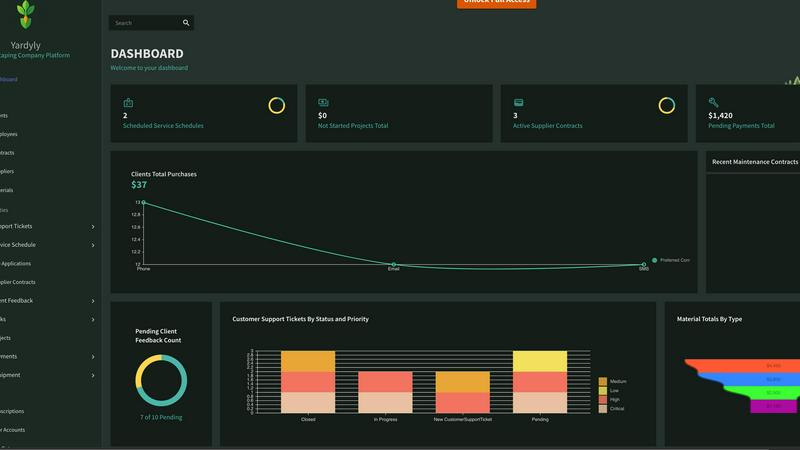
Yardyly is an all-in-one software that streamlines landscaping management, enhancing efficiency and driving business.
Last updated: March 4, 2026
Visual Comparison
File Studio

Yardyly
Feature Comparison
File Studio
Comprehensive PDF Management
File Studio offers a complete PDF toolkit that allows users to merge multiple PDFs, split them into individual pages, reorder and rotate spreads, and remove passwords—all without requiring an internet connection. This feature empowers users to perform full PDF management while ensuring their documents remain private.
Versatile Image Processing
With support for over 20 file formats, including HEIC, WebP, and various RAW types, File Studio enables users to convert, resize, compress, and edit images seamlessly. This versatility makes it an essential tool for photographers and graphic designers who need to manage their image files efficiently.
Batch Processing Capability
File Studio excels in handling multiple files simultaneously, allowing users to convert, resize, or compress entire folders in one go. This feature significantly improves productivity by saving time and streamlining workflows for users dealing with large volumes of files.
100% Offline Functionality
All processes within File Studio occur locally on your device, meaning no files are uploaded to the cloud. This offline functionality guarantees that sensitive documents remain secure and private, making it ideal for users who prioritize confidentiality in their work.
Yardyly
Automated Scheduling
Yardyly's automated scheduling feature allows you to optimize your team's work hours with intuitive drag-and-drop functionality. This ensures your resources are allocated efficiently, making it easy to adjust plans on the fly based on real-time needs.
Customer Relationship Management (CRM)
The integrated CRM system streamlines client interactions by organizing customer data and communication history in one place. This facilitates better relationship management, ensuring that you can respond promptly to inquiries and manage client expectations effectively.
Financial Management Tools
Monitor your financial health with Yardyly's comprehensive finance tracking tools. From supplier contracts to client payments, you can manage all financial transactions in one platform, ensuring accuracy and transparency in fiscal matters.
Real-Time Project Tracking
Stay on top of your projects with real-time tracking capabilities. Yardyly enables you to oversee job status, budget adherence, and team collaboration, ensuring that every aspect of your operations is running smoothly and efficiently.
Use Cases
File Studio
Secure Document Management
Professionals who handle sensitive documents, such as legal contracts or personal identification, can rely on File Studio to manage these files securely without the risk of data breaches from online services.
Image Conversion for Web Use
Photographers can quickly convert HEIC images from their smartphones to JPG formats, ensuring compatibility with various applications and platforms. This makes it easier to share high-quality images online.
Efficient File Organization
Freelancers and remote workers can utilize File Studio to organize their digital assets by merging and rearranging PDFs. This functionality helps maintain a clear structure for important documents, improving overall workflow efficiency.
Bulk Processing for Large Projects
For projects that involve numerous files, File Studio’s batch processing feature allows users to convert or compress large folders of images and PDFs in a single operation. This capability is particularly beneficial for businesses that manage extensive documentation.
Yardyly
Solo Operator Management
For solo operators, Yardyly simplifies the daily grind by consolidating all management tasks into a single platform. You can handle bookings, invoicing, and scheduling without the hassle of juggling multiple tools, allowing you to focus on delivering quality service.
Team Coordination
In a team environment, Yardyly enhances collaboration by providing clear visibility into tasks and schedules. Team members can easily access job information and communicate updates, ensuring everyone is on the same page and working towards common goals.
Client Feedback Integration
Yardyly allows you to integrate client feedback directly into your ongoing projects. This ensures that customer satisfaction is prioritized, and adjustments can be made in real-time based on client input, leading to improved service delivery.
Resource Management
With Yardyly, managing equipment and resources becomes a breeze. You can track equipment usage and availability, making it easier to plan jobs without overcommitting resources or facing delays due to unavailability.
Overview
About File Studio
File Studio is an advanced desktop application specifically crafted for managing PDFs and images entirely offline, prioritizing user privacy and data security. Designed for a diverse range of professionals, including photographers, freelancers, and remote workers, it provides a suite of powerful tools to handle sensitive documents like passports, IDs, and contracts without the risk associated with cloud storage. With File Studio, you can merge, split, reorder, rotate, and password-protect PDFs, while also converting files between more than 20 formats including HEIC, WebP, AVIF, and various RAW types. Its one-time purchase model eliminates the need for subscriptions or accounts, making it an attractive choice for users seeking reliable and efficient file management solutions. Compatible with both Mac and Windows, File Studio ensures that all processing is done locally, safeguarding your private files and allowing you to work with confidence.
About Yardyly
Yardyly is your comprehensive digital solution tailored for landscaping, lawn care, and outdoor service businesses. It addresses the specific challenges faced by the green industry by unifying essential operational tools into a single, cloud-based platform. With Yardyly, users can manage online bookings, job scheduling, customer relationships (CRM), invoicing, and team coordination seamlessly. This all-in-one approach eliminates the chaos of juggling spreadsheets, paper notes, and disparate applications, providing clarity and control. Whether you are a solo entrepreneur or managing a growing team, Yardyly automates repetitive tasks and minimizes administrative burdens, thus enhancing communication with your crew and clients. Its mobile-friendly design ensures you can manage schedules, track revenue, and update job statuses from anywhere, whether you are in the field or at the office. Ultimately, Yardyly empowers you to focus on what you do best: crafting stunning outdoor spaces and expanding your business.
Frequently Asked Questions
File Studio FAQ
Is my data ever uploaded?
No. File Studio processes everything locally on your device. Your files never leave your computer, ensuring 100% offline processing for maximum privacy.
Do you offer a free trial?
Yes. Users can try File Studio before making a purchase, allowing them to experience its powerful capabilities without any commitments.
What platforms is File Studio compatible with?
File Studio is compatible with both Mac and Windows operating systems, making it accessible to a wide range of users regardless of their preferred platform.
How does the one-time purchase model work?
With a one-time payment of $29, users receive a lifetime license for File Studio. This includes all current tools, future updates, and offline processing without any ongoing fees or subscriptions.
Yardyly FAQ
What kind of businesses can benefit from Yardyly?
Yardyly is designed for landscaping, lawn care, and outdoor service businesses, whether you're a solo operator or managing a larger team. It streamlines operations specific to the green industry.
Is Yardyly mobile-friendly?
Yes, Yardyly features a mobile-friendly design that allows users to manage their operations from any location. This means you can check schedules, update job statuses, and track revenue on the go.
How does Yardyly support team collaboration?
Yardyly enhances team collaboration by providing clear visibility into tasks, schedules, and project updates. Team members can communicate effectively, ensuring everyone is aligned and informed.
Can I customize the Yardyly platform?
Absolutely! Yardyly offers customizable settings and fields, allowing you to tailor the application to meet the specific needs of your business, ensuring it aligns perfectly with your operational requirements.
Alternatives
File Studio Alternatives
File Studio is a powerful desktop application that falls under the category of productivity and management tools. It specializes in offline file handling, particularly for PDFs and images, catering to users who value privacy and security. As more individuals and businesses seek reliable solutions for managing sensitive documents, many users often look for alternatives to File Studio due to varying reasons such as pricing, specific feature sets, or compatibility with different platforms. When exploring alternatives, users should consider several factors, including the range of tools available for file management, the ability to work offline, and any potential subscription models. Additionally, compatibility with various operating systems and file formats is crucial for ensuring seamless integration into existing workflows. Ultimately, the right alternative will depend on individual needs and preferences.
Yardyly Alternatives
Yardyly is a comprehensive software solution tailored for the landscaping and outdoor service industry. As an all-in-one platform, it integrates essential functionalities such as online booking, job scheduling, customer relationship management, invoicing, and team coordination, making it easier for businesses to operate efficiently. Users often seek alternatives to Yardyly for various reasons, including pricing considerations, specific feature requirements, or the need for platform compatibility that better aligns with their existing systems. When evaluating potential alternatives, it's crucial to prioritize features that enhance productivity, ease of use, and seamless integration with other tools you may already be employing in your business operations.