
FilexHost vs MeetingMind
Side-by-side comparison to help you choose the right product.

FilexHost
Effortlessly host and share any file with instant URLs using FilexHost's simple drag-and-drop interface.
Last updated: February 27, 2026

MeetingMind
MeetingMind is a macOS AI assistant that auto-records and summarizes Zoom meetings into searchable notes.
Last updated: March 1, 2026
Visual Comparison
FilexHost

MeetingMind
Feature Comparison
FilexHost
Instant Subdomains
With FileXHost, users receive instant subdomains for their uploaded files, allowing them to share links like your-file.filex.host without any setup. This feature enhances accessibility and makes sharing files effortless.
Free SSL Encryption
Every link generated through FileXHost comes with free SSL encryption, ensuring that the files shared are secure. This feature is essential for maintaining privacy and protecting sensitive data during transmission.
Smart View Modes
FileXHost offers intelligent view modes that allow files to be rendered directly in the browser or presented as a download page. This flexibility caters to various user preferences and enhances the overall experience for both the host and the recipient.
Optional Password Protection
For users who need an extra layer of security, FileXHost provides optional password protection and expiry settings for shared files. This means that sensitive information can be safeguarded while still allowing easy access to authorized users.
MeetingMind
Automatic Zoom Detection & Recording
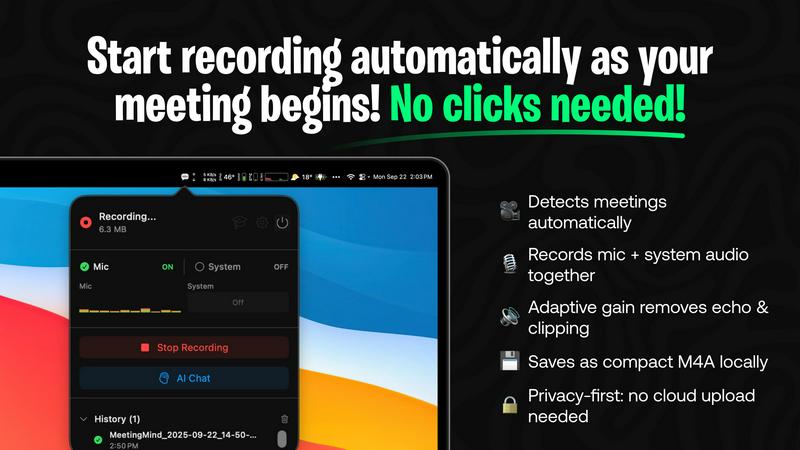
The application operates as a lightweight menu bar utility that continuously monitors system activity. Using advanced heuristics, it automatically detects when the user joins or starts a Zoom meeting, initiating recording without any manual clicks. It captures a high-fidelity audio stream by recording both the user's microphone input and the system's audio output simultaneously, employing adaptive gain control for optimal clarity. This hands-free operation is the foundation of its seamless integration into the user's workflow.
On-Device or Cloud AI Processing
MeetingMind offers unparalleled flexibility in its AI processing backend. Users can opt for complete privacy by running open-source large language models (LLMs) locally via an Ollama integration, ensuring no meeting data ever leaves their Mac. Alternatively, for more powerful summarization, they can connect to cloud-based models through the OpenRouter gateway. This hybrid architecture allows teams to balance performance requirements with stringent data security and compliance policies.
Interactive AI Chat & Live Transcription
During and after the meeting, users can interact with the captured content through an integrated AI chat interface. This allows for real-time querying of the discussion, such as asking for clarifications on points made or requesting immediate summaries of specific topics. The live transcription appears in the app with speaker attribution, creating an interactive transcript that serves as a live knowledge base for the ongoing conversation.
Markdown Export & Structured Output
All meeting intelligence is processed and exported in well-formatted markdown (.md) files. The AI doesn't just transcribe; it structures the output to include a concise summary, a bulleted list of key takeaways, clearly defined action items with potential owners, and the full, timestamped transcript. This format ensures immediate usability in note-taking apps like Obsidian or Notion, and for version control in developer workflows, making the information easy to search, share, and archive.
Use Cases
FilexHost
Sharing Client Reports
Professionals can effortlessly share client reports and presentations without worrying about email attachment limits. FileXHost allows for instant sharing with secure links, enabling quick access for clients and stakeholders.
Hosting Landing Pages
Developers can use FileXHost to host landing pages or mock APIs without the hassle of server configurations. The platform supports HTML rendering, making it ideal for testing and showcasing projects.
Distributing Digital Products
Creators can distribute digital products such as eBooks, videos, or software through FileXHost. The simplicity of uploading and sharing files makes it an efficient platform for selling or sharing content without complications.
Collaborating on Projects
Teams can collaborate on projects by sharing documents and data files through FileXHost. Its support for various file types and smart rendering ensures that all team members can view and interact with files as intended, enhancing collaboration.
MeetingMind
Daily Engineering Stand-ups and Sprint Meetings
For software development teams conducting daily syncs or sprint planning on Zoom, MeetingMind automatically captures detailed technical discussions, feature decisions, and bug reports. The AI-generated action items ensure every ticket and TODO is clearly documented and assigned. Engineers can later query the transcript to recall specific implementation details or API decisions without relying on fragmented manual notes.
Client Consultations and Sales Demos
Professionals in consulting, sales, or agency roles use MeetingMind to fully focus on the client interaction during Zoom calls. The tool faithfully records every client requirement, concern, and feedback. Post-meeting, the AI summary highlights client pain points and agreed-upon next steps, enabling the rapid creation of accurate follow-up emails, proposals, and project briefs directly from the structured markdown output.
Remote Academic Research and Interviews
Researchers and students conducting qualitative interviews or collaborative research meetings over Zoom benefit from the verbatim, speaker-attributed transcript. The local processing option via Ollama is crucial for handling sensitive, unpublished research data confidentially. The searchable transcripts facilitate thematic analysis and easy citation of sources directly from the recorded conversation.
Executive Briefings and Strategic Planning
For leadership teams and board meetings where strategic direction is set, capturing nuance and context is vital. MeetingMind records the entire high-level discussion, and the AI chat feature allows executives to ask complex questions post-meeting to surface insights across different discussion threads. The concise summary and action items provide a clear, authoritative record for aligning the entire organization.
Overview
About FilexHost
FileXHost is a robust, high-speed file hosting and sharing solution designed for users who require an effortless way to upload and distribute various file types. Whether you're dealing with documents, media files, spreadsheets, or entire websites, FileXHost simplifies the process through its intuitive "Drop & Share" workflow. Users can simply drag their files into the interface, receive an instant secure URL, and share it with others—no server setups, DNS configurations, or login requirements for recipients. This makes FileXHost an ideal solution for professionals, developers, and creators who need a seamless and efficient method of file delivery. With features like free SSL encryption and smart rendering, FileXHost enhances the viewing experience, ensuring that each file is presented exactly as intended, whether it is viewed directly in the browser or downloaded.
About MeetingMind
MeetingMind is a sophisticated, AI-native meeting intelligence application built exclusively for macOS. It functions as an autonomous meeting recorder and analyzer, specifically engineered to integrate seamlessly with the Zoom conferencing platform. The core value proposition is its ability to capture every detail of a meeting without user intervention, freeing professionals to engage fully in the discussion. It automatically detects when a Zoom meeting starts and begins recording both microphone and system audio, generating real-time, speaker-attributed transcripts. The application leverages a powerful, on-device AI stack, offering users a choice between local processing via Ollama models or cloud-based inference through OpenRouter. This ensures sensitive meeting data can remain entirely private on the user's Mac. The output is transformed into clean, searchable markdown documents containing full transcripts, AI-generated summaries, and extracted action items. Designed for individual professionals, remote teams, and organizations that rely on Zoom for daily collaboration, MeetingMind turns ephemeral conversations into structured, actionable knowledge assets, ensuring critical insights are never lost.
Frequently Asked Questions
FilexHost FAQ
What is FileXHost?
FileXHost is a file hosting and sharing service that allows users to upload and distribute various file types easily. It emphasizes speed, security, and user experience through its simple drag-and-drop interface and instant link generation.
Is it really free?
Yes, FileXHost offers a free plan that allows users to host up to 1,000 files with a maximum size of 25MB per file. This plan is ad-supported and includes an expiry of up to 7 days for shared files.
What file types are supported?
FileXHost supports a wide range of file types including PDFs, images (JPG, PNG, WEBP), spreadsheets (XLSX, CSV), media files (MP4, MP3), and ZIP archives. This versatility makes it suitable for various use cases.
How do I update my site?
To update your site or shared files, simply re-upload the new version of the file. FileXHost will generate a new link, and you can choose to share this updated link as needed, ensuring that your recipients always access the latest version.
MeetingMind FAQ
How does the automatic Zoom detection work?
MeetingMind runs as a background service on your macOS system. It uses a combination of system-level APIs to detect audio session changes and process names associated with Zoom meetings. When it identifies a meeting is active, it automatically initiates the recording process for both microphone and system audio, requiring zero manual intervention from the user after the initial setup and permission grants.
What are the differences between local (Ollama) and cloud (OpenRouter) AI?
The local Ollama option runs open-source LLMs directly on your Mac's hardware (CPU/GPU). This provides 100% data privacy as no information is transmitted externally, but it requires sufficient system resources and may have slower processing times for very long meetings. The cloud OpenRouter option sends the transcript to a selected, powerful cloud model for processing, offering faster and often more sophisticated summaries, but the data leaves your device.
Is there a free version available?
Yes, MeetingMind offers a fully-featured free tier that includes 60 minutes of recording time per day. This includes automatic Zoom detection, live transcription, AI summaries using the chosen backend, and local processing. It is designed to be perpetually free, perfect for daily short meetings like stand-ups. An unlimited, one-time purchase upgrade is available for users requiring longer recording sessions.
What are the system requirements and compatibility?
MeetingMind is a native macOS application available on the Mac App Store. It requires macOS 14.0 (Sonoma) or later. The application is specifically engineered for compatibility with the Zoom conferencing application. For optimal performance with the local Ollama AI feature, a Mac with Apple Silicon (M-series chips) is recommended due to their superior neural engine capabilities for efficient AI inference.
Alternatives
FilexHost Alternatives
FilexHost is a user-friendly file hosting and sharing platform designed to streamline the process of uploading and distributing files of any type. It falls under the category of productivity and management tools, emphasizing ease of use with its drag-and-drop functionality. Users often seek alternatives to FilexHost due to various reasons, including pricing structures, specific feature sets, or compatibility with different platforms and workflows. When searching for alternatives, it's essential to consider factors such as storage capacity, file size limits, security features, and user experience. Additionally, understanding the target audience's needs—whether they are professionals, developers, or casual users—can help in selecting a service that best fits their requirements for efficient file management and sharing.
MeetingMind Alternatives
MeetingMind is a macOS-native AI meeting assistant in the productivity and management category. It specializes in auto-recording and transcribing Zoom meetings, using on-device or cloud AI to generate searchable summaries and action items directly from your desktop. Users often explore alternatives for various reasons, including budget constraints, the need for cross-platform compatibility beyond macOS, or specific feature requirements like integration with other video conferencing tools like Teams or Google Meet. Some may seek different AI models, more extensive team collaboration features, or a different approach to data privacy and storage. When evaluating alternatives, key considerations should include the supported operating systems and conferencing platforms, the underlying transcription and AI technology stack, data processing location (local vs. cloud), and the flexibility of the output formats. It's also crucial to assess how well a tool integrates into your existing workflow and tech ecosystem.