
HeyVid vs MeetingMind
Side-by-side comparison to help you choose the right product.

HeyVid is your all-in-one AI platform for generating high-quality videos and images quickly and effortlessly.
Last updated: April 4, 2026

MeetingMind
MeetingMind is a macOS AI assistant that auto-records and summarizes Zoom meetings into searchable notes.
Last updated: March 1, 2026
Visual Comparison
HeyVid

MeetingMind
Feature Comparison
HeyVid
Text to Video
The Text to Video feature allows users to transform written content into stunning videos in just a few clicks. By simply inputting text, the AI analyzes the context and generates a corresponding video, complete with visuals and animations tailored to enhance the narrative.
Image to Video
HeyVid's Image to Video functionality enables users to create dynamic videos from static images. This feature is particularly useful for businesses looking to showcase products or tell a story using a series of images, seamlessly converting them into engaging video presentations.
AI Image Refiner & Stylizer
The AI Image Refiner & Stylizer takes your visuals to the next level by enhancing image quality and applying artistic styles. This feature is perfect for creators wanting to give their images a unique look, ensuring they stand out in a crowded digital landscape.
One-Click AI Video Maker
With the One-Click AI Video Maker, users can generate professional-quality videos quickly. This feature simplifies the video creation process by allowing users to describe their vision, upload images, and let the AI handle the rest, making it accessible for those without editing skills.
MeetingMind
Automatic Zoom Detection & Recording
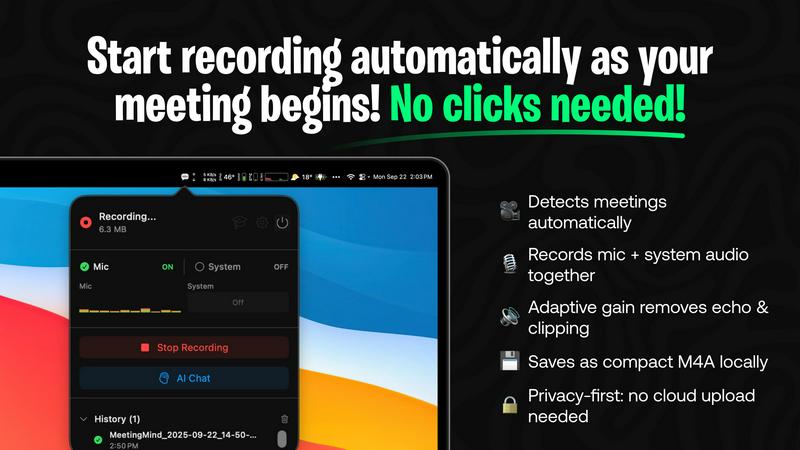
The application operates as a lightweight menu bar utility that continuously monitors system activity. Using advanced heuristics, it automatically detects when the user joins or starts a Zoom meeting, initiating recording without any manual clicks. It captures a high-fidelity audio stream by recording both the user's microphone input and the system's audio output simultaneously, employing adaptive gain control for optimal clarity. This hands-free operation is the foundation of its seamless integration into the user's workflow.
On-Device or Cloud AI Processing
MeetingMind offers unparalleled flexibility in its AI processing backend. Users can opt for complete privacy by running open-source large language models (LLMs) locally via an Ollama integration, ensuring no meeting data ever leaves their Mac. Alternatively, for more powerful summarization, they can connect to cloud-based models through the OpenRouter gateway. This hybrid architecture allows teams to balance performance requirements with stringent data security and compliance policies.
Interactive AI Chat & Live Transcription
During and after the meeting, users can interact with the captured content through an integrated AI chat interface. This allows for real-time querying of the discussion, such as asking for clarifications on points made or requesting immediate summaries of specific topics. The live transcription appears in the app with speaker attribution, creating an interactive transcript that serves as a live knowledge base for the ongoing conversation.
Markdown Export & Structured Output
All meeting intelligence is processed and exported in well-formatted markdown (.md) files. The AI doesn't just transcribe; it structures the output to include a concise summary, a bulleted list of key takeaways, clearly defined action items with potential owners, and the full, timestamped transcript. This format ensures immediate usability in note-taking apps like Obsidian or Notion, and for version control in developer workflows, making the information easy to search, share, and archive.
Use Cases
HeyVid
Marketing Campaigns
HeyVid is ideal for digital marketers who need to create visually appealing content for campaigns. With its ability to generate videos and images rapidly, marketers can enhance their promotional efforts on social media, email marketing, and landing pages.
Educational Content Creation
Educators can leverage HeyVid to create engaging tutorials, presentations, and course content. The platform's intuitive tools allow for the quick production of instructional videos that captivate students and facilitate learning.
Corporate Communications
Businesses can use HeyVid for internal communications, such as team updates and client presentations. Professional-grade videos created through HeyVid can effectively convey important messages, ensuring clarity and engagement among stakeholders.
Crowdfunding Campaigns
Entrepreneurs aiming to launch crowdfunding campaigns can benefit from HeyVid's capabilities. The platform allows users to produce compelling pitch videos that resonate with potential backers, showcasing their projects in a visually appealing and professional manner.
MeetingMind
Daily Engineering Stand-ups and Sprint Meetings
For software development teams conducting daily syncs or sprint planning on Zoom, MeetingMind automatically captures detailed technical discussions, feature decisions, and bug reports. The AI-generated action items ensure every ticket and TODO is clearly documented and assigned. Engineers can later query the transcript to recall specific implementation details or API decisions without relying on fragmented manual notes.
Client Consultations and Sales Demos
Professionals in consulting, sales, or agency roles use MeetingMind to fully focus on the client interaction during Zoom calls. The tool faithfully records every client requirement, concern, and feedback. Post-meeting, the AI summary highlights client pain points and agreed-upon next steps, enabling the rapid creation of accurate follow-up emails, proposals, and project briefs directly from the structured markdown output.
Remote Academic Research and Interviews
Researchers and students conducting qualitative interviews or collaborative research meetings over Zoom benefit from the verbatim, speaker-attributed transcript. The local processing option via Ollama is crucial for handling sensitive, unpublished research data confidentially. The searchable transcripts facilitate thematic analysis and easy citation of sources directly from the recorded conversation.
Executive Briefings and Strategic Planning
For leadership teams and board meetings where strategic direction is set, capturing nuance and context is vital. MeetingMind records the entire high-level discussion, and the AI chat feature allows executives to ask complex questions post-meeting to surface insights across different discussion threads. The concise summary and action items provide a clear, authoritative record for aligning the entire organization.
Overview
About HeyVid
HeyVid is an advanced AI-driven platform that revolutionizes the way users create videos and images. Designed for content creators, marketers, educators, and businesses, HeyVid allows anyone to generate high-quality visual content quickly and effortlessly. With features that support text-to-video, image-to-video, text-to-image, and image-to-image transformations, this all-in-one creative studio caters to a diverse range of needs. Whether you are a beginner looking for straightforward tools or a professional seeking advanced capabilities, HeyVid's intuitive interface and powerful models deliver professional results in moments. The platform also integrates various AI models like Veo 3.1 and Sora 2, ensuring users have access to cutting-edge technology for their creative projects. With HeyVid, turning ideas into captivating visual stories has never been easier or faster.
About MeetingMind
MeetingMind is a sophisticated, AI-native meeting intelligence application built exclusively for macOS. It functions as an autonomous meeting recorder and analyzer, specifically engineered to integrate seamlessly with the Zoom conferencing platform. The core value proposition is its ability to capture every detail of a meeting without user intervention, freeing professionals to engage fully in the discussion. It automatically detects when a Zoom meeting starts and begins recording both microphone and system audio, generating real-time, speaker-attributed transcripts. The application leverages a powerful, on-device AI stack, offering users a choice between local processing via Ollama models or cloud-based inference through OpenRouter. This ensures sensitive meeting data can remain entirely private on the user's Mac. The output is transformed into clean, searchable markdown documents containing full transcripts, AI-generated summaries, and extracted action items. Designed for individual professionals, remote teams, and organizations that rely on Zoom for daily collaboration, MeetingMind turns ephemeral conversations into structured, actionable knowledge assets, ensuring critical insights are never lost.
Frequently Asked Questions
HeyVid FAQ
What types of media can I create with HeyVid?
HeyVid allows you to create a wide variety of media, including videos and images. You can generate content through text-to-video, image-to-video, text-to-image, and image-to-image capabilities.
Is HeyVid suitable for beginners?
Yes, HeyVid is designed to be user-friendly and accessible for all skill levels. Its intuitive controls and one-click features enable beginners to create professional-quality content without prior editing experience.
Can I customize the output of my videos?
Absolutely. HeyVid offers options to customize videos, including aspect ratios, resolutions, and watermarks. You can tailor the content to match your specific needs and brand identity.
What AI models does HeyVid integrate?
HeyVid integrates several leading AI models, including Veo 3.1, Sora 2, and various image generation models like Dall-E and Midjourney. This allows users to leverage the best technology available for their creative projects.
MeetingMind FAQ
How does the automatic Zoom detection work?
MeetingMind runs as a background service on your macOS system. It uses a combination of system-level APIs to detect audio session changes and process names associated with Zoom meetings. When it identifies a meeting is active, it automatically initiates the recording process for both microphone and system audio, requiring zero manual intervention from the user after the initial setup and permission grants.
What are the differences between local (Ollama) and cloud (OpenRouter) AI?
The local Ollama option runs open-source LLMs directly on your Mac's hardware (CPU/GPU). This provides 100% data privacy as no information is transmitted externally, but it requires sufficient system resources and may have slower processing times for very long meetings. The cloud OpenRouter option sends the transcript to a selected, powerful cloud model for processing, offering faster and often more sophisticated summaries, but the data leaves your device.
Is there a free version available?
Yes, MeetingMind offers a fully-featured free tier that includes 60 minutes of recording time per day. This includes automatic Zoom detection, live transcription, AI summaries using the chosen backend, and local processing. It is designed to be perpetually free, perfect for daily short meetings like stand-ups. An unlimited, one-time purchase upgrade is available for users requiring longer recording sessions.
What are the system requirements and compatibility?
MeetingMind is a native macOS application available on the Mac App Store. It requires macOS 14.0 (Sonoma) or later. The application is specifically engineered for compatibility with the Zoom conferencing application. For optimal performance with the local Ollama AI feature, a Mac with Apple Silicon (M-series chips) is recommended due to their superior neural engine capabilities for efficient AI inference.
Alternatives
HeyVid Alternatives
HeyVid is an all-in-one AI video and image generator designed to empower users with the ability to create high-quality visual content quickly and efficiently. It falls under the productivity and management category, making it a valuable tool for businesses, marketers, and creatives who require professional media without the complexity typically associated with video and image production. Users often seek alternatives to HeyVid due to various reasons such as pricing, specific feature sets, or compatibility with existing platforms and workflows. When choosing an alternative, it's important to consider factors like ease of use, integration capabilities with other tools, quality of output, and customer support. Finding a solution that meets your unique needs can enhance your productivity and creativity in content generation.
MeetingMind Alternatives
MeetingMind is a macOS-native AI meeting assistant in the productivity and management category. It specializes in auto-recording and transcribing Zoom meetings, using on-device or cloud AI to generate searchable summaries and action items directly from your desktop. Users often explore alternatives for various reasons, including budget constraints, the need for cross-platform compatibility beyond macOS, or specific feature requirements like integration with other video conferencing tools like Teams or Google Meet. Some may seek different AI models, more extensive team collaboration features, or a different approach to data privacy and storage. When evaluating alternatives, key considerations should include the supported operating systems and conferencing platforms, the underlying transcription and AI technology stack, data processing location (local vs. cloud), and the flexibility of the output formats. It's also crucial to assess how well a tool integrates into your existing workflow and tech ecosystem.