
LuxSign vs Tinyart.io
Side-by-side comparison to help you choose the right product.

LuxSign enables secure, legally binding electronic signatures for documents across the EU, all hosted in Luxembourg.
Last updated: February 27, 2026

Tinyart.io
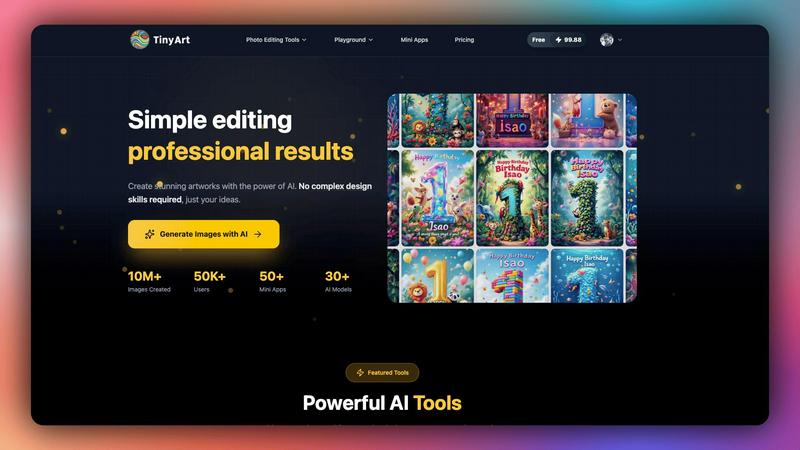
Tinyart.io integrates AI image generation and editing tools for effortless professional visual creation.
Last updated: March 1, 2026
Visual Comparison
LuxSign

Tinyart.io
Feature Comparison
LuxSign
Multiple Signature Methods
LuxSign provides flexibility in how users can sign documents. You can draw your signature using a mouse, type your name, or upload an image of your signature. This versatility ensures that users can choose the method that suits them best, making the signing process quick and efficient.
Advanced Security
Security is paramount at LuxSign. The platform employs industry-standard encryption for documents during upload, storage, and transmission. This ensures that sensitive information remains protected at all times, and secure servers housed in Luxembourg guarantee compliance with EU data protection regulations.
Complete Audit Trail
LuxSign offers a comprehensive audit trail that logs every action taken on a document. This includes timestamps, IP addresses, and signer information, providing transparency and aiding in compliance verification. This feature is crucial for organizations that need to ensure accountability and traceability in their document signing processes.
Collaboration Workspaces
For teams needing to work together on documents, LuxSign includes collaboration workspaces. These shared environments allow team members to organize documents in folders, manage member access, and collaborate seamlessly on signing workflows. This feature enhances teamwork and streamlines the document management process.
Tinyart.io
AI-Powered Image Generator & Playground
This core feature leverages a suite of over 30 state-of-the-art AI models, including Flux and Qwen, to generate images from text prompts. The integrated Playground provides a sandbox environment for developers and creators to test prompts, fine-tune outputs, and experiment with different models like Seedream V4 Edit and GPT Image Edit. This allows for precise control over the generation process, enabling the creation of custom visuals that align perfectly with technical specifications and brand guidelines without manual design work.
Developer-First Design Editor with Smart Templates
The platform's editor is built with integration and automation in mind. It features smart templates that can be customized programmatically, automatic detection of brand colors from uploaded assets, and one-click resizing for all major social media and advertising platforms. This API-accessible editor allows teams to maintain visual consistency across all channels by automating the adaptation of core assets, effectively turning a single AI-generated image into a complete, platform-optimized campaign suite in minutes.
Specialized AI Utility Tools (Mini Apps)
Tinyart.io offers a modular system of over 50 Mini Apps, which are small, focused utilities for specific tasks. This includes a professional-grade Background Remover capable of batch processing up to 30 files, an Image Upscaler for enhancing resolution, a Watermark Remover, and object removal via the Clean Up tool. For specialized use cases, apps like ID Photo generator, Photo Restoration, and Face Swap provide targeted functionality, allowing users to compose a custom toolkit that integrates directly into their unique content pipeline.
Batch Processing & API-Centric Workflow
Designed for efficiency at scale, the platform supports batch operations for tasks like background removal and editing. This is crucial for e-commerce and marketing teams handling large product catalogs. The underlying architecture is API-centric, enabling seamless integration into existing content management systems (CMS), e-commerce backends, and automated marketing platforms. This allows for the programmatic triggering of image generation and editing tasks, making Tinyart.io a powerful backend service for any tech stack requiring dynamic visual content.
Use Cases
LuxSign
Real Estate Transactions
Real estate professionals can use LuxSign to facilitate the signing of contracts and agreements efficiently. The ability to send documents to multiple signers ensures that transactions can be completed swiftly, reducing delays in closing deals.
Legal Contracts
Law firms can leverage LuxSign to manage their legal documentation, ensuring that all contracts are signed securely and in compliance with regulatory requirements. The complete audit trail helps maintain accountability and compliance for legal organizations.
Human Resources
HR departments can utilize LuxSign for onboarding paperwork, employment contracts, and policy acknowledgments. The platform's features enable quick document signing, which can streamline the hiring process and improve employee experience.
Financial Services
Financial institutions can use LuxSign to manage agreements and contracts with clients securely. The platform's compliance with eIDAS SES standards ensures that all electronic signatures are legally valid, facilitating smooth business transactions.
Tinyart.io
E-commerce Product Image Automation
Online retailers can integrate Tinyart.io's API to automate the entire product photo lifecycle. This includes generating lifestyle images from product descriptions, removing backgrounds from hundreds of product shots in batch, upscaling supplier images, and resizing the final assets for web, mobile, and marketplace listings. This use case cuts photo production costs by up to 90% while ensuring a consistent, high-quality visual presentation across all sales channels without manual design intervention.
Agile Social Media Marketing Campaigns
Marketing teams can use the smart template system within Tinyart.io to rapidly produce cohesive visual campaigns. A single AI-generated brand image can be automatically adapted into dozens of platform-specific formats (Instagram posts, Stories, Facebook ads, Twitter headers) with corrected dimensions and optimized layouts. This enables real-time, data-driven campaign adjustments and A/B testing with visually consistent assets, all managed through an efficient, developer-friendly interface.
Technical Documentation & Blog Asset Creation
Developers, technical writers, and SaaS companies can utilize the AI Image Generator and editing tools to create custom illustrations, diagrams, and featured images for documentation, blog posts, and tutorials. The ability to generate precise conceptual art from technical prompts and then edit it seamlessly ensures that complex ideas are communicated visually, enhancing user understanding and engagement without requiring a dedicated graphic designer.
Personal & Professional Photo Enhancement
Individuals and professionals leverage the suite of Mini Apps for practical photo editing needs. This includes creating compliant ID photos with automatic background replacement, restoring and colorizing old family photographs using AI, and professionally editing portraits by removing blemishes or unwanted objects. These tools provide studio-quality results through an accessible web platform, democratizing advanced photo editing capabilities.
Overview
About LuxSign
LuxSign is an advanced electronic signature platform designed specifically for businesses that prioritize security and compliance. Developed in Luxembourg, it offers a robust, cloud-based solution that ensures end-to-end encryption of all documents, with data storage strictly within the country's borders for full GDPR compliance. LuxSign is tailored for organizations that need to manage contracts and agreements efficiently while meeting regulatory standards across the European Union. By adhering to eIDAS SES standards, LuxSign guarantees the legal validity of signatures for contracts throughout the EU. The platform's user-friendly interface allows for seamless document management, making it ideal for professionals, small teams, and large enterprises alike. With features like parallel or sequential signing workflows, drag-and-drop functionality for signature placement, and automated notifications, LuxSign enhances productivity while maintaining the highest security measures.
About Tinyart.io
Tinyart.io is an advanced, AI-powered creative platform engineered for developers, marketers, and content creators who require high-quality visual assets without the overhead of traditional design software. It functions as a comprehensive, API-friendly ecosystem that goes beyond simple image generation, focusing on the entire creation-to-optimization pipeline. The platform's core value proposition lies in its developer-first design editor, which enables seamless integration of AI-generated visuals into existing workflows through smart templates, automatic brand color detection, and one-click multi-platform resizing. With a robust backend supporting over 30 AI models, including specialized tools like Seedream V4 Edit, Flux Kontext Pro, and Nano Banana Pro, Tinyart.io provides a scalable solution for generating and editing over 10 million images. It is built for technical users who need to programmatically create marketing images, product photos, and social media content, significantly reducing production time and cost while maintaining professional-grade quality. This focus on technical integration, compatibility with various creative pipelines, and a suite of utility-focused Mini Apps positions Tinyart.io as an essential component in the modern tech stack for automated visual content creation.
Frequently Asked Questions
LuxSign FAQ
Is LuxSign compliant with GDPR?
Yes, LuxSign is fully GDPR compliant. All documents are encrypted and stored in Luxembourg, adhering to local data protection laws to ensure your privacy.
Can I sign documents on mobile devices?
Absolutely! LuxSign is optimized for mobile and tablet use, allowing you to sign documents anytime and anywhere with a touch-friendly interface.
What file formats does LuxSign support?
LuxSign supports various file formats, including PDF, DOC, and DOCX. You can easily upload files up to 10MB and the system will handle automatic conversion as necessary.
What happens if I need more than four signers?
If you require more than four signers, LuxSign's Business plan offers collaboration workspaces and advanced features that can accommodate larger teams and complex signing workflows. You can contact sales for tailored solutions.
Tinyart.io FAQ
What AI models are available on Tinyart.io?
Tinyart.io provides access to a diverse and cutting-edge model library exceeding 30 different AI engines. This includes premier models for image generation like Flux and specialized editors like Seedream V4 Edit for modifications, Qwen Image Edit, and Flux Kontext Pro for context-aware editing. The platform also features proprietary and fine-tuned models for specific tasks such as background removal and photo restoration, giving users the flexibility to choose the best tool for each unique creative or technical requirement.
Can Tinyart.io integrate with my existing workflow or application?
Absolutely. Tinyart.io is built with a strong API-first philosophy, designed for seamless integration into existing tech stacks. Its functionalities, from image generation to batch editing via Mini Apps, can be accessed programmatically. This allows developers to embed its capabilities directly into content management systems (CMS), e-commerce platforms, custom applications, and automated marketing pipelines, enabling the dynamic creation and optimization of visual assets within your established workflow.
How does the batch processing feature work?
The batch processing feature, notably in tools like the Background Remover, allows users to upload and process up to 30 image files simultaneously in a single operation. This is executed through a streamlined web interface or via API calls. The system queues the jobs, processes them using optimized AI models, and delivers the edited results, significantly accelerating workflows for bulk tasks like preparing product catalogs or editing large sets of social media images, all while maintaining consistent quality.
Is there a free tier or trial available?
Yes, Tinyart.io offers a free starting tier that allows users to explore core features and generate images without requiring a credit card. This freemium model is designed to let developers, creators, and teams test the platform's compatibility with their needs, experiment with its API, and assess output quality. Users can then upgrade to paid plans for higher volume, advanced features, API access, and commercial usage, with the flexibility to cancel anytime.
Alternatives
LuxSign Alternatives
LuxSign is a highly secure electronic signature platform that operates from Luxembourg, specifically designed for businesses that prioritize compliance and data privacy. This platform adheres to eIDAS SES standards, ensuring that signatures are legally valid across all EU member states. Users often seek alternatives to LuxSign due to factors such as pricing structures, specific feature sets, platform integration capabilities, or unique business requirements that LuxSign may not fully address. When searching for an alternative to LuxSign, consider essential factors such as compliance with relevant regulations, the ease of integration with existing systems, and the overall user experience. Evaluate features that align with your organization's needs, such as signing workflow flexibility, document management capabilities, and support for collaboration. Selecting an electronic signature platform that meets both your technical requirements and budget constraints is crucial for optimal operational efficiency.
Tinyart.io Alternatives
Tinyart.io is an AI-powered creative platform in the productivity and management category, designed to help developers, marketers, and content creators generate and edit professional visuals. Its developer-first editor, smart templates, and focus on the creation-to-polish workflow make it a unique tool for non-designers. Users often explore alternatives for various reasons, including budget constraints, specific feature requirements like advanced API access or different AI models, and the need for deeper integration with their existing tech stack such as CMS platforms, design software, or development environments. When evaluating an alternative, key considerations should include API availability and documentation, compatibility with your current tools, the underlying AI model's capabilities, scalability for team use, and the overall cost-to-value ratio for your specific workflow. The goal is to find a solution that seamlessly fits into and enhances your production pipeline.