
MeetingMind vs Wipyly
Side-by-side comparison to help you choose the right product.

MeetingMind
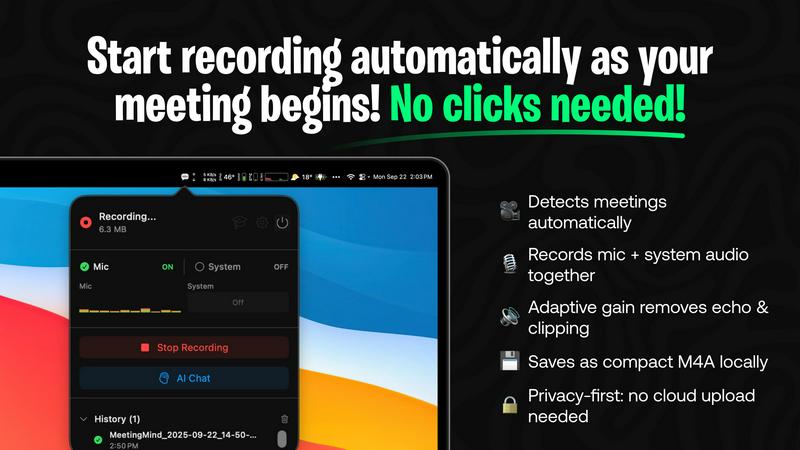
MeetingMind is a macOS AI assistant that auto-records and summarizes Zoom meetings into searchable notes.
Last updated: March 1, 2026

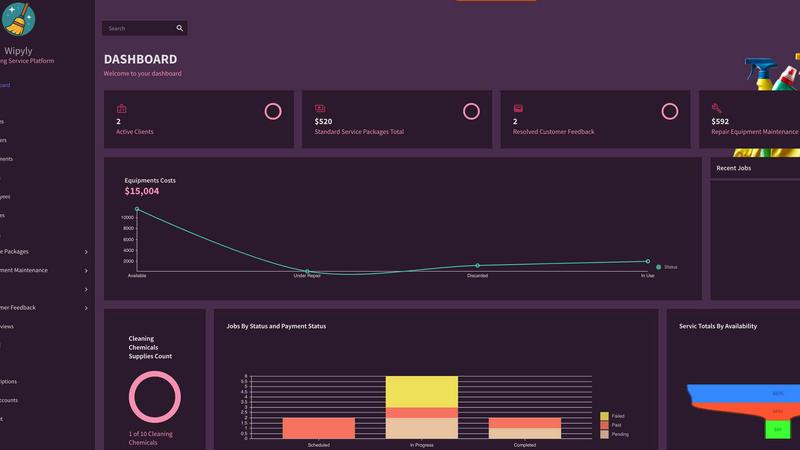
Wipyly is a comprehensive SaaS platform that integrates scheduling, team management, and inventory for cleaning.
Last updated: March 4, 2026
Visual Comparison
MeetingMind
Wipyly
Feature Comparison
MeetingMind
Automatic Zoom Detection & Recording
The application operates as a lightweight menu bar utility that continuously monitors system activity. Using advanced heuristics, it automatically detects when the user joins or starts a Zoom meeting, initiating recording without any manual clicks. It captures a high-fidelity audio stream by recording both the user's microphone input and the system's audio output simultaneously, employing adaptive gain control for optimal clarity. This hands-free operation is the foundation of its seamless integration into the user's workflow.
On-Device or Cloud AI Processing
MeetingMind offers unparalleled flexibility in its AI processing backend. Users can opt for complete privacy by running open-source large language models (LLMs) locally via an Ollama integration, ensuring no meeting data ever leaves their Mac. Alternatively, for more powerful summarization, they can connect to cloud-based models through the OpenRouter gateway. This hybrid architecture allows teams to balance performance requirements with stringent data security and compliance policies.
Interactive AI Chat & Live Transcription
During and after the meeting, users can interact with the captured content through an integrated AI chat interface. This allows for real-time querying of the discussion, such as asking for clarifications on points made or requesting immediate summaries of specific topics. The live transcription appears in the app with speaker attribution, creating an interactive transcript that serves as a live knowledge base for the ongoing conversation.
Markdown Export & Structured Output
All meeting intelligence is processed and exported in well-formatted markdown (.md) files. The AI doesn't just transcribe; it structures the output to include a concise summary, a bulleted list of key takeaways, clearly defined action items with potential owners, and the full, timestamped transcript. This format ensures immediate usability in note-taking apps like Obsidian or Notion, and for version control in developer workflows, making the information easy to search, share, and archive.
Wipyly
Unified Operational Dashboard
The platform provides a centralized, real-time dashboard that aggregates all critical business metrics and modules. This includes live views of active jobs, team locations, equipment status, and pending client communications. Built on a responsive cloud architecture, it ensures managers have instant, secure access to the complete operational picture from any device, facilitating immediate decision-making and resource allocation without switching between disparate systems.
Intelligent Scheduling & Dispatch Engine
Wipyly features a smart scheduling system that automates job assignment based on team availability, location, skill set, and required equipment. The engine integrates with digital calendars and sends automatic notifications and reminders to both technicians and clients, reducing no-shows and optimizing route planning. This automation replaces manual, error-prone scheduling methods, dramatically increasing daily productivity and on-time service rates.
Integrated Financial & Payroll Modules
The platform includes comprehensive financial tools that track job costs, supplier invoices, and client payments in one place. Its payroll module simplifies compensation management by integrating with scheduled jobs and hours worked, ensuring accurate and compliant payroll processing. This closed-loop system provides clear insights into profitability per job, overall business health, and total compensation liabilities.
Client & Feedback Management Hub
Wipyly consolidates all client interactions, service histories, and feedback within unified profiles. The system can automate follow-up requests for reviews and centralize customer feedback for analysis. This integrated hub enables businesses to leverage insights for continuous service improvement, manage client relationships proactively, and enhance retention through personalized, data-informed service delivery.
Use Cases
MeetingMind
Daily Engineering Stand-ups and Sprint Meetings
For software development teams conducting daily syncs or sprint planning on Zoom, MeetingMind automatically captures detailed technical discussions, feature decisions, and bug reports. The AI-generated action items ensure every ticket and TODO is clearly documented and assigned. Engineers can later query the transcript to recall specific implementation details or API decisions without relying on fragmented manual notes.
Client Consultations and Sales Demos
Professionals in consulting, sales, or agency roles use MeetingMind to fully focus on the client interaction during Zoom calls. The tool faithfully records every client requirement, concern, and feedback. Post-meeting, the AI summary highlights client pain points and agreed-upon next steps, enabling the rapid creation of accurate follow-up emails, proposals, and project briefs directly from the structured markdown output.
Remote Academic Research and Interviews
Researchers and students conducting qualitative interviews or collaborative research meetings over Zoom benefit from the verbatim, speaker-attributed transcript. The local processing option via Ollama is crucial for handling sensitive, unpublished research data confidentially. The searchable transcripts facilitate thematic analysis and easy citation of sources directly from the recorded conversation.
Executive Briefings and Strategic Planning
For leadership teams and board meetings where strategic direction is set, capturing nuance and context is vital. MeetingMind records the entire high-level discussion, and the AI chat feature allows executives to ask complex questions post-meeting to surface insights across different discussion threads. The concise summary and action items provide a clear, authoritative record for aligning the entire organization.
Wipyly
Scaling a Residential Cleaning Operation
A growing residential cleaning company uses Wipyly to transition from manual booking via phone and text to a professional online booking portal. The integrated system automatically populates the smart schedule, dispatches jobs to the nearest available team with the right supplies, and handles invoicing and payment collection post-service. This automation allows the owner to manage a larger client base and multiple teams without proportional increases in administrative overhead.
Managing Commercial Cleaning Contracts & Compliance
A commercial cleaning service managing multi-location contracts utilizes Wipyly to standardize service checklists, track equipment maintenance schedules for industrial gear, and document completion for each site. The platform's operational view ensures compliance with client-specific requirements, while financial modules track contract values against labor and supply costs, providing clear profitability metrics for each commercial account.
Optimizing Fleet & Inventory Logistics
A cleaning business with a mobile fleet of vehicles and specialized equipment leverages Wipyly to coordinate supply inventory across teams and schedule preventive maintenance for vehicles and cleaning machines. The system alerts managers for low stock levels and upcoming maintenance, preventing job delays due to equipment failure or missing supplies, thereby maximizing fleet uptime and operational reliability.
Centralizing Performance Data for Strategic Growth
A cleaning business owner uses Wipyly's analytics and reporting features to move from gut-feel decisions to data-driven strategy. By analyzing trends in job profitability, team efficiency, client feedback scores, and repeat booking rates from the unified platform, the owner can identify high-margin services, optimize pricing packages, invest in training for underperforming areas, and develop targeted strategies for sustainable business growth.
Overview
About MeetingMind
MeetingMind is a sophisticated, AI-native meeting intelligence application built exclusively for macOS. It functions as an autonomous meeting recorder and analyzer, specifically engineered to integrate seamlessly with the Zoom conferencing platform. The core value proposition is its ability to capture every detail of a meeting without user intervention, freeing professionals to engage fully in the discussion. It automatically detects when a Zoom meeting starts and begins recording both microphone and system audio, generating real-time, speaker-attributed transcripts. The application leverages a powerful, on-device AI stack, offering users a choice between local processing via Ollama models or cloud-based inference through OpenRouter. This ensures sensitive meeting data can remain entirely private on the user's Mac. The output is transformed into clean, searchable markdown documents containing full transcripts, AI-generated summaries, and extracted action items. Designed for individual professionals, remote teams, and organizations that rely on Zoom for daily collaboration, MeetingMind turns ephemeral conversations into structured, actionable knowledge assets, ensuring critical insights are never lost.
About Wipyly
Wipyly is a comprehensive, cloud-native software platform engineered specifically for the operational and financial management of modern cleaning service businesses. It functions as a centralized command hub, integrating all critical workflows—from client booking and team scheduling to inventory tracking, invoicing, and performance analytics—into a single, cohesive system. Built for both solo operators and multi-team enterprises in residential and commercial cleaning, Wipyly's core value proposition is the elimination of operational chaos caused by disparate tools like spreadsheets, paper notes, and multiple unconnected apps. Its tech stack is designed for seamless accessibility and real-time collaboration, enabling business owners to automate administrative burdens, gain clear operational visibility, and make data-driven decisions. By consolidating service package management, equipment maintenance logs, client feedback loops, and payroll insights, Wipyly empowers cleaning businesses to streamline daily tasks, enhance team coordination, deliver superior client experiences, and scale their operations with confidence and efficiency.
Frequently Asked Questions
MeetingMind FAQ
How does the automatic Zoom detection work?
MeetingMind runs as a background service on your macOS system. It uses a combination of system-level APIs to detect audio session changes and process names associated with Zoom meetings. When it identifies a meeting is active, it automatically initiates the recording process for both microphone and system audio, requiring zero manual intervention from the user after the initial setup and permission grants.
What are the differences between local (Ollama) and cloud (OpenRouter) AI?
The local Ollama option runs open-source LLMs directly on your Mac's hardware (CPU/GPU). This provides 100% data privacy as no information is transmitted externally, but it requires sufficient system resources and may have slower processing times for very long meetings. The cloud OpenRouter option sends the transcript to a selected, powerful cloud model for processing, offering faster and often more sophisticated summaries, but the data leaves your device.
Is there a free version available?
Yes, MeetingMind offers a fully-featured free tier that includes 60 minutes of recording time per day. This includes automatic Zoom detection, live transcription, AI summaries using the chosen backend, and local processing. It is designed to be perpetually free, perfect for daily short meetings like stand-ups. An unlimited, one-time purchase upgrade is available for users requiring longer recording sessions.
What are the system requirements and compatibility?
MeetingMind is a native macOS application available on the Mac App Store. It requires macOS 14.0 (Sonoma) or later. The application is specifically engineered for compatibility with the Zoom conferencing application. For optimal performance with the local Ollama AI feature, a Mac with Apple Silicon (M-series chips) is recommended due to their superior neural engine capabilities for efficient AI inference.
Wipyly FAQ
What is the core technology stack behind Wipyly?
Wipyly is built as a secure, cloud-based SaaS (Software-as-a-Service) application. It utilizes a modern web stack ensuring compatibility across all devices via any standard web browser. The platform employs enterprise-grade security protocols, including SSL encryption, to protect all business and client data. Its API-first design philosophy allows for potential future integrations with other business tools, such as accounting software or payment gateways.
How does Wipyly handle team communication and updates?
The platform features built-in automated notification systems. It sends SMS and/or email alerts to team members for new job assignments, schedule changes, and client updates. Similarly, clients receive automated confirmations, reminders, and follow-up messages. This eliminates the need for manual phone calls or text threads, ensuring consistent, reliable communication and keeping all stakeholders informed in real-time.
Can I customize Wipyly for my specific service packages?
Yes, a core functionality of Wipyly is its customizable setup. Business owners can define and manage multiple, tailored service packages with specific tasks, durations, and pricing. This flexibility allows you to mirror your unique service offerings in the system, from standard residential cleans to detailed commercial deep-cleaning contracts, ensuring the software adapts to your business model, not the other way around.
Is my business data secure and backed up on the platform?
Absolutely. Wipyly prioritizes data security and integrity. All data is encrypted in transit using SSL technology and stored securely in professional cloud infrastructure. The platform includes robust access controls and undergoes regular security audits. Furthermore, as a cloud-based system, your data is automatically backed up, providing protection against data loss from local hardware failures and ensuring business continuity.
Alternatives
MeetingMind Alternatives
MeetingMind is a macOS-native AI meeting assistant in the productivity and management category. It specializes in auto-recording and transcribing Zoom meetings, using on-device or cloud AI to generate searchable summaries and action items directly from your desktop. Users often explore alternatives for various reasons, including budget constraints, the need for cross-platform compatibility beyond macOS, or specific feature requirements like integration with other video conferencing tools like Teams or Google Meet. Some may seek different AI models, more extensive team collaboration features, or a different approach to data privacy and storage. When evaluating alternatives, key considerations should include the supported operating systems and conferencing platforms, the underlying transcription and AI technology stack, data processing location (local vs. cloud), and the flexibility of the output formats. It's also crucial to assess how well a tool integrates into your existing workflow and tech ecosystem.
Wipyly Alternatives
Wipyly is a cloud-based productivity and management software platform designed specifically for cleaning businesses. It consolidates operations like scheduling, customer management, invoicing, and performance tracking into a single command center, aiming to replace disparate tools and manual processes. Users often explore alternatives to find a solution that better aligns with their specific operational stack, budget constraints, or desired feature integrations. Common drivers include the need for different pricing models, more specialized functionality, or compatibility with existing business systems and third-party applications. When evaluating alternatives, consider core requirements like API availability for custom integrations, mobile platform support for field teams, and the depth of native reporting tools. The ideal platform should seamlessly connect your scheduling, communication, and financial workflows without creating data silos or requiring extensive manual workarounds.