
Nabbed vs Phishly
Side-by-side comparison to help you choose the right product.

Nabbed is a career CRM that integrates with ATS platforms to track jobs, manage contacts, and provide AI intel for your job search.
Last updated: April 13, 2026

Phishly
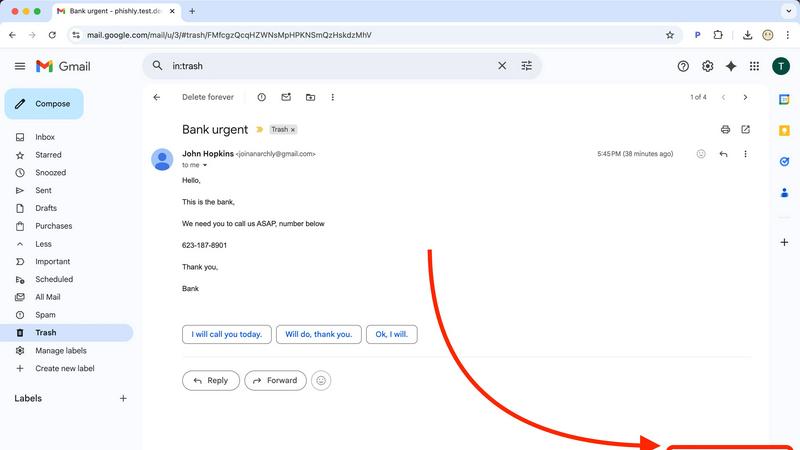
Phishly is an AI Chrome extension that instantly detects phishing emails in Gmail.
Visual Comparison
Nabbed

Phishly
Feature Comparison
Nabbed
Dual Sales Pipelines & Visual Kanban Boards
Nabbed provides HubSpot-style dual pipeline management for both job applications and networking contacts. This allows you to drag-and-drop opportunities through custom stages, track momentum, and analyze velocity analytics. You manage your career search with the same precision as a million-dollar sales pipeline, offering clear visibility into your outreach, discovery, and closed-won stages for unparalleled organizational control.
AI-Powered Career Suite & Chrome Extension
The integrated AI Career Suite delivers four powerful tools: AI-generated cover letters, resume tailoring, interview preparation, and an email composer, all designed to write in your voice instantly. Coupled with the Chrome extension, this feature set allows for stealth application mode, one-click job saving from any platform, and automatic field population across 25+ ATS systems, deeply integrating your search into your daily browser activity.
Company Intelligence & Hiring Signal Alerts
This feature delivers real-time, automated company enrichment on every saved job. It surfaces critical data such as funding rounds, employee headcount, tech stack (e.g., React, AWS, Python), Glassdoor ratings, and open positions. More importantly, it proactively alerts you to hiring signals—like when a target company is growing or hiring—enabling a targeted, account-based approach to your job search strategy.
Email Tracking & Contact CRM
Nabbed includes robust email tracking with open/click notifications directly within Gmail, a capability absent in many competitors. This is paired with a full-featured Contact CRM for logging activities, setting follow-ups, tagging connections, and managing a six-stage networking pipeline. It enables data-driven outreach with reusable templates and sequences, turning your warm network into a measurable asset.
Phishly
Native Gmail Integration via Chrome Extension
The Phishly Chrome extension embeds a "Scan with Phishly" button directly into the Gmail web interface, creating a frictionless security workflow. This deep integration allows users to analyze any open email without ever leaving their inbox or copying/pasting content. It respects Gmail's existing API and UI framework, providing a native-feeling experience that enhances productivity by delivering instant security insights within the primary communication platform used by millions.
AI-Powered Multi-Indicator Analysis Engine
At its core, Phishly utilizes a sophisticated AI engine that concurrently analyzes multiple vectors of a potential phishing attack. It scrutinizes domain reputation and subtle spoofing techniques, parses email headers for sender impersonation, evaluates the linguistic markers of urgency and social engineering, and inspects embedded links for redirects or obfuscation. This multi-layered analysis, presented as a unified risk score, offers a more comprehensive assessment than simple link checkers or blocklists.
Privacy-First, On-Demand Scanning Architecture
Phishly is built on a strict privacy-first protocol. Unlike systems that scan all incoming mail automatically, Phishly only activates when a user explicitly clicks the scan button or pastes content into the web tool. This on-demand model ensures user consent and control, with no background monitoring or data logging. This architecture is crucial for compliance-conscious users and aligns with modern data minimization principles, making it a trustworthy component in any privacy-oriented tech stack.
Clear, Actionable Risk Assessment Dashboard
Following analysis, Phishly presents findings through a clear, tri-color risk assessment (Safe, Medium Risk, High Risk) accompanied by detailed, plain-language explanations. This dashboard breaks down which specific indicators triggered the alert—such as a mismatched sender domain or a suspicious link pattern—educating the user while providing the context needed to make an informed decision. This feature transforms the tool from a simple blocker into an educational resource.
Use Cases
Nabbed
Revenue Professional Executing a Strategic Job Search
A sales executive uses Nabbed to treat their job search like a new territory plan. They populate their Target Account Dashboard with dream companies, use the dual pipelines to track applications and networking side-by-side, and rely on hiring signal alerts to time their outreach perfectly. The AI tools help tailor communications, while email tracking provides actionable data on recruiter engagement.
Tech Salesperson Researching Target Company Compatibility
A candidate targeting roles at specific tech companies utilizes the Company Intelligence feature to automatically pull data on funding, tech stack, and team size for every saved job. This allows them to assess cultural and technical fit before applying and to craft informed questions for interviews, demonstrating deep preparation and genuine interest to potential employers.
Active Candidate Managing High-Volume Applications
Someone applying to dozens of roles weekly uses the Chrome extension to capture jobs from 11+ sources with one click. The ATS autofill functionality saves hours by populating repetitive application forms instantly. The visual pipeline keeps all opportunities organized, preventing any follow-up from slipping through the cracks amidst a high-volume search.
Network-Focused Candidate Leveraging Warm Introductions
A professional relying on their network uses the Contact CRM to map and track every warm introduction. They log conversations, schedule follow-ups, and move contacts through a dedicated networking pipeline. Email templates and tracking ensure their outreach is professional and measurable, maximizing the ROI of every relationship in their career CRM.
Phishly
Securing Small Business & Startup Communications
Small businesses and startups often lack dedicated cybersecurity staff but are frequent targets of phishing due to perceived weaker defenses. Phishly integrates directly into their standard Gmail/Google Workspace environment, providing enterprise-grade detection without the cost or complexity. Team members can instantly verify suspicious invoices, payment requests, or impersonation attempts from "management," preventing financial loss and data breaches with a single click.
Empowering Freelancers & Remote Contractors
Freelancers and independent contractors manage their own security while communicating with multiple clients via email. A phishing attack compromising their account can lead to identity theft, loss of work, and damaged professional reputation. Phishly acts as a personal security analyst, allowing them to scrutinize project briefs, contract attachments, and payment notifications from new or unfamiliar clients before engaging, ensuring safe business operations.
Enhancing Developer and IT Professional Workflows
Developers and IT pros are high-value targets for credential theft and supply chain attacks. Phishly fits neatly into their existing browser-centric workflow. When receiving emails about repository access, system alerts, or SaaS account updates, they can use the integrated tool to perform a quick security audit, complementing their technical knowledge with AI analysis to catch sophisticated spoofs they might otherwise miss in a busy inbox.
Verifying Personal Account and Financial Emails
Individuals face a constant barrage of phishing attempts mimicking banks, utility providers, and popular services like Netflix or PayPal. The Phishly web tool allows anyone to copy the content of a worrying email—such as an "urgent" password reset or a too-good-to-be-true offer—and paste it for an instant, impartial analysis. This use case is critical for preventing personal financial fraud and identity theft.
Overview
About Nabbed
Nabbed is the definitive Career CRM, engineered specifically for sales, revenue, and go-to-market professionals who apply their deal-closing rigor to their own career advancement. It transforms a chaotic job search into a structured, data-driven pipeline, mirroring the tools and methodologies used to manage a sales territory. The platform provides a unified command center to track job applications in a visual Kanban board, build a strategic contact CRM with warm path mapping, and gain AI-powered company intelligence on target accounts. Its powerful Chrome extension seamlessly integrates with your workflow, enabling one-click job capture and autofill across 60+ Applicant Tracking System (ATS) platforms like Greenhouse, Lever, and Workday. With features like Gmail auto-sync for interview detection, hiring signal alerts, AI-driven interview coaching, and a proprietary Job Fit Score, Nabbed ensures every action is informed and efficient. Built by a Chief Revenue Officer (CRO), it eliminates fluff and focuses on technical integration and actionable insights, offering a free tier and a Core plan at $19/month to automate and optimize the path to your next role.
About Phishly
Phishly is an AI-powered cybersecurity tool engineered to provide immediate, accessible phishing detection for modern email workflows. It operates as a lightweight Chrome extension, integrating directly into the Gmail interface, and as a standalone web application for broader email analysis. The core value proposition lies in its seamless integration and developer-friendly, no-fuss architecture. It eliminates the complexity and overhead of enterprise-grade security suites, offering a precise, on-demand scanning utility. The platform is specifically designed for individuals, freelancers, and small to medium-sized businesses that require robust phishing protection without the need for complex deployment, configuration, or dedicated IT resources. By leveraging machine learning models trained on phishing indicators—such as domain spoofing, malicious link patterns, urgent social engineering language, and sender address anomalies—Phishly delivers clear, actionable risk assessments. Its commitment to privacy is foundational; the tool only processes emails explicitly submitted by the user, ensuring no passive scanning or data retention. This makes it a perfect fit for tech-savvy users who prioritize both security and privacy within their existing tech stack.
Frequently Asked Questions
Nabbed FAQ
How does Nabbed's email tracking work?
Nabbed's email tracking integrates directly with your Gmail account using a secure tracking pixel. When you send an email using a Nabbed template or through the platform, the pixel is embedded. You then receive real-time notifications within your Nabbed dashboard the moment a recipient opens your email or clicks a link, providing valuable engagement data before any reply is sent.
What ATS platforms does the Chrome extension support for autofill?
The Nabbed Chrome extension supports automatic field population across 60+ major Applicant Tracking System (ATS) platforms. This includes widely used systems such as Greenhouse, Lever, Workday, Ashby, JazzHR, and SmartRecruiters. The extension intelligently maps your saved profile information to the correct form fields on these career sites, drastically reducing manual data entry.
What is included in the free tier versus the Core plan?
The free tier includes access to the Chrome extension for basic job capture and autofill functionality. Upgrading to the Core plan at $19/month unlocks the full feature set: advanced Gmail email tracking with open/click analytics, AI-powered email templates and career tools, LinkedIn contact capture, outreach sequences, full pipeline and CRM access, and detailed company intelligence with hiring alerts.
How does the Job Fit Score work?
The Job Fit Score is an AI-powered analysis that matches your uploaded resume and profile against a specific job description. It evaluates key criteria such as skills, experience, keywords, and qualifications to generate a compatibility percentage. This score helps you quickly identify the roles where your profile is strongest, allowing you to prioritize applications and understand where tailoring may be needed.
Phishly FAQ
How does Phishly integrate with my existing email setup?
Phishly offers dual integration paths. For Gmail users, the primary method is the Chrome browser extension, which adds functionality directly into the Gmail web interface. For emails from other clients or for non-Gmail accounts, users can utilize the standalone web application by copying and pasting the full email header and body content. This ensures compatibility across virtually any email ecosystem without requiring server-side changes or IMAP/POP3 access.
What specific AI models or indicators does Phishly analyze?
Phishly's AI engine is trained to detect a composite of technical and psychological phishing indicators. Technically, it analyzes sender address spoofing (like lookalike domains), suspicious URL structures and redirects, and anomalous header information. Linguistically, it assesses the email's content for hallmarks of social engineering, including urgent calls to action, threats of account closure, too-good-to-be-true offers, and impersonation of authority figures to bypass logical scrutiny.
Is my email data stored or used for training after a scan?
No. Phishly operates on a strict, privacy-by-design principle. Emails are processed in real-time for the sole purpose of generating the phishing risk assessment. Once the analysis is complete and the result is delivered to your browser, the email content is not stored on Phishly's servers, logged for future use, or utilized to train the AI models. Each scan is a discrete, ephemeral event designed to protect your confidentiality.
What is the difference between the Chrome extension and the web tool?
The Chrome extension provides seamless, one-click integration for users of Gmail on the Chrome browser, embedding the scan function directly into your workflow. The web tool is a versatile fallback and alternative for several scenarios: when using other browsers (like Firefox or Edge), when checking emails from non-Gmail accounts (e.g., Outlook, Yahoo), or when you only have access to the email's text content rather than direct browser access to the inbox. Both interfaces connect to the same powerful AI backend.