
BarBrain vs Phishly
Side-by-side comparison to help you choose the right product.

BarBrain
BarBrain is an API-first inventory platform that integrates with your POS to automate beverage and food counting for hospitality.
Last updated: April 4, 2026

Phishly
Phishly is an AI Chrome extension that instantly detects phishing emails in Gmail.
Visual Comparison
BarBrain

Phishly
Feature Comparison
BarBrain
Parallel Multi-Device Counting
BarBrain's architecture is built for collaborative efficiency, allowing teams to conduct inventory counts simultaneously on multiple iOS and Android smartphones or tablets. This distributed counting model, powered by real-time cloud sync, drastically reduces the time required for physical stocktaking. The system ensures data consistency across all devices, eliminating the traditional bottleneck of a single person or device and enabling complete inventory audits to be finished in a fraction of the traditional time.
Extensive Pre-Loaded Product Catalog
The platform integrates a massive, industry-specific database containing over 30,000 pre-defined products, including spirits, wines, AFGs, food items, and housekeeping supplies. This extensive catalog accelerates initial setup and ongoing counting by providing standardized product information. For custom or unique items, the system offers full customization capabilities, allowing operators to build a perfectly tailored digital inventory that matches their specific stock, ensuring comprehensive coverage.
Automated Inventory & Variance Reporting
Upon completion of a count, BarBrain's backend processing engine automatically generates a detailed, finalized inventory report. This eliminates hours of manual data entry, cross-referencing, and spreadsheet calculation. The report provides clear insights into stock levels, usage, and, crucially, identifies variance and potential shrinkage in real-time, offering operators immediate, actionable financial data to control costs and reduce waste.
Intuitive Fill-Level Slider for Open Items
Understanding the nuance of partial consumption, BarBrain features a unique UI component: a fill-level slider. This allows staff to accurately record the remaining quantity of open food and beverage products—like a half-used bottle of olive oil or a partial bottle of whiskey—with a single tap. This granular tracking is essential for precise cost-per-dish/drink calculations and provides a true picture of on-hand inventory that simple unit counting cannot achieve.
Phishly
Native Gmail Integration via Chrome Extension
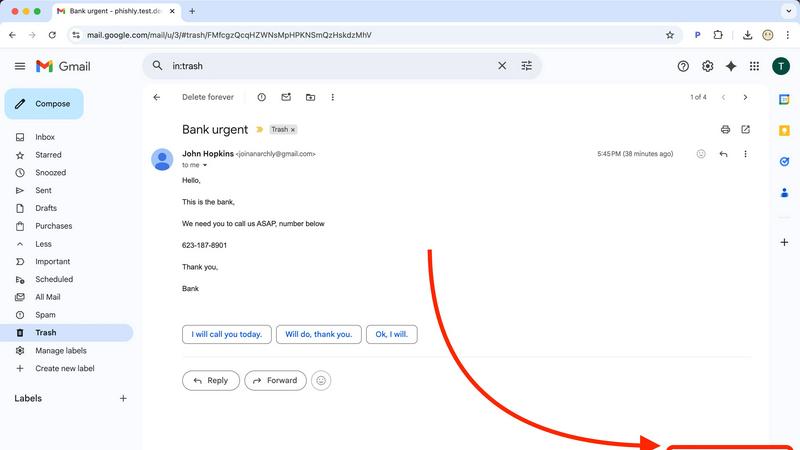
The Phishly Chrome extension embeds a "Scan with Phishly" button directly into the Gmail web interface, creating a frictionless security workflow. This deep integration allows users to analyze any open email without ever leaving their inbox or copying/pasting content. It respects Gmail's existing API and UI framework, providing a native-feeling experience that enhances productivity by delivering instant security insights within the primary communication platform used by millions.
AI-Powered Multi-Indicator Analysis Engine
At its core, Phishly utilizes a sophisticated AI engine that concurrently analyzes multiple vectors of a potential phishing attack. It scrutinizes domain reputation and subtle spoofing techniques, parses email headers for sender impersonation, evaluates the linguistic markers of urgency and social engineering, and inspects embedded links for redirects or obfuscation. This multi-layered analysis, presented as a unified risk score, offers a more comprehensive assessment than simple link checkers or blocklists.
Privacy-First, On-Demand Scanning Architecture
Phishly is built on a strict privacy-first protocol. Unlike systems that scan all incoming mail automatically, Phishly only activates when a user explicitly clicks the scan button or pastes content into the web tool. This on-demand model ensures user consent and control, with no background monitoring or data logging. This architecture is crucial for compliance-conscious users and aligns with modern data minimization principles, making it a trustworthy component in any privacy-oriented tech stack.
Clear, Actionable Risk Assessment Dashboard
Following analysis, Phishly presents findings through a clear, tri-color risk assessment (Safe, Medium Risk, High Risk) accompanied by detailed, plain-language explanations. This dashboard breaks down which specific indicators triggered the alert—such as a mismatched sender domain or a suspicious link pattern—educating the user while providing the context needed to make an informed decision. This feature transforms the tool from a simple blocker into an educational resource.
Use Cases
BarBrain
Independent Bars & Restaurants
For single-location owner-operators, BarBrain replaces error-prone spreadsheets and clipboards. It provides an affordable, professional-grade system to gain control over liquor costs and food margins without requiring dedicated staff or IT expertise. The quick setup and intuitive mobile interface allow the owner or manager to conduct fast, accurate counts themselves, leading to direct, measurable savings and preventing revenue leakage from unaccounted-for waste or shrinkage.
Multi-Location Restaurant & Bar Groups
BarBrain's centralized cloud dashboard offers corporate or regional managers a unified, real-time view of inventory performance across all venues. This enables standardized counting procedures, consolidated reporting, and easy benchmarking between locations. The platform's scalability ensures consistent data collection, allowing leadership to identify best practices, spot outliers with high variance, and make bulk purchasing decisions based on accurate, aggregated data from all sites.
Hotels & Resorts (F&B Operations)
Hotels with complex F&B offerings, including multiple restaurants, bars, banqueting, and minibars, require a robust inventory solution. BarBrain is compatible with tracking a full range of products, from fine dining ingredients to housekeeping amenities. Its ability to handle high product volume and provide detailed consumption reports helps large hospitality operations manage costs across diverse revenue centers and maintain strict budgetary control.
Nightclubs & High-Volume Venues
In fast-paced environments with high product turnover and often less formalized controls, BarBrain provides essential oversight. The speed of parallel counting minimizes operational disruption during off-hours. Real-time variance flags help management quickly identify discrepancies that could indicate spillage, over-pouring, or other issues, allowing for immediate corrective action to protect profitability in a margin-sensitive business.
Phishly
Securing Small Business & Startup Communications
Small businesses and startups often lack dedicated cybersecurity staff but are frequent targets of phishing due to perceived weaker defenses. Phishly integrates directly into their standard Gmail/Google Workspace environment, providing enterprise-grade detection without the cost or complexity. Team members can instantly verify suspicious invoices, payment requests, or impersonation attempts from "management," preventing financial loss and data breaches with a single click.
Empowering Freelancers & Remote Contractors
Freelancers and independent contractors manage their own security while communicating with multiple clients via email. A phishing attack compromising their account can lead to identity theft, loss of work, and damaged professional reputation. Phishly acts as a personal security analyst, allowing them to scrutinize project briefs, contract attachments, and payment notifications from new or unfamiliar clients before engaging, ensuring safe business operations.
Enhancing Developer and IT Professional Workflows
Developers and IT pros are high-value targets for credential theft and supply chain attacks. Phishly fits neatly into their existing browser-centric workflow. When receiving emails about repository access, system alerts, or SaaS account updates, they can use the integrated tool to perform a quick security audit, complementing their technical knowledge with AI analysis to catch sophisticated spoofs they might otherwise miss in a busy inbox.
Verifying Personal Account and Financial Emails
Individuals face a constant barrage of phishing attempts mimicking banks, utility providers, and popular services like Netflix or PayPal. The Phishly web tool allows anyone to copy the content of a worrying email—such as an "urgent" password reset or a too-good-to-be-true offer—and paste it for an instant, impartial analysis. This use case is critical for preventing personal financial fraud and identity theft.
Overview
About BarBrain
BarBrain is a purpose-built, cloud-native inventory management platform engineered exclusively for the hospitality sector. It directly addresses the critical inefficiencies of manual stocktaking and generic warehouse software by providing a specialized tool that understands the unique operational flows of bars, restaurants, hotels, and multi-location groups. The platform's core value proposition is delivering verifiable, real-time financial control by digitizing and automating the entire inventory lifecycle. Built with a modern tech stack for seamless integration and accessibility, BarBrain enables operators to conduct inventory counts in minutes instead of hours, leveraging parallel counting on multiple iOS and Android devices. It goes beyond simple stock tracking by automatically calculating exact pour costs, identifying variance and waste, and generating comprehensive audit reports. This provides management with the precise data needed to protect margins, optimize supplier orders, and make informed purchasing decisions. Designed for scalability, its architecture supports everything from single independent venues to large enterprise operations, ensuring reliable, accurate numbers are always at the operator's fingertips without the need for complex training or bloated feature sets.
About Phishly
Phishly is an AI-powered cybersecurity tool engineered to provide immediate, accessible phishing detection for modern email workflows. It operates as a lightweight Chrome extension, integrating directly into the Gmail interface, and as a standalone web application for broader email analysis. The core value proposition lies in its seamless integration and developer-friendly, no-fuss architecture. It eliminates the complexity and overhead of enterprise-grade security suites, offering a precise, on-demand scanning utility. The platform is specifically designed for individuals, freelancers, and small to medium-sized businesses that require robust phishing protection without the need for complex deployment, configuration, or dedicated IT resources. By leveraging machine learning models trained on phishing indicators—such as domain spoofing, malicious link patterns, urgent social engineering language, and sender address anomalies—Phishly delivers clear, actionable risk assessments. Its commitment to privacy is foundational; the tool only processes emails explicitly submitted by the user, ensuring no passive scanning or data retention. This makes it a perfect fit for tech-savvy users who prioritize both security and privacy within their existing tech stack.
Frequently Asked Questions
BarBrain FAQ
What devices and operating systems are compatible with BarBrain?
BarBrain is built as a cross-platform mobile application, ensuring broad compatibility. It is fully functional on both iOS (iPhone, iPad) and Android smartphones and tablets. The system operates on a cloud-based architecture, meaning all data is synchronized in real-time across devices and accessible from any web browser for management reporting, requiring no complex on-premise software installation.
How does BarBrain handle our existing product list and supplier information?
The platform offers multiple pathways for integration. You can leverage the extensive pre-loaded catalog of over 30,000 items for quick addition. For custom products, you can manually enter them or utilize bulk import tools via CSV files to migrate existing lists. The system also allows you to input and manage supplier details, streamlining the ordering process by keeping all vendor information centralized within the inventory ecosystem.
Can BarBrain integrate with our existing Point of Sale (POS) or accounting systems?
BarBrain is designed with API-led connectivity in mind, focusing on seamless data exchange. While direct, pre-built integrations depend on specific partners, the platform can facilitate data export in standardized formats (like CSV) that can be imported into most accounting software (e.g., QuickBooks, Xero) for financial reconciliation. For POS integration, it enables variance analysis by comparing theoretical usage (from sales data) against actual physical inventory counts.
Is training required for our staff to use BarBrain effectively?
BarBrain is engineered for intuitive use, requiring minimal formal training. The mobile counting interface is designed for simplicity, often requiring just a single tap or slider adjustment per item. Most teams become proficient after one guided inventory cycle. Furthermore, BarBrain provides onboarding support and resources to ensure your staff can leverage the platform's full capabilities efficiently from the start.
Phishly FAQ
How does Phishly integrate with my existing email setup?
Phishly offers dual integration paths. For Gmail users, the primary method is the Chrome browser extension, which adds functionality directly into the Gmail web interface. For emails from other clients or for non-Gmail accounts, users can utilize the standalone web application by copying and pasting the full email header and body content. This ensures compatibility across virtually any email ecosystem without requiring server-side changes or IMAP/POP3 access.
What specific AI models or indicators does Phishly analyze?
Phishly's AI engine is trained to detect a composite of technical and psychological phishing indicators. Technically, it analyzes sender address spoofing (like lookalike domains), suspicious URL structures and redirects, and anomalous header information. Linguistically, it assesses the email's content for hallmarks of social engineering, including urgent calls to action, threats of account closure, too-good-to-be-true offers, and impersonation of authority figures to bypass logical scrutiny.
Is my email data stored or used for training after a scan?
No. Phishly operates on a strict, privacy-by-design principle. Emails are processed in real-time for the sole purpose of generating the phishing risk assessment. Once the analysis is complete and the result is delivered to your browser, the email content is not stored on Phishly's servers, logged for future use, or utilized to train the AI models. Each scan is a discrete, ephemeral event designed to protect your confidentiality.
What is the difference between the Chrome extension and the web tool?
The Chrome extension provides seamless, one-click integration for users of Gmail on the Chrome browser, embedding the scan function directly into your workflow. The web tool is a versatile fallback and alternative for several scenarios: when using other browsers (like Firefox or Edge), when checking emails from non-Gmail accounts (e.g., Outlook, Yahoo), or when you only have access to the email's text content rather than direct browser access to the inbox. Both interfaces connect to the same powerful AI backend.