
HeyVid vs Phishly
Side-by-side comparison to help you choose the right product.

HeyVid is your all-in-one AI platform for generating high-quality videos and images quickly and effortlessly.
Last updated: April 4, 2026

Phishly
Phishly is an AI Chrome extension that instantly detects phishing emails in Gmail.
Visual Comparison
HeyVid

Phishly
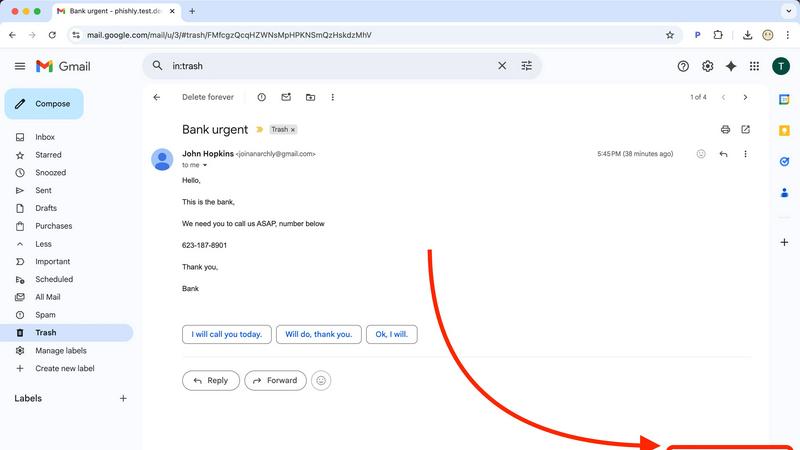
Feature Comparison
HeyVid
Text to Video
The Text to Video feature allows users to transform written content into stunning videos in just a few clicks. By simply inputting text, the AI analyzes the context and generates a corresponding video, complete with visuals and animations tailored to enhance the narrative.
Image to Video
HeyVid's Image to Video functionality enables users to create dynamic videos from static images. This feature is particularly useful for businesses looking to showcase products or tell a story using a series of images, seamlessly converting them into engaging video presentations.
AI Image Refiner & Stylizer
The AI Image Refiner & Stylizer takes your visuals to the next level by enhancing image quality and applying artistic styles. This feature is perfect for creators wanting to give their images a unique look, ensuring they stand out in a crowded digital landscape.
One-Click AI Video Maker
With the One-Click AI Video Maker, users can generate professional-quality videos quickly. This feature simplifies the video creation process by allowing users to describe their vision, upload images, and let the AI handle the rest, making it accessible for those without editing skills.
Phishly
Native Gmail Integration via Chrome Extension
The Phishly Chrome extension embeds a "Scan with Phishly" button directly into the Gmail web interface, creating a frictionless security workflow. This deep integration allows users to analyze any open email without ever leaving their inbox or copying/pasting content. It respects Gmail's existing API and UI framework, providing a native-feeling experience that enhances productivity by delivering instant security insights within the primary communication platform used by millions.
AI-Powered Multi-Indicator Analysis Engine
At its core, Phishly utilizes a sophisticated AI engine that concurrently analyzes multiple vectors of a potential phishing attack. It scrutinizes domain reputation and subtle spoofing techniques, parses email headers for sender impersonation, evaluates the linguistic markers of urgency and social engineering, and inspects embedded links for redirects or obfuscation. This multi-layered analysis, presented as a unified risk score, offers a more comprehensive assessment than simple link checkers or blocklists.
Privacy-First, On-Demand Scanning Architecture
Phishly is built on a strict privacy-first protocol. Unlike systems that scan all incoming mail automatically, Phishly only activates when a user explicitly clicks the scan button or pastes content into the web tool. This on-demand model ensures user consent and control, with no background monitoring or data logging. This architecture is crucial for compliance-conscious users and aligns with modern data minimization principles, making it a trustworthy component in any privacy-oriented tech stack.
Clear, Actionable Risk Assessment Dashboard
Following analysis, Phishly presents findings through a clear, tri-color risk assessment (Safe, Medium Risk, High Risk) accompanied by detailed, plain-language explanations. This dashboard breaks down which specific indicators triggered the alert—such as a mismatched sender domain or a suspicious link pattern—educating the user while providing the context needed to make an informed decision. This feature transforms the tool from a simple blocker into an educational resource.
Use Cases
HeyVid
Marketing Campaigns
HeyVid is ideal for digital marketers who need to create visually appealing content for campaigns. With its ability to generate videos and images rapidly, marketers can enhance their promotional efforts on social media, email marketing, and landing pages.
Educational Content Creation
Educators can leverage HeyVid to create engaging tutorials, presentations, and course content. The platform's intuitive tools allow for the quick production of instructional videos that captivate students and facilitate learning.
Corporate Communications
Businesses can use HeyVid for internal communications, such as team updates and client presentations. Professional-grade videos created through HeyVid can effectively convey important messages, ensuring clarity and engagement among stakeholders.
Crowdfunding Campaigns
Entrepreneurs aiming to launch crowdfunding campaigns can benefit from HeyVid's capabilities. The platform allows users to produce compelling pitch videos that resonate with potential backers, showcasing their projects in a visually appealing and professional manner.
Phishly
Securing Small Business & Startup Communications
Small businesses and startups often lack dedicated cybersecurity staff but are frequent targets of phishing due to perceived weaker defenses. Phishly integrates directly into their standard Gmail/Google Workspace environment, providing enterprise-grade detection without the cost or complexity. Team members can instantly verify suspicious invoices, payment requests, or impersonation attempts from "management," preventing financial loss and data breaches with a single click.
Empowering Freelancers & Remote Contractors
Freelancers and independent contractors manage their own security while communicating with multiple clients via email. A phishing attack compromising their account can lead to identity theft, loss of work, and damaged professional reputation. Phishly acts as a personal security analyst, allowing them to scrutinize project briefs, contract attachments, and payment notifications from new or unfamiliar clients before engaging, ensuring safe business operations.
Enhancing Developer and IT Professional Workflows
Developers and IT pros are high-value targets for credential theft and supply chain attacks. Phishly fits neatly into their existing browser-centric workflow. When receiving emails about repository access, system alerts, or SaaS account updates, they can use the integrated tool to perform a quick security audit, complementing their technical knowledge with AI analysis to catch sophisticated spoofs they might otherwise miss in a busy inbox.
Verifying Personal Account and Financial Emails
Individuals face a constant barrage of phishing attempts mimicking banks, utility providers, and popular services like Netflix or PayPal. The Phishly web tool allows anyone to copy the content of a worrying email—such as an "urgent" password reset or a too-good-to-be-true offer—and paste it for an instant, impartial analysis. This use case is critical for preventing personal financial fraud and identity theft.
Overview
About HeyVid
HeyVid is an advanced AI-driven platform that revolutionizes the way users create videos and images. Designed for content creators, marketers, educators, and businesses, HeyVid allows anyone to generate high-quality visual content quickly and effortlessly. With features that support text-to-video, image-to-video, text-to-image, and image-to-image transformations, this all-in-one creative studio caters to a diverse range of needs. Whether you are a beginner looking for straightforward tools or a professional seeking advanced capabilities, HeyVid's intuitive interface and powerful models deliver professional results in moments. The platform also integrates various AI models like Veo 3.1 and Sora 2, ensuring users have access to cutting-edge technology for their creative projects. With HeyVid, turning ideas into captivating visual stories has never been easier or faster.
About Phishly
Phishly is an AI-powered cybersecurity tool engineered to provide immediate, accessible phishing detection for modern email workflows. It operates as a lightweight Chrome extension, integrating directly into the Gmail interface, and as a standalone web application for broader email analysis. The core value proposition lies in its seamless integration and developer-friendly, no-fuss architecture. It eliminates the complexity and overhead of enterprise-grade security suites, offering a precise, on-demand scanning utility. The platform is specifically designed for individuals, freelancers, and small to medium-sized businesses that require robust phishing protection without the need for complex deployment, configuration, or dedicated IT resources. By leveraging machine learning models trained on phishing indicators—such as domain spoofing, malicious link patterns, urgent social engineering language, and sender address anomalies—Phishly delivers clear, actionable risk assessments. Its commitment to privacy is foundational; the tool only processes emails explicitly submitted by the user, ensuring no passive scanning or data retention. This makes it a perfect fit for tech-savvy users who prioritize both security and privacy within their existing tech stack.
Frequently Asked Questions
HeyVid FAQ
What types of media can I create with HeyVid?
HeyVid allows you to create a wide variety of media, including videos and images. You can generate content through text-to-video, image-to-video, text-to-image, and image-to-image capabilities.
Is HeyVid suitable for beginners?
Yes, HeyVid is designed to be user-friendly and accessible for all skill levels. Its intuitive controls and one-click features enable beginners to create professional-quality content without prior editing experience.
Can I customize the output of my videos?
Absolutely. HeyVid offers options to customize videos, including aspect ratios, resolutions, and watermarks. You can tailor the content to match your specific needs and brand identity.
What AI models does HeyVid integrate?
HeyVid integrates several leading AI models, including Veo 3.1, Sora 2, and various image generation models like Dall-E and Midjourney. This allows users to leverage the best technology available for their creative projects.
Phishly FAQ
How does Phishly integrate with my existing email setup?
Phishly offers dual integration paths. For Gmail users, the primary method is the Chrome browser extension, which adds functionality directly into the Gmail web interface. For emails from other clients or for non-Gmail accounts, users can utilize the standalone web application by copying and pasting the full email header and body content. This ensures compatibility across virtually any email ecosystem without requiring server-side changes or IMAP/POP3 access.
What specific AI models or indicators does Phishly analyze?
Phishly's AI engine is trained to detect a composite of technical and psychological phishing indicators. Technically, it analyzes sender address spoofing (like lookalike domains), suspicious URL structures and redirects, and anomalous header information. Linguistically, it assesses the email's content for hallmarks of social engineering, including urgent calls to action, threats of account closure, too-good-to-be-true offers, and impersonation of authority figures to bypass logical scrutiny.
Is my email data stored or used for training after a scan?
No. Phishly operates on a strict, privacy-by-design principle. Emails are processed in real-time for the sole purpose of generating the phishing risk assessment. Once the analysis is complete and the result is delivered to your browser, the email content is not stored on Phishly's servers, logged for future use, or utilized to train the AI models. Each scan is a discrete, ephemeral event designed to protect your confidentiality.
What is the difference between the Chrome extension and the web tool?
The Chrome extension provides seamless, one-click integration for users of Gmail on the Chrome browser, embedding the scan function directly into your workflow. The web tool is a versatile fallback and alternative for several scenarios: when using other browsers (like Firefox or Edge), when checking emails from non-Gmail accounts (e.g., Outlook, Yahoo), or when you only have access to the email's text content rather than direct browser access to the inbox. Both interfaces connect to the same powerful AI backend.