
OGimagen vs Quickfix AI
Side-by-side comparison to help you choose the right product.

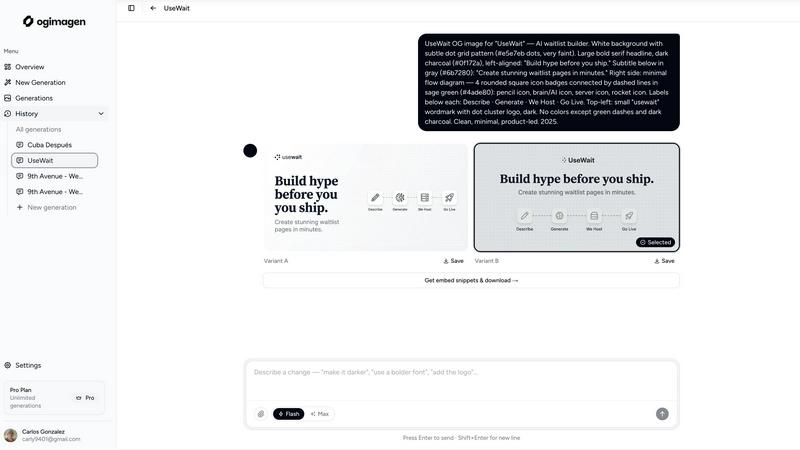
OGImagen instantly generates and delivers optimized Open Graph images with ready-to-paste meta tags for your framework.
Last updated: March 11, 2026

Quickfix AI
Quickfix AI instantly diagnoses system health and provides AI-powered insights for Windows and macOS.
Last updated: February 28, 2026
Visual Comparison
OGimagen
Quickfix AI
Feature Comparison
OGimagen
AI-Powered Multi-Platform Generation
OGimagen uses artificial intelligence to create two unique visual variants (A & B) for your content based on a simple title and description input. The AI automatically tailors the output to meet the exact pixel dimensions and aspect ratios required by major social platforms. This means a single generation yields three optimized images: a standard Open Graph image for Facebook and messaging apps, a Twitter Card, and a LinkedIn Card, ensuring perfect display everywhere without manual resizing or cropping.
Framework-Specific Meta Tag Snippets
After generation, OGimagen provides ready-to-paste code snippets tailored to your project's stack. Free users receive standard HTML meta tags, while Pro users unlock specialized snippets for modern frameworks including Next.js (App Router and Pages Router), Astro, SvelteKit, and Remix. This feature eliminates the guesswork in implementing openGraph and twitter: metadata objects, ensuring correct integration and faster shipping.
MCP (Model Context Protocol) Integration
A flagship feature for Pro users, MCP integration allows developers to generate and manage OG images without leaving their code editor. By connecting OGimagen to MCP-compatible tools like Claude Code, Cursor, or Windsurf, you can trigger image creation, list previous generations, and fetch embed snippets directly from your IDE, streamlining the development workflow and maintaining focus.
Global CDN Hosting & Asset Management
All generated images are automatically uploaded and served via Cloudflare's global CDN, ensuring fast, reliable delivery worldwide. Pro plans include permanent hosting, while one-time packs offer 45 or 90-day hosting. This managed infrastructure removes the burden of storing, optimizing, and serving image assets from your own servers, simplifying deployment and improving page performance.
About Quickfix AI
Comprehensive System Scan
The Quickfix AI agent performs a holistic scan of your entire system, analyzing critical components in a single click. It gathers real-time and historical data on CPU utilization, memory pressure, GPU load, storage health and capacity, battery cycles, network connection status, and core security settings like firewall status. This unified diagnostic report provides a complete snapshot of your machine's health and performance bottlenecks, eliminating the need to juggle multiple disparate system monitoring tools.
AI-Powered Analysis & Chat
Beyond raw data, Quickfix AI includes an intelligent chat interface that reads your full diagnostic report. You can ask questions about your system in plain English, such as "Why is my Mac running slow?" and receive clear, contextual answers. The AI identifies root causes, like specific applications consuming excessive CPU, and provides tailored, step-by-step recommendations for resolution, making advanced troubleshooting accessible to users of all technical skill levels.
Secure Remote Diagnostics via Sharing Code
Designed for collaborative troubleshooting, this feature allows IT support teams or individuals helping others to diagnose issues remotely without invasive software installation. Generate a secure, one-time sharing code from your Quickfix AI dashboard and share it with the user in need. They simply enter the code to initiate a scan, and you instantly gain view-only access to their anonymized diagnostic report, streamlining the support process dramatically.
Cross-Platform Compatibility & Lightweight Agent
Quickfix AI is built for broad ecosystem compatibility, offering native agents for both Windows and macOS operating systems. The agent is lightweight, requiring minimal system resources to run, and ensures full functionality across personal and professional Mac environments. This cross-platform support ensures consistent diagnostic capabilities and user experience regardless of the underlying hardware or OS version.
Use Cases
OGimagen
Rapid Prototyping for Development Teams
Development teams and solo developers can instantly generate professional social previews for new features, landing pages, or blog posts during the build phase. By using the MCP integration or the web tool, they can iterate on designs and immediately copy-paste the correct meta tags into their components, significantly speeding up the development and staging process without needing a designer.
Content Marketing & Blog Management
Content creators and marketing teams can ensure every new blog post, article, or news update shared on social media has a unique, engaging preview image. By simply entering the post's title and description, they can generate on-brand visuals that improve click-through rates, all without relying on graphic design software or waiting for a designer's availability.
SaaS Product Launch & Documentation
SaaS companies launching new products or updating documentation can use OGimagen to create consistent, polished link previews for every feature announcement, changelog, or help article shared in communities like Twitter, LinkedIn, or Discord. This maintains a professional brand image and drives engagement from shared links in release notes and community updates.
Agency Workflow for Client Projects
Digital agencies managing multiple client websites can standardize their OG image creation process. OGimagen allows them to quickly generate client-specific images by adjusting brand colors and styles, then seamlessly implement them across different frameworks (Next.js, Astro, etc.) used for various client projects, ensuring quality and saving billable hours.
Quickfix AI
Proactive Performance Troubleshooting
Ideal for users who experience system slowdowns, lag, or unexpected behavior but lack the technical knowledge to identify the cause. Quickfix AI automatically pinpoints resource-hungry processes, thermal throttling issues, or memory leaks and explains them in simple terms with direct recommendations, such as closing specific browser tabs or applications, to restore optimal performance immediately.
IT Support & Help Desk Operations
IT support teams can leverage Quickfix AI to triage and resolve employee tickets efficiently. Instead of relying on user-described symptoms, technicians can request a sharing code to view a precise diagnostic report from the user's machine. This enables rapid, accurate diagnosis of issues ranging from network connectivity problems to failing hardware, drastically reducing mean time to resolution (MTTR).
System Health Audit for Tech Enthusiasts
Gamers, developers, and power users who demand peak system performance use Quickfix AI for deep dives into their hardware. They can monitor GPU and CPU temperatures under load, check disk health (SSD/HDD), analyze memory bandwidth utilization, and validate security configurations, all through a unified dashboard to optimize their setup for demanding workloads or gaming sessions.
Pre-Purchase or Resale Device Inspection
When evaluating a used computer for purchase or preparing one for resale, Quickfix AI provides an objective health check. A quick scan reveals critical information like battery health and cycle count, storage drive condition, potential hardware failures, and overall system integrity, ensuring informed decision-making and transparent transactions.
Overview
About OGimagen
OGimagen is an AI-powered developer tool engineered to generate production-ready Open Graph (OG) images and social cards in seconds. It solves a critical yet often tedious front-end task: creating visually compelling and technically correct preview images for shared links. The platform is built for developers, content teams, and indie makers who need to ensure their web pages, blog posts, or applications look professional when shared on platforms like Facebook, X (Twitter), LinkedIn, Discord, and Slack. Its core value proposition lies in automating the entire workflow—from AI image generation to framework-specific meta tag delivery—within a developer-centric ecosystem. By integrating directly into modern coding workflows via MCP (Model Context Protocol) for editors like Cursor and Claude Code, OGimagen eliminates context switching. It ensures pixel-perfect compliance with each platform's unique specifications (1200x630 for OG, 1200x600 for Twitter, 1200x627 for LinkedIn) and delivers globally cached images via Cloudflare's CDN for instant load times. This tool is not just an image generator; it's an infrastructure layer for your site's social identity, designed to boost click-through rates by ensuring every shared link is backed by a high-quality, on-brand preview.
About Quickfix AI
Quickfix AI is a comprehensive, AI-powered system diagnostics tool engineered for seamless integration into modern tech stacks. It provides instant, deep insight into hardware performance, system health, and potential issues across Windows and macOS environments. The tool operates through a lightweight agent that executes a full system scan, generating a detailed diagnostic report in under a minute. Its core value proposition lies in translating complex technical data into plain-English insights and actionable recommendations via an integrated AI chat interface. This makes it an indispensable utility for a wide range of users, from individual troubleshooters and tech enthusiasts to professional IT support teams. By offering enterprise-grade diagnostics with an intuitive user experience, Quickfix AI bridges the gap between raw system telemetry and practical understanding, enabling users to proactively manage performance, security, and stability without requiring deep technical expertise.
Frequently Asked Questions
OGimagen FAQ
What is the difference between Starter, Growth, and Pro plans?
The Starter plan is a one-time purchase of 10 generations with 45-day CDN hosting. The Growth plan is also one-time, offering 25 generations and 90-day hosting. The Pro plan is a monthly subscription providing 50 generations per month, permanent CDN hosting, and exclusive access to MCP integration for editor workflows. All plans include both AI image variants and framework snippets, with Pro offering priority queue access.
What happens when my CDN hosting expires on a one-time plan?
When the CDN hosting period (45 or 90 days) expires on a Starter or Growth pack, the generated images will no longer be served from the OGimagen CDN. The image URLs will return an error, which will cause social platforms to show a broken or default image preview. To maintain the links, you must regenerate new images or upgrade to a Pro plan for permanent hosting before the expiry date.
What is MCP integration and which tools support it?
MCP (Model Context Protocol) integration allows OGimagen to connect directly to your code editor, enabling you to generate images and fetch code snippets via the editor's AI assistant. This is supported in any MCP-compatible tool, including Claude Code, Cursor, Windsurf, and others. It lets you manage OG images entirely within your development environment.
Which frameworks are supported for meta tag snippets?
OGimagen provides ready-to-paste meta tag snippets for a wide range of modern frameworks. This includes Next.js (for both the App Router and Pages Router), Astro, SvelteKit, and Remix. A plain HTML fallback snippet is always included for all users, ensuring compatibility with any web project.
Quickfix AI FAQ
Is Quickfix AI free?
Yes, Quickfix AI offers a free version that includes the core system scan, comprehensive diagnostic report, and access to the AI chat for insights and basic recommendations. This allows users to perform essential health checks and troubleshooting at no cost.
Is my data secure?
Absolutely. Quickfix AI is designed with privacy and security as a priority. Diagnostic scans are processed with a focus on anonymized system metadata rather than personal files. For remote sessions using the sharing code, data is transmitted securely with encryption, and reports are accessible only to those with the unique, one-time code.
Do I need technical knowledge to use it?
No technical knowledge is required. The primary design goal of Quickfix AI is to demystify system diagnostics. The AI chat interface is built specifically to answer your questions in plain English and provide clear, actionable steps, making advanced system insights accessible to everyone.
What platforms are supported?
Quickfix AI provides full native support for both Windows and macOS operating systems. You can download a dedicated, optimized agent for your platform, ensuring comprehensive compatibility and accurate diagnostics for desktops and laptops across these ecosystems.
Alternatives
OGimagen Alternatives
OGimagen is an AI-powered developer tool designed to automate the creation of Open Graph images. It falls into the category of dev tools focused on social media integration and front-end asset generation. By producing production-ready social cards, it helps ensure shared links from websites and applications have professional, engaging previews. Developers often seek alternatives to such tools for various reasons. These can include budget constraints, specific feature requirements like custom API access or advanced template control, and the need for compatibility with particular tech stacks or hosting environments. The search is driven by finding the right balance between automation, customization, and seamless workflow integration. When evaluating an alternative, key considerations should be its API design and documentation quality, the level of customization available for branding, and how well it integrates with your existing framework or static site generator. Security and data handling policies are also crucial, as is the overall developer experience and the tool's ability to scale with your project's needs.
Quickfix AI Alternatives
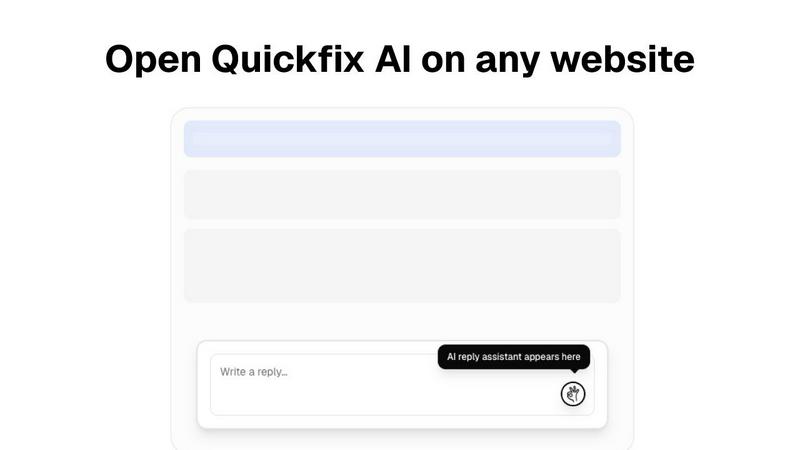
Quickfix AI is a browser extension in the productivity and management category, designed to automate and enhance online communication. It uses AI to generate contextual replies directly within platforms like Gmail, Slack, and social media, aiming to save users time and effort. Users often explore alternatives for several key reasons. These can include specific pricing models, the need for different feature sets like advanced customization or integration with a particular tech stack, and compatibility requirements with niche platforms or enterprise systems not covered by a generalist tool. When evaluating an alternative, focus on core technical compatibility. Assess the depth of API integrations, the range of supported platforms and browsers, and the tool's ability to operate within your specific workflow environment without disrupting existing processes. The ideal solution should seamlessly embed into your current tech stack.