
Seedream 4.0 vs Shrinkpad
Side-by-side comparison to help you choose the right product.

Seedream 4.0
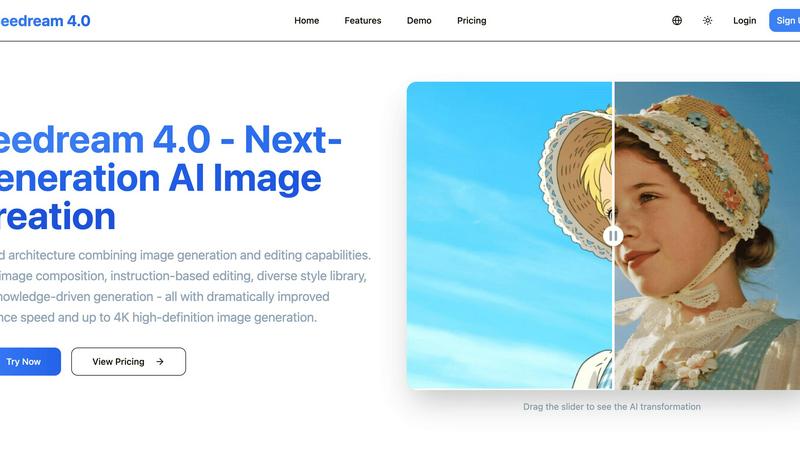
Seedream 4.0 is a unified AI platform for seamless image generation and instruction-based editing.
Last updated: March 1, 2026

Shrinkpad
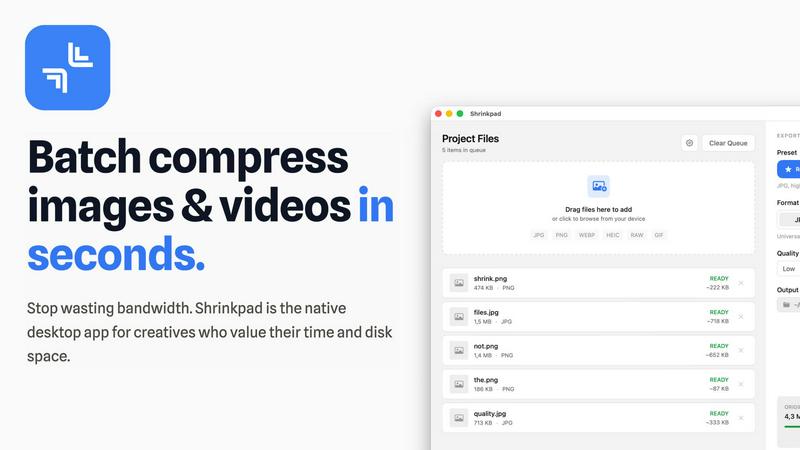
Shrinkpad is a native Mac app that batch compresses images and videos locally for faster, integrated workflows.
Last updated: February 28, 2026
Visual Comparison
Seedream 4.0
Shrinkpad
Feature Comparison
Seedream 4.0
Unified Generation & Editing Architecture
This core architectural feature combines what are typically separate AI models into a single, cohesive system. This integration allows for a fluid workflow where a generated image can be iteratively refined using natural language instructions without leaving the platform or losing context. It reduces latency and complexity in the creative process, enabling a more efficient pipeline from initial concept to final, polished asset, all within a unified technical environment.
Instruction-Based Precision Editing
The platform operates on a "what you say is what you get" principle, where both generation and edits are driven by descriptive sentences. This natural language interface allows for precise control over modifications, such as altering specific elements, adjusting composition, or applying complex stylistic changes. This feature minimizes the learning curve associated with traditional graphic software and integrates seamlessly with scriptable workflows via its API for automated asset customization.
Knowledge-Driven Generation Engine
Beyond stylistic rendering, Seedream 4.0 incorporates a knowledge-augmented model capable of generating accurate and contextually relevant imagery. This is critical for creating detailed educational diagrams, scientifically accurate illustrations, professional charts, and product visuals that adhere to real-world specifications. It ensures the output is not just visually appealing but also factually coherent, making it reliable for technical documentation and professional presentations.
High-Performance 4K Inference Pipeline
Engineered for speed and quality, Seedream 4.0 features a dramatically optimized inference pipeline that delivers high-definition images up to 4K resolution rapidly. This performance is crucial for professional use where time-to-market and asset quality are paramount. The system supports batch processing and offers priority queues for higher-tier plans, ensuring compatibility with high-demand production schedules and scalable content operations.
Shrinkpad
Native macOS & Apple Silicon Optimization
Shrinkpad is built exclusively for macOS, utilizing Apple's Core Graphics, VideoToolbox, and AVFoundation frameworks for maximum performance and system integration. It is fully optimized for Apple Silicon (M1/M2/M3 chips), leveraging multi-threaded processing to compress thousands of images and videos in minutes. This deep integration with the macOS tech stack ensures unparalleled speed and stability compared to cross-platform or web-based tools.
Intelligent, Automated Quality Analysis
The application automatically analyzes the visual complexity of each asset to apply the perfect, format-specific compression ratio. This eliminates the guesswork from manual quality sliders, preventing artifacts while achieving maximum file size reduction. The intelligent algorithm ensures perceptual quality is maintained, making it ideal for batch processing where individual file inspection is impractical.
Comprehensive Format Support
Shrinkpad supports over 30 image formats—including JPG, PNG, WEBP, AVIF, HEIC, and professional RAW files—alongside all major video formats like MP4 and MOV. This extensive compatibility allows users to process mixed-media batches containing photos and videos together in a single operation, with the app automatically applying the optimal compression settings for each file type.
Advanced Folder Mode & Batch Processing
With its advanced Folder Mode, you can drag and drop an entire project directory onto Shrinkpad. It will automatically scan subfolders, detect all supported media files, and ignore non-media assets, readying hundreds or thousands of files for compression in one click. This feature, combined with auto-renaming and metadata stripping options, completely automates the optimization of exported assets from tools like Figma or Photoshop.
Use Cases
Seedream 4.0
Marketing & Advertising Asset Production
Marketing teams can rapidly generate and tailor a high volume of visual assets for campaigns, social media, and advertisements. Using multi-image composition and the diverse style library, they can maintain brand consistency while creating varied content. The 4K output ensures assets are ready for digital and print mediums, streamlining the entire creative production cycle from concept to deployment.
Technical Documentation & Educational Content
Technical writers and educators can leverage the knowledge-driven generation to produce accurate diagrams, complex scientific illustrations, and educational charts simply by describing them. This use case transforms the creation of textbook graphics, training manuals, and research presentation materials, making it faster and more accessible to generate precise, informative visuals without specialized design skills.
Concept Art & Creative Prototyping
Artists and designers can use Seedream 4.0 as a powerful brainstorming and prototyping tool. They can quickly visualize concepts, explore different artistic styles from the library (e.g., cyberpunk, watercolor), and make iterative refinements through instruction-based editing. This accelerates the early creative stages, allowing for rapid exploration of visual narratives and design directions.
E-commerce & Product Visualization
E-commerce businesses can generate high-quality lifestyle images, product variations, and contextual scenes for their listings. The ability to edit existing product photos via natural language instructions—such as changing backgrounds, adding props, or adjusting lighting—creates diverse marketing visuals without costly photoshoots, enhancing online catalogs and improving customer engagement.
Shrinkpad
Optimizing Web and Mobile Application Assets
Software developers and web designers use Shrinkpad to drastically reduce the size of image and video assets within app bundles and websites. By batch-compressing icons, screenshots, hero images, and promotional videos locally, they achieve faster load times, improved Largest Contentful Paint (LCP) scores, and smaller download sizes for end-users, directly impacting performance metrics and user experience.
Managing Photographer and Creator Media Libraries
Photographers and content creators dealing with large volumes of high-resolution photos and video footage utilize Shrinkpad to reclaim terabytes of disk space. The tool allows them to create optimized, web-ready versions of their portfolios or social media content from original RAW files and 4K videos in a single, automated batch process, all while keeping master files untouched and private.
Streamlining Design-to-Development Workflows
Design teams exporting assets from UI/UX tools like Figma, Sketch, or Adobe Photoshop can export everything at 2x or 4x resolution and use Shrinkpad as a final optimization step. It handles bulk compression, renaming, and format conversion, delivering production-ready assets to developers without manual, time-consuming export sessions for each screen density or format.
Preparing Assets for Presentations and Documents
Professionals preparing decks, reports, or client presentations containing numerous high-resolution screenshots and embedded videos can use Shrinkpad to compress these files en masse. This ensures the final document file size remains manageable for email distribution and cloud storage without sacrificing on-screen visual fidelity.
Pricing Comparison
Seedream 4.0
Seedream 4.0 offers tiered subscription plans billed monthly or annually, with annual subscriptions offering a 20% discount. The Basic plan at $7.99/month ($95.90/year) includes 1200 credits/year, 50 high-quality images per month, all style templates, standard speed, and basic support. The Pro plan at $19.99/month ($239.90/year) offers 4800 credits/year, 200 images/month, priority queue and support, WebP downloads, and upcoming video tools. The Max plan at $55.99/month ($671.90/year) provides 14400 credits/year, 600 images/month, premium styles, fastest generation, a dedicated account manager, batch processing, professional video tools, and full API access for integration.
Shrinkpad
Shrinkpad offers a simple, one-time payment pricing model with no subscriptions. The Free Starter tier is available at no cost and includes standard compression for common formats (JPG, PNG), with a limit of 10 files per batch and a 1GB maximum file size. The Personal license, priced at a one-time payment of $14, unlocks unlimited batch processing, support for all formats (including RAW, HEIC, WEBP), mixed image & video compression, and removes all file size limits for a single device. For teams, the Team license is a one-time payment of $35, covering up to 10 device licenses and including priority support.
Overview
About Seedream 4.0
Seedream 4.0 represents a significant architectural leap in AI-powered visual content creation, engineered as a unified platform that seamlessly integrates advanced image generation with robust, instruction-based editing tools. Built for a modern tech stack, it serves creative professionals, marketing teams, and developers who require a high-throughput, API-accessible solution for producing commercial-grade visuals. Its core value proposition lies in its consolidated architecture, eliminating the need to switch between disparate generation and editing applications. This integration, powered by a knowledge-augmented model, ensures not only stylistic versatility but also contextual accuracy for technical and educational imagery. With optimizations for dramatically improved inference speed and native support for up to 4K resolution generation, Seedream 4.0 is designed for scalability and quality, fitting directly into professional workflows for advertising, content creation, and product design. Its compatibility with various output formats (JPG, PNG, WebP) and forthcoming video generation APIs positions it as a central, future-proof asset in any content production pipeline.
About Shrinkpad
Shrinkpad is a native macOS application engineered for high-performance, batch compression of images and videos directly on your local machine. It leverages Apple's native frameworks, including Core Graphics, VideoToolbox, and AVFoundation, to process media files without ever requiring an internet connection or cloud upload. This architecture ensures complete data privacy and eliminates server-dependent bottlenecks. The app is built for a tech-savvy audience, including software developers needing to optimize app bundles, web designers reducing page load times, photographers managing large libraries, and content creators handling mixed-media projects. Its core value proposition is delivering a powerful, automated compression workflow that integrates seamlessly into the macOS ecosystem, offering significant storage savings—up to 90%—while maintaining perceptual quality through intelligent, format-specific algorithms. By handling hundreds of files in a single drag-and-drop operation, Shrinkpad replaces tedious, manual export and optimization steps with a streamlined, local-first tool.
Frequently Asked Questions
Seedream 4.0 FAQ
What makes Seedream 4.0 different from other AI image generators?
Seedream 4.0's primary differentiation is its unified architecture that natively combines generation and advanced editing within a single model. Unlike tools that specialize in one or the other, it offers a seamless, end-to-end workflow. Additionally, its knowledge-driven engine focuses on accuracy for professional imagery, and it is built with a tech-stack oriented design, featuring API access and high-performance 4K inference suitable for scalable production environments.
Can I use the generated images for commercial purposes?
Yes, images generated using Seedream 4.0 are typically provided with a license that allows for commercial use. Users should review the specific Terms of Service for detailed licensing information, but the tool is designed to empower professionals and businesses to create assets for marketing, products, publications, and other commercial applications without restrictive copyright claims from the platform.
What image formats and resolutions does Seedream 4.0 support?
The platform supports downloading generated and edited images in widely compatible formats including JPG and PNG, with WebP format available on higher-tier plans for optimized web use. It offers a range of standard dimensions and aspect ratios, with generation capabilities extending up to 4K high-definition resolution (e.g., 3840x2160), ensuring suitability for both digital displays and high-quality print media.
Is there an API available for integrating Seedream 4.0 into my applications?
Yes, API access is a key feature included with the Max subscription plan. This allows developers and businesses to integrate Seedream 4.0's generation and editing capabilities directly into their own applications, websites, or automated workflows. This enables custom solutions for bulk asset creation, dynamic content generation, and seamless integration into existing content management systems and production pipelines.
Shrinkpad FAQ
What file formats does Shrinkpad support?
Shrinkpad supports a wide array of image and video formats. For images, it handles JPG, PNG, WEBP, AVIF, HEIC, SVG, and over 30 formats including professional RAW files from camera manufacturers. For video, it supports major formats like MP4, MOV, and more. This allows for true mixed-media batch processing in a single workflow.
Does Shrinkpad support video compression?
Yes, Shrinkpad fully supports batch video compression. It utilizes macOS's native VideoToolbox and AVFoundation frameworks to efficiently compress video files like MP4 and MOV formats directly on your machine. You can process videos individually or mix them with image files in the same batch queue for a unified optimization workflow.
Are my files uploaded to the cloud?
No. Shrinkpad operates on a strict privacy-first principle. All compression processing is executed locally on your Mac using Apple's native frameworks. Your original files, intermediates, and optimized outputs never leave your device, ensuring complete data privacy and security, which is crucial for handling sensitive or proprietary assets.
Can I use Shrinkpad on multiple devices?
Licensing depends on the plan you purchase. The Personal plan includes a license for use on one device. The Team plan includes licenses for up to 10 devices, making it suitable for small studios or teams where multiple members need to use the application across different Macs.
Alternatives
Seedream 4.0 Alternatives
Seedream 4.0 is a sophisticated AI image generation and editing platform within the image and photo software category. It is engineered for professionals who require seamless multi-image composition and instruction-based editing within a unified architecture, supporting high-definition outputs and a knowledge-driven approach for accurate content. Users often explore alternatives to find a solution that better aligns with their specific tech stack, budget, or workflow requirements. Common considerations include API availability for custom integration, compatibility with existing design tools, the total cost of ownership, and the specific balance between generation power and editing granularity needed for their projects. When evaluating other platforms, key technical criteria include the underlying model's capabilities for instruction fidelity and style consistency, SDK support for development teams, batch processing efficiency, and output resolution limits. The ideal alternative should integrate smoothly into your existing pipeline while meeting your core creative and technical demands.
Shrinkpad Alternatives
Shrinkpad is a native macOS application for local batch compression of images and videos, falling squarely into the media optimization and productivity software category. Users often seek alternatives for various reasons, including budget constraints, the need for cross-platform compatibility on Windows or Linux, or specific feature requirements not covered by a single tool. When evaluating alternatives, key technical considerations include the processing engine's architecture—whether it's a native app, a cross-platform framework, or a web service—and its impact on performance and privacy. Integration capabilities with your existing tech stack, such as CLI support for CI/CD pipelines or compatibility with specific file formats like AVIF or ProRes, are also critical. The ideal solution should align with your workflow's scale, security requirements, and quality benchmarks. Ultimately, the choice hinges on balancing processing power, platform support, and data sovereignty. A tool that compresses locally using hardware-accelerated frameworks offers a different value proposition than a cloud-based API or a multi-platform utility built on Electron.