
Dokie AI vs SimpleDraw
Side-by-side comparison to help you choose the right product.

Dokie AI
Dokie AI leverages Claude Opus 4.6 to generate and enhance professional PPT slides from text, PDFs, or YouTube in minutes.
Last updated: March 19, 2026

SimpleDraw
Create precise floor plans and scale drawings effortlessly online with SimpleDraw’s user-friendly, free web tool.
Last updated: March 1, 2026
Visual Comparison
Dokie AI

SimpleDraw
Feature Comparison
Dokie AI
AI-Powered Generation from Scratch
This core feature allows users to input a plain text description of their presentation topic. Dokie AI's engine, built on Claude Opus 4.6, then autonomously generates a complete, structured slide deck. It intelligently determines the narrative flow, creates compelling content for each slide, selects appropriate and professional layouts, and incorporates relevant visual elements and data charts. This end-to-end generation eliminates the blank canvas problem and provides a fully-formed first draft in minutes, compatible with standard presentation software.
Intelligent Slide Beautification & Redesign
Beyond creation, Dokie AI offers a powerful enhancement engine. Users can upload existing PowerPoint files, and the AI will analyze and redesign them. It fixes inconsistent layouts, applies cohesive and professional color schemes and typography, improves visual balance, and suggests better imagery—all while strictly preserving the original user-provided content. This feature acts as an automated design assistant, upgrading the visual polish of any deck without manual redesign work.
Multi-Format Document Conversion Suite
Dokie AI functions as a versatile conversion hub for presentation assets. It supports batch conversion from multiple source formats into editable PowerPoint slides. This includes converting PDF documents while preserving structure, transforming Word documents into slide-ready content, extracting key points and visuals from YouTube videos, and even parsing HTML web pages. This interoperability feature streamlines content repurposing across different mediums and file types within a unified workflow.
Automated Speaker Notes & Reverse Prompt Engineering
The platform includes tools to support presentation delivery and analysis. It can automatically generate detailed speaker notes and talking points for each slide in a deck, aiding in rehearsal and confident delivery. Conversely, its unique Reverse Prompt feature can analyze an uploaded presentation and extract the underlying prompt or content structure that could have generated it, providing valuable insights for iteration and understanding AI-generated content frameworks.
SimpleDraw
Accurate Measurements & Scale Drawing
SimpleDraw offers precise measurements and smart alignment tools, ensuring that all drawings maintain accuracy and are to scale. This feature is crucial for users who demand precision in their designs, whether for personal projects or professional plans.
Specialized Floor Plan Creator
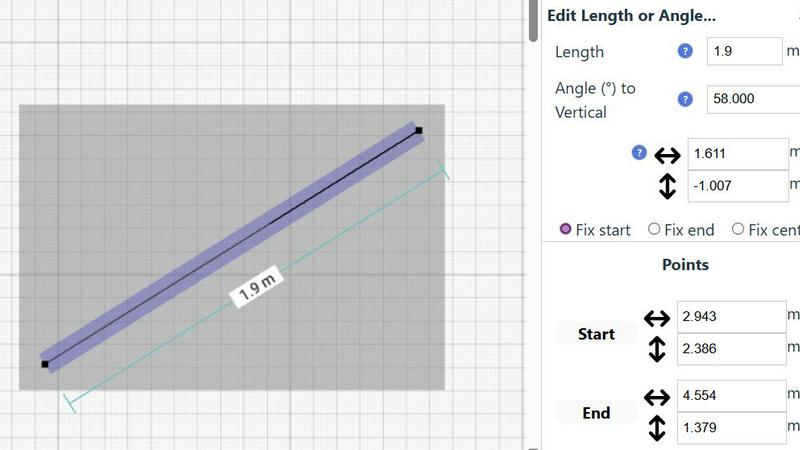
The dedicated Floor Plan Mode allows users to create detailed floor plans effortlessly. Users can draw walls, add windows and doors with a single click, and view real-time measurements as they adjust their designs, making it an invaluable tool for home renovations and space planning.
Smart Alignment System
This feature assists users in placing points and lines exactly where they need them. By using visual cues, SimpleDraw guides users to achieve precise placements, enhancing the overall drawing experience and reducing errors during the layout process.
Comprehensive Measurement System
SimpleDraw includes a comprehensive measurement system with customizable options for displaying measurements in either metric or standard US units. Contextual measurements appear dynamically as users work, allowing for precise adjustments and ensuring that the final output matches the user's expectations.
Use Cases
Dokie AI
Startup Pitch Deck Development
Founders and entrepreneurs can rapidly prototype and iterate on investor pitch decks. By describing their business model, market analysis, and solution, Dokie AI generates a professionally structured deck with compelling narratives and data visualization placeholders. This accelerates the fundraising process, allowing teams to focus on refining the message rather than slide design, ensuring a credible first impression with potential investors.
Marketing & Sales Proposal Automation
Marketing teams and sales professionals can use Dokie AI to quickly generate client proposals, campaign overviews, and sales presentations. The tool can convert existing product briefs (Word/PDF) or webinar content (YouTube) into client-ready slide decks. The AI beautification feature ensures all outgoing materials maintain brand-consistent, high-quality design, scaling the production of polished sales collateral without a design team.
Academic & Corporate Training Material Creation
Educators and corporate trainers can efficiently create lecture slides, workshop materials, and training modules. By inputting lesson outlines or converting textbook excerpts (PDF), they receive structured educational decks. The automatic speaker notes generation is particularly valuable for creating instructor guides, making the preparation of comprehensive training materials significantly faster and more consistent.
Technical & Conference Presentation Design
Engineers, researchers, and conference speakers often have dense content but lack design skills. Dokie AI helps structure complex technical information into clear, visually engaging slides. The beautification tool can take a text-heavy, manually created research presentation and apply professional design principles to improve readability and audience engagement, ensuring the visual delivery matches the quality of the content.
SimpleDraw
Kitchen & Bathroom Floor Plans
Users can plan renovations for kitchens and bathrooms with accurate measurements, visualizing layouts before starting any physical work. This helps in making informed decisions about design and functionality.
Room Layouts & Furniture Planning
Designing layouts for bedrooms, living rooms, or offices is made simple with SimpleDraw. Users can visualize whether furniture will fit in their desired spaces before making purchases, streamlining the planning process.
House & Apartment Plans
Create comprehensive floor plans for home projects, ideal for both personal use and rental listings. SimpleDraw's tools enable users to design every aspect of their living spaces, from room dimensions to furnishings.
Community-Driven Development
Engage with the SimpleDraw community to influence future features and improvements. This collaborative approach ensures the tool evolves based on real user feedback, making it more responsive to the needs of its users.
Overview
About Dokie AI
Dokie AI is a next-generation, AI-native presentation platform engineered to automate the entire slide creation and enhancement workflow. It transcends traditional template-based tools by leveraging a true generative AI stack, powered by Anthropic's Claude Opus 4.6 model, to handle the complex interplay of content structuring, intelligent layout selection, typographic hierarchy, and visual design. The platform is architected for business professionals, educators, marketers, and startup founders who require polished, professional presentations but lack dedicated design resources or time. Its core value proposition lies in its multi-modal operation: users can generate a complete deck from a text prompt, upload and beautify an existing PowerPoint or PDF, convert documents and videos into slide format, or automatically generate structured speaker notes. This makes Dokie AI a comprehensive, API-like solution for presentation tasks, seamlessly integrating into various content production pipelines to deliver designer-quality output with minimal user input, fundamentally changing the economics and speed of professional presentation development.
About SimpleDraw
SimpleDraw is an innovative, free online platform designed to empower users in creating precise and accurate scale drawings. Whether you're a casual user, a DIY enthusiast, or a professional architect, SimpleDraw caters to your drawing needs with its intuitive interface and specialized tools. The platform allows you to craft detailed floor plans, elevations, and other technical drawings without the necessity of extensive training or prior software experience. Its primary value proposition lies in the seamless blend of simplicity and efficiency, enabling users to realize their creative visions with just a few clicks. With no sign-up or software installation required, you can start drawing immediately in your web browser. This focus on ease of use, combined with a robust set of features, positions SimpleDraw as the ideal choice for anyone looking to create accurate scale drawings quickly and effectively.
Frequently Asked Questions
Dokie AI FAQ
What AI model does Dokie AI use?
Dokie AI is powered by Anthropic's Claude Opus 4.6, a state-of-the-art large language model known for its advanced reasoning and instruction-following capabilities. This integration allows Dokie AI to perform deep content understanding, logical structuring, and context-aware design generation that surpasses simpler template-matching systems, providing truly intelligent presentation creation.
Can I edit the presentations generated by Dokie AI?
Yes, absolutely. Dokie AI outputs standard PowerPoint (.pptx) files that are fully compatible with Microsoft PowerPoint, Google Slides, Apple Keynote, and other presentation software. You retain complete editorial control and can modify any aspect of the content, design, or layout after generation, allowing for seamless integration into your existing review and customization workflow.
What file formats can Dokie AI accept for conversion?
Dokie AI supports a wide range of input formats for its conversion tools. This includes PDF documents, Microsoft Word (.docx) files, YouTube video URLs, and HTML web pages. This multi-format compatibility is designed to fit into diverse content ecosystems, allowing users to transform existing assets from virtually any common source into a structured presentation.
How does the Beautify feature handle my original content?
The AI Beautify PPT feature is designed to be non-destructive. It strictly preserves all your original text, data, and core imagery. The AI's role is solely to enhance the visual design layer: it reorganizes layouts for better flow, applies professional color palettes and fonts, improves spacing and alignment, and may suggest aesthetic background or icon elements. Your informational content remains intact and unaltered.
SimpleDraw FAQ
Is SimpleDraw really free to use?
Yes, SimpleDraw is a completely free online tool that requires no sign-up or software installation, allowing users to start drawing immediately.
What types of drawings can I create with SimpleDraw?
You can create a variety of drawings including floor plans, room layouts, elevations, and architectural designs tailored to your specific needs and projects.
Do I need any prior experience to use SimpleDraw?
No, SimpleDraw is designed for users of all skill levels. Its intuitive interface allows beginners to create detailed drawings without the need for extensive training or prior software experience.
Can I collaborate with others using SimpleDraw?
While SimpleDraw currently focuses on individual use, users are encouraged to join the community and share feedback, which can help inform future collaborative features and enhancements.
Alternatives
Dokie AI Alternatives
Dokie AI is a specialized AI presentation generator operating within the design tools and productivity software category. It leverages advanced language models like Claude Opus 4.6 to automate the end-to-end creation and beautification of professional slide decks, moving beyond static templates to true content-aware design. Users often explore alternatives for various technical and operational reasons. These can include budget constraints, specific feature requirements not covered by the core offering, or the need for deeper integration with an existing tech stack, such as a particular cloud storage service, project management platform, or enterprise software ecosystem. Platform compatibility, whether desktop versus web-based or mobile support, is another common driver for evaluation. When assessing an alternative, key technical considerations should include the underlying AI model's capabilities for content and design coherence, the depth and flexibility of API access for custom workflows, and the tool's export compatibility with standard formats like PowerPoint or Google Slides. The efficiency of the workflow automation and the quality of the final visual output are also critical benchmarks for comparison.
SimpleDraw Alternatives
SimpleDraw is a free, web-based tool designed for creating precise and accurate scale drawings, which places it firmly in the realm of design tools. Its user-friendly interface caters to a wide audience, from casual users to professional designers seeking to draft detailed floor plans and technical drawings without extensive training. As users increasingly seek alternatives, reasons often include the desire for enhanced features, different pricing structures, or specific platform compatibility that better suits their needs. When searching for an alternative to SimpleDraw, users should consider the essential features that align with their project requirements. Key factors to evaluate include the accuracy of scale drawings, the availability of specialized modes like floor plan creation, and the robustness of editing capabilities. Additionally, the ease of use and integration with existing workflows or software platforms can significantly influence the decision-making process in selecting the right tool for their design needs.