
ProcessBankStatement vs Tradepal
Side-by-side comparison to help you choose the right product.

ProcessBankStatement
Effortlessly convert your PDF bank statements into accurate, organized CSV files in seconds, ready for seamless integration with your favorite tools.
Last updated: March 19, 2026

Tradepal
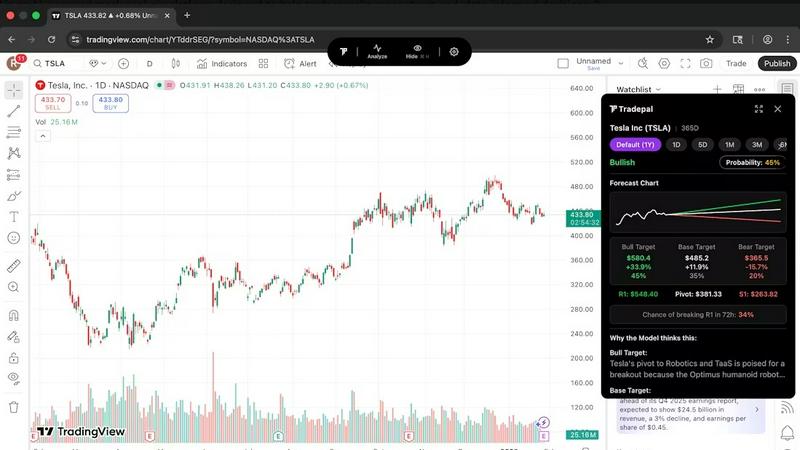
Tradepal delivers AI-driven stock analysis, turning screenshots into actionable insights with real-time forecasts and.
Last updated: February 27, 2026
Visual Comparison
ProcessBankStatement

Tradepal
Feature Comparison
ProcessBankStatement
Instant PDF to CSV Conversion
ProcessBankStatement allows you to upload any PDF bank statement and receive a downloadable CSV file in seconds. This feature ensures that you can convert multiple statements without delay, enhancing your productivity significantly.
High Accuracy Rate
Our smart parsing engine boasts an impressive accuracy rate of over 99%. This ensures that the data extracted from your bank statements is clean and structured, minimizing the likelihood of errors when managing financial records.
Support for Multi-page and Batch Uploads
You can upload multi-page PDF bank statements and even batch upload multiple files at once. This feature is particularly beneficial for accountants and bookkeepers who handle large volumes of data regularly, streamlining the entire conversion process.
Secure Data Handling
ProcessBankStatement prioritizes your data security. All files are encrypted during transit, and you maintain control over your data by having the ability to delete files whenever necessary, ensuring complete confidentiality.
Tradepal
AI Forecasts
Tradepal provides real-time intraday forecasts for price ranges, reversals, and volatility. Utilizing a blended AI ensemble, these forecasts are continuously updated, allowing traders to identify potential risks before they impact pricing, thus enhancing decision-making capabilities.
Price Cone Projections
Users can visualize forward price cones directly on their charts with an intuitive layout. This feature is customizable to suit individual trading styles and preferences, enabling traders to save their layouts for future sessions and ensuring a personalized trading experience.
News and Sentiment Analysis
Tradepal aggregates market sentiment from various professional trader sources and financial news outlets into one comprehensive stream. This feature enables traders to monitor when crowd conviction is building, providing insights into potential market movements before they materialize.
Breakout Signals
The platform detects early signals of strength or failure by analyzing live sentiment streams, order flow hints, and momentum shifts. This feature empowers traders to act swiftly on emerging opportunities, helping them stay ahead of market trends and capitalize on favorable conditions.
Use Cases
ProcessBankStatement
Streamlining Bookkeeping Tasks
For accountants and bookkeepers, ProcessBankStatement simplifies the process of managing client bank statements. Instead of spending hours inputting data manually, users can quickly convert multiple statements into CSV files ready for analysis, saving significant time and effort.
Efficient Financial Reporting
Finance professionals can use ProcessBankStatement to prepare financial reports with ease. The ability to convert bank statements into structured data allows for quick import into reporting tools, facilitating timely decision-making.
Simplifying Tax Preparation
Tax preparers can leverage ProcessBankStatement to handle client bank statements efficiently. The tool allows for rapid conversion, enabling tax professionals to focus on analysis rather than data entry, ultimately improving client service and satisfaction.
Enhancing Data Analysis for Small Businesses
Small business owners can utilize ProcessBankStatement to analyze their financial transactions without the hassle of manual entry. This tool empowers them to keep their data organized and ready for important financial assessments, ensuring they make informed business decisions.
Tradepal
Streamlined Chart Analysis
Active traders can leverage Tradepal to quickly analyze stock charts without the need for extensive manual analysis. By simply clicking 'Analyze' or uploading a screenshot, they can receive instant insights that enhance their trading strategies.
Risk Management
Investors can utilize Tradepal to assess potential risks associated with their trades. The AI-generated forecasts and sentiment analyses help traders identify risk factors and make more informed decisions, ultimately leading to improved risk management practices.
Enhancing Trading Accuracy
Traders looking to refine their strategies can use Tradepal's technical pattern detection and breakout signals to validate their trading ideas. This boosts their confidence in executing trades, as they can rely on data-driven insights rather than solely on intuition.
Market Sentiment Monitoring
For traders focused on market dynamics, Tradepal offers a robust solution for monitoring sentiment trends. By tracking news and sentiment analysis, users can gauge market mood and make timely decisions based on collective trader behavior.
Overview
About ProcessBankStatement
ProcessBankStatement is an advanced, intelligent tool designed to streamline the tedious task of converting bank statement PDFs into organized, structured data. Catering to finance professionals, accountants, bookkeepers, small business owners, and anyone who manages financial data, this secure web-based application automates the manual data entry process. Whether you have a text-based PDF from an online banking portal or a scanned image of a paper statement, our cutting-edge parsing engine quickly transforms it into a downloadable CSV file. This means you can import your transactions directly into QuickBooks, Excel, or any other analysis platform with ease. With a remarkable accuracy rate of over 99%, ProcessBankStatement saves you valuable time and helps you regain control over your data management. We support statements from all major U.S. banks, ensuring you have the compatibility needed for seamless financial operations.
About Tradepal
Tradepal is an innovative AI-powered trading assistant designed specifically for active traders and investors seeking fast, objective chart analysis without the burden of manual guesswork. By allowing users to analyze any U.S.-listed stock chart, Tradepal streamlines the trading process significantly. Users can interact with the platform by clicking the 'Analyze' button while viewing a chart or by uploading a screenshot through the web app. The AI technology behind Tradepal identifies crucial technical patterns, support and resistance levels, trend strength, and momentum, subsequently generating clear bull, base, and bear scenarios complete with confidence scores and price targets. Unlike traditional trading platforms that execute trades, Tradepal serves as a reliable second opinion, helping traders validate ideas, minimize emotional bias, and make data-driven decisions. Its compatibility across popular charting platforms makes it an ideal choice for traders who desire AI assistance that seamlessly integrates into their existing workflows, enhancing their trading experience without requiring significant changes to their trading habits.
Frequently Asked Questions
ProcessBankStatement FAQ
What file types are supported?
Currently, ProcessBankStatement supports PDF bank statements, including both text-based and scanned files. This flexibility allows users to process a variety of statement formats.
Can I upload scanned images or photos?
Yes, the platform fully supports scanned PDFs and image-based statements. This ensures that even if your statement is a photo, you can still convert it into structured data effortlessly.
Is there a free trial?
Absolutely! Guests can enjoy 3 free pages per day, while registered users receive 5 free pages per day. This allows you to test the functionality of the tool before committing to a paid plan.
Is my data secure?
Yes, your data security is our top priority. All files are encrypted during transit, and you have control over your data, including the option to delete files at any time, ensuring your information remains confidential.
Tradepal FAQ
How do I use Tradepal?
After signing up, you can download Tradepal for macOS or Windows, which remains accessible on your screen while you trade. If you prefer not to download the app, the web platform allows you to upload a screenshot of any U.S.-listed stock chart for AI-powered analysis directly in your browser.
Is Tradepal financial advice?
Tradepal provides data-driven insights and analysis to assist traders in making informed decisions, but it is not intended to be financial advice. Users should conduct their own research and consider their financial situations before making trading decisions.
What charts are compatible with Tradepal?
Tradepal is designed to work with any U.S.-listed stock chart from various trading platforms. This universal compatibility ensures that traders can analyze charts regardless of the platform they prefer for trading.
Does Tradepal work on all timeframes?
Yes, Tradepal is versatile and can analyze stock charts across all timeframes. Whether you are day trading or using longer-term strategies, the AI assistant delivers relevant insights to enhance your trading decisions.
Alternatives
ProcessBankStatement Alternatives
ProcessBankStatement is an innovative tool designed to transform PDF bank statements into structured CSV files, making it a vital asset in the Business & Finance category. Users often seek alternatives due to various reasons, such as pricing concerns, specific feature requirements, or compatibility with different platforms. When evaluating alternatives, it is crucial to consider factors like processing speed, accuracy, security measures, and ease of integration with existing accounting software, ensuring the solution aligns with your unique financial data handling needs.
Tradepal Alternatives
Tradepal is an AI-powered trading assistant that specializes in stock chart analysis, aimed at active traders and investors seeking to enhance their trading strategies. By transforming screenshots into comprehensive insights, Tradepal eliminates the guesswork involved in chart analysis, enabling users to make informed decisions based on objective data. Users often seek alternatives to Tradepal for various reasons, including pricing, additional features, or specific platform compatibility. When evaluating alternatives, it is essential to consider factors such as integration capabilities with existing trading platforms, the range of analytical tools offered, and the overall user experience to ensure that the tool aligns with individual trading preferences and needs.