
Hush Touch | Voice-to-Text for MacOS vs URL to Any
Side-by-side comparison to help you choose the right product.

Hush Touch | Voice-to-Text for MacOS
Hush Touch is an intelligent offline voice-to-text app for Mac that learns your vocabulary and processes dictation.
Last updated: February 27, 2026

URL to Any
Effortlessly convert any URL into multiple formats like PDF, Markdown, and images with URL to Any's powerful tools.
Last updated: March 2, 2026
Visual Comparison
Hush Touch | Voice-to-Text for MacOS

URL to Any
Feature Comparison
Hush Touch | Voice-to-Text for MacOS
Dual-Engine Recognition
Hush Touch leverages the power of two Apple dictation engines: DictationTranscriber for natural flow and punctuation, and SFSpeechRecognizer for custom vocabulary enhancement. This combination facilitates exceptional transcription accuracy, ensuring that your spoken words are captured precisely as intended.
Custom Vocabulary
The application supports a customizable vocabulary of up to 500 terms, automatically learning from user corrections. This feature is particularly beneficial for professionals in specialized fields such as medicine or technology, ensuring that industry-specific jargon is recognized and accurately transcribed every time.
Smart Text Processing
Hush Touch incorporates advanced text processing capabilities, such as filler word removal and auto-correction. This means that common distractions in speech, like "um" or "you know," are eliminated, resulting in cleaner, more professional outputs. Additionally, it can format voice snippets for repeated phrases and organize numbered lists, all in real-time.
Context Modes & Hands-Free Operation
The app offers specialized context modes, including General, Email, Code, and Notes, allowing users to switch seamlessly based on their dictation needs. Hands-free operation is facilitated through integration with Siri, enabling users to initiate dictation and send messages using simple voice commands, enhancing the overall user experience.
URL to Any
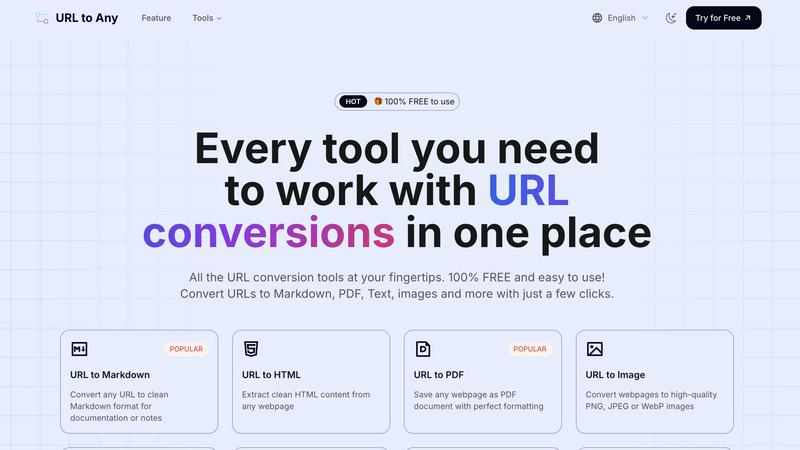
URL to Markdown
This feature allows users to convert any webpage into clean and well-structured Markdown format. Ideal for documentation or note-taking, it ensures that the content retains its original formatting while being easily editable. The streamlined process makes it a popular choice for writers and developers seeking to integrate web content into their projects.
URL to PDF
With the URL to PDF feature, users can save any webpage as a PDF document with impeccable formatting. This is particularly beneficial for archiving online resources, creating reports, or sharing information in a universally accessible format. The conversion is quick, allowing users to obtain a polished document in seconds.
URL to Image
This feature empowers users to convert webpages into high-quality images in formats like PNG, JPEG, or WebP. Ideal for content creators and marketers, this tool allows for easy sharing and incorporation of visual content into presentations, social media posts, and other marketing materials.
URL to QR Code
The URL to QR Code feature generates QR codes from any URL, facilitating easy sharing of links. This is particularly useful for events, marketing campaigns, or educational purposes, allowing users to quickly disseminate information to a wider audience without requiring lengthy URLs.
Use Cases
Hush Touch | Voice-to-Text for MacOS
Drafting Emails
With Hush Touch, users can dictate emails effortlessly. The app's ability to recognize context-specific language and apply proper punctuation means that composing professional correspondence becomes a swift and stress-free process.
Taking Notes
Students and professionals alike can benefit from using Hush Touch to take notes during lectures or meetings. The app captures spoken content accurately, allowing users to focus on the discussion without the distraction of manual typing.
Creating Documents
Hush Touch is an excellent tool for anyone looking to create written content, from articles to reports. Its adaptive learning ensures that the software becomes attuned to the user's writing style over time, leading to more fluid and coherent document creation.
Programming and Code Writing
For software developers, Hush Touch's context mode for coding allows for efficient voice dictation of programming languages. The app's accurate transcription of technical terms and commands helps streamline the coding process, making it easier to focus on development without interruptions.
URL to Any
Content Creation
Writers and bloggers can utilize URL to Any to quickly convert online articles into Markdown or PDF formats for easy editing and reference. This simplifies the documentation process and enhances productivity.
Research and Documentation
Researchers can extract valuable information from web pages and convert them into structured formats like JSON or XML for analysis. This streamlines the data collection process and aids in compiling comprehensive reports.
Marketing and Promotion
Marketers can convert web pages into images or QR codes to create engaging promotional materials. Sharing links through QR codes at events or on printed advertisements facilitates easy access to online content.
Educational Purposes
Teachers and students can leverage URL to Any to convert educational resources into PDF or text formats for offline access. This aids in resource management and enhances the learning experience by providing easily shareable content.
Overview
About Hush Touch | Voice-to-Text for MacOS
Hush Touch is an innovative voice-to-text application designed specifically for macOS users who seek a seamless and efficient dictation experience. Harnessing the power of dual Apple transcription engines, Hush Touch operates entirely on-device, ensuring that your voice data remains private and secure. The software is lightweight, with a size of just 5.5 MB, and requires minimal setup, making it an ideal choice for users who value convenience and quick access. It is perfect for professionals, students, and anyone who frequently drafts emails, messages, notes, or documents hands-free. The application learns your unique vocabulary over time, improving its accuracy with every use while eliminating filler words and enhancing punctuation. With a one-time purchase of $20, users gain lifetime access to a tool that prioritizes privacy and efficiency, making Hush Touch an exceptional investment for anyone looking to enhance their writing workflow.
About URL to Any
URL to Any is an advanced web content conversion tool that revolutionizes how users interact with and repurpose online information. Designed for efficiency and ease of use, this platform enables users to convert URLs into a multitude of formats, including Markdown, PDF, HTML, images, and QR codes. It caters to a diverse audience, from content creators and developers to students and researchers, allowing them to extract and share web content seamlessly. The primary value proposition of URL to Any lies in its user-friendly interface and instant processing capabilities, which eliminate the need for complex software or extensive technical knowledge. By providing a completely free service with no registration required, URL to Any empowers users to maximize their engagement with online resources without barriers. Whether you need to save important web content for documentation, create shareable links, or simply archive information, URL to Any is the go-to solution for converting web pages into versatile formats.
Frequently Asked Questions
Hush Touch | Voice-to-Text for MacOS FAQ
How does Hush Touch ensure my privacy?
Hush Touch processes all voice data entirely on your Mac, eliminating any dependency on cloud services. This means your information remains private, with zero data collection or sharing.
Can I customize the vocabulary in Hush Touch?
Yes, Hush Touch allows users to customize a vocabulary of up to 500 terms. The app learns from your corrections, ensuring that it recognizes specific jargon relevant to your field or personal preferences over time.
Is there a subscription fee for Hush Touch?
No, Hush Touch is available for a one-time purchase of $20, giving you lifetime access to the application without any recurring subscription fees.
How does the adaptive learning feature work?
The adaptive learning feature detects corrections made to transcriptions and automatically updates the vocabulary, improving accuracy and ensuring that it reflects your unique speech patterns and terminology preferences.
URL to Any FAQ
What formats can I convert URLs into?
You can convert URLs into various formats, including Markdown, PDF, HTML, images, JSON, XML, and more, making it versatile for different needs.
Is URL to Any free to use?
Yes, URL to Any is completely free to use, with no registration required. This accessibility encourages users to make the most of online resources without barriers.
How quickly can I convert a URL?
The conversion process is extremely fast, typically taking just seconds to complete, thanks to the optimized processing engine of URL to Any.
Is my data secure when using URL to Any?
Absolutely. URL to Any prioritizes user privacy and ensures that your data is processed securely and is not stored on their servers after conversion.
Alternatives
Hush Touch | Voice-to-Text for MacOS Alternatives
Hush Touch | Voice-to-Text for MacOS is an innovative voice-to-text application designed to make dictation seamless, efficient, and private. As part of the AI Assistants category, it leverages on-device processing to deliver fast and accurate transcription without relying on cloud services. Users often seek alternatives for various reasons, such as exploring different pricing models, assessing a wider range of features, or finding better compatibility with their specific platform needs. When selecting an alternative, it's essential to consider factors such as ease of use, integration capabilities with existing workflows, and the level of privacy offered by the application. A good alternative should also provide robust dictation functionalities and customization options to enhance the overall user experience, ensuring that it meets individual preferences and requirements.
URL to Any Alternatives
URL to Any is a versatile tool that falls under the category of web content conversion solutions. It allows users to effortlessly transform online resources into various formats such as Markdown, PDF, HTML, images, and QR codes, making it an essential utility for content creators, developers, and anyone needing to repurpose web material efficiently. Users often seek alternatives to URL to Any due to factors like pricing, specific feature sets, or platform compatibility. When exploring alternatives, it's important to consider aspects such as ease of use, the range of supported formats, accessibility, and whether the service offers free options without hidden fees. Additionally, evaluating multi-language support can be crucial for users with diverse needs.