
TrafficClaw vs URL to Any
Side-by-side comparison to help you choose the right product.

TrafficClaw
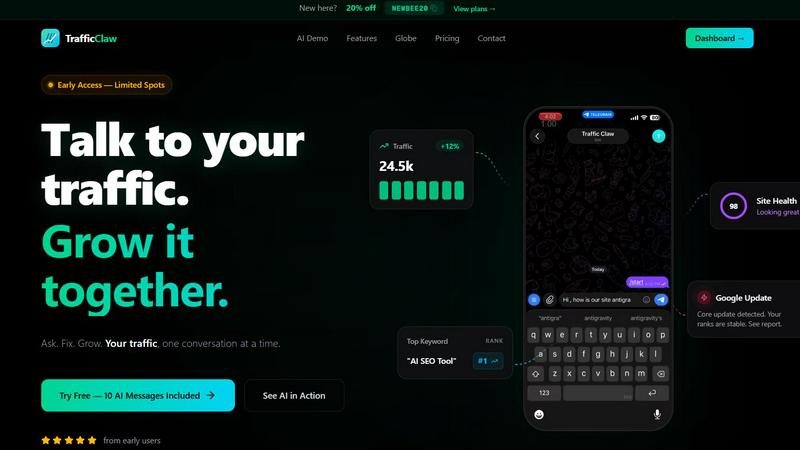
TrafficClaw transforms your SEO and analytics data into actionable insights through natural conversation, driving traffic growth effortlessly.
Last updated: April 13, 2026

URL to Any
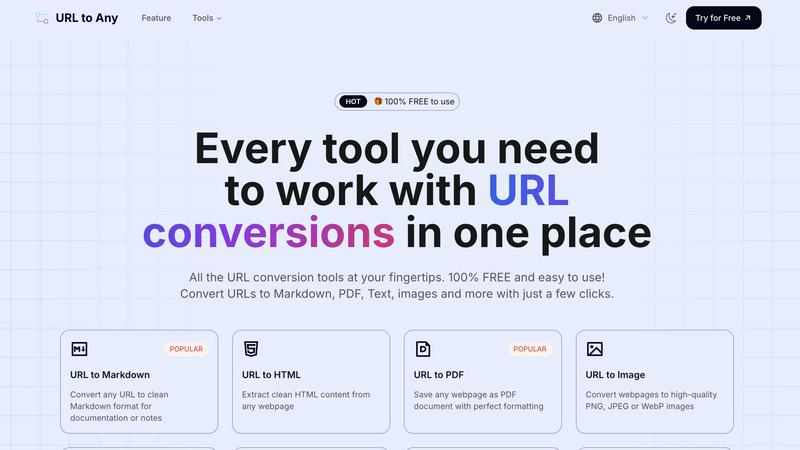
Effortlessly convert any URL into multiple formats like PDF, Markdown, and images with URL to Any's powerful tools.
Last updated: March 2, 2026
Visual Comparison
TrafficClaw
URL to Any
Feature Comparison
TrafficClaw
AI Chat
The AI Chat feature allows users to interact with their analytics data in a conversational manner. By simply typing questions in natural language, users receive instant answers, detailed charts, and actionable insights tailored to their specific queries. This eliminates the need to navigate complex analytics dashboards, making data interpretation straightforward and efficient.
SEO Intelligence
TrafficClaw offers advanced SEO intelligence capabilities, including keyword gap analysis, content decay alerts, and cannibalization detection. Users can optimize their content strategy by leveraging the AEO (Answer Engine Optimization) engine, which is designed to enhance visibility in AI-driven search results. This feature ensures users stay ahead in a competitive SEO landscape.
Analytics Dashboard
The comprehensive analytics dashboard provides a real-time overview of visitors, traffic trends, bounce rates, and conversion funnels—all in one place. Users can easily monitor their site's performance metrics without the hassle of switching between multiple platforms, making it easier to track growth and identify issues.
Site Audit
TrafficClaw's Site Audit feature conducts deep page-level audits to analyze performance scores, Core Web Vitals, and offers auto-fix suggestions. This ensures that users not only understand their site's health but also receive actionable recommendations to improve page performance and user experience.
URL to Any
URL to Markdown
This feature allows users to convert any webpage into clean and well-structured Markdown format. Ideal for documentation or note-taking, it ensures that the content retains its original formatting while being easily editable. The streamlined process makes it a popular choice for writers and developers seeking to integrate web content into their projects.
URL to PDF
With the URL to PDF feature, users can save any webpage as a PDF document with impeccable formatting. This is particularly beneficial for archiving online resources, creating reports, or sharing information in a universally accessible format. The conversion is quick, allowing users to obtain a polished document in seconds.
URL to Image
This feature empowers users to convert webpages into high-quality images in formats like PNG, JPEG, or WebP. Ideal for content creators and marketers, this tool allows for easy sharing and incorporation of visual content into presentations, social media posts, and other marketing materials.
URL to QR Code
The URL to QR Code feature generates QR codes from any URL, facilitating easy sharing of links. This is particularly useful for events, marketing campaigns, or educational purposes, allowing users to quickly disseminate information to a wider audience without requiring lengthy URLs.
Use Cases
TrafficClaw
Traffic Recovery
When website traffic experiences a sudden drop, TrafficClaw enables users to diagnose the issue swiftly. By asking the AI specific questions, users can uncover underlying problems such as technical errors or SEO issues and receive immediate recommendations for recovery.
Content Optimization
Digital marketers and content creators can use TrafficClaw to identify content decay and keyword gaps. By utilizing the SEO intelligence features, they can refine their content strategy, ensuring that all articles are optimized for maximum engagement and relevance.
Performance Monitoring
With the analytics dashboard, users can continuously monitor their website's performance metrics. This feature is crucial for businesses wanting to keep a close eye on their traffic trends, allowing them to react promptly to any fluctuations and maintain steady growth.
Site Health Improvement
Website owners can regularly perform site audits with TrafficClaw to ensure optimal site health. By receiving auto-fix suggestions and insights into Core Web Vitals, they can proactively enhance their site's performance, leading to better user experiences and improved search rankings.
URL to Any
Content Creation
Writers and bloggers can utilize URL to Any to quickly convert online articles into Markdown or PDF formats for easy editing and reference. This simplifies the documentation process and enhances productivity.
Research and Documentation
Researchers can extract valuable information from web pages and convert them into structured formats like JSON or XML for analysis. This streamlines the data collection process and aids in compiling comprehensive reports.
Marketing and Promotion
Marketers can convert web pages into images or QR codes to create engaging promotional materials. Sharing links through QR codes at events or on printed advertisements facilitates easy access to online content.
Educational Purposes
Teachers and students can leverage URL to Any to convert educational resources into PDF or text formats for offline access. This aids in resource management and enhances the learning experience by providing easily shareable content.
Overview
About TrafficClaw
TrafficClaw is an innovative AI-driven tool designed to help website owners understand and optimize their traffic. In an age where data-driven decisions are paramount, TrafficClaw stands out by providing actionable insights derived from real-time data from Google Analytics 4 (GA4) and Search Console. Instead of relying on generic advice often found in blogs, users can directly query the AI with specific questions like "Why did my traffic drop?" and receive tailored answers backed by their website's performance data. This solution is ideal for digital marketers, SEO specialists, and business owners who want to enhance their online presence and growth. With TrafficClaw, users can streamline their analytics experience, uncover hidden opportunities, and make informed decisions to drive traffic growth—all through an intuitive, conversational interface.
About URL to Any
URL to Any is an advanced web content conversion tool that revolutionizes how users interact with and repurpose online information. Designed for efficiency and ease of use, this platform enables users to convert URLs into a multitude of formats, including Markdown, PDF, HTML, images, and QR codes. It caters to a diverse audience, from content creators and developers to students and researchers, allowing them to extract and share web content seamlessly. The primary value proposition of URL to Any lies in its user-friendly interface and instant processing capabilities, which eliminate the need for complex software or extensive technical knowledge. By providing a completely free service with no registration required, URL to Any empowers users to maximize their engagement with online resources without barriers. Whether you need to save important web content for documentation, create shareable links, or simply archive information, URL to Any is the go-to solution for converting web pages into versatile formats.
Frequently Asked Questions
TrafficClaw FAQ
How does TrafficClaw connect with my Google Analytics and Search Console?
TrafficClaw simplifies the integration process by allowing users to sign in with their Google account. The tool automatically detects GA4 properties and Search Console sites, enabling a seamless setup in just 30 seconds.
What kind of insights can I expect from the AI Analyst?
The AI Analyst provides real-time insights based on your live analytics and SEO data. You can ask it anything related to your traffic and receive tailored verdicts and actionable recommendations, rather than generic advice.
Is my data safe with TrafficClaw?
Yes, your data remains secure. TrafficClaw uses read-only Google OAuth, ensuring that you maintain full control over your data. Additionally, the platform prioritizes user privacy and data security, so you can use it with confidence.
Can I try TrafficClaw for free?
Absolutely! TrafficClaw offers a free trial that includes 10 AI messages, allowing users to experience the platform's capabilities without any commitment. You can explore the features and see how it can benefit your traffic growth.
URL to Any FAQ
What formats can I convert URLs into?
You can convert URLs into various formats, including Markdown, PDF, HTML, images, JSON, XML, and more, making it versatile for different needs.
Is URL to Any free to use?
Yes, URL to Any is completely free to use, with no registration required. This accessibility encourages users to make the most of online resources without barriers.
How quickly can I convert a URL?
The conversion process is extremely fast, typically taking just seconds to complete, thanks to the optimized processing engine of URL to Any.
Is my data secure when using URL to Any?
Absolutely. URL to Any prioritizes user privacy and ensures that your data is processed securely and is not stored on their servers after conversion.
Alternatives
TrafficClaw Alternatives
TrafficClaw is an innovative tool designed for SEO and analytics enthusiasts, enabling users to interact with their data in a conversational manner. It belongs to the AI Assistants category, specifically tailored for analytics and data-driven decisions. Users often seek alternatives due to various reasons, such as pricing concerns, the need for specific features, or compatibility with different platforms and data sources. When choosing an alternative, it's essential to consider the tool’s integration capabilities with existing analytics platforms, the range of features it offers, and how well it can address the unique needs of your SEO strategy. Assessing user support and the overall user experience can also play a crucial role in finding the right fit for your requirements.
URL to Any Alternatives
URL to Any is a versatile tool that falls under the category of web content conversion solutions. It allows users to effortlessly transform online resources into various formats such as Markdown, PDF, HTML, images, and QR codes, making it an essential utility for content creators, developers, and anyone needing to repurpose web material efficiently. Users often seek alternatives to URL to Any due to factors like pricing, specific feature sets, or platform compatibility. When exploring alternatives, it's important to consider aspects such as ease of use, the range of supported formats, accessibility, and whether the service offers free options without hidden fees. Additionally, evaluating multi-language support can be crucial for users with diverse needs.