
AI Formatter
AI Formatter integrates with your workflow to instantly transform raw text into professional documents.
VisitPublished on:
October 14, 2025
Pricing:
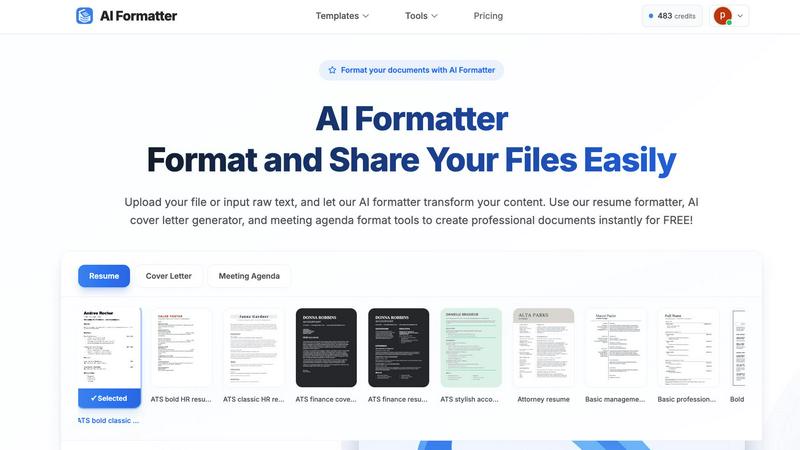
About AI Formatter
AI Formatter is a sophisticated, cloud-based SaaS platform engineered by Sun Sky LLC to automate and perfect document formatting through advanced artificial intelligence. It serves as a centralized productivity engine for professionals, job seekers, businesses, and academics who require consistently polished, professional documents. The core value proposition lies in its ability to transform unstructured raw text or uploaded files—including Word, PDF, DOCX, and TXT formats—into visually appealing, ATS-optimized documents within seconds. Built on a robust tech stack designed for seamless integration and broad compatibility, the platform eliminates the manual, time-consuming labor of formatting, saving users an average of 2+ hours per document. By standardizing document output and ensuring technical compliance with modern hiring and business systems, AI Formatter streamlines workflows, enhances professional presentation, and significantly boosts overall productivity, boasting a documented 95%+ pass rate with Applicant Tracking Systems.
Features of AI Formatter
Advanced AI-Powered Formatting Engine
At the heart of AI Formatter is a sophisticated artificial intelligence engine that intelligently parses uploaded documents or raw text input. It understands context, structure, and content hierarchy to apply perfect formatting automatically. This engine is built for compatibility, processing files up to 10MB in formats like PDF, DOC, DOCX, and TXT, and rendering them into professionally structured documents while preserving the original information and intent.
Extensive Template Library with ATS Optimization
The platform provides access to over 162 industry-specific, professional templates for resumes, cover letters, meeting agendas, and invoices. Each template is engineered not just for visual appeal but specifically for ATS (Applicant Tracking System) compatibility. This ensures that resumes and other critical documents maintain their structure and keyword integrity when parsed by automated hiring software, maximizing their chances of passing initial screening stages.
Real-Time Collaborative Editor & Multi-Format Export
Following AI processing, users gain access to a powerful, intuitive online editor for granular customization and real-time collaboration. This editor allows for precise adjustments to layout, fonts, and content. The platform supports seamless multi-format export, enabling users to download their finalized documents in universally accepted formats such as PDF and DOCX, ensuring broad software compatibility for sharing, printing, and submission.
Integrated Document Generation Tools
AI Formatter functions as a unified hub, integrating specialized tools like an AI Cover Letter Generator, Resume Formatter, Meeting Agenda Formatter, and Invoice Generator. These tools leverage the core AI engine to transform drafts or raw data into polished, business-ready documents instantly. This integration eliminates the need to switch between disparate applications, creating a streamlined workflow for all professional document needs.
Use Cases of AI Formatter
Job Seeker Resume & Cover Letter Optimization
Job seekers can upload an existing resume draft or input raw career history. AI Formatter's resume formatter and AI cover letter generator tools then optimize the content into ATS-friendly formats, applying professional styling and structure. This ensures their application materials are both visually compelling to recruiters and technically compliant with automated screening systems, dramatically improving interview callback rates.
Business Professional Meeting Management
Professionals can transform disorganized meeting notes or bullet points into a structured, professional meeting agenda in seconds. By uploading raw text or a draft, the meeting agenda format tool applies consistent formatting, creates clear sections for objectives, discussions, and action items, and produces a shareable document that enhances meeting clarity, focus, and productivity.
Academic and Research Paper Preparation
Students, researchers, and academics can use AI Formatter to ensure their papers, theses, and reports adhere to strict formatting guidelines. By inputting their text, the AI can apply consistent styles for headings, citations, spacing, and margins, saving hours of manual adjustment and allowing the author to focus on content quality rather than presentation logistics.
Freelancer and Small Business Invoice Creation
Freelancers and small business owners can quickly generate polished, professional invoices. Using the AI invoice generator, they can input client details, services rendered, and rates. The tool automatically formats this data into a clean, branded invoice template, which can then be edited, downloaded as a PDF for emailing, or saved in DOCX format for further integration into accounting software.
Frequently Asked Questions
What file formats does AI Formatter support for upload?
AI Formatter is built for broad compatibility and supports a wide range of common document formats for upload. You can directly upload files in PDF, DOC, DOCX, and plain TXT formats. The platform is engineered to parse and extract text and structural elements from these formats efficiently, with a maximum file size limit of 10MB per upload to ensure optimal processing performance.
How does the AI ensure my resume is ATS-optimized?
The AI Formatter engine and its specialized resume templates are developed with ATS (Applicant Tracking System) technical compliance as a core requirement. The AI applies clean, parsable formatting, avoids complex layouts, graphics, or columns that can confuse ATS software, and structures content with standard heading hierarchies. This technical optimization, combined with content-aware formatting, results in the platform's high documented pass rate with these automated systems.
Can I edit my document after the AI formats it?
Absolutely. Following the initial AI formatting process, your document is rendered within AI Formatter's full-featured, real-time online editor. This intuitive editor provides complete control, allowing you to make granular customizations to text, fonts, spacing, layout, and sections. You can fine-tune the AI's work to match your precise preferences before exporting the final version.
Is my document content secure and private on AI Formatter?
Yes. AI Formatter, as a professional SaaS platform, is built with data security and user privacy as foundational principles. The cloud-based infrastructure employs standard encryption protocols for data in transit and at rest. Document processing is performed securely, and we do not claim ownership of your content. You maintain full rights to the documents you create and format on the platform.
Similar to AI Formatter

Jev turns text or JSON into Choice, Score and Noul answers with probabilities. Build decision flows and call the API.

Apps and files on an infinite canvas where people and AI agents work together.

A notepad calculator that reads plain text and gives instant answers as you type, free on Mac, iOS, Windows, Linux, Android and Web.

Clever AI Humanizer is a free tool that makes AI-generated text sound more human.

AI Email Filter sorts incoming mail into folders using plain-language prompts you write. Works with any IMAP mailbox; bring your own LLM if you want.

No-code 2D game editor: visual node logic, drag-and-drop scenes, live preview. Exports to Windows, macOS, Linux, Android, iOS, Web.

Free collection of online developer utilities, code formatters, and digital converters designed to streamline your daily workflow.

Online tally counter for tracking attendance, workouts, inventory, visitors, sports scores, habits, and everyday counting tasks.