
PseudoRun
PseudoRun is the free, ad-free IGCSE pseudocode editor with real-time validation and debugging.
Visit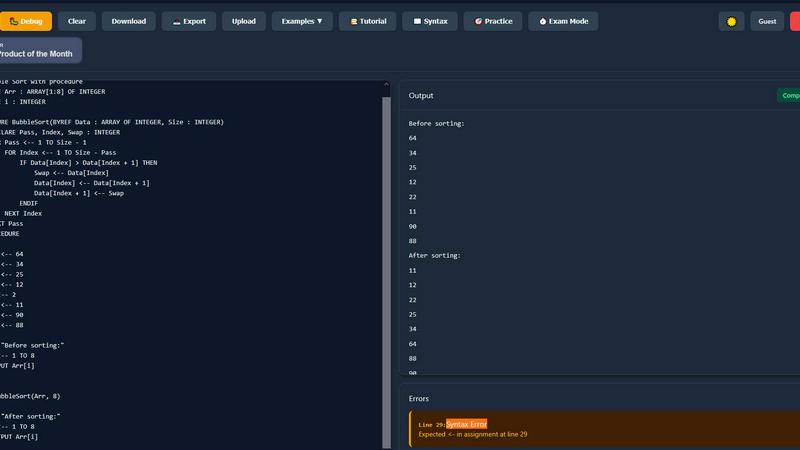
About PseudoRun
PseudoRun is a purpose-built, browser-based platform engineered to provide a seamless and integrated environment for mastering IGCSE Computer Science pseudocode. It functions as a comprehensive editor, simulator, and debugger, specifically architected to align with the Cambridge IGCSE pseudocode specification. The platform's core value proposition lies in its ability to bridge the gap between theoretical algorithm design and practical execution, eliminating the dependency on traditional, complex programming language setups. Its tech stack is designed for universal compatibility, running entirely in modern web browsers, which ensures immediate accessibility from any device without installation. The primary user base comprises IGCSE students, educators, and self-learners seeking a focused tool for exam preparation. By offering real-time code validation, step-by-step execution, and a vast library of IGCSE-aligned practice problems, PseudoRun provides a structured and distraction-free ecosystem that directly translates algorithmic thinking into exam-ready skills. Its commitment to a zero-ad, fully-featured free model further ensures an uninterrupted learning experience, making it an indispensable tool in the IGCSE Computer Science tech stack.
Features of PseudoRun
IGCSE-Specification Compliant Editor
The editor is the cornerstone of PseudoRun, built to strictly adhere to the syntax and conventions of the Cambridge IGCSE pseudocode standard. It provides syntax highlighting, auto-indentation, and intelligent code completion tailored specifically for IGCSE constructs like DECLARE, CASE...OF, and REPEAT...UNTIL. This ensures that students practice and write code exactly as required in their examinations, preventing the formation of bad habits from using generic programming language syntax.
Real-Time Validation & Error Detection
Integrated directly into the editing environment, this feature performs continuous static analysis on the pseudocode. It instantly flags syntax errors, undefined variables, and logical inconsistencies specific to the IGCSE pseudocode specification. This immediate feedback loop allows for on-the-fly correction and learning, significantly reducing debugging time and helping students understand the precise rules of the pseudocode language before they run their programs.
Interactive Step-by-Step Debugger
This advanced tool allows users to execute their pseudocode line-by-line, providing deep visibility into the program's state. It features a call stack viewer, variable tracker that updates in real-time, and control flow visualization. This granular level of inspection is critical for understanding complex algorithms involving loops, conditionals, and procedures, enabling students to deconstruct and comprehend the exact sequence of operations and data changes.
Integrated IGCSE Practice Library & Exam Mode
PseudoRun includes a comprehensive, cloud-accessible repository of 50+ curated practice problems and examples that mirror IGCSE exam patterns. Coupled with an "Exam Mode" timer, this feature creates a simulated exam environment. Students can practice solving problems under timed conditions, building both speed and confidence, while all their work is automatically saved to their free cloud account for review across any compatible device.
Use Cases of PseudoRun
Independent IGCSE Exam Preparation
Students can use PseudoRun as a primary study tool to independently practice past paper algorithms and textbook exercises. The platform's spec-aligned editor and instant feedback allow for self-directed learning, enabling students to identify weaknesses, practice efficiently, and track their progress through saved programs in their personal cloud storage, all tailored to the IGCSE syllabus.
Classroom Teaching & Live Demonstration
Educators can integrate PseudoRun into their lessons for live coding demonstrations. The step-by-step debugger is perfect for visually deconstructing algorithms on a projector, showing variable states and flow control in real-time. Teachers can also create and share problem sets with students, leveraging the platform to provide a standardized, accessible practice environment for the entire class.
Algorithm Design & Prototyping
Beyond rote practice, students and learners can use PseudoRun as a sandbox for designing and testing their own algorithms. The ability to quickly write, run, and debug pseudocode without setup overhead makes it an ideal tool for prototyping logic before potentially translating it into an actual programming language for coursework or projects.
Revision & Conceptual Reinforcement
In the lead-up to exams, students can utilize the platform for focused revision. They can re-run their saved programs, use the debugger to step through tricky algorithms they previously wrote, and tackle new problems from the practice library under timed "Exam Mode" conditions to reinforce concepts and improve time management skills.
Frequently Asked Questions
Is PseudoRun really free with no hidden costs?
Yes, absolutely. PseudoRun operates on a promise of being completely free, with zero advertisements and no premium paywalls. All features, including the IGCSE editor, debugger, cloud storage, and practice library, are available at no cost. The platform is sustained by community support, not user fees.
How does PseudoRun ensure compatibility with the IGCSE exam?
The platform's core parsing engine and syntax definitions are built exclusively around the official Cambridge IGCSE Computer Science pseudocode specification. The editor, error checks, and example problems are all designed to mirror the language and patterns used in past papers and syllabus materials, ensuring direct exam relevance.
Do I need to install any software or create an account?
No installation is required. PseudoRun is a web-based application that runs directly in your browser. While you can use many features immediately without an account, creating a free account is recommended to unlock cloud storage, allowing you to save and access your programs from any device seamlessly.
Can I use PseudoRun on a tablet or smartphone?
Yes, PseudoRun is built with a responsive design, making it compatible with tablets and larger smartphones. The interface adapts to different screen sizes, allowing you to write, edit, and run pseudocode on the go, although a physical keyboard is generally recommended for extensive coding sessions.
Similar to PseudoRun


Turn Long YouTube Videos into Quick AI Summaries in Seconds.


Name 100 Women is a fast browser challenge game using Wikidata integration for instant validation as you race to name 100 real women from memory.

Generate random animals with pictures, facts, and category filters for prompts, games, and wildlife learning.


Convinco is an invisible AI sales copilot that integrates with your tech stack to deliver real-time objection handling and tactical phrasing during.

TaleHug transforms a child's voice, drawing, or idea into a customizable AI storybook for safe co-reading.