
retroshelf
Retroshelf automatically logs your retro handheld gaming sessions, tracks trends, and connects you with fellow players effortlessly.
Visit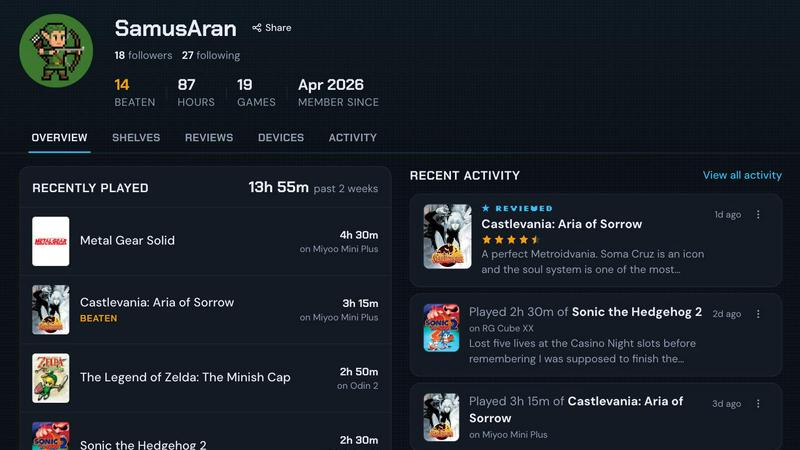
About retroshelf
retroshelf is an innovative play-tracking and discovery app tailored for retro handheld gaming enthusiasts. It streamlines the gaming experience by providing users with a public shelf that showcases the games they are currently playing, have completed, are reviewing, and are replaying, all while preserving device context. This eliminates the need for laborious tracking across multiple platforms, spreadsheets, or relying on memory alone. With retroshelf, every game session is logged automatically through a small plugin that runs on the user's handheld device, documenting key details such as game title, playtime, and the specific device used. The result is a browsable history that allows gamers to reflect on their gaming journey, discover popular titles, and connect with a community of like-minded players. By transforming scattered gaming sessions into a cohesive timeline, retroshelf enhances the enjoyment and organization of retro gaming.
Features of retroshelf
Automatic Session Logging
Every game session is logged effortlessly through a lightweight plugin that runs on your handheld device. This feature ensures that all essential details, including game title, playtime, and the device used, are captured automatically, allowing users to focus solely on their gaming experience.
Browsable Gaming Timeline
retroshelf compiles all gaming sessions into a comprehensive timeline that is easy to navigate. Users can access a detailed log of what they played, where they played it, and what notes they left, making it simple to revisit past experiences and milestones in their gaming journey.
Community Discovery
With retroshelf, users can see which games are trending among other handheld players. This community-driven feature highlights popular titles and devices, helping users discover new games worth trying based on what others are playing, finishing, and replaying.
Device-Specific Reviews
Users can enhance their gaming insights by leaving reviews that include the handheld device used for each game. This feature provides context to star ratings and helps others understand how different devices may influence the gaming experience, ensuring more informed decisions about what to play next.
Use Cases of retroshelf
Casual Gamers
Casual gamers can benefit from retroshelf by effortlessly tracking their gaming sessions across multiple handheld devices. The automatic logging feature allows them to enjoy gaming without worrying about keeping detailed notes, making it easier to return to games they love.
Competitive Players
For competitive gamers, retroshelf offers the ability to analyze playtime and sessions across various titles. By reviewing their gaming history, they can identify patterns, strengths, and weaknesses in their gameplay, leading to improved performance over time.
Community Connectors
Players looking to connect with others in the retro gaming community will find retroshelf invaluable. The platform facilitates interactions and discussions around trending games, fostering a sense of community and shared interests among handheld gaming enthusiasts.
Game Reviewers
Individuals who enjoy writing reviews can use retroshelf to provide context for their ratings by linking them to specific handheld devices. This feature allows them to craft more comprehensive reviews that can guide others in their gaming choices while contributing to a richer community dialogue.
Frequently Asked Questions
How does retroshelf automatically log my gaming sessions?
retroshelf uses a lightweight plugin that you place on your handheld device's SD card. This plugin runs in the background while you play, capturing important details about your gaming sessions automatically.
What handheld devices are supported by retroshelf?
Currently, retroshelf supports devices running muOS and OnionOS. This compatibility allows a wide range of retro handheld devices to seamlessly integrate with the app for tracking and discovery.
Can I customize my gaming shelf on retroshelf?
Yes, users can customize their public shelves to showcase the games they are currently playing, have completed, or are reviewing. This personal touch enhances the browsing experience for others in the community.
How can I join the closed beta for retroshelf?
To join the closed beta, simply visit the retroshelf website and sign up. The beta is being rolled out in phases, allowing early adopters to provide feedback that shapes the future of the platform.
Explore more in this category:
Similar to retroshelf

Snapkin is a calorie tracker you use by photographing your plate.

Adopt a virtual baby who grows, learns, and remembers you.

Anonymous Instagram viewer. Browse profiles, stories, and posts without an account or leaving a trace.

Name 100 Women is a fast browser challenge game using Wikidata integration for instant validation as you race to name 100 real women from memory.

Generate random animals with pictures, facts, and category filters for prompts, games, and wildlife learning.

GeoRank merges satellite and station data to map sunshine, taxes, and costs for 190 countries at 5.5 km resolution.

PrettyScale runs nine private AI beauty tools locally in your browser with zero uploads and no account required for instant facial analysis.

Burge Coffee integrates a home roasting guide, batch tracking, and a roaster map into a single tech stack with zero accounts required.