
Todowing
Chrome extension for Todoist that nests sub-tasks under their parents in Today, Upcoming, Filter and Label views.
VisitPublished on:
October 28, 2026
Pricing:
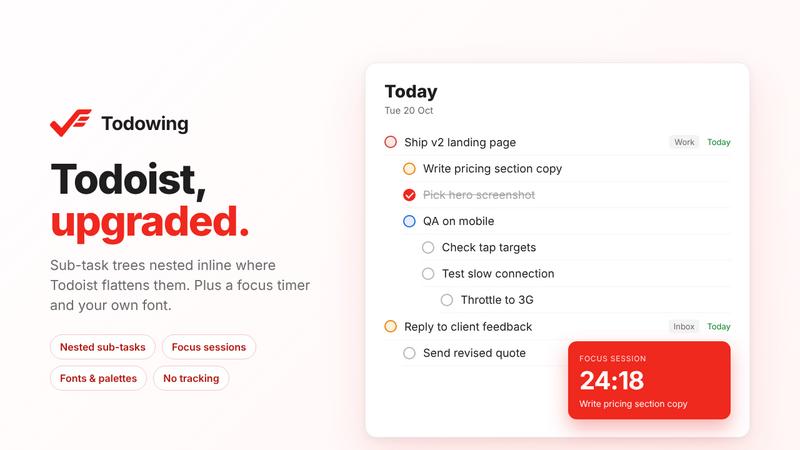
About Todowing
Todoist shows sub-tasks as flat rows in Today, Upcoming, filter and label views, so you lose track of which parent each one belongs to. Todowing is a Chrome extension that nests them under their parents in those views, up to four levels deep. Each sub-task row shows its own due date, priority and labels, and you can check tasks off or reopen them without leaving the list.
The free plan covers nesting, row details, seven dark theme palettes with spacing and corner options, and a text size slider from 85% to 200%. It is limited to 5 sub-task rows per top-level task and needs no account. The lifetime unlock costs $19.99 once, with no subscription. It removes the row limit and adds inline sub-task editing (add, rename, reorder), a hide-done toggle, filing a task under a parent in another project, focus sessions with a countdown timer, time estimates, a notes pad above Today, a font picker with fifty Google Fonts, and read-only Apple Calendar feeds in Today. Refunds are available within 14 days.
Todowing runs in Chrome on the Todoist web app and works with any Todoist plan. It does not run in the downloadable Todoist desktop app. Your Todoist API token stays in the browser and goes only to the official Todoist API. Tasks never touch Todowing's servers, and the extension has no analytics or tracking.
It is made for Todoist users who rely on sub-tasks and want them visible in the views they work from. Todowing is an unofficial companion and is not affiliated with Doist.
Similar to Todowing

Clone any webpage pixel-perfect, export HTML/CSS/ZIP or React/Vue components.

See every app and what it's using in plain English, and end or slow down the one that's hogging your Mac.

Clip pages, take full-page screenshots and batch-capture list data to Notion, Feishu, Obsidian, Markdown, CSV or JSON.

Search tabs, Chrome bookmarks and history, run browser commands, and save webpages and social posts locally—no account.

Learn Morse code on a machine you can press. Write and send messages, turn Morse into text and back, and key Morse in any app on your Mac.

Every key you press lights up on an on-screen keyboard, and each shortcut is named as you press it.

Free Online Screen Test Tool - Instantly diagnose dead pixels, lines, color issues, and flickering. Multiple test modes, no download needed.
