
Afterly Plan vs MeetingMind
Side-by-side comparison to help you choose the right product.

Afterly Plan
Afterly Plan integrates expert guidance to streamline probate and estate settlement for executors.
Last updated: February 28, 2026

MeetingMind
MeetingMind is a macOS AI assistant that auto-records and summarizes Zoom meetings into searchable notes.
Last updated: March 1, 2026
Visual Comparison
Afterly Plan

MeetingMind
Feature Comparison
Afterly Plan
Phase-Based Action Plan
The platform structures the entire post-loss process into clear, sequential phases, such as Immediate Steps, Funeral & Memorial, and Financial Affairs. This architectural approach breaks down monumental tasks into a defined workflow, providing a visual timeline and prioritized checklist. Users progress through a curated roadmap, ensuring no critical step is overlooked while adapting the plan to their specific situation and jurisdiction.
Secure Digital Document Hub
Afterly Plan provides an encrypted, centralized vault for organizing and storing essential documents. This feature supports the upload and categorization of wills, deeds, account statements, death certificates, and other vital records. It mitigates the risk of lost paperwork and creates a single source of truth, facilitating easier sharing with attorneys, accountants, or family members as needed during the settlement process.
Integrated Expert Guidance Library
The platform embeds a comprehensive knowledge base curated by estate professionals. This library offers plain-language explanations of probate, executor responsibilities, legal terminology, and financial procedures. It acts as an always-available reference, reducing dependency on frantic internet searches and providing trustworthy, context-sensitive information directly within the relevant step of the action plan.
Interactive Checklists & Progress Tracking
Dynamic, customizable checklists form the core of the user interface, allowing individuals to track completed, pending, and upcoming tasks. The system offers conditional logic, showing or hiding tasks based on user input (e.g., "Was there a will?"). This interactive tracking provides a sense of control and accomplishment, visually mapping progress through an otherwise daunting journey.
MeetingMind
Automatic Zoom Detection & Recording
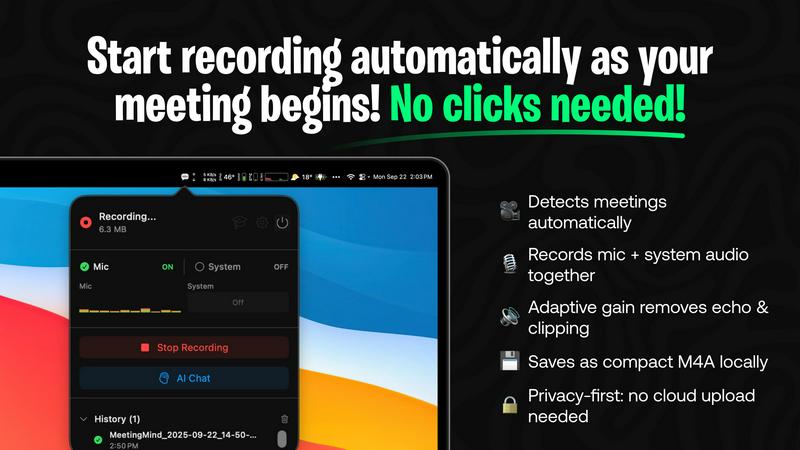
The application operates as a lightweight menu bar utility that continuously monitors system activity. Using advanced heuristics, it automatically detects when the user joins or starts a Zoom meeting, initiating recording without any manual clicks. It captures a high-fidelity audio stream by recording both the user's microphone input and the system's audio output simultaneously, employing adaptive gain control for optimal clarity. This hands-free operation is the foundation of its seamless integration into the user's workflow.
On-Device or Cloud AI Processing
MeetingMind offers unparalleled flexibility in its AI processing backend. Users can opt for complete privacy by running open-source large language models (LLMs) locally via an Ollama integration, ensuring no meeting data ever leaves their Mac. Alternatively, for more powerful summarization, they can connect to cloud-based models through the OpenRouter gateway. This hybrid architecture allows teams to balance performance requirements with stringent data security and compliance policies.
Interactive AI Chat & Live Transcription
During and after the meeting, users can interact with the captured content through an integrated AI chat interface. This allows for real-time querying of the discussion, such as asking for clarifications on points made or requesting immediate summaries of specific topics. The live transcription appears in the app with speaker attribution, creating an interactive transcript that serves as a live knowledge base for the ongoing conversation.
Markdown Export & Structured Output
All meeting intelligence is processed and exported in well-formatted markdown (.md) files. The AI doesn't just transcribe; it structures the output to include a concise summary, a bulleted list of key takeaways, clearly defined action items with potential owners, and the full, timestamped transcript. This format ensures immediate usability in note-taking apps like Obsidian or Notion, and for version control in developer workflows, making the information easy to search, share, and archive.
Use Cases
Afterly Plan
The Unprepared Executor
An individual named as executor in a will but with no prior experience in estate law or administration uses Afterly Plan. The platform provides them with a definitive, step-by-step protocol, explaining their fiduciary duties, court deadlines, and the order of operations for asset collection, debt payment, and distribution, transforming an overwhelming responsibility into a managed project.
The Grieving Immediate Family
A surviving spouse or adult child is emotionally overwhelmed and unable to focus on logistical details. They use the platform's compassionate, guided workflow starting with "Immediate Steps," which helps them notify relevant parties, plan a funeral using provided checklists, and locate critical documents without having to mentally organize the chaos themselves.
Managing Digital & Financial Assets
Families struggle to locate and manage a deceased loved one's online accounts, subscriptions, and financial assets. Afterly Plan's structured modules guide them through creating an inventory, providing templates for contacting financial institutions, and offering steps for handling passwords, recurring bills, and closing accounts systematically.
Coordinating with Professional Advisors
An executor or family representative uses Afterly Plan to organize all documents and task statuses in one secure hub. This organized digital estate file can then be efficiently shared with the family's attorney, CPA, or financial advisor, streamlining communication, reducing billable hours spent on organization, and ensuring all professionals are working from the same information.
MeetingMind
Daily Engineering Stand-ups and Sprint Meetings
For software development teams conducting daily syncs or sprint planning on Zoom, MeetingMind automatically captures detailed technical discussions, feature decisions, and bug reports. The AI-generated action items ensure every ticket and TODO is clearly documented and assigned. Engineers can later query the transcript to recall specific implementation details or API decisions without relying on fragmented manual notes.
Client Consultations and Sales Demos
Professionals in consulting, sales, or agency roles use MeetingMind to fully focus on the client interaction during Zoom calls. The tool faithfully records every client requirement, concern, and feedback. Post-meeting, the AI summary highlights client pain points and agreed-upon next steps, enabling the rapid creation of accurate follow-up emails, proposals, and project briefs directly from the structured markdown output.
Remote Academic Research and Interviews
Researchers and students conducting qualitative interviews or collaborative research meetings over Zoom benefit from the verbatim, speaker-attributed transcript. The local processing option via Ollama is crucial for handling sensitive, unpublished research data confidentially. The searchable transcripts facilitate thematic analysis and easy citation of sources directly from the recorded conversation.
Executive Briefings and Strategic Planning
For leadership teams and board meetings where strategic direction is set, capturing nuance and context is vital. MeetingMind records the entire high-level discussion, and the AI chat feature allows executives to ask complex questions post-meeting to surface insights across different discussion threads. The concise summary and action items provide a clear, authoritative record for aligning the entire organization.
Overview
About Afterly Plan
Afterly Plan is a specialized digital platform engineered to provide structured, step-by-step guidance through the complex administrative and logistical tasks following a death. It functions as an operational system for grief, translating the overwhelming process of estate settlement, probate, and executor duties into manageable, sequential actions. The platform is architected for individuals and families who are navigating loss, offering them clarity and organization when they need it most. Its core value proposition lies in filling the critical gap left by traditional estate plans, which are legal documents but not actionable day-by-day guides. Afterly Plan covers the immediate, practical necessities—from funeral planning and document location to managing financial accounts and understanding legal procedures—all within a secure, cloud-based environment. Built with direct input from estate professionals, it ensures reliable, expert-informed workflows. By integrating checklists, timelines, and secure document organization, Afterly Plan reduces cognitive load during a highly stressful time, allowing users to delegate mental energy from logistics to healing.
About MeetingMind
MeetingMind is a sophisticated, AI-native meeting intelligence application built exclusively for macOS. It functions as an autonomous meeting recorder and analyzer, specifically engineered to integrate seamlessly with the Zoom conferencing platform. The core value proposition is its ability to capture every detail of a meeting without user intervention, freeing professionals to engage fully in the discussion. It automatically detects when a Zoom meeting starts and begins recording both microphone and system audio, generating real-time, speaker-attributed transcripts. The application leverages a powerful, on-device AI stack, offering users a choice between local processing via Ollama models or cloud-based inference through OpenRouter. This ensures sensitive meeting data can remain entirely private on the user's Mac. The output is transformed into clean, searchable markdown documents containing full transcripts, AI-generated summaries, and extracted action items. Designed for individual professionals, remote teams, and organizations that rely on Zoom for daily collaboration, MeetingMind turns ephemeral conversations into structured, actionable knowledge assets, ensuring critical insights are never lost.
Frequently Asked Questions
Afterly Plan FAQ
How is Afterly Plan different from an estate plan?
An estate plan (will, trust) is a set of legal documents that instructs courts on your final wishes. Afterly Plan is the operational guide that helps your family execute those wishes. It addresses the immediate, practical logistics—finding documents, planning services, managing accounts—that legal documents do not cover, ensuring the plan is actionable.
Is my sensitive data secure on the platform?
Yes. Afterly Plan employs bank-level encryption for data both at rest and in transit. The company adheres to a strict privacy-first policy, meaning your personal information and uploaded documents are never sold or shared. The platform is designed as a secure vault for organizing this critical information during the settlement process.
Do I need to be tech-savvy to use Afterly Plan?
No. The platform is designed with a user-friendly, guided interface that requires no technical expertise. It uses simple language, clear step-by-step instructions, and intuitive checklists. The complexity of the estate process is handled by the platform's backend logic, presenting users with only the next actionable task in a simple format.
Can Afterly Plan provide legal or financial advice?
Afterly Plan is not a law firm or financial advisory service. It provides educational guidance, checklists, and organizational tools built with input from professionals. For specific legal, tax, or financial advice pertaining to your unique situation, the platform guides you on when and how to consult with licensed attorneys, CPAs, or other qualified experts.
MeetingMind FAQ
How does the automatic Zoom detection work?
MeetingMind runs as a background service on your macOS system. It uses a combination of system-level APIs to detect audio session changes and process names associated with Zoom meetings. When it identifies a meeting is active, it automatically initiates the recording process for both microphone and system audio, requiring zero manual intervention from the user after the initial setup and permission grants.
What are the differences between local (Ollama) and cloud (OpenRouter) AI?
The local Ollama option runs open-source LLMs directly on your Mac's hardware (CPU/GPU). This provides 100% data privacy as no information is transmitted externally, but it requires sufficient system resources and may have slower processing times for very long meetings. The cloud OpenRouter option sends the transcript to a selected, powerful cloud model for processing, offering faster and often more sophisticated summaries, but the data leaves your device.
Is there a free version available?
Yes, MeetingMind offers a fully-featured free tier that includes 60 minutes of recording time per day. This includes automatic Zoom detection, live transcription, AI summaries using the chosen backend, and local processing. It is designed to be perpetually free, perfect for daily short meetings like stand-ups. An unlimited, one-time purchase upgrade is available for users requiring longer recording sessions.
What are the system requirements and compatibility?
MeetingMind is a native macOS application available on the Mac App Store. It requires macOS 14.0 (Sonoma) or later. The application is specifically engineered for compatibility with the Zoom conferencing application. For optimal performance with the local Ollama AI feature, a Mac with Apple Silicon (M-series chips) is recommended due to their superior neural engine capabilities for efficient AI inference.
Alternatives
Afterly Plan Alternatives
Afterly Plan is a specialized productivity and management platform designed to guide individuals through the complex administrative and emotional tasks following a loss. It provides a structured, step-by-step framework for handling probate, estate duties, and memorial planning, integrating checklists and expert guidance into a single workflow. Users often explore alternatives to find a solution that better aligns with their specific technical ecosystem or budget. Common considerations include the need for deeper integration with existing legal or financial software stacks, a preference for a different pricing model, or requirements for more advanced collaborative features for dispersed family members. When evaluating an alternative, prioritize platforms with robust API support and compatibility with common cloud storage and document management systems. Assess the depth of the platform's feature set against your specific procedural needs, and ensure its security protocols and data handling policies meet the sensitive nature of estate management.
MeetingMind Alternatives
MeetingMind is a macOS-native AI meeting assistant in the productivity and management category. It specializes in auto-recording and transcribing Zoom meetings, using on-device or cloud AI to generate searchable summaries and action items directly from your desktop. Users often explore alternatives for various reasons, including budget constraints, the need for cross-platform compatibility beyond macOS, or specific feature requirements like integration with other video conferencing tools like Teams or Google Meet. Some may seek different AI models, more extensive team collaboration features, or a different approach to data privacy and storage. When evaluating alternatives, key considerations should include the supported operating systems and conferencing platforms, the underlying transcription and AI technology stack, data processing location (local vs. cloud), and the flexibility of the output formats. It's also crucial to assess how well a tool integrates into your existing workflow and tech ecosystem.