
AskFormulas vs LuxSign
Side-by-side comparison to help you choose the right product.

AskFormulas
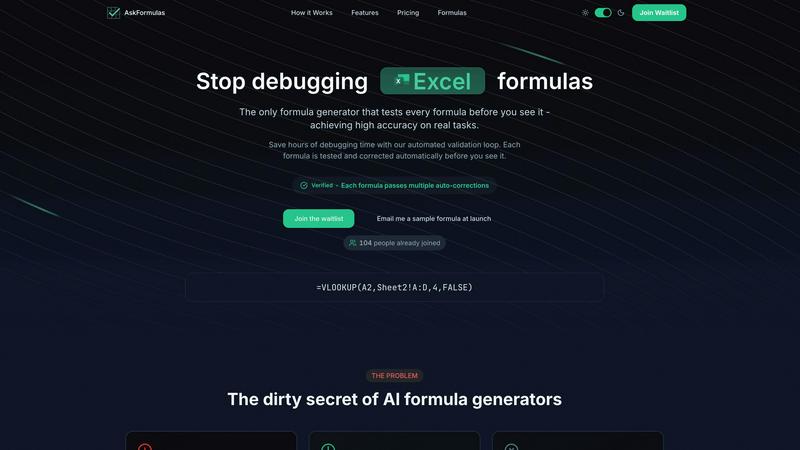
AskFormulas generates and validates Excel and Google Sheets formulas with guaranteed accuracy.
Last updated: February 28, 2026

LuxSign enables secure, legally binding electronic signatures for documents across the EU, all hosted in Luxembourg.
Last updated: February 27, 2026
Visual Comparison
AskFormulas
LuxSign

Feature Comparison
AskFormulas
Proprietary Validation Loop
This is the core technological differentiator of AskFormulas. Every user request passes through a rigorous, automated 3-step process: natural language parsing, execution on synthetic test data in a secure sandbox, and iterative auto-corrections. This loop continuously tests and fixes errors like #REF! or #VALUE! until the formula is fully functional, guaranteeing a verified output with over 95% accuracy before the user ever sees it, directly addressing the high failure rates of other generators.
Full-Stack Spreadsheet Compatibility
AskFormulas is built for heterogeneous data environments, offering native support for both Microsoft Excel and Google Sheets. A simple one-click toggle allows users to switch between platforms, and the system automatically adjusts the formula syntax (e.g., converting VLOOKUP structures for Excel or implementing ARRAYFORMULA for Sheets). This ensures seamless integration regardless of an organization's primary spreadsheet software, making it a versatile tool for any tech stack.
Intelligent Error Detection & Auto-Correction
Beyond simple generation, the platform proactively identifies and resolves formula errors. When the validation sandbox detects a common error like #REF!, #VALUE!, or #N/A, the system doesn't just report it; it intelligently diagnoses the cause—such as an incorrect range reference—and automatically applies corrections through multiple iterations until a working formula is produced, saving users from manual debugging.
Integrated Workflow Tools
AskFormulas enhances productivity with built-in utilities designed for continuous use. This includes a one-click copy function for instant pasting into live spreadsheets and an automatic formula history that saves the user's last 10 generated formulas. This creates a personal, retrievable formula library, streamlining workflow and ensuring no work is lost, which is critical for audit trails and repetitive task automation.
LuxSign
Multiple Signature Methods
LuxSign provides flexibility in how users can sign documents. You can draw your signature using a mouse, type your name, or upload an image of your signature. This versatility ensures that users can choose the method that suits them best, making the signing process quick and efficient.
Advanced Security
Security is paramount at LuxSign. The platform employs industry-standard encryption for documents during upload, storage, and transmission. This ensures that sensitive information remains protected at all times, and secure servers housed in Luxembourg guarantee compliance with EU data protection regulations.
Complete Audit Trail
LuxSign offers a comprehensive audit trail that logs every action taken on a document. This includes timestamps, IP addresses, and signer information, providing transparency and aiding in compliance verification. This feature is crucial for organizations that need to ensure accountability and traceability in their document signing processes.
Collaboration Workspaces
For teams needing to work together on documents, LuxSign includes collaboration workspaces. These shared environments allow team members to organize documents in folders, manage member access, and collaborate seamlessly on signing workflows. This feature enhances teamwork and streamlines the document management process.
Use Cases
AskFormulas
Financial Modeling & Analysis
Financial analysts building complex discounted cash flow (DCF) models, variance analyses, or consolidation reports can describe logic in plain English. AskFormulas generates and validates intricate formulas involving XLOOKUP, INDEX/MATCH, and nested IF statements, ensuring absolute accuracy in calculations that underpin critical investment decisions and financial forecasts, directly impacting data integrity.
Automated Business Reporting
Revenue operations managers, sales analysts, and marketing teams can automate weekly and monthly reports. By requesting formulas to summarize data, calculate conversion rates, or segment customer cohorts, they receive verified formulas that work immediately in their Google Sheets or Excel reports, eliminating hours of manual formula writing and debugging, and enabling faster, reliable insights.
SMB Operations & Administration
Small business owners or office managers who lack deep technical expertise in spreadsheet functions can use AskFormulas to create invoices, calculate payroll taxes, manage inventory, or track expenses. The plain-English interface and guaranteed verified formulas democratize advanced data manipulation, allowing them to build efficient systems without needing to learn complex formula syntax.
Data Cleaning & Preparation
Data analysts and scientists preparing datasets for analysis often spend significant time on data cleaning tasks. AskFormulas can quickly generate validated formulas for tasks like extracting substrings with LEFT/RIGHT/MID, converting text to dates, removing duplicates, or conditional formatting, accelerating the data preparation phase and ensuring clean, analysis-ready data.
LuxSign
Real Estate Transactions
Real estate professionals can use LuxSign to facilitate the signing of contracts and agreements efficiently. The ability to send documents to multiple signers ensures that transactions can be completed swiftly, reducing delays in closing deals.
Legal Contracts
Law firms can leverage LuxSign to manage their legal documentation, ensuring that all contracts are signed securely and in compliance with regulatory requirements. The complete audit trail helps maintain accountability and compliance for legal organizations.
Human Resources
HR departments can utilize LuxSign for onboarding paperwork, employment contracts, and policy acknowledgments. The platform's features enable quick document signing, which can streamline the hiring process and improve employee experience.
Financial Services
Financial institutions can use LuxSign to manage agreements and contracts with clients securely. The platform's compliance with eIDAS SES standards ensures that all electronic signatures are legally valid, facilitating smooth business transactions.
Overview
About AskFormulas
AskFormulas is a precision-engineered AI tool designed to solve the critical problem of broken spreadsheet formulas, a common flaw in existing AI formula generators which suffer from 40-60% error rates. Its core innovation is a proprietary, automated validation loop that guarantees a "Verified" formula every time. The platform operates by allowing users to describe their calculation need in plain English. The AI then generates the appropriate formula, tests it against synthetic data in a secure sandbox environment, and performs iterative auto-corrections on errors like #REF! and #VALUE! until it functions perfectly, achieving an accuracy rate exceeding 95%. Built for seamless integration into modern data stacks, AskFormulas offers full-stack compatibility with both Microsoft Excel and Google Sheets, featuring a one-click syntax switch. It is engineered for professionals who depend on accurate and efficient data manipulation, including financial analysts building complex models, revenue managers automating reports, SMB owners lacking deep Excel expertise, and any user tired of wasting hours debugging faulty formulas. With features like formula history tracking and one-click copy, AskFormulas transforms formula creation from an error-prone task into a reliable, efficient, and integrated workflow component.
About LuxSign
LuxSign is an advanced electronic signature platform designed specifically for businesses that prioritize security and compliance. Developed in Luxembourg, it offers a robust, cloud-based solution that ensures end-to-end encryption of all documents, with data storage strictly within the country's borders for full GDPR compliance. LuxSign is tailored for organizations that need to manage contracts and agreements efficiently while meeting regulatory standards across the European Union. By adhering to eIDAS SES standards, LuxSign guarantees the legal validity of signatures for contracts throughout the EU. The platform's user-friendly interface allows for seamless document management, making it ideal for professionals, small teams, and large enterprises alike. With features like parallel or sequential signing workflows, drag-and-drop functionality for signature placement, and automated notifications, LuxSign enhances productivity while maintaining the highest security measures.
Frequently Asked Questions
AskFormulas FAQ
How accurate are the generated formulas?
AskFormulas guarantees an accuracy rate exceeding 95% for real-world tasks. This high reliability is achieved through our proprietary validation loop, which automatically tests and iteratively corrects every formula in a secure sandbox environment before presenting it to the user as "Verified." This process directly targets and eliminates the 40-60% error rates common in other AI formula generators.
Does it work with both Excel and Google Sheets?
Yes, AskFormulas is built for full-stack compatibility. It natively supports both Microsoft Excel and Google Sheets. Users can switch between the two platforms with a single click, and the system will automatically adjust the formula syntax to be correct for the selected environment, ensuring seamless integration into any existing data workflow.
How does the validation loop work?
The validation loop is a 3-step automated process. First, your natural language request is parsed into formula intent. Second, the generated formula is executed against synthetic template data in a secure, isolated sandbox. Third, if any errors (like #REF!) are detected, the system performs automatic corrections and retests the formula. This loop continues until the formula passes all tests and is marked as "Verified."
What happens if my formula request is very complex?
AskFormulas is designed to handle a wide range of formula complexities, from simple sums to advanced nested functions and array formulas. The AI is trained to understand context, and the validation loop is particularly crucial for complex requests, as it systematically tests and corrects logic errors, range issues, and syntax problems that are common in intricate formulas, ensuring a working result.
LuxSign FAQ
Is LuxSign compliant with GDPR?
Yes, LuxSign is fully GDPR compliant. All documents are encrypted and stored in Luxembourg, adhering to local data protection laws to ensure your privacy.
Can I sign documents on mobile devices?
Absolutely! LuxSign is optimized for mobile and tablet use, allowing you to sign documents anytime and anywhere with a touch-friendly interface.
What file formats does LuxSign support?
LuxSign supports various file formats, including PDF, DOC, and DOCX. You can easily upload files up to 10MB and the system will handle automatic conversion as necessary.
What happens if I need more than four signers?
If you require more than four signers, LuxSign's Business plan offers collaboration workspaces and advanced features that can accommodate larger teams and complex signing workflows. You can contact sales for tailored solutions.
Alternatives
AskFormulas Alternatives
AskFormulas is a precision AI tool in the productivity and management category, designed to generate and validate spreadsheet formulas with guaranteed accuracy. It solves the critical issue of error-prone formula creation by using an automated validation loop, ensuring outputs work correctly in both Excel and Google Sheets. Users often explore alternatives for various reasons, including specific budget constraints, the need for different feature sets like advanced data visualization or integration with niche software, or a requirement to support a singular platform like only Excel or only Google Sheets. The search for a tool that aligns perfectly with an existing tech stack and workflow is common. When evaluating any alternative, key considerations should include its core accuracy guarantee and validation methodology, native compatibility with your primary spreadsheet environment, and how seamlessly it integrates into your daily processes without creating additional steps or security concerns.
LuxSign Alternatives
LuxSign is a highly secure electronic signature platform that operates from Luxembourg, specifically designed for businesses that prioritize compliance and data privacy. This platform adheres to eIDAS SES standards, ensuring that signatures are legally valid across all EU member states. Users often seek alternatives to LuxSign due to factors such as pricing structures, specific feature sets, platform integration capabilities, or unique business requirements that LuxSign may not fully address. When searching for an alternative to LuxSign, consider essential factors such as compliance with relevant regulations, the ease of integration with existing systems, and the overall user experience. Evaluate features that align with your organization's needs, such as signing workflow flexibility, document management capabilities, and support for collaboration. Selecting an electronic signature platform that meets both your technical requirements and budget constraints is crucial for optimal operational efficiency.