
BarBrain vs Refbox
Side-by-side comparison to help you choose the right product.

BarBrain
BarBrain is an API-first inventory platform that integrates with your POS to automate beverage and food counting for hospitality.
Last updated: April 4, 2026

Refbox
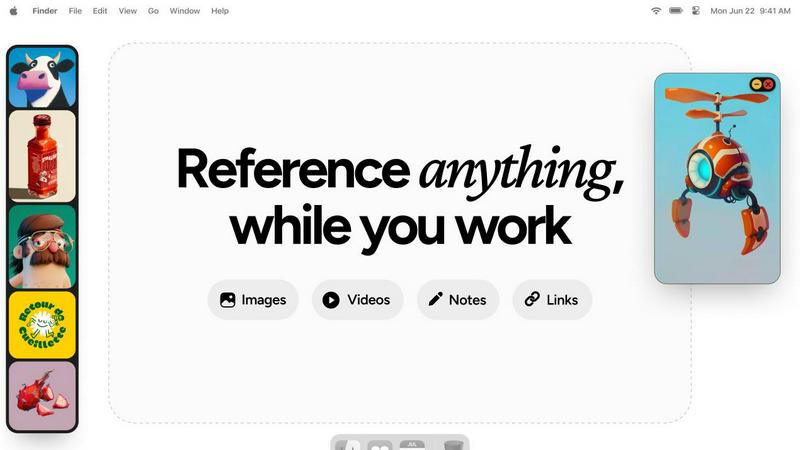
Refbox provides instant access to your images, videos, and notes, streamlining your workflow without distractions.
Last updated: February 28, 2026
Visual Comparison
BarBrain

Refbox
Feature Comparison
BarBrain
Parallel Multi-Device Counting
BarBrain's architecture is built for collaborative efficiency, allowing teams to conduct inventory counts simultaneously on multiple iOS and Android smartphones or tablets. This distributed counting model, powered by real-time cloud sync, drastically reduces the time required for physical stocktaking. The system ensures data consistency across all devices, eliminating the traditional bottleneck of a single person or device and enabling complete inventory audits to be finished in a fraction of the traditional time.
Extensive Pre-Loaded Product Catalog
The platform integrates a massive, industry-specific database containing over 30,000 pre-defined products, including spirits, wines, AFGs, food items, and housekeeping supplies. This extensive catalog accelerates initial setup and ongoing counting by providing standardized product information. For custom or unique items, the system offers full customization capabilities, allowing operators to build a perfectly tailored digital inventory that matches their specific stock, ensuring comprehensive coverage.
Automated Inventory & Variance Reporting
Upon completion of a count, BarBrain's backend processing engine automatically generates a detailed, finalized inventory report. This eliminates hours of manual data entry, cross-referencing, and spreadsheet calculation. The report provides clear insights into stock levels, usage, and, crucially, identifies variance and potential shrinkage in real-time, offering operators immediate, actionable financial data to control costs and reduce waste.
Intuitive Fill-Level Slider for Open Items
Understanding the nuance of partial consumption, BarBrain features a unique UI component: a fill-level slider. This allows staff to accurately record the remaining quantity of open food and beverage products—like a half-used bottle of olive oil or a partial bottle of whiskey—with a single tap. This granular tracking is essential for precise cost-per-dish/drink calculations and provides a true picture of on-hand inventory that simple unit counting cannot achieve.
Refbox
Floating Reference Frames
This feature allows users to keep their references visible while working across various applications. The resizable frames can be adjusted to fit any screen layout, ensuring that users can maintain focus without losing sight of their inspiration.
Masonry Mode
Masonry Mode presents references in a visually appealing grid layout, enabling users to see multiple images or media items at once. This mode is ideal for comparing ideas side by side, fostering creativity and quick decision-making.
Instant Collection Switching
Refbox provides the ability to create and manage multiple collections of references. Users can switch between these collections instantly with a click, allowing for seamless transitions based on different project requirements or creative directions.
Enhanced Note-Taking
With Refbox, users can take structured notes that include text styling options and checklists. This feature is perfect for jotting down ideas or reminders, ensuring that all relevant information is easily accessible alongside visual references.
Use Cases
BarBrain
Independent Bars & Restaurants
For single-location owner-operators, BarBrain replaces error-prone spreadsheets and clipboards. It provides an affordable, professional-grade system to gain control over liquor costs and food margins without requiring dedicated staff or IT expertise. The quick setup and intuitive mobile interface allow the owner or manager to conduct fast, accurate counts themselves, leading to direct, measurable savings and preventing revenue leakage from unaccounted-for waste or shrinkage.
Multi-Location Restaurant & Bar Groups
BarBrain's centralized cloud dashboard offers corporate or regional managers a unified, real-time view of inventory performance across all venues. This enables standardized counting procedures, consolidated reporting, and easy benchmarking between locations. The platform's scalability ensures consistent data collection, allowing leadership to identify best practices, spot outliers with high variance, and make bulk purchasing decisions based on accurate, aggregated data from all sites.
Hotels & Resorts (F&B Operations)
Hotels with complex F&B offerings, including multiple restaurants, bars, banqueting, and minibars, require a robust inventory solution. BarBrain is compatible with tracking a full range of products, from fine dining ingredients to housekeeping amenities. Its ability to handle high product volume and provide detailed consumption reports helps large hospitality operations manage costs across diverse revenue centers and maintain strict budgetary control.
Nightclubs & High-Volume Venues
In fast-paced environments with high product turnover and often less formalized controls, BarBrain provides essential oversight. The speed of parallel counting minimizes operational disruption during off-hours. Real-time variance flags help management quickly identify discrepancies that could indicate spillage, over-pouring, or other issues, allowing for immediate corrective action to protect profitability in a margin-sensitive business.
Refbox
Graphic Design
Graphic designers can use Refbox to pin various design inspirations, color palettes, and typography samples. This allows for quick access to essential references while working in design software, enhancing both creativity and efficiency.
Animation Projects
Animators can benefit from Refbox by keeping reference videos and GIFs in view during the animation process. This feature helps them maintain consistency in movement and style, leading to smoother animations and improved workflow.
UI/UX Design
Refbox serves UI/UX designers by providing a dedicated space for reference images, wireframes, and user feedback notes. This enables a streamlined design process, allowing designers to quickly adapt their work based on ongoing insights and inspirations.
Moodboarding and Concept Development
For artists and creative professionals involved in moodboarding or concept development, Refbox allows for effortless organization of visual references. Users can create moodboards that are always accessible, promoting a more cohesive and inspired creative process.
Overview
About BarBrain
BarBrain is a purpose-built, cloud-native inventory management platform engineered exclusively for the hospitality sector. It directly addresses the critical inefficiencies of manual stocktaking and generic warehouse software by providing a specialized tool that understands the unique operational flows of bars, restaurants, hotels, and multi-location groups. The platform's core value proposition is delivering verifiable, real-time financial control by digitizing and automating the entire inventory lifecycle. Built with a modern tech stack for seamless integration and accessibility, BarBrain enables operators to conduct inventory counts in minutes instead of hours, leveraging parallel counting on multiple iOS and Android devices. It goes beyond simple stock tracking by automatically calculating exact pour costs, identifying variance and waste, and generating comprehensive audit reports. This provides management with the precise data needed to protect margins, optimize supplier orders, and make informed purchasing decisions. Designed for scalability, its architecture supports everything from single independent venues to large enterprise operations, ensuring reliable, accurate numbers are always at the operator's fingertips without the need for complex training or bloated feature sets.
About Refbox
Refbox is an innovative floating reference application tailored specifically for creative professionals who require constant access to their sources of inspiration. Designed for those engaged in activities such as sketching, designing, animating, and modeling, Refbox enables users to pin images, GIFs, videos, and notes in always-on-top frames that hover above their working applications. This feature eliminates the need for time-consuming window switching, leading to a more efficient and streamlined workflow. The application allows users to pull media from multiple sources, including the web, local storage, or the clipboard, presenting a customizable sidebar that adjusts to individual work styles. With unique features like Masonry Mode and a full-screen Gallery, Refbox caters to diverse display preferences, making it easy to organize and view references effectively. By enabling the creation of multiple collections, users can quickly switch between different sets of references based on their current project needs. Refbox is an invaluable tool for creative individuals looking to enhance productivity and maintain their creative flow, ensuring that inspiration is always at hand without unnecessary distractions.
Frequently Asked Questions
BarBrain FAQ
What devices and operating systems are compatible with BarBrain?
BarBrain is built as a cross-platform mobile application, ensuring broad compatibility. It is fully functional on both iOS (iPhone, iPad) and Android smartphones and tablets. The system operates on a cloud-based architecture, meaning all data is synchronized in real-time across devices and accessible from any web browser for management reporting, requiring no complex on-premise software installation.
How does BarBrain handle our existing product list and supplier information?
The platform offers multiple pathways for integration. You can leverage the extensive pre-loaded catalog of over 30,000 items for quick addition. For custom products, you can manually enter them or utilize bulk import tools via CSV files to migrate existing lists. The system also allows you to input and manage supplier details, streamlining the ordering process by keeping all vendor information centralized within the inventory ecosystem.
Can BarBrain integrate with our existing Point of Sale (POS) or accounting systems?
BarBrain is designed with API-led connectivity in mind, focusing on seamless data exchange. While direct, pre-built integrations depend on specific partners, the platform can facilitate data export in standardized formats (like CSV) that can be imported into most accounting software (e.g., QuickBooks, Xero) for financial reconciliation. For POS integration, it enables variance analysis by comparing theoretical usage (from sales data) against actual physical inventory counts.
Is training required for our staff to use BarBrain effectively?
BarBrain is engineered for intuitive use, requiring minimal formal training. The mobile counting interface is designed for simplicity, often requiring just a single tap or slider adjustment per item. Most teams become proficient after one guided inventory cycle. Furthermore, BarBrain provides onboarding support and resources to ensure your staff can leverage the platform's full capabilities efficiently from the start.
Refbox FAQ
What operating systems does Refbox support?
Refbox is compatible with both Windows and macOS, ensuring that creative professionals can utilize the tool on their preferred platforms without compatibility issues.
Can I use Refbox with multiple monitors?
Yes, Refbox is designed to work seamlessly across multiple monitors. Users can pin reference frames on any screen, allowing for an expansive workspace that enhances productivity.
Is there a mobile version of Refbox?
Currently, Refbox is optimized for desktop use, focusing on providing a robust experience for creative professionals working on larger screens. A mobile version may be considered in future updates.
How does Refbox handle image and video formats?
Refbox supports a wide range of media formats, including common image formats (JPEG, PNG) and video formats (MP4, GIF). Users can easily add media from various sources, making it versatile for all types of creative work.
Alternatives
BarBrain Alternatives
BarBrain is a specialized inventory management platform built for the hospitality industry, specifically bars and restaurants. It falls into the productivity and management software category, designed to replace manual counting and generic warehouse tools with a system that understands pours, recipes, and perishables. Users often explore alternatives to BarBrain to find a solution that better aligns with their specific tech stack, budget, or operational scale. Common drivers include the need for different pricing models, deeper integrations with existing POS or accounting systems, or a feature set tailored to a different segment of the food service industry. When evaluating an alternative, prioritize solutions with robust API access and native integrations for seamless data flow. Look for platforms that offer real-time analytics, granular cost tracking, and a user experience designed for the high-speed, detail-oriented environment of hospitality. The right tool should fit your existing operational workflow without requiring extensive customization or training.
Refbox Alternatives
Refbox is a cutting-edge floating reference application designed for creative professionals who require immediate access to their sources of inspiration while working. By allowing users to pin images, videos, and notes above their applications, it streamlines the creative process, making it easier to maintain focus without the hassle of constant window switching. Users often seek alternatives to Refbox for various reasons, including pricing limitations, feature sets that may not fully meet their needs, or compatibility with specific platforms. When searching for an alternative, it is essential to consider factors such as user interface, integration capabilities with existing tools, customization options, and overall ease of use to ensure that the new solution complements and enhances your workflow effectively.