ClipMake vs Kling 5

Side-by-side comparison to help you choose the right product.

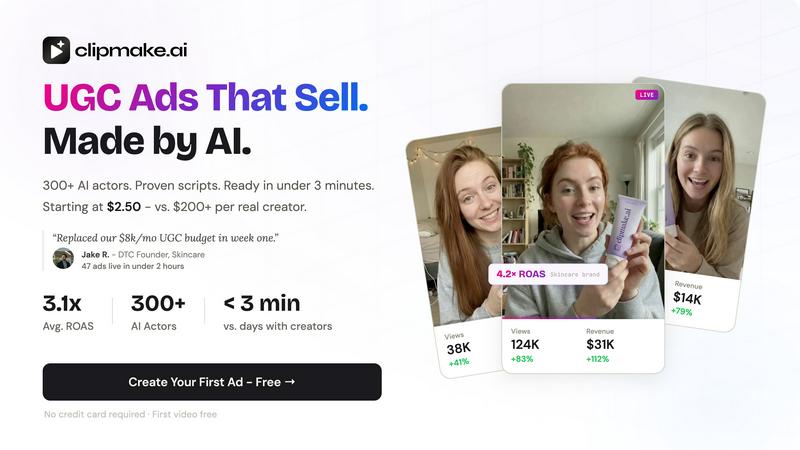
ClipMake is an AI-driven video generator that creates stunning ads with 300+ actors in under 3 minutes, starting at just $2.50 each.

Last updated: April 13, 2026

Kling 5 logo

Kling 5

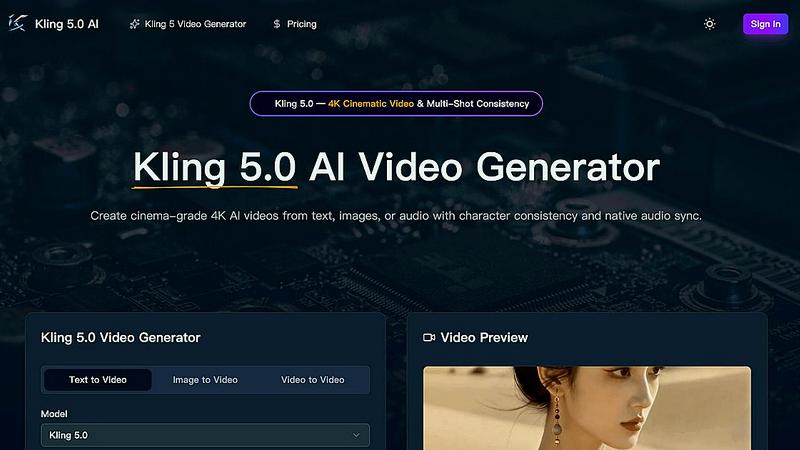
Kling 5.0 is an AI video generator that creates professional 4K cinematic clips with consistent characters and native audio sync.

Last updated: April 13, 2026

Visual Comparison

ClipMake

ClipMake screenshot

Kling 5

Kling 5 screenshot

Feature Comparison

ClipMake

AI Actor Selection

Choose from a diverse library of over 300 AI actors that cater to various styles and tones. Whether you're looking for an energetic vibe or a more professional demeanor, the platform allows you to pick the ideal avatar or even create a custom one tailored to your brand's identity.

Automated Script Generation

ClipMake utilizes advanced algorithms to generate engaging hooks and scripts based on high-performing ad formats from platforms like Meta and TikTok. This feature ensures that your videos are not only visually appealing but also strategically optimized for audience engagement and conversion.

Versatile Scene Templates

The platform offers a wide array of scene templates such as unboxing, testimonials, tutorials, and lifestyle snippets. This versatility allows marketers to create content that resonates with their target audience while maintaining a professional appearance, regardless of the ad format.

Batch Generation Capability

With ClipMake, users can create multiple variations of video ads in one session. This batch generation feature allows you to test different hooks, actors, and scripts simultaneously, enabling data-driven decisions that enhance your marketing strategy and improve ad performance.

Kling 5

4K Cinematic Video Generation

Kling 5.0's core engine generates videos up to 15 seconds in stunning 4K resolution from simple text prompts. It leverages advanced neural rendering techniques to produce clips with a professional, cinematic look and feel, complete with realistic lighting, textures, and atmospheric effects. This ensures the output is immediately usable for platforms like YouTube, broadcast, and social media without requiring post-processing upscaling.

Omni Subject Library for Multi-Shot Consistency

This proprietary feature addresses a major challenge in AI video: character consistency. The Omni Subject Library allows users to "lock" a subject's facial features, proportions, and style across different shots, camera angles, and scenes. This is essential for creating episodic content, product series, or any narrative project where a character must remain visually identical, enabling seamless multi-shot storytelling.

Native Audio Generation & Multilingual Lip-Sync

Kling 5.0 integrates a native audio engine that generates synchronized dialogue, Foley, and ambient sound in a single pass. Its advanced phoneme-level lip-sync technology accurately matches mouth movements to generated audio in five languages: English, Chinese, Japanese, Korean, and Spanish. This creates a cohesive audio-visual experience, eliminating the need for separate audio editing and syncing software.

Advanced Physics & Motion Simulation

The model is powered by a sophisticated physics engine that simulates natural movement for complex elements like water, fabric, fire, and human anatomy. This results in fluid dynamics, realistic cloth behavior, and natural character motion that are indistinguishable from real-world physics, greatly enhancing the realism and production value of the generated videos.

Use Cases

ClipMake

E-commerce Product Launch

When launching new products, brands can quickly create multiple video ads showcasing features, benefits, and customer testimonials. This rapid content generation helps maximize visibility and engagement during critical launch periods.

A/B Testing for Ad Optimization

Marketers can utilize ClipMake to generate various ad variations for A/B testing. By experimenting with different voices, scripts, and visuals, brands can identify which elements yield the highest conversion rates, leading to more effective advertising campaigns.

Seasonal Promotions and Sales

During holiday seasons or special promotions, ClipMake allows brands to swiftly produce themed video ads that capture the essence of the event. This agility ensures that marketing efforts are timely and relevant, driving increased traffic and sales.

Social Media Engagement

With the ability to create engaging video content in minutes, brands can maintain a consistent presence on social media platforms. Regularly updated content keeps audiences engaged, fostering brand loyalty and encouraging user interaction.

Kling 5

Rapid Prototyping for Film & Game Development

Filmmakers and game developers can use Kling 5.0 to quickly visualize scenes, characters, and action sequences from script excerpts or concept art. The 4K cinematic quality and physics simulation allow for high-fidelity pre-visualization and cutscene prototyping, accelerating the creative iteration process and aiding in storyboarding and pitch development.

Scalable Social Media & Marketing Content Creation

Marketing teams and content creators can generate a high volume of stylistically consistent, platform-optimized videos for campaigns. By leveraging text-to-video and image-to-video features, they can produce engaging content for TikTok, Instagram Reels, and YouTube Shorts at scale, with the ability to maintain brand character consistency across multiple videos using the Omni Subject Library.

Educational & Explainer Video Production

Educators and corporate trainers can create compelling explainer videos and animated lessons by simply describing the concept. The AI handles the complex animation and scene setting, allowing the creator to focus on the narrative and instructional design. Multilingual lip-sync also facilitates the creation of accessible educational content for a global audience.

Episodic Narrative & Short-Form Series Production

Independent creators and studios can produce serialized content with consistent characters and settings. The multi-shot consistency engine ensures that protagonists, antagonists, and key visual elements remain stable across different episodes or scenes, making Kling 5.0 a viable tool for creating pilot episodes, web series, and animated shorts with a coherent visual identity.

Overview

About ClipMake

ClipMake is an innovative AI-driven tool designed to revolutionize the way e-commerce brands and performance marketers create user-generated content (UGC) video ads. By eliminating the need for traditional creators, lengthy shoots, and complex editing processes, ClipMake allows users to generate high-quality video ads in record time. The platform boasts a library of over 300 AI actors, enabling users to select the perfect avatar that aligns with their brand's persona. With capabilities to generate scripts based on proven ad structures, as well as offering a variety of scene templates, ClipMake transforms the ad creation process into a seamless experience. The primary value proposition lies in its ability to deliver finished video ads in under three minutes, making it easier for brands to scale their marketing efforts without the usual budget constraints and time delays.

About Kling 5

Kling 5.0 is a next-generation AI video generation model engineered to produce professional-grade, cinematic video content directly from text, images, or audio inputs. It represents a significant leap in AI-driven content creation, moving beyond simple animation to deliver broadcast-ready 4K resolution clips with advanced physics simulation and multi-shot character consistency. The platform is built for a tech-savvy user base, including filmmakers, content creators, marketing teams, and developers who require a powerful, integrated tool for rapid video prototyping and production. Its core value proposition lies in its ability to replace complex, multi-software production pipelines with a single, AI-powered engine that handles everything from scene generation and character locking to native audio synthesis and lip-sync, all while maintaining a high degree of creative control and output quality suitable for commercial use.

Frequently Asked Questions

ClipMake FAQ

How does ClipMake ensure the realism of AI actors?

ClipMake utilizes advanced AI technology that mimics natural lip sync, facial expressions, and body language. This realism ensures that the videos produced resonate well with audiences, making the ads feel authentic.

Can I customize the scripts generated by ClipMake?

Yes, users have the flexibility to edit the scripts generated by the platform. This allows for personalization and ensures that the messaging aligns perfectly with your brand voice and campaign objectives.

Is there a limit to the number of videos I can create?

There is no strict limit to the number of videos you can create with ClipMake. The platform is designed for high-volume production, allowing users to generate numerous ad variations quickly and efficiently.

What types of products are best suited for ClipMake?

ClipMake is particularly effective for e-commerce brands across various sectors, including beauty, health, fashion, and home goods. Its versatility caters to any product that can benefit from engaging video content, enhancing marketing efforts.

Kling 5 FAQ

What input methods does Kling 5.0 support?

Kling 5.0 is a multimodal AI video generator. It accepts three primary input types: text prompts (text-to-video), uploaded images or concept art (image-to-video), and audio for driving lip-sync and scene generation. This flexibility allows users to start the creative process from whichever medium best suits their existing assets or workflow.

How does the character consistency feature work?

Character consistency is managed through the Omni Subject Library. When you generate or define a character, the system creates a unique digital fingerprint of that subject. You can then reference this fingerprint in subsequent prompts for different shots or scenes. Kling 5.0's AI engine uses this reference to maintain the locked facial features, proportions, and style, ensuring visual continuity across your project.

In which languages does the lip-sync feature work?

The native audio generation and phoneme-level lip-sync technology in Kling 5.0 currently supports five languages: English, Chinese, Japanese, Korean, and Spanish. The AI models the specific mouth shapes and movements for each language to produce highly accurate and natural-looking synchronization between the generated speech and the character's lips.

What is the maximum video length and output resolution?

Kling 5.0 can generate video clips with a maximum duration of 15 seconds per generation cycle. The output is rendered in professional 4K resolution (3840 x 2160 pixels), ensuring high detail and clarity suitable for most digital platforms and even broadcast use cases without quality degradation.

Alternatives

ClipMake Alternatives

ClipMake is an AI-driven user-generated content (UGC) video generator designed for marketers and e-commerce brands. It allows users to create hyper-realistic video ads featuring over 300 AI actors in a matter of minutes, eliminating the need for traditional video shoots and editing. Users frequently seek alternatives to ClipMake due to various reasons, including pricing, feature sets, and specific platform integration needs. When choosing an alternative, it's essential to consider factors such as video quality, customization options, ease of use, available templates, and the flexibility to cater to different marketing channels.

Kling 5 Alternatives

Kling 5.0 is a prominent AI video generator, a tool that leverages artificial intelligence to create professional-quality video content directly from text prompts. This places it squarely in the competitive and rapidly evolving category of generative AI video platforms. Users often seek alternatives to Kling 5 for a variety of practical reasons. These can include budget constraints, specific feature requirements not met by the platform, or the need for compatibility with a particular tech stack or workflow integration. The ideal solution for one creator or business may not align with the technical or operational needs of another. When evaluating an alternative, it's crucial to assess key technical factors. Prioritize the platform's API availability for custom integrations, its compatibility with your existing content management or editing software, and the underlying model's capabilities for your desired output style and resolution. The decision should balance raw generative power with how seamlessly the tool fits into your production pipeline.

Continue exploring