
Code Word Solver - Missing Words Finder vs PseudoRun
Side-by-side comparison to help you choose the right product.

Code Word Solver - Missing Words Finder
Unlock codewords effortlessly with our intuitive solver, designed for quick and accurate word discovery.
Last updated: February 27, 2026

PseudoRun
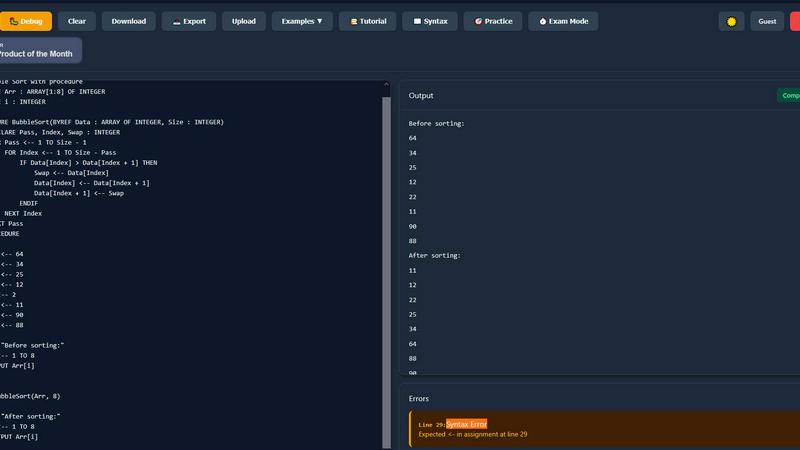
PseudoRun is the free, ad-free IGCSE pseudocode editor with real-time validation and debugging.
Last updated: March 1, 2026
Visual Comparison
Code Word Solver - Missing Words Finder

PseudoRun
Feature Comparison
Code Word Solver - Missing Words Finder
Single Pattern Solving
This feature allows users to input a single word pattern and receive a list of matching word candidates. By simply entering known letters alongside placeholders for unknown letters, the solver quickly filters through a vast database to provide you with potential solutions. This streamlined approach eliminates guesswork, making it easier to fill in the blanks in your codeword puzzle.
Multi-Pattern Solving
For those tackling more complex puzzles, the multi-pattern solving feature enables you to input two patterns simultaneously. This is particularly useful when the same number-letter relationships are present across different words in the puzzle. By analyzing the connections between linked words, the solver enhances your chances of finding the correct answers more quickly and efficiently.
Flexible Pattern Input
The solver offers a user-friendly interface for pattern input, where you can easily indicate known letters, unknown letters, and repeated letters. By using symbols like '.' or '?' for unknown letters and numbers for consistent repeats, you can create a precise representation of the puzzle. This flexible input method ensures that the solver understands your requirements and delivers accurate results.
Customizable Difficulty Dictionaries
Recognizing that different players have varying levels of expertise, the Code Word Solver provides multiple dictionary options. You can choose between hard (260k words), normal (115k words), and easy (20k words) dictionaries. This flexibility allows you to select a word list that best matches your skill level, ensuring a more tailored and enjoyable puzzle-solving experience.
PseudoRun
IGCSE-Specification Compliant Editor
The editor is the cornerstone of PseudoRun, built to strictly adhere to the syntax and conventions of the Cambridge IGCSE pseudocode standard. It provides syntax highlighting, auto-indentation, and intelligent code completion tailored specifically for IGCSE constructs like DECLARE, CASE...OF, and REPEAT...UNTIL. This ensures that students practice and write code exactly as required in their examinations, preventing the formation of bad habits from using generic programming language syntax.
Real-Time Validation & Error Detection
Integrated directly into the editing environment, this feature performs continuous static analysis on the pseudocode. It instantly flags syntax errors, undefined variables, and logical inconsistencies specific to the IGCSE pseudocode specification. This immediate feedback loop allows for on-the-fly correction and learning, significantly reducing debugging time and helping students understand the precise rules of the pseudocode language before they run their programs.
Interactive Step-by-Step Debugger
This advanced tool allows users to execute their pseudocode line-by-line, providing deep visibility into the program's state. It features a call stack viewer, variable tracker that updates in real-time, and control flow visualization. This granular level of inspection is critical for understanding complex algorithms involving loops, conditionals, and procedures, enabling students to deconstruct and comprehend the exact sequence of operations and data changes.
Integrated IGCSE Practice Library & Exam Mode
PseudoRun includes a comprehensive, cloud-accessible repository of 50+ curated practice problems and examples that mirror IGCSE exam patterns. Coupled with an "Exam Mode" timer, this feature creates a simulated exam environment. Students can practice solving problems under timed conditions, building both speed and confidence, while all their work is automatically saved to their free cloud account for review across any compatible device.
Use Cases
Code Word Solver - Missing Words Finder
Casual Puzzle Solving
For casual puzzle enthusiasts, the Code Word Solver simplifies the process of tackling codeword puzzles. By inputting known letters and using the solver to find possible matches, players can enjoy a more relaxed and enjoyable experience without the frustration of being stuck on challenging clues.
Competitive Puzzle Challenges
In competitive environments, such as puzzle competitions or timed challenges, using the Code Word Solver can provide a strategic advantage. By quickly generating potential word matches, players can save time and maintain their competitive edge, ultimately increasing their chances of winning.
Educational Tool for Learners
Teachers and educators can utilize the Code Word Solver as an educational tool to help students understand word patterns and develop problem-solving skills. By engaging with the solver, students can learn to recognize letter relationships and improve their vocabulary in a fun and interactive way.
Community Contribution and Improvement
The Code Word Solver allows users to submit new words and definitions, fostering a sense of community and collaboration. This feature encourages users to contribute to the database, ensuring that the solver continually improves and expands its coverage over time, benefiting all users in the process.
PseudoRun
Independent IGCSE Exam Preparation
Students can use PseudoRun as a primary study tool to independently practice past paper algorithms and textbook exercises. The platform's spec-aligned editor and instant feedback allow for self-directed learning, enabling students to identify weaknesses, practice efficiently, and track their progress through saved programs in their personal cloud storage, all tailored to the IGCSE syllabus.
Classroom Teaching & Live Demonstration
Educators can integrate PseudoRun into their lessons for live coding demonstrations. The step-by-step debugger is perfect for visually deconstructing algorithms on a projector, showing variable states and flow control in real-time. Teachers can also create and share problem sets with students, leveraging the platform to provide a standardized, accessible practice environment for the entire class.
Algorithm Design & Prototyping
Beyond rote practice, students and learners can use PseudoRun as a sandbox for designing and testing their own algorithms. The ability to quickly write, run, and debug pseudocode without setup overhead makes it an ideal tool for prototyping logic before potentially translating it into an actual programming language for coursework or projects.
Revision & Conceptual Reinforcement
In the lead-up to exams, students can utilize the platform for focused revision. They can re-run their saved programs, use the debugger to step through tricky algorithms they previously wrote, and tackle new problems from the practice library under timed "Exam Mode" conditions to reinforce concepts and improve time management skills.
Overview
About Code Word Solver - Missing Words Finder
Code Word Solver - Missing Words Finder is an innovative tool designed to enhance your experience with codeword puzzles, making them less frustrating and more enjoyable. This product is perfect for puzzle enthusiasts who often find themselves confronted with tricky codewords that require additional help. By leveraging the patterns you already know, this tool filters potential answers, allowing you to decode the puzzle grid confidently. Codewords operate on a unique mapping system where letters are replaced with numbers (1-26), and once you've identified the mapping for a specific letter, it applies universally throughout the puzzle. The solver supports both single and multiple pattern inputs, accommodating various solving strategies. Whether you're a casual player or a serious puzzle solver, this tool is tailored to help you solve codewords efficiently.
About PseudoRun
PseudoRun is a purpose-built, browser-based platform engineered to provide a seamless and integrated environment for mastering IGCSE Computer Science pseudocode. It functions as a comprehensive editor, simulator, and debugger, specifically architected to align with the Cambridge IGCSE pseudocode specification. The platform's core value proposition lies in its ability to bridge the gap between theoretical algorithm design and practical execution, eliminating the dependency on traditional, complex programming language setups. Its tech stack is designed for universal compatibility, running entirely in modern web browsers, which ensures immediate accessibility from any device without installation. The primary user base comprises IGCSE students, educators, and self-learners seeking a focused tool for exam preparation. By offering real-time code validation, step-by-step execution, and a vast library of IGCSE-aligned practice problems, PseudoRun provides a structured and distraction-free ecosystem that directly translates algorithmic thinking into exam-ready skills. Its commitment to a zero-ad, fully-featured free model further ensures an uninterrupted learning experience, making it an indispensable tool in the IGCSE Computer Science tech stack.
Frequently Asked Questions
Code Word Solver - Missing Words Finder FAQ
How does the Code Word Solver work?
The Code Word Solver filters potential answers based on the patterns you provide, using known letters, placeholders for unknown letters, and numbers for repeated letters to generate matching word candidates.
Can I use the solver for complex codewords with multiple patterns?
Yes, the solver supports both single pattern and multi-pattern solving. You can input two patterns at once, making it easier to solve linked words that share similar number-letter relationships.
What type of dictionaries are available in the solver?
The Code Word Solver offers three difficulty levels for its dictionaries: hard (260k words), normal (115k words), and easy (20k words). This allows users to select a word list that best suits their skill level.
How can I improve the word coverage in the solver?
If you encounter a word that is not in the database or wish to add an extra definition, you can submit it through the solver. This community-powered feature helps enhance the overall word coverage and keeps the solver relevant and useful.
PseudoRun FAQ
Is PseudoRun really free with no hidden costs?
Yes, absolutely. PseudoRun operates on a promise of being completely free, with zero advertisements and no premium paywalls. All features, including the IGCSE editor, debugger, cloud storage, and practice library, are available at no cost. The platform is sustained by community support, not user fees.
How does PseudoRun ensure compatibility with the IGCSE exam?
The platform's core parsing engine and syntax definitions are built exclusively around the official Cambridge IGCSE Computer Science pseudocode specification. The editor, error checks, and example problems are all designed to mirror the language and patterns used in past papers and syllabus materials, ensuring direct exam relevance.
Do I need to install any software or create an account?
No installation is required. PseudoRun is a web-based application that runs directly in your browser. While you can use many features immediately without an account, creating a free account is recommended to unlock cloud storage, allowing you to save and access your programs from any device seamlessly.
Can I use PseudoRun on a tablet or smartphone?
Yes, PseudoRun is built with a responsive design, making it compatible with tablets and larger smartphones. The interface adapts to different screen sizes, allowing you to write, edit, and run pseudocode on the go, although a physical keyboard is generally recommended for extensive coding sessions.
Alternatives
Code Word Solver - Missing Words Finder Alternatives
Code Word Solver - Missing Words Finder is a specialized online tool designed to assist users in solving codeword puzzles efficiently. This product falls under the category of puzzle-solving applications, offering features that streamline the process of decoding letters and numbers in various word games. Users often seek alternatives to such tools for reasons ranging from pricing and feature sets to specific platform compatibility, which can impact their overall experience. When searching for an alternative, it's essential to consider factors such as the comprehensiveness of the word database, the flexibility of input options, and the ease of use in adapting to different puzzle types. In the realm of codeword solvers, the user experience can vary significantly based on the interface, available features, and the level of support provided. It's crucial to look for options that allow for both single and multi-pattern solving, as well as the ability to choose from different difficulty dictionaries. Additionally, community support for expanding word coverage can enhance the effectiveness of any codeword solver, making it a valuable tool for both casual players and seasoned code-crackers alike.
PseudoRun Alternatives
PseudoRun is a specialized online IDE and learning platform within the educational technology category, designed explicitly for mastering IGCSE Computer Science pseudocode. It provides a focused environment with real-time validation and debugging tailored to the Cambridge syllabus. Users often explore alternatives for various reasons, including specific feature requirements, the need for offline functionality, or integration with a broader tech stack like local IDEs or learning management systems. Some may seek platforms that support additional programming languages beyond the strict IGCSE pseudocode specification. When evaluating an alternative, key considerations include its compatibility with the official IGCSE pseudocode syntax, the robustness of its debugging and execution engine, and data portability. The ideal platform should offer seamless integration into a student's or educator's existing workflow, providing reliable performance without vendor lock-in for saved projects.