
Cosy vs documentorium
Side-by-side comparison to help you choose the right product.

Cosy automates Slack member onboarding and introductions, boosting engagement while saving you valuable time.
Last updated: February 28, 2026

documentorium
Documentorium is a developer-first API that generates professional contractor documents and PDFs with guided, trade-specific forms.
Last updated: March 26, 2026
Visual Comparison
Cosy
documentorium

Feature Comparison
Cosy
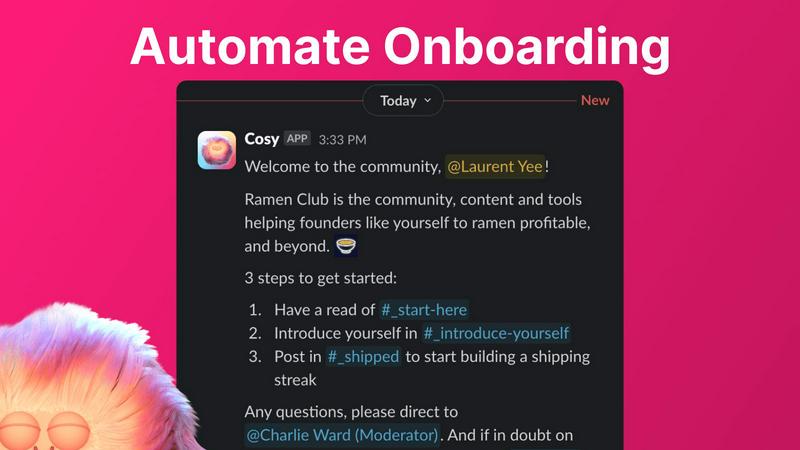
Automate Onboarding
Cosy enables community managers to create and automate up to 10 distinct onboarding welcome DM sequences. These messages can be sent from either a team member or the Cosy bot, ensuring that new members are welcomed either immediately or at a customized delay. This feature allows for fully customizable messages, including the use of member names and links, helping to personalize the onboarding experience and save valuable time for community leaders.
Connect Your Members
With Cosy, community engagement is amplified through automatic introductions among members. This feature introduces opted-in members to each other in DMs at a frequency determined during setup, enhancing networking opportunities. The customization options allow community managers to choose the intro message, timing, and frequency, fostering a sense of community and encouraging member interaction without additional manual effort.
Member Directory
The searchable member directory feature allows communities to create a simple yet effective internal directory without leaving Slack. Members can fill out customizable profiles that can include various fields, making it easy to search for and connect with other members based on shared interests or expertise. This directory enhances member discoverability and promotes interaction within the community.
Content Highlights
Cosy can instantly surface the most engaging posts within the community, allowing members to stay updated on popular discussions. By using quick slash commands, users can retrieve the top 10 most engaged messages in specific channels or across all public channels. This feature ensures that valuable content is not overlooked and encourages ongoing participation in community conversations.
documentorium
Trade-Specific Template Library
The platform's foundation is its extensive catalog of over 200 document templates, meticulously categorized across 26 trades. Unlike generic form builders, each template—for quotes, work orders, inspection reports, proposals, and more—is pre-configured with fields, sections, and terminology specific to that trade. For an electrician, this means fields for circuit amperage and NEC code references; for an HVAC tech, it includes SEER ratings and refrigerant types. This built-in domain intelligence ensures documents are technically precise and professionally relevant from the first use.
Guided Form Interface with Intelligent Prefill
documentorium utilizes a structured, step-by-step form interface that guides users through document creation without the paralysis of a blank page. The system's architecture supports data persistence, meaning previously entered client details, company information, and service items are saved. This allows for intelligent pre-filling on subsequent documents, dramatically reducing repetitive data entry. The guided workflow ensures no critical section is missed, enhancing document completeness and compliance.
Instant PDF Generation Engine
At the core of the platform is a robust document rendering engine. Upon form submission, the system processes the structured data through a professional template to generate a clean, branded PDF in seconds. This engine handles all layout, typography, and formatting automatically, producing a print-ready or digitally deliverable file. This feature eliminates the manual, error-prone process of copying data into a separate design tool or word processor for final formatting.
Centralized Document History & Management
Every document created is automatically logged and stored within the user's secure account history. This creates a searchable, centralized repository for all business documentation—quotes, invoices, service reports, contracts, and warranties. This historical record is invaluable for auditing, referencing past work, managing warranties, and quickly creating follow-up or similar documents for returning clients, providing a complete audit trail of all business interactions.
Use Cases
Cosy
Streamlined Member Onboarding
Community managers can utilize Cosy to streamline the onboarding process for new members. By automating welcome messages and follow-ups, they can ensure that every new member feels welcomed and informed without the need for manual intervention, allowing managers to focus on other critical tasks.
Enhanced Member Networking
Cosy facilitates enhanced networking opportunities by automatically introducing community members to each other. This feature can be particularly beneficial in professional communities where building relationships is essential for collaboration and growth, ultimately creating a more engaged and interactive community.
Efficient Member Management
With the searchable member directory, community leaders can efficiently manage member information and preferences. This feature allows members to connect based on their profiles, fostering a sense of belonging and enabling easier collaboration among members with common interests.
Content Engagement Optimization
By surfacing the most engaging posts and discussions, Cosy enables community managers to optimize content engagement. This feature helps ensure that valuable insights and popular topics remain at the forefront of community conversations, encouraging participation and interaction among members.
documentorium
On-Site Quote and Proposal Generation
A solar installer at a client's home can use the mobile-responsive platform to quickly populate a detailed, trade-specific proposal template. By entering system specs, panel models, energy estimates, and financing options into the guided form, they can generate a professional, itemized PDF proposal on the spot. This immediacy accelerates the sales cycle, impresses clients with professionalism, and reduces the need for follow-up visits just to deliver paperwork.
Streamlined Service Reporting and Invoicing
After completing a repair, an HVAC technician can fill out a detailed service report template that includes fields for diagnostics, parts used (with model/serial numbers), labor time, and test results. With one click, this generates a comprehensive report for the client. The technician can then instantly create a connected invoice from the same job data, ensuring accuracy between the work performed and the amount billed, and delivering both documents to the client before leaving the job site.
Managing Complex Projects with Change Orders
For a general contractor managing a renovation, documentorium simplifies the critical process of change orders. When a client requests a modification, the contractor can quickly generate a formal change order document from a template built for construction. This document clearly outlines the change in scope, associated costs, and impact on timeline. The instant, professional PDF provides a clear record for client approval and helps prevent disputes, ensuring project documentation stays aligned with the actual work.
Creating Legally-Sound Service Contracts and Warranties
A roofing company can use the platform to generate standardized but customizable service agreements and warranty documents. Using the trade-specific contract templates, they can input project specifics, warranty durations, material details, and terms & conditions to produce a legally-formatted contract. This provides clear protection for both the business and the customer, establishes professional credibility, and ensures all necessary clauses for the trade are included.
Overview
About Cosy
Cosy is a native Slack application designed to elevate standard Slack workspaces into dynamic, thriving communities. It provides a suite of tools specifically tailored for community leaders, managers, and founders who rely on Slack as their primary communication hub. By automating essential engagement workflows, Cosy significantly reduces the operational burden that community managers face, enabling them to focus on building deeper connections within their communities. Its core value proposition is anchored in its seamless integration with Slack, which ensures that both administrators and members enjoy a frictionless experience. Key functionalities include personalized onboarding sequences, automated member introductions, a searchable member directory, and intelligent content moderation. By leveraging these capabilities, Cosy fosters an environment where communities can scale organically while saving administrators countless hours of manual effort each week. The result is a more connected, safe, and easily discoverable community ecosystem, all within the familiar interface of Slack.
About documentorium
documentorium is a specialized document generation engine architected for the technical and operational workflows of skilled trades and service professionals. It functions as a purpose-built SaaS platform that eliminates the inefficiency of creating business documents from scratch or adapting generic templates. The system serves electricians, plumbers, contractors, HVAC technicians, roofers, and a wide array of other field service operators. Its core value proposition lies in its deep trade-specific customization and streamlined output. The platform hosts a curated library of over 200 guided templates across 26 distinct trade categories. Each template is engineered with field logic and terminology native to the profession, ensuring technical accuracy and relevance. The documentorium stack is designed for high-velocity document creation: users populate a structured, guided form, and the engine instantly compiles the data into a polished, print-ready PDF. This process bypasses manual formatting in word processors, saving significant administrative time and ensuring brand consistency across all client-facing documentation.
Frequently Asked Questions
Cosy FAQ
How does Cosy integrate with Slack?
Cosy is a native application built specifically for Slack, which means it operates seamlessly within the Slack environment. This integration allows for automated workflows, member interactions, and content management without the need for external platforms.
What is the maximum number of members I can manage with Cosy?
Cosy offers a free plan for up to 250 members. For communities with more members, a 30-day trial is available, allowing unlimited access to all features during that period.
Can I customize the onboarding messages sent to new members?
Yes, Cosy allows community managers to fully customize onboarding messages. You can include member names, relevant links, and even emojis, ensuring that each welcome message is personalized and engaging.
How does the member directory work?
The member directory is a searchable tool that allows community members to create and view profiles within Slack. Members can fill in custom fields, making it easier to connect with others based on shared interests or skills, all without leaving the Slack interface.
documentorium FAQ
Can I cancel my subscription at any time?
Yes, the documentorium platform is designed with flexibility in mind. You can cancel your subscription directly from your account settings at any time. Upon cancellation, your access remains active until the end of your current billing period. There are no penalties or lock-in contracts, allowing you to manage your subscription according to your business needs without long-term commitment.
What happens to my data and documents when the free trial ends?
Your data is preserved. When your one-month free trial expires, you retain full view and download access to all documents you created during the trial period. The platform does not delete your document history. To create or edit new documents after the trial, you will need to activate a paid subscription. This model allows you to evaluate the platform's output fully without risk of losing your work.
Do I lose access to my existing documents if I don't subscribe after the trial?
No, you do not lose access to your existing documents. Your document history is maintained within your account, and you can log in to view, download, and print any document you created. The subscription gate only applies to the creation and editing of new documents. This ensures your past business records remain accessible as a valuable archive, regardless of your current subscription status.
Does documentorium provide legal advice for its contracts and forms?
No. documentorium is a document generation tool and template provider. While the templates are built for specific trades and standard business practices, the platform does not offer legal advice. It is recommended that you have any contract or legal form reviewed by a qualified legal professional to ensure it meets the specific requirements of your jurisdiction and business circumstances. The tool facilitates professional formatting and organization, not legal counsel.
Alternatives
Cosy Alternatives
Cosy is a native Slack application designed to enhance community engagement and streamline onboarding processes within Slack workspaces. It automates key workflows for community managers, allowing them to focus on building connections rather than managing manual tasks. This tool is ideal for community leaders, managers, and founders who want to create vibrant, self-sustaining communities without relying on external platforms. Users often seek alternatives to Cosy for various reasons, including pricing, specific feature sets, or compatibility with other tools in their tech stack. When searching for a suitable alternative, it’s essential to consider aspects such as integration capabilities, user experience, customization options, and the ability to automate key community workflows effectively, ensuring that the chosen solution aligns with the unique needs of their community.
documentorium Alternatives
documentorium is a specialized document automation platform within the contractor productivity and management software category. It serves tradespeople by providing a library of trade-specific templates to generate professional PDFs like quotes, invoices, and work orders efficiently, eliminating the need to create documents from scratch. Users often explore alternatives for several key reasons. These include seeking different pricing models or subscription tiers, requiring specific third-party integrations with accounting or scheduling tools, or needing platform compatibility beyond web browsers, such as dedicated mobile or desktop applications. The need for more advanced features like client portals, inventory management, or complex custom branding can also drive the search for other solutions. When evaluating an alternative, prioritize core functionality: a robust template library tailored to your specific trade, seamless PDF generation, and reliable mobile access for on-site work. Crucially, assess the software's integration capabilities with your existing tech stack—its ability to connect with accounting software, payment processors, or CRM systems will determine its long-term utility and impact on workflow efficiency.