
Cosy vs FilexHost
Side-by-side comparison to help you choose the right product.

Cosy automates Slack member onboarding and introductions, boosting engagement while saving you valuable time.
Last updated: February 28, 2026

FilexHost
Effortlessly host and share any file with instant URLs using FilexHost's simple drag-and-drop interface.
Last updated: February 27, 2026
Visual Comparison
Cosy
FilexHost

Feature Comparison
Cosy
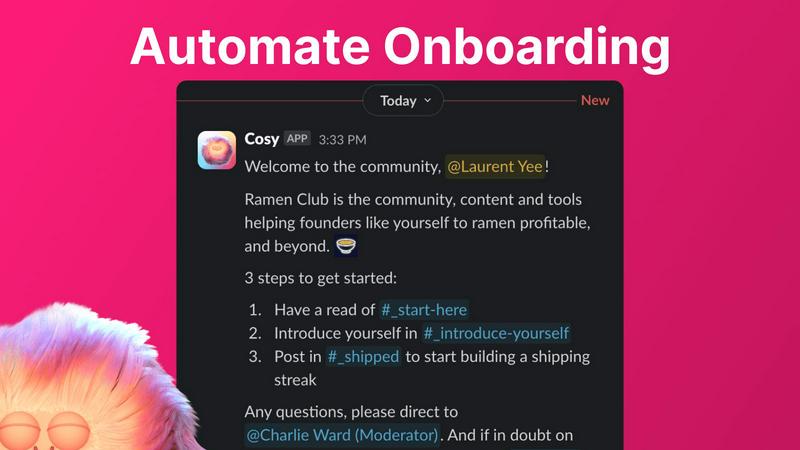
Automate Onboarding
Cosy enables community managers to create and automate up to 10 distinct onboarding welcome DM sequences. These messages can be sent from either a team member or the Cosy bot, ensuring that new members are welcomed either immediately or at a customized delay. This feature allows for fully customizable messages, including the use of member names and links, helping to personalize the onboarding experience and save valuable time for community leaders.
Connect Your Members
With Cosy, community engagement is amplified through automatic introductions among members. This feature introduces opted-in members to each other in DMs at a frequency determined during setup, enhancing networking opportunities. The customization options allow community managers to choose the intro message, timing, and frequency, fostering a sense of community and encouraging member interaction without additional manual effort.
Member Directory
The searchable member directory feature allows communities to create a simple yet effective internal directory without leaving Slack. Members can fill out customizable profiles that can include various fields, making it easy to search for and connect with other members based on shared interests or expertise. This directory enhances member discoverability and promotes interaction within the community.
Content Highlights
Cosy can instantly surface the most engaging posts within the community, allowing members to stay updated on popular discussions. By using quick slash commands, users can retrieve the top 10 most engaged messages in specific channels or across all public channels. This feature ensures that valuable content is not overlooked and encourages ongoing participation in community conversations.
FilexHost
Instant Subdomains
With FileXHost, users receive instant subdomains for their uploaded files, allowing them to share links like your-file.filex.host without any setup. This feature enhances accessibility and makes sharing files effortless.
Free SSL Encryption
Every link generated through FileXHost comes with free SSL encryption, ensuring that the files shared are secure. This feature is essential for maintaining privacy and protecting sensitive data during transmission.
Smart View Modes
FileXHost offers intelligent view modes that allow files to be rendered directly in the browser or presented as a download page. This flexibility caters to various user preferences and enhances the overall experience for both the host and the recipient.
Optional Password Protection
For users who need an extra layer of security, FileXHost provides optional password protection and expiry settings for shared files. This means that sensitive information can be safeguarded while still allowing easy access to authorized users.
Use Cases
Cosy
Streamlined Member Onboarding
Community managers can utilize Cosy to streamline the onboarding process for new members. By automating welcome messages and follow-ups, they can ensure that every new member feels welcomed and informed without the need for manual intervention, allowing managers to focus on other critical tasks.
Enhanced Member Networking
Cosy facilitates enhanced networking opportunities by automatically introducing community members to each other. This feature can be particularly beneficial in professional communities where building relationships is essential for collaboration and growth, ultimately creating a more engaged and interactive community.
Efficient Member Management
With the searchable member directory, community leaders can efficiently manage member information and preferences. This feature allows members to connect based on their profiles, fostering a sense of belonging and enabling easier collaboration among members with common interests.
Content Engagement Optimization
By surfacing the most engaging posts and discussions, Cosy enables community managers to optimize content engagement. This feature helps ensure that valuable insights and popular topics remain at the forefront of community conversations, encouraging participation and interaction among members.
FilexHost
Sharing Client Reports
Professionals can effortlessly share client reports and presentations without worrying about email attachment limits. FileXHost allows for instant sharing with secure links, enabling quick access for clients and stakeholders.
Hosting Landing Pages
Developers can use FileXHost to host landing pages or mock APIs without the hassle of server configurations. The platform supports HTML rendering, making it ideal for testing and showcasing projects.
Distributing Digital Products
Creators can distribute digital products such as eBooks, videos, or software through FileXHost. The simplicity of uploading and sharing files makes it an efficient platform for selling or sharing content without complications.
Collaborating on Projects
Teams can collaborate on projects by sharing documents and data files through FileXHost. Its support for various file types and smart rendering ensures that all team members can view and interact with files as intended, enhancing collaboration.
Overview
About Cosy
Cosy is a native Slack application designed to elevate standard Slack workspaces into dynamic, thriving communities. It provides a suite of tools specifically tailored for community leaders, managers, and founders who rely on Slack as their primary communication hub. By automating essential engagement workflows, Cosy significantly reduces the operational burden that community managers face, enabling them to focus on building deeper connections within their communities. Its core value proposition is anchored in its seamless integration with Slack, which ensures that both administrators and members enjoy a frictionless experience. Key functionalities include personalized onboarding sequences, automated member introductions, a searchable member directory, and intelligent content moderation. By leveraging these capabilities, Cosy fosters an environment where communities can scale organically while saving administrators countless hours of manual effort each week. The result is a more connected, safe, and easily discoverable community ecosystem, all within the familiar interface of Slack.
About FilexHost
FileXHost is a robust, high-speed file hosting and sharing solution designed for users who require an effortless way to upload and distribute various file types. Whether you're dealing with documents, media files, spreadsheets, or entire websites, FileXHost simplifies the process through its intuitive "Drop & Share" workflow. Users can simply drag their files into the interface, receive an instant secure URL, and share it with others—no server setups, DNS configurations, or login requirements for recipients. This makes FileXHost an ideal solution for professionals, developers, and creators who need a seamless and efficient method of file delivery. With features like free SSL encryption and smart rendering, FileXHost enhances the viewing experience, ensuring that each file is presented exactly as intended, whether it is viewed directly in the browser or downloaded.
Frequently Asked Questions
Cosy FAQ
How does Cosy integrate with Slack?
Cosy is a native application built specifically for Slack, which means it operates seamlessly within the Slack environment. This integration allows for automated workflows, member interactions, and content management without the need for external platforms.
What is the maximum number of members I can manage with Cosy?
Cosy offers a free plan for up to 250 members. For communities with more members, a 30-day trial is available, allowing unlimited access to all features during that period.
Can I customize the onboarding messages sent to new members?
Yes, Cosy allows community managers to fully customize onboarding messages. You can include member names, relevant links, and even emojis, ensuring that each welcome message is personalized and engaging.
How does the member directory work?
The member directory is a searchable tool that allows community members to create and view profiles within Slack. Members can fill in custom fields, making it easier to connect with others based on shared interests or skills, all without leaving the Slack interface.
FilexHost FAQ
What is FileXHost?
FileXHost is a file hosting and sharing service that allows users to upload and distribute various file types easily. It emphasizes speed, security, and user experience through its simple drag-and-drop interface and instant link generation.
Is it really free?
Yes, FileXHost offers a free plan that allows users to host up to 1,000 files with a maximum size of 25MB per file. This plan is ad-supported and includes an expiry of up to 7 days for shared files.
What file types are supported?
FileXHost supports a wide range of file types including PDFs, images (JPG, PNG, WEBP), spreadsheets (XLSX, CSV), media files (MP4, MP3), and ZIP archives. This versatility makes it suitable for various use cases.
How do I update my site?
To update your site or shared files, simply re-upload the new version of the file. FileXHost will generate a new link, and you can choose to share this updated link as needed, ensuring that your recipients always access the latest version.
Alternatives
Cosy Alternatives
Cosy is a native Slack application designed to enhance community engagement and streamline onboarding processes within Slack workspaces. It automates key workflows for community managers, allowing them to focus on building connections rather than managing manual tasks. This tool is ideal for community leaders, managers, and founders who want to create vibrant, self-sustaining communities without relying on external platforms. Users often seek alternatives to Cosy for various reasons, including pricing, specific feature sets, or compatibility with other tools in their tech stack. When searching for a suitable alternative, it’s essential to consider aspects such as integration capabilities, user experience, customization options, and the ability to automate key community workflows effectively, ensuring that the chosen solution aligns with the unique needs of their community.
FilexHost Alternatives
FilexHost is a user-friendly file hosting and sharing platform designed to streamline the process of uploading and distributing files of any type. It falls under the category of productivity and management tools, emphasizing ease of use with its drag-and-drop functionality. Users often seek alternatives to FilexHost due to various reasons, including pricing structures, specific feature sets, or compatibility with different platforms and workflows. When searching for alternatives, it's essential to consider factors such as storage capacity, file size limits, security features, and user experience. Additionally, understanding the target audience's needs—whether they are professionals, developers, or casual users—can help in selecting a service that best fits their requirements for efficient file management and sharing.