
dmaya vs Prompt Builder
Side-by-side comparison to help you choose the right product.

dmaya
dMaya is the AI design platform for agencies that generates production-ready UI and exports to any code framework.
Last updated: April 13, 2026

Prompt Builder
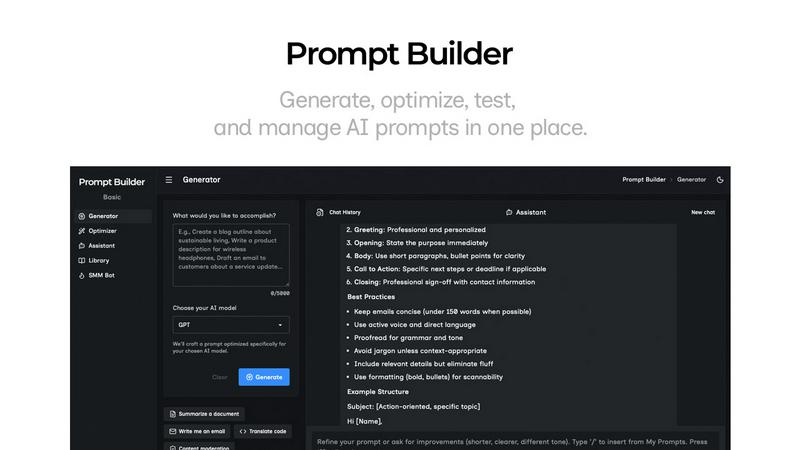
Generate, optimize, test, and manage AI prompts in one place. Turn an idea into a ready-to-use prompt in seconds.
Visual Comparison
dmaya
Prompt Builder
Overview
About dmaya
dmaya is an AI-powered design platform engineered for the modern development workflow, bridging the critical gap between conceptualization and code generation. It is purpose-built for agencies, product teams, and freelancers who operate on a design-first principle, where stakeholder alignment and visual approval are prerequisites to development. Unlike AI tools that bypass design to produce immediate code, dmaya provides a dedicated visual design environment. Here, users can generate complete, professional UI screens from simple text descriptions, iterate on them conversationally with an AI agent, and secure client sign-off—all before a single line of code is written. Its core value proposition lies in accelerating the entire front-end process: from initial brief to client-approved design and, finally, to exportable, clean code that integrates seamlessly with popular coding agents and frameworks like React, Next.js, and Flutter. By focusing on the intentional design phase, dmaya ensures teams can make critical decisions early, reduce costly rework, and ship with confidence.
About Prompt Builder
Prompt Builder is a prompt engineering workspace for writing, testing, and saving prompts. Describe the task in plain English, and it helps you create a prompt that matches the model you choose. Start with a draft, refine it in chat, save or pin versions, then run them when you are ready. It works with GPT, Claude, Gemini, Llama, Mistral, DeepSeek, Grok, Perplexity, and more. You also get an Optimizer, an assistant for quick tests, and a library of reusable prompts and templates from the community. Turn an idea into a ready-to-use prompt in seconds. Refine it in chat, save it to your Library, and run it anytime.