
Imgezy vs Vailo AI
Side-by-side comparison to help you choose the right product.

Imgezy
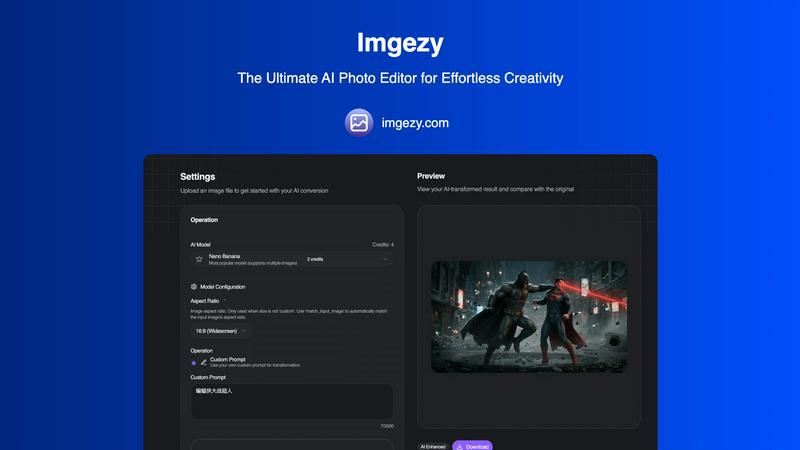
Imgezy is the AI photo editor that effortlessly removes objects, changes backgrounds, and enhances images in seconds.
Last updated: February 28, 2026

Vailo AI
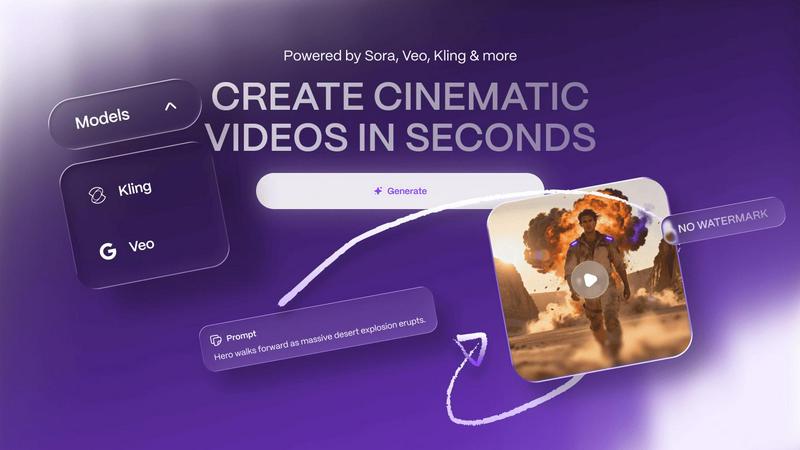
Vailo AI seamlessly integrates text and image inputs to generate high-quality, watermark-free cinematic videos.
Last updated: February 28, 2026
Visual Comparison
Imgezy
Vailo AI
Feature Comparison
Imgezy
Object Removal
Imgezy's object removal feature uses cutting-edge AI algorithms to identify and erase unwanted elements from your photos. This includes anything from tourists in the background to distracting objects that compromise the integrity of your shot. The AI reconstructs the background seamlessly, ensuring that the final image looks natural and untouched.
Background Replacement
Instantly change the background of your images with Imgezy’s background replacement feature. Users can select from a variety of stunning landscapes or solid colors to create the perfect backdrop for their subjects. This feature allows for creative freedom, enabling users to set the scene without advanced editing skills.
Photo Enhancement
Imgezy automatically enhances your photos by optimizing colors, lighting, and sharpness. This feature allows for a professional polish that transforms everyday images into stunning visuals. Users can enjoy improved picture quality without needing to manually adjust settings or apply filters.
Batch Processing
For those with multiple images to edit, Imgezy offers batch processing capabilities. This feature allows users to edit numerous photos simultaneously, saving valuable time and streamlining the workflow for larger projects. It is particularly useful for photographers working on events or businesses needing consistent imagery.
Vailo AI
Multi-Model AI Engine
Vailo AI's architecture is built around a powerful multi-model engine, providing users with access to several premium, top-tier generative AI models from a single interface. This technical stack integration allows for flexibility and quality, as different models can be selected or leveraged for specific tasks—whether generating hyper-realistic images, creating smooth cinematic motion, or applying particular artistic styles. This eliminates the need to juggle subscriptions across multiple standalone AI services, centralizing capability and ensuring compatibility within one workflow for consistent, professional results.
Image-to-Video (I2V) Generation
This advanced feature allows users to animate any static portrait, product shot, or landscape image, seamlessly transforming it into a dynamic video clip. The I2V technology analyzes the input image and generates plausible, natural motion, bringing subjects to life without requiring any original video footage. It's ideal for creating engaging product promos, animated portraits, or adding cinematic flair to still photography, effectively bridging the gap between static visual assets and motion content within the platform's integrated studio environment.
Professional Video & Image Studio
Beyond simple generation, Vailo AI includes a full suite of editing tools within its Video and Image Studios. This encompasses advanced editing capabilities for refining generated content, such as motion control for directing specific movements within a scene, upscaling to enhance resolution, and applying detailed edits. This integrated toolset ensures the entire production pipeline—from initial AI generation to final polish—can be completed without exporting to external software, maintaining a streamlined and efficient workflow for professional creators.
Template Library & Format Optimization
The platform offers a library of ready-made templates designed to generate polished results quickly, reducing complexity for users of all skill levels. Furthermore, it features automatic format optimization for major social media and web platforms. Users can effortlessly create content tailored for specific aspect ratios, such as 9:16 for vertical video platforms (Reels, TikTok) and 16:9 for YouTube or web use, ensuring technical compatibility and optimal presentation across all distribution channels directly from the Vailo AI workspace.
Use Cases
Imgezy
Event Photography
Event photographers can utilize Imgezy to quickly edit and enhance images from weddings, parties, or corporate functions. With features like object removal and background replacement, they can create polished, professional photos that impress clients and guests alike.
Social Media Content Creation
Social media influencers and creators can use Imgezy to produce eye-catching content for their profiles. The tool’s easy-to-use interface allows users to edit images on-the-go, ensuring that their posts stand out in crowded feeds.
E-commerce Product Photography
Online retailers can benefit from Imgezy by enhancing product images for their websites. With the ability to remove distractions and improve image quality, businesses can present their products in the best light, ultimately driving sales and customer engagement.
Personal Projects and Gifts
For individuals looking to personalize gifts or create unique photo albums, Imgezy offers a fun and creative outlet. Users can easily edit family photos or vacation snapshots, making them memorable keepsakes that capture special moments.
Vailo AI
Social Media Marketing Content
Marketers and social media managers can leverage Vailo AI to rapidly produce a high volume of engaging, platform-specific video ads, promotional reels, and animated posts. By using text prompts or existing brand imagery, teams can generate eye-catching content for campaigns on TikTok, Instagram Reels, and YouTube Shorts without the need for film shoots, actors, or complex editing suites, enabling agile and cost-effective content strategy execution.
Product Visualization & Promos
E-commerce brands and designers can utilize the Image-to-Video feature to create compelling animated showcases for their products. A simple product photo can be transformed into a short video highlighting details, demonstrating use, or placing the item in a dynamic scene. This creates more engaging and informative product pages and advertising materials than static images, driving higher conversion rates without the logistical hassle of traditional video production.
Concept Visualization & Storyboarding
Filmmakers, writers, and creative directors can use Vailo AI's text-to-video capabilities to visualize scenes, characters, or concepts during pre-production. By inputting descriptive prompts, they can generate rough video shots or storyboard sequences to communicate ideas, test cinematic styles, and plan shoots more effectively. This accelerates the creative development process and provides a tangible visual reference early in the project lifecycle.
Brand Content & Motion Graphics
Brands and content studios can produce a wide array of professional assets, including animated logos, explainer video segments, website background visuals, and branded motion graphics. The all-in-one platform allows for consistent application of brand elements across different types of content, from image generation to final video editing, ensuring a cohesive visual identity while significantly reducing production time and dependency on multiple specialized software tools.
Overview
About Imgezy
Imgezy is a revolutionary AI-powered photo editing tool designed to simplify and enhance the image editing experience for users of all skill levels. Whether you are a casual creator or a professional photographer, Imgezy allows you to transform your images in just a few clicks. The platform harnesses advanced artificial intelligence to perform complex tasks such as removing unwanted objects, changing backgrounds, and enhancing details without the need for any prior design knowledge. With an intuitive interface, users can simply describe their desired edits, and Imgezy takes care of the rest. Trusted by over 200,000 users, the tool not only delivers high-quality results in seconds but also fosters creativity by enabling users to bring their ideas to life effortlessly. Imgezy’s combination of advanced technology and ease of use makes it the go-to choice for anyone looking to elevate their photography.
About Vailo AI
Vailo AI is a comprehensive, all-in-one generative AI studio engineered to streamline and professionalize digital content creation. It functions as a unified platform that consolidates multiple production tools into a single, cohesive workflow, eliminating the need for disparate software and complex technical setups. At its core, Vailo AI specializes in transforming textual prompts or static images into high-quality, cinematic videos within seconds. This capability is powered by a sophisticated multi-model engine that provides users with access to various top-tier AI models for different creative needs. The platform is specifically designed for creators, marketers, filmmakers, designers, and brands who require efficient, studio-grade output without the traditional overhead of physical equipment, filming, or extensive post-production editing. Its architecture supports seamless integration of various AI models, offering features from basic generation to advanced editing, upscaling, and motion control. The value proposition is clear: a single subscription grants access to a full suite of professional tools, enabling the rapid creation of platform-optimized content (like 9:16 for Reels/TikTok or 16:9 for YouTube) and dramatically reducing the time and resource investment typically associated with high-quality video production.
Frequently Asked Questions
Imgezy FAQ
How does Imgezy work?
Imgezy uses advanced AI technology to analyze and process images based on user descriptions. Users simply upload their photos and describe the edits they want, and the AI executes the tasks in seconds.
Do I need any design skills to use Imgezy?
No, Imgezy is designed to be user-friendly and accessible to anyone, regardless of their design experience. The platform allows you to edit photos simply by describing your desired changes.
What file formats does Imgezy support?
Imgezy supports all major image formats, including JPG, PNG, and WebP. This makes it convenient for users to upload and edit their images without worrying about compatibility issues.
Can I download my edited photos in high resolution?
Yes, Imgezy allows users to download their edited images in full resolution without any quality loss, ensuring that you receive professional-grade results suitable for printing or sharing online.
Vailo AI FAQ
What can I create with Vailo AI?
You can create a wide range of studio-grade visual content, including cinematic video shots from text (Text-to-Video), animated videos from images (Image-to-Video), high-quality AI-generated images, and edited/motion-controlled videos. Specific outputs include social media ads, product promotions, short film scenes, storyboards, motion graphics, and upscaled visuals, all optimized for platforms like YouTube, TikTok, and Instagram.
What is included in the Free Plan?
The Free Plan is designed for exploration and includes 40 credits upon sign-up, with an additional 200 credits granted when you create an account. This allows for up to 11 video generations and over 100 image generations using all the platform's premium AI models and tools. Content created on the Free Plan carries no watermark, providing a full-featured experience to test the platform's integrated workflow before upgrading.
How does the credit system work?
Credits are the currency used for generating content on Vailo AI. Each image or video generation consumes a certain number of credits, which varies based on the model used and the complexity of the task. Plans offer a monthly refresh of credits (e.g., 2500 credits in the Creator Plan). You can also purchase additional credit packs ($5 for 400 credits, $10 for 800, etc.) on top of your subscription if needed, providing flexibility for project-based workloads.
Is there a watermark on the generated content?
No, Vailo AI does not apply watermarks to any content generated on its platform, even on the Free Plan. This ensures that all your created images and videos are clean and professional, ready for immediate use in commercial projects, social media, or client work without any branding from the AI tool itself.
Alternatives
Imgezy Alternatives
Imgezy is an innovative AI photo editor that simplifies the image editing process for users of all skill levels. It allows individuals to effortlessly remove objects, change backgrounds, and enhance their photos with just a few descriptive commands. This user-friendly platform has gained popularity among both casual creators and professionals, making it a go-to solution for enhancing visual content. Users often seek alternatives to Imgezy for various reasons, including pricing models, feature sets, or compatibility with specific platforms. When choosing an alternative, it is essential to consider factors such as ease of use, editing capabilities, AI performance, and integration with other tools. A suitable substitute should offer comparable features while fitting within your budget and technical requirements.
Vailo AI Alternatives
Vailo AI is a generative AI video creation platform that transforms text prompts and static images into cinematic video content. It operates within the competitive landscape of AI-powered creative studios, specifically targeting text-to-video and image-to-video generation. This category is defined by rapid technological evolution and diverse application needs. Users often explore alternatives to Vailo AI to find a solution that better aligns with their specific technical stack, budget, or feature requirements. Common drivers include seeking different pricing models, specialized output formats, deeper API integration capabilities, or workflows that connect more seamlessly with existing design and marketing tools. The need for a platform that fits a particular content pipeline is a primary consideration. When evaluating an alternative, key technical factors include the core AI model's output quality and consistency, supported aspect ratios and resolution options, and the availability of an API for automation. Integration potential with other software in your creative suite, such as CMS, DAM, or social scheduling tools, is crucial for operational efficiency. Additionally, assess the platform's data handling policies and security compliance to ensure it meets your organizational standards.