
Juntos vs PseudoRun
Side-by-side comparison to help you choose the right product.

Juntos
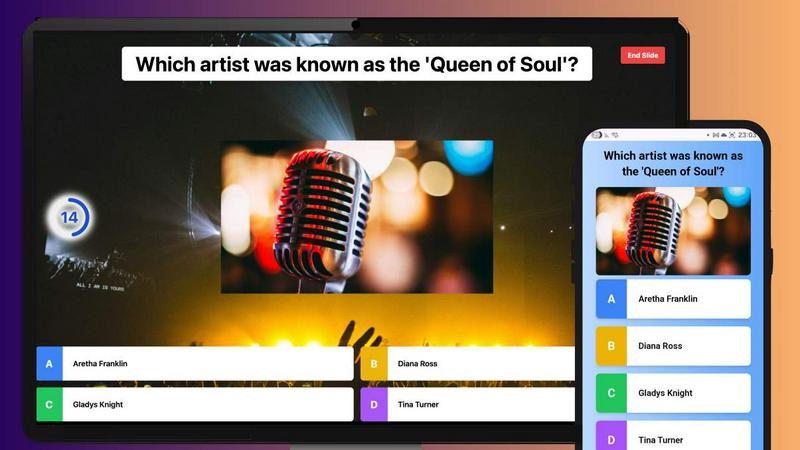
Juntos is a free no-app quiz platform that integrates live multiplayer trivia directly into any chat.
Last updated: February 28, 2026

PseudoRun
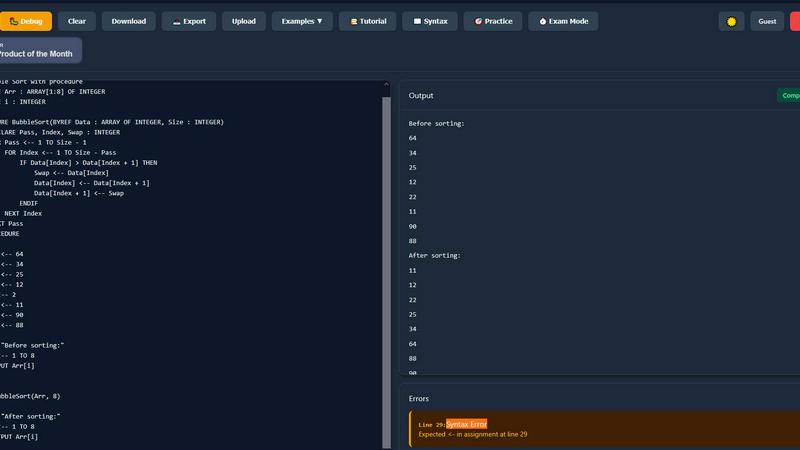
PseudoRun is the free, ad-free IGCSE pseudocode editor with real-time validation and debugging.
Last updated: March 1, 2026
Visual Comparison
Juntos
PseudoRun
Feature Comparison
Juntos
Browser-Based, Zero-Install Participation
Juntos is architected as a fully responsive web application, requiring no software installation for participants. This design ensures universal compatibility across desktops, laptops, tablets, and smartphones. Users join a live quiz session by navigating to the Juntos.live website and entering a unique game code provided by the host. This eliminates friction points like app store downloads, account creation, and platform-specific restrictions, enabling instant engagement from any modern browser.
Native Video Conferencing Integration
To optimize the remote meeting experience, Juntos features deep integration capabilities with popular video conferencing ecosystems including Zoom, Google Meet, and Microsoft Teams. This integration allows participants to submit their quiz answers directly through the conferencing platform's native chat function. By preventing disruptive tab-switching and maintaining focus within the primary meeting interface, this feature preserves meeting flow and enhances the cohesiveness of virtual workshops, training, and social events.
Real-Time Multiplayer Game Engine
At its core, Juntos operates on a real-time multiplayer game engine that powers live quizzes with competitive scoring, countdown timers, and dynamic leaderboards. This engine processes participant inputs instantaneously, updating the public scoreboard after each question to foster excitement and friendly competition. The live, synchronous nature of the platform is engineered to create a shared, engaging experience that connects distributed audiences, turning solitary viewing into an interactive group activity.
Intuitive Quiz Creation & Customization Studio
Hosts access a comprehensive, user-friendly editor to build custom quizzes from the ground up. This studio allows for the creation of personalized questions, the setting of answer timers, and the configuration of scoring rules. The platform supports a variety of question formats and enables hosts to tailor content for specific audiences, whether for educational purposes, corporate trivia, or social entertainment. Created quizzes are stored in the cloud for easy access and repeated use.
PseudoRun
IGCSE-Specification Compliant Editor
The editor is the cornerstone of PseudoRun, built to strictly adhere to the syntax and conventions of the Cambridge IGCSE pseudocode standard. It provides syntax highlighting, auto-indentation, and intelligent code completion tailored specifically for IGCSE constructs like DECLARE, CASE...OF, and REPEAT...UNTIL. This ensures that students practice and write code exactly as required in their examinations, preventing the formation of bad habits from using generic programming language syntax.
Real-Time Validation & Error Detection
Integrated directly into the editing environment, this feature performs continuous static analysis on the pseudocode. It instantly flags syntax errors, undefined variables, and logical inconsistencies specific to the IGCSE pseudocode specification. This immediate feedback loop allows for on-the-fly correction and learning, significantly reducing debugging time and helping students understand the precise rules of the pseudocode language before they run their programs.
Interactive Step-by-Step Debugger
This advanced tool allows users to execute their pseudocode line-by-line, providing deep visibility into the program's state. It features a call stack viewer, variable tracker that updates in real-time, and control flow visualization. This granular level of inspection is critical for understanding complex algorithms involving loops, conditionals, and procedures, enabling students to deconstruct and comprehend the exact sequence of operations and data changes.
Integrated IGCSE Practice Library & Exam Mode
PseudoRun includes a comprehensive, cloud-accessible repository of 50+ curated practice problems and examples that mirror IGCSE exam patterns. Coupled with an "Exam Mode" timer, this feature creates a simulated exam environment. Students can practice solving problems under timed conditions, building both speed and confidence, while all their work is automatically saved to their free cloud account for review across any compatible device.
Use Cases
Juntos
Corporate Training & Team Building
In corporate environments, Juntos transforms standard training modules and all-hands meetings into interactive, memorable experiences. Trainers can embed knowledge-check quizzes directly into presentations to gauge understanding and reinforce key concepts in real-time. For team building, hosts can create custom trivia about company history or industry facts, fostering camaraderie and a sense of shared culture among in-office and remote employees through friendly, live competition.
Virtual Classroom & Educational Engagement
Educators leverage Juntos to break the monotony of lectures and increase student participation in both physical and virtual classrooms. Teachers can launch quick formative assessments, review games, or topic introductions using the platform's quiz format. The immediate feedback from live polls and the competitive element of the leaderboard motivate students, while the browser-based access ensures every student can participate regardless of their device or location.
Hybrid & Virtual Event Programming
Event organizers use Juntos to drive interaction during webinars, conferences, and virtual happy hours. By interspersing scheduled content with live trivia rounds relevant to the event's theme, hosts can maintain high energy levels and attendee focus. The platform's ability to integrate with streaming and conferencing software makes it a versatile tool for injecting participatory elements into otherwise one-directional event formats, significantly boosting engagement metrics.
Social Gatherings & Family Game Nights
For informal social settings, Juntos provides an easy-to-use platform for hosting interactive game nights. Friends and family can connect remotely or in the same room, using their own devices to play through curated quizzes on topics like pop culture, world cuisine, or general knowledge. The simple "game code" join method makes it accessible for all age groups, turning any gathering into a fun, connected, and engaging multiplayer experience.
PseudoRun
Independent IGCSE Exam Preparation
Students can use PseudoRun as a primary study tool to independently practice past paper algorithms and textbook exercises. The platform's spec-aligned editor and instant feedback allow for self-directed learning, enabling students to identify weaknesses, practice efficiently, and track their progress through saved programs in their personal cloud storage, all tailored to the IGCSE syllabus.
Classroom Teaching & Live Demonstration
Educators can integrate PseudoRun into their lessons for live coding demonstrations. The step-by-step debugger is perfect for visually deconstructing algorithms on a projector, showing variable states and flow control in real-time. Teachers can also create and share problem sets with students, leveraging the platform to provide a standardized, accessible practice environment for the entire class.
Algorithm Design & Prototyping
Beyond rote practice, students and learners can use PseudoRun as a sandbox for designing and testing their own algorithms. The ability to quickly write, run, and debug pseudocode without setup overhead makes it an ideal tool for prototyping logic before potentially translating it into an actual programming language for coursework or projects.
Revision & Conceptual Reinforcement
In the lead-up to exams, students can utilize the platform for focused revision. They can re-run their saved programs, use the debugger to step through tricky algorithms they previously wrote, and tackle new problems from the practice library under timed "Exam Mode" conditions to reinforce concepts and improve time management skills.
Overview
About Juntos
Juntos is a modern, cloud-native interactive quiz and poll platform engineered to transform passive audiences into active participants. Built as a responsive web application, its core architecture is designed for seamless, frictionless integration into any digital or physical environment. The platform enables hosts to create and launch live, multiplayer quizzes that feature timers, scoring, and dynamic leaderboards to foster energetic competition and connection. Its primary value proposition lies in its exceptional cross-platform compatibility and zero-barrier entry. Participants can join a session instantly from any device with a web browser by simply entering a game code, eliminating the need for app downloads, user accounts, or complex setup. For remote and hybrid settings, Juntos offers a powerful integration layer with major video conferencing stacks like Zoom, Google Meet, and Microsoft Teams, allowing responses to be submitted directly through the native chat interface to maintain meeting flow. Positioned as a free, accessible alternative to platforms like Kahoot, Juntos serves a broad spectrum of users including educators, corporate trainers, event organizers, and families looking to enhance engagement in classrooms, workshops, team-building sessions, and social gatherings.
About PseudoRun
PseudoRun is a purpose-built, browser-based platform engineered to provide a seamless and integrated environment for mastering IGCSE Computer Science pseudocode. It functions as a comprehensive editor, simulator, and debugger, specifically architected to align with the Cambridge IGCSE pseudocode specification. The platform's core value proposition lies in its ability to bridge the gap between theoretical algorithm design and practical execution, eliminating the dependency on traditional, complex programming language setups. Its tech stack is designed for universal compatibility, running entirely in modern web browsers, which ensures immediate accessibility from any device without installation. The primary user base comprises IGCSE students, educators, and self-learners seeking a focused tool for exam preparation. By offering real-time code validation, step-by-step execution, and a vast library of IGCSE-aligned practice problems, PseudoRun provides a structured and distraction-free ecosystem that directly translates algorithmic thinking into exam-ready skills. Its commitment to a zero-ad, fully-featured free model further ensures an uninterrupted learning experience, making it an indispensable tool in the IGCSE Computer Science tech stack.
Frequently Asked Questions
Juntos FAQ
Is Juntos really free to use?
Yes, Juntos is a free-to-use platform. The core functionality of creating, hosting, and playing interactive multiplayer quizzes is available at no cost and does not require a credit card to start. This positions it as a accessible alternative to other freemium or subscription-based interactive platforms, making it ideal for educators, casual users, and organizations on a budget.
How do participants join a Juntos game?
Joining a game is designed for maximum simplicity and compatibility. The host shares a unique game code generated when they start a quiz. Participants then open any web browser on their device (phone, tablet, or computer), go to the Juntos.live website, enter the code, and are immediately connected to the live game session. No downloads, accounts, or logins are required for players.
Can I use Juntos with Zoom or Google Meet?
Absolutely. Juntos is built with integration for major video conferencing stacks. During a Zoom, Google Meet, or Microsoft Teams call, the host can launch a quiz. Participants can then answer questions directly through the conferencing platform's chat feature by typing their response (e.g., "A", "B", "1", "2"), which Juntos processes in real-time. This seamless integration keeps everyone in the same window.
Can I create my own custom quizzes?
Yes, hosts have full access to an intuitive quiz creation studio. You can build quizzes from scratch, adding custom questions, multiple-choice answers, setting timers for each question, and defining scoring rules. This allows for complete customization to suit specific topics, audiences, or learning objectives. Your created quizzes are saved in your host library for future use.
PseudoRun FAQ
Is PseudoRun really free with no hidden costs?
Yes, absolutely. PseudoRun operates on a promise of being completely free, with zero advertisements and no premium paywalls. All features, including the IGCSE editor, debugger, cloud storage, and practice library, are available at no cost. The platform is sustained by community support, not user fees.
How does PseudoRun ensure compatibility with the IGCSE exam?
The platform's core parsing engine and syntax definitions are built exclusively around the official Cambridge IGCSE Computer Science pseudocode specification. The editor, error checks, and example problems are all designed to mirror the language and patterns used in past papers and syllabus materials, ensuring direct exam relevance.
Do I need to install any software or create an account?
No installation is required. PseudoRun is a web-based application that runs directly in your browser. While you can use many features immediately without an account, creating a free account is recommended to unlock cloud storage, allowing you to save and access your programs from any device seamlessly.
Can I use PseudoRun on a tablet or smartphone?
Yes, PseudoRun is built with a responsive design, making it compatible with tablets and larger smartphones. The interface adapts to different screen sizes, allowing you to write, edit, and run pseudocode on the go, although a physical keyboard is generally recommended for extensive coding sessions.
Alternatives
Juntos Alternatives
Juntos is a cloud-based, interactive quiz platform within the lifestyle and entertainment category, engineered for real-time engagement. It operates on a zero-friction, browser-first architecture, allowing participants to join instantly via any web browser without downloads, making it a popular choice for live multiplayer trivia in both virtual and physical settings. Users often explore alternatives to Juntos to address specific technical or operational requirements. Common drivers include the need for different pricing models beyond a free tier, more advanced feature sets like complex gamification or analytics, or deeper integrations with niche software ecosystems beyond mainstream video conferencing stacks. Platform-specific needs, such as dedicated mobile apps or specialized administrative controls, also prompt evaluation of other solutions. When selecting an alternative, prioritize core technical compatibility. Assess the platform's integration layer with your existing communication stack, such as video conferencing APIs or learning management systems. Evaluate the participant join flow for frictionless access and consider the host's tooling for content creation and live session management. The ideal alternative should align with your specific use-case requirements while maintaining robust, real-time performance.
PseudoRun Alternatives
PseudoRun is a specialized online IDE and learning platform within the educational technology category, designed explicitly for mastering IGCSE Computer Science pseudocode. It provides a focused environment with real-time validation and debugging tailored to the Cambridge syllabus. Users often explore alternatives for various reasons, including specific feature requirements, the need for offline functionality, or integration with a broader tech stack like local IDEs or learning management systems. Some may seek platforms that support additional programming languages beyond the strict IGCSE pseudocode specification. When evaluating an alternative, key considerations include its compatibility with the official IGCSE pseudocode syntax, the robustness of its debugging and execution engine, and data portability. The ideal platform should offer seamless integration into a student's or educator's existing workflow, providing reliable performance without vendor lock-in for saved projects.