
KeywordKick vs ScreenDemos
Side-by-side comparison to help you choose the right product.

KeywordKick
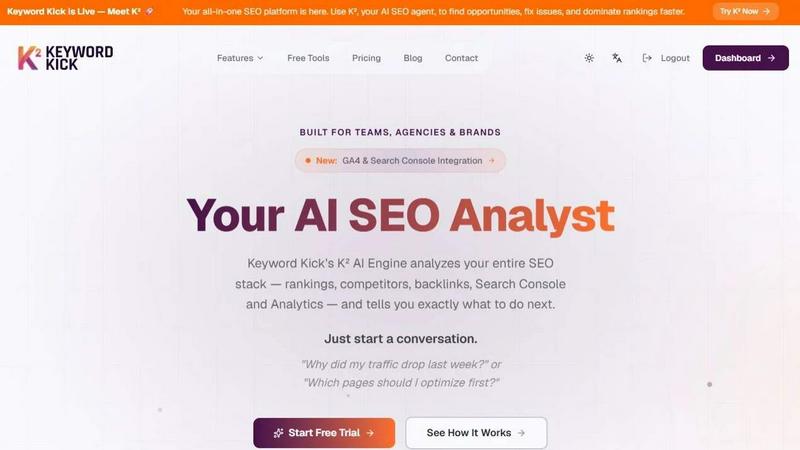
KeywordKick's K² AI agent integrates your entire SEO tech stack to deliver clear, actionable insights and recommendations.
Last updated: April 13, 2026

ScreenDemos
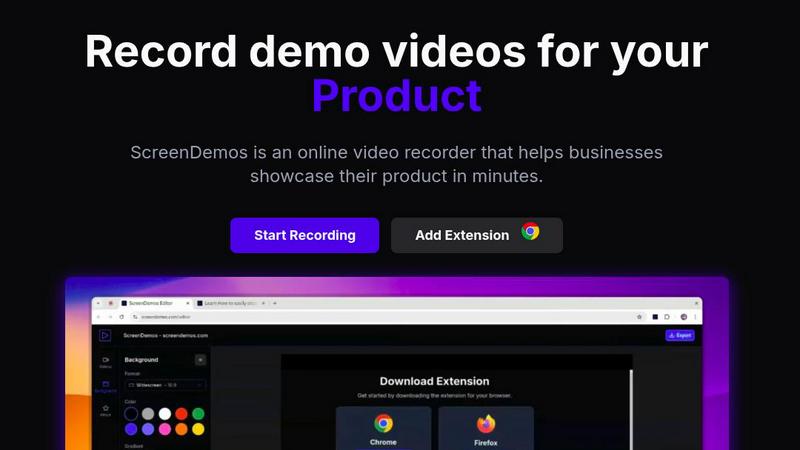
ScreenDemos instantly creates professional product demos with automatic effects directly in your browser.
Last updated: February 28, 2026
Visual Comparison
KeywordKick
ScreenDemos
Feature Comparison
KeywordKick
K² AI SEO Agent
The K² AI Agent is the intelligent interface of the platform, acting as a conversational analyst. Instead of navigating complex reports, users can ask direct questions about their SEO performance. The agent analyzes connected data from GA4, Search Console, rankings, and backlinks to provide plain-English insights and prioritized action items, turning data sprawl into a clear roadmap for execution.
Unified SEO Data Workspace
This feature consolidates your entire SEO tech stack into a single dashboard. It seamlessly integrates data from Google Analytics 4, Google Search Console, keyword rank tracking, backlink profiles, and technical site audits. This eliminates the need to cross-reference multiple tools, providing a comprehensive, real-time view of site health, keyword performance, and competitive positioning in one location.
AI-Powered Rank Tracking & SERP Analysis
Go beyond basic position tracking. This module monitors daily keyword rankings with historical trends and competitive context. It specifically tracks visibility across critical SERP features like Featured Snippets and "People Also Ask" boxes. The system compares your positions against selected competitors to identify content gaps and opportunities for improved visibility.
Automated Site Health Auditing
The platform includes a comprehensive technical SEO auditor that continuously monitors your website. It generates a clear Site Health Score (e.g., 94/100), categorizing issues as Passed, Warnings, or Critical. This provides teams with an immediate, prioritized list of technical problems to fix, from meta tags to page speed, ensuring the foundation for SEO success is solid.
ScreenDemos
Browser-Native Recording Engine
ScreenDemos operates entirely within your browser as a lightweight extension, requiring no separate desktop application. This architecture ensures instant access, eliminates complex installation procedures, and guarantees compatibility across all major operating systems including Windows, macOS, and Linux. The recorder captures your screen, system audio, and microphone input directly through the browser's native APIs, providing a stable and resource-efficient recording experience without ever leaving your web workflow.
Automatic Zoom & Pan Effects
The platform intelligently applies professional zoom and pan effects in real-time during your recording. This feature automatically guides the viewer's attention to key areas of your screen, such as button clicks, menu interactions, or specific data points. By automating this typically manual post-production task, ScreenDemos adds a layer of polish and engagement to videos that would otherwise require hours of editing in traditional video software.
Smooth Animated Cursor & Shortcut Hints
Enhance viewer comprehension with a dynamically enlarged, smoothly animated cursor that is easy to follow. Simultaneously, ScreenDemos can display on-screen hints for keyboard shortcuts as you use them. This dual-feature is invaluable for creating clear software tutorials and product demos, as it visually communicates both mouse navigation and keyboard commands, improving the overall learning experience without any post-recording annotation.
Customizable Backgrounds & Branding
Apply custom backgrounds to your screen recordings to align the visual output with your brand identity or specific video style. This feature allows you to replace your native desktop background with a solid color, gradient, or branded image directly within the recording interface. For Pro users, this extends to removing the ScreenDemos watermark, enabling the creation of fully branded, professional assets suitable for public marketing and sales materials.
Use Cases
KeywordKick
Diagnosing Organic Traffic Drops
When a sudden traffic decline occurs, SEO professionals can query the K² agent directly. The AI cross-references Analytics traffic data with Search Console impressions/clicks, ranking fluctuations, and recent site changes to pinpoint the root cause—whether it's a ranking drop for key terms, a technical indexing issue, or a competitor surge—and recommends specific recovery actions.
Prioritizing Page Optimization Efforts
Marketing teams can ask K², "Which pages should I optimize first?" The agent analyzes ranking data, search volume, intent, and current performance metrics across all site pages. It then returns a prioritized list of URLs with the highest potential ROI for optimization, focusing efforts where they will have the greatest impact on traffic and conversions.
Conducting Competitive Content Gap Analysis
SEO agencies managing client portfolios can use the competitor analysis features to benchmark performance. By connecting competitor domains, the platform identifies keywords where competitors rank highly but the client does not. This reveals strategic content gaps and opportunities to create or improve content to capture valuable, missed organic traffic.
Streamlining Client Reporting for Agencies
For digital agencies, the unified dashboard and AI insights simplify reporting. Instead of manually compiling data from 5+ tools, they have one source of truth. The clear Site Health Score, trend graphs, and AI-generated recommendations can be easily packaged into client reports, saving hours of manual work and providing clear, actionable narratives.
ScreenDemos
Product Demo & Feature Announcements
Ideal for product managers and developers, ScreenDemos enables the rapid creation of high-quality demo videos to showcase new features or entire product workflows. The automatic effects like zoom and cursor highlighting draw attention to specific UI elements, making it perfect for creating engaging announcement videos for blogs, release notes, or internal team updates, significantly speeding up the communication cycle.
User Onboarding & Tutorial Creation
Support and education teams can leverage ScreenDemos to build intuitive, step-by-step tutorial videos and onboarding sequences. The smooth cursor and shortcut hints make complex processes easy to follow for new users. By embedding these videos in help centers, knowledge bases, or in-app guides, teams can reduce support tickets and improve user adoption rates with scalable visual content.
Marketing & Social Media Content
Marketing professionals can use ScreenDemos to quickly produce compelling social media clips, website explainer videos, and sales collateral. The ability to add custom backgrounds and create polished videos without an editor allows for rapid content iteration. This is crucial for agile marketing teams looking to capitalize on trends, explain product benefits visually, and grow their brand's presence across digital channels.
Internal Training & Process Documentation
For agile teams across all departments, ScreenDemos serves as a powerful tool for internal knowledge sharing. Employees can easily record process walkthroughs, code reviews (for developers), design critiques, or standard operating procedures. The browser-based nature means anyone can contribute to the company's knowledge repository without a steep learning curve, fostering a culture of asynchronous communication.
Pricing Comparison
KeywordKick
The platform offers tiered pricing plans designed to scale with different team and business needs. All plans include access to the core all-in-one SEO platform with rank tracking, backlink analysis, site auditing, and the K² AI agent. Specific tiers cater to individuals, growing businesses, and large agencies or brands, typically differing by the number of projects or websites tracked, keyword tracking volume, and the depth of historical data available. Users can start with a free trial to evaluate the platform's integrations and AI capabilities before committing to a paid plan.
ScreenDemos
ScreenDemos offers a simple, tiered pricing model with a free Starter plan and a paid Pro plan. The Pro plan is available on a monthly or annual subscription, with the annual offering a significant discount.
Starter Plan: Priced at $0/month, this plan includes access to the browser recorder extension, the ability to download your videos, and standard 720p video quality. It's ideal for getting started with basic screen recording.
Pro Plan: Priced at $15/month (with annual billing available for 40% savings), this plan unlocks all professional features. This includes automatic zoom effects, smooth cursor movement, higher 1080p video quality, the ability to add custom backgrounds, and the removal of the ScreenDemos watermark from your final videos.
Overview
About KeywordKick
KeywordKick is an AI-powered SEO execution platform engineered to replace fragmented data dashboards with actionable intelligence. At its core is K², a conversational AI agent that serves as your dedicated SEO analyst. The platform is built for a modern tech stack, offering deep, native integrations with essential data sources like Google Search Console and Google Analytics 4, alongside rank tracking, backlink, and site audit data. By unifying these disparate signals into a single workspace, KeywordKick's K² engine performs a holistic analysis of your entire SEO ecosystem. It cuts through the noise to deliver clear, prioritized, and executable recommendations. Designed for founders, in-house marketing teams, and SEO agencies, KeywordKick shifts the focus from passive data monitoring to active growth. Users can simply ask questions like "Why did my traffic drop?" or "What should I optimize first?" and receive direct, context-aware answers, enabling faster decision-making and demonstrable improvements in organic rankings and traffic.
About ScreenDemos
ScreenDemos is a browser-native screen recording platform engineered to streamline the creation of professional-grade video content directly within your web environment. It functions as a lightweight browser extension, eliminating the need for bulky, platform-dependent desktop software installations. The core value proposition lies in its ability to automate complex post-production effects during the recording process itself. Users can generate engaging demos, tutorials, and social media clips featuring automatic zoom effects, smooth cursor animations, and custom backgrounds without any manual editing skills. Built for modern, agile teams, it integrates seamlessly into the workflows of product, marketing, design, and support departments who rely on visual communication. Its architecture prioritizes cross-platform compatibility, operating across major browsers like Chrome and Firefox on Windows, macOS, and Linux systems. By leveraging the browser as its runtime, ScreenDemos transforms the technical process of video production into a simple, efficient, and integrated task, enabling professionals to create high-impact visual assets in minutes rather than hours.
Frequently Asked Questions
KeywordKick FAQ
What data sources does KeywordKick integrate with?
KeywordKick is built for integration with core components of the modern SEO and analytics tech stack. It connects natively with Google Search Console and Google Analytics 4 for official performance and traffic data. Additionally, the platform incorporates data from its own rank tracking, backlink analysis, and site audit engines, unifying everything into a single analysis environment for the K² AI agent.
How does the K² AI Agent differ from a standard SEO dashboard?
Standard dashboards present raw data, leaving interpretation and prioritization to the user. The K² AI Agent is an active analyst. You interact with it conversationally, asking specific questions about your SEO performance. It then synthesizes all connected data to provide direct answers, causal explanations, and a clear list of next steps, moving from data presentation to guided execution.
Is KeywordKick suitable for small businesses or solo founders?
Yes, absolutely. KeywordKick is designed for anyone seeking execution over data overload. For founders and small teams with limited SEO bandwidth, the AI agent's ability to provide clear, prioritized actions is invaluable. It eliminates the need for deep expertise to interpret complex data, making professional-grade SEO insights accessible and actionable for smaller operations.
How does the platform handle technical SEO monitoring?
KeywordKick includes an automated site audit tool that continuously crawls your website. It checks for hundreds of technical factors, from crawlability and indexation to on-page elements like H1 tags and meta descriptions. Issues are categorized by severity and compiled into a single Site Health Score, giving teams a constant, prioritized view of their technical SEO foundation.
ScreenDemos FAQ
Is ScreenDemos privacy-friendly?
Yes, ScreenDemos is designed with privacy as a core principle. The platform does not collect or store your personal data or recording content without your explicit action. All video processing for automated effects happens locally within your browser session where possible. You maintain full control, choosing to save final videos directly to your device or to your private account on the ScreenDemos website. We recommend avoiding recording sensitive information as a general best practice.
What devices and browsers are supported?
ScreenDemos is built for maximum compatibility and operates as a browser extension. It is fully supported on all major browsers that support extensions, primarily Google Chrome and Mozilla Firefox. Because it runs in the browser, it is compatible with all underlying operating systems, including Windows, macOS, and Linux, ensuring a consistent experience across different tech stacks and hardware.
Why does the extension require certain permissions?
The ScreenDemos extension requires permissions to access your tabs, screen, and microphone to provide its core functionality. These permissions are standard for screen recording software and are necessary to capture your browser tabs, entire screen, or application windows, as well as system and microphone audio. These permissions are used solely for the recording function within your browser and are not abused.
Can I edit my videos after recording?
Yes, ScreenDemos includes basic editing capabilities within its workflow. After you stop a recording, you are taken to a preview interface where you can trim the beginning and end of your clip to remove any unwanted footage. This integrated step allows for quick refinements before finalizing and downloading or sharing your video, maintaining the platform's all-in-one, efficient ethos.
Alternatives
KeywordKick Alternatives
KeywordKick is an AI-driven SEO execution platform that moves beyond traditional analytics dashboards. It falls into the category of conversational AI agents for SEO, designed to provide direct, actionable recommendations by synthesizing data from connected sources like Google Search Console and analytics platforms. Users often explore alternatives for several practical reasons. These can include budget constraints, specific feature requirements not covered by the core offering, or the need for integration with a particular existing tech stack, such as a specific CRM, project management tool, or data warehouse. When evaluating other solutions, prioritize platforms that offer robust API connectivity and seamless compatibility with your essential data sources. The ideal alternative should not only provide insights but also fit cleanly into your workflow, enabling clear action items without creating data silos or additional reporting overhead.
ScreenDemos Alternatives
ScreenDemos is a browser-native screen recording platform in the content creation and design tools category. It automates professional video effects directly within your browser, eliminating the need for separate editing software and catering to agile, tech-stack oriented teams. Users often evaluate alternatives for several reasons. These include specific pricing models, the need for advanced native desktop features, different collaboration workflows, or requirements for integrations outside the browser ecosystem. Platform compatibility and deployment method are also key decision points. When assessing alternatives, consider your primary tech stack and integration needs. Key factors include whether a browser-based or desktop-native architecture fits your workflow, the depth of automated versus manual editing control required, and compatibility with your team's operating systems and existing software tools.