
PseudoRun vs SchoolGPT
Side-by-side comparison to help you choose the right product.

PseudoRun
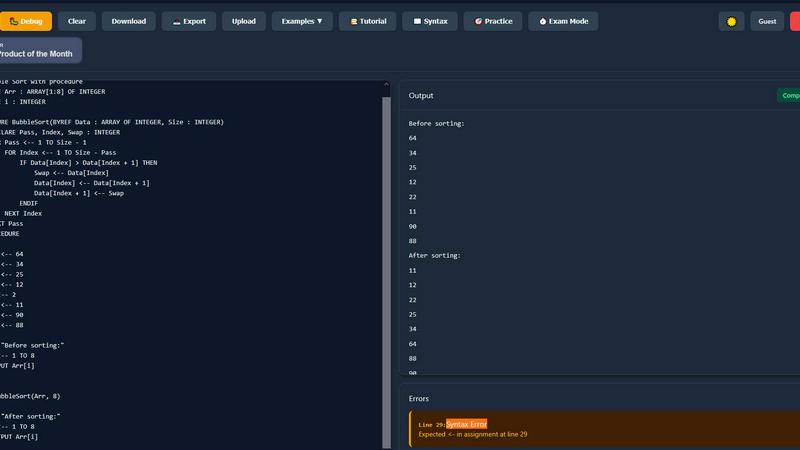
PseudoRun is the free, ad-free IGCSE pseudocode editor with real-time validation and debugging.
Last updated: March 1, 2026

SchoolGPT
SchoolGPT is an AI teaching assistant that saves educators 10+ hours weekly on lesson planning and grading.
Last updated: February 28, 2026
Visual Comparison
PseudoRun
SchoolGPT

Feature Comparison
PseudoRun
IGCSE-Specification Compliant Editor
The editor is the cornerstone of PseudoRun, built to strictly adhere to the syntax and conventions of the Cambridge IGCSE pseudocode standard. It provides syntax highlighting, auto-indentation, and intelligent code completion tailored specifically for IGCSE constructs like DECLARE, CASE...OF, and REPEAT...UNTIL. This ensures that students practice and write code exactly as required in their examinations, preventing the formation of bad habits from using generic programming language syntax.
Real-Time Validation & Error Detection
Integrated directly into the editing environment, this feature performs continuous static analysis on the pseudocode. It instantly flags syntax errors, undefined variables, and logical inconsistencies specific to the IGCSE pseudocode specification. This immediate feedback loop allows for on-the-fly correction and learning, significantly reducing debugging time and helping students understand the precise rules of the pseudocode language before they run their programs.
Interactive Step-by-Step Debugger
This advanced tool allows users to execute their pseudocode line-by-line, providing deep visibility into the program's state. It features a call stack viewer, variable tracker that updates in real-time, and control flow visualization. This granular level of inspection is critical for understanding complex algorithms involving loops, conditionals, and procedures, enabling students to deconstruct and comprehend the exact sequence of operations and data changes.
Integrated IGCSE Practice Library & Exam Mode
PseudoRun includes a comprehensive, cloud-accessible repository of 50+ curated practice problems and examples that mirror IGCSE exam patterns. Coupled with an "Exam Mode" timer, this feature creates a simulated exam environment. Students can practice solving problems under timed conditions, building both speed and confidence, while all their work is automatically saved to their free cloud account for review across any compatible device.
SchoolGPT
Multi-Model AI Integration
SchoolGPT is architected on a robust backend that leverages a suite of advanced AI models, including GPT-4, Claude 3, and Gemini. This integration allows the platform to intelligently route tasks to the most capable model for the specific job, ensuring optimal output quality for everything from creative lesson ideation to analytical rubric generation. Users benefit from the combined strengths of these models without needing to manage separate accounts or complex API integrations, creating a unified and powerful assistant.
Educator-Designed Template Library
The platform hosts a continuously growing library of over 60 ready-to-use templates that codify expert teaching workflows. These are not generic prompts but specialized tools—like the Text Leveler, IEP Generator, or Choice Board Creator—built with pedagogical best practices and classroom realities in mind. This feature turns complex task creation into a simple form-fill process, guaranteeing that outputs like lesson plans include critical components such as learning objectives, differentiation strategies, and alignment to educational standards by default.
Standards Alignment and Differentiation Engine
A cornerstone feature is the automatic alignment of generated content to Common Core and state-specific educational standards. When creating a lesson plan or quiz, educators can select the relevant standard, and SchoolGPT constructs the activity around it. Furthermore, the built-in differentiation engine provides instant suggestions and modifications to adapt materials for diverse learning needs, ensuring resources are classroom-ready for all students without requiring extra hours of manual adaptation.
Compliance-First Data Security
SchoolGPT is engineered with a compliance-first architecture, adhering to critical educational data privacy regulations like FERPA (Family Educational Rights and Privacy Act) and COPPA (Children's Online Privacy Protection Act). This ensures that all data processed within the platform—including student information entered to generate personalized feedback or comments—is handled securely. This built-in compliance provides schools and districts with the necessary confidence to integrate the tool into their existing tech infrastructure.
Use Cases
PseudoRun
Independent IGCSE Exam Preparation
Students can use PseudoRun as a primary study tool to independently practice past paper algorithms and textbook exercises. The platform's spec-aligned editor and instant feedback allow for self-directed learning, enabling students to identify weaknesses, practice efficiently, and track their progress through saved programs in their personal cloud storage, all tailored to the IGCSE syllabus.
Classroom Teaching & Live Demonstration
Educators can integrate PseudoRun into their lessons for live coding demonstrations. The step-by-step debugger is perfect for visually deconstructing algorithms on a projector, showing variable states and flow control in real-time. Teachers can also create and share problem sets with students, leveraging the platform to provide a standardized, accessible practice environment for the entire class.
Algorithm Design & Prototyping
Beyond rote practice, students and learners can use PseudoRun as a sandbox for designing and testing their own algorithms. The ability to quickly write, run, and debug pseudocode without setup overhead makes it an ideal tool for prototyping logic before potentially translating it into an actual programming language for coursework or projects.
Revision & Conceptual Reinforcement
In the lead-up to exams, students can utilize the platform for focused revision. They can re-run their saved programs, use the debugger to step through tricky algorithms they previously wrote, and tackle new problems from the practice library under timed "Exam Mode" conditions to reinforce concepts and improve time management skills.
SchoolGPT
Streamlining Lesson Planning and Unit Design
Educators can generate comprehensive, standard-aligned lesson plans or full unit plans in seconds by simply inputting a topic, objective, or desired standard. The tool produces a structured draft complete with activities, materials lists, and differentiation options, which the teacher can then refine. This use case transforms what was traditionally a multi-hour task into a matter of minutes, allowing for more dynamic and responsive curriculum development.
Automating Assessment Creation and Grading Feedback
Teachers use SchoolGPT to rapidly create formative and summative assessments, including multiple-choice quizzes, text-dependent questions, and custom rubrics. For grading, the Writing Feedback tool analyzes student submissions against teacher-defined criteria or a rubric to generate detailed, constructive feedback. This drastically reduces the time spent on manual grading while providing consistent, high-quality feedback to students.
Generating Administrative and Family Communications
The platform automates the creation of time-consuming administrative documents. This includes drafting professional emails, personalized report card comments that highlight strengths and growth areas, letters of recommendation, and sensitive communications to families regarding student progress or IEP meetings. This ensures communication is clear, consistent, and professional, freeing educators from tedious paperwork.
Personalizing Learning Materials and Support
With tools like the Text Leveler and Worksheet Generator, teachers can instantly adapt existing reading passages or create new activities to match the specific reading proficiency of individual students or groups. Similarly, the IEP Generator helps special education teams draft tailored program goals and accommodations. This use case is critical for efficiently meeting diverse student needs within an inclusive classroom environment.
Overview
About PseudoRun
PseudoRun is a purpose-built, browser-based platform engineered to provide a seamless and integrated environment for mastering IGCSE Computer Science pseudocode. It functions as a comprehensive editor, simulator, and debugger, specifically architected to align with the Cambridge IGCSE pseudocode specification. The platform's core value proposition lies in its ability to bridge the gap between theoretical algorithm design and practical execution, eliminating the dependency on traditional, complex programming language setups. Its tech stack is designed for universal compatibility, running entirely in modern web browsers, which ensures immediate accessibility from any device without installation. The primary user base comprises IGCSE students, educators, and self-learners seeking a focused tool for exam preparation. By offering real-time code validation, step-by-step execution, and a vast library of IGCSE-aligned practice problems, PseudoRun provides a structured and distraction-free ecosystem that directly translates algorithmic thinking into exam-ready skills. Its commitment to a zero-ad, fully-featured free model further ensures an uninterrupted learning experience, making it an indispensable tool in the IGCSE Computer Science tech stack.
About SchoolGPT
SchoolGPT is a specialized AI teaching assistant engineered exclusively for K-12 educators, designed to integrate seamlessly into the modern educational tech stack. It functions as a centralized, purpose-built platform that aggregates the capabilities of leading AI models—including OpenAI's ChatGPT, Anthropic's Claude, and Google's Gemini—into a single, educator-focused interface. The product eliminates the need for teachers to manually navigate and prompt-engineer across disparate generic AI tools, instead providing over 60 pre-configured, classroom-ready templates. These templates, developed by and for educators, automate and accelerate the creation of lesson plans aligned to state standards, writing feedback, quizzes, rubrics, report card comments, IEPs, and administrative communications. The core value proposition is profound time savings, with users reporting over 10 hours reclaimed per week, by generating pedagogically sound, differentiated drafts in seconds. SchoolGPT is architected with compliance in mind (FERPA/COPPA) and is trusted by over 10,000 teachers, positioning it as a critical, interoperable component in the educational technology ecosystem for reducing burnout and restoring work-life balance.
Frequently Asked Questions
PseudoRun FAQ
Is PseudoRun really free with no hidden costs?
Yes, absolutely. PseudoRun operates on a promise of being completely free, with zero advertisements and no premium paywalls. All features, including the IGCSE editor, debugger, cloud storage, and practice library, are available at no cost. The platform is sustained by community support, not user fees.
How does PseudoRun ensure compatibility with the IGCSE exam?
The platform's core parsing engine and syntax definitions are built exclusively around the official Cambridge IGCSE Computer Science pseudocode specification. The editor, error checks, and example problems are all designed to mirror the language and patterns used in past papers and syllabus materials, ensuring direct exam relevance.
Do I need to install any software or create an account?
No installation is required. PseudoRun is a web-based application that runs directly in your browser. While you can use many features immediately without an account, creating a free account is recommended to unlock cloud storage, allowing you to save and access your programs from any device seamlessly.
Can I use PseudoRun on a tablet or smartphone?
Yes, PseudoRun is built with a responsive design, making it compatible with tablets and larger smartphones. The interface adapts to different screen sizes, allowing you to write, edit, and run pseudocode on the go, although a physical keyboard is generally recommended for extensive coding sessions.
SchoolGPT FAQ
Is SchoolGPT really free to start?
Yes, SchoolGPT offers a Free Forever plan that includes 10 AI generations per month at no cost and does not require a credit card to sign up. This allows educators to fully test core functionalities like generating a lesson plan or report card comments. For unlimited access and advanced features, users can upgrade to the paid Pro plan.
Why not just use ChatGPT or another generic AI?
While powerful, generic AI like ChatGPT requires significant "prompt engineering" expertise to produce educationally sound, classroom-ready materials. SchoolGPT eliminates this complexity by providing pre-built templates designed by educators that automatically incorporate standards, differentiation, and pedagogical structure. It is a compliant, specialized tool versus a general-purpose chatbot.
Is my data and student information safe?
Yes. SchoolGPT is built with data security as a priority and is designed to be compliant with FERPA and COPPA regulations. The platform does not use user data or student information to train its AI models. You retain ownership of all content you create, and the system implements measures to protect the privacy of all information processed within it.
How much time will I actually save?
Based on feedback from thousands of educators, users of SchoolGPT report saving an average of over 10 hours per week on tasks like lesson planning, creating assessments, grading, and drafting communications. The efficiency comes from generating first drafts and structured documents in seconds, which teachers can then personalize, rather than starting from a blank page.
Alternatives
PseudoRun Alternatives
PseudoRun is a specialized online IDE and learning platform within the educational technology category, designed explicitly for mastering IGCSE Computer Science pseudocode. It provides a focused environment with real-time validation and debugging tailored to the Cambridge syllabus. Users often explore alternatives for various reasons, including specific feature requirements, the need for offline functionality, or integration with a broader tech stack like local IDEs or learning management systems. Some may seek platforms that support additional programming languages beyond the strict IGCSE pseudocode specification. When evaluating an alternative, key considerations include its compatibility with the official IGCSE pseudocode syntax, the robustness of its debugging and execution engine, and data portability. The ideal platform should offer seamless integration into a student's or educator's existing workflow, providing reliable performance without vendor lock-in for saved projects.
SchoolGPT Alternatives
SchoolGPT is an AI teaching assistant in the education technology category, designed to automate lesson planning, grading, and administrative tasks for K-12 educators. It leverages multiple AI models to provide classroom-ready materials, saving teachers significant time each week. Educators often seek alternatives to tools like SchoolGPT for various reasons. These can include budget constraints, specific feature requirements not covered by the core offering, or the need for integration with existing platforms like specific Learning Management Systems (LMS) or student information systems. Compatibility with a school's current tech stack is a primary driver for evaluation. When considering an alternative, focus on the AI model's integration capabilities, the depth of its template library, and its compliance with educational data privacy standards. The ideal solution should seamlessly connect with your school's digital ecosystem, offer robust customization, and maintain strict security protocols to protect student information.