
quickseo.ai vs RemoveTexts
Side-by-side comparison to help you choose the right product.

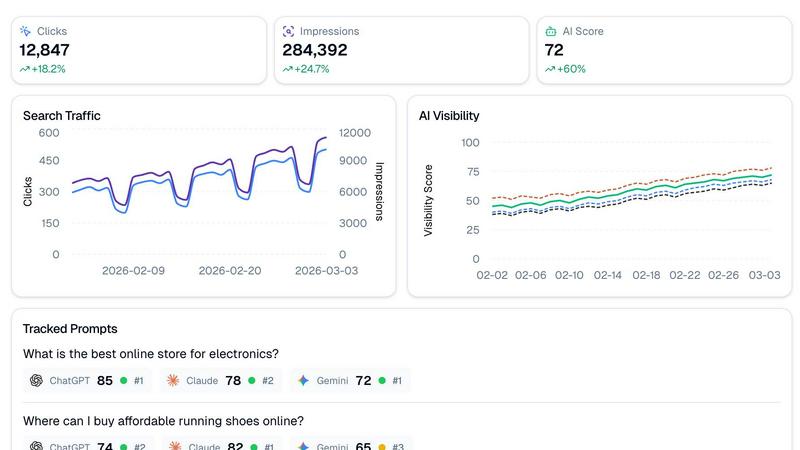
QuickSEO.ai integrates Google Search Console with AI visibility tracking across ChatGPT, Claude, and Gemini in a unified dashboard.
Last updated: March 11, 2026

RemoveTexts
RemoveTexts is an AI tool that quickly removes text and unwanted elements from images, delivering professional results without any design skills.
Last updated: March 11, 2026
Visual Comparison
quickseo.ai
RemoveTexts

Feature Comparison
quickseo.ai
Unified Search & AI Dashboard
This core feature seamlessly integrates Google Search Console data with AI visibility tracking, presenting clicks, impressions, CTR, and ranking trends alongside AI performance metrics in a single interface. It eliminates the need to juggle multiple platforms, providing a holistic view of your organic performance across the entire search spectrum, from traditional queries to conversational AI prompts.
AI Visibility Scoring & Prompt Tracking
The platform automatically generates daily visibility scores for your brand across ChatGPT, Claude, and Gemini, tracking performance trends over time. Users can define and monitor specific prompts (e.g., "best online store for electronics") to see exactly where their brand ranks in AI-generated answers, providing actionable insights into conversational search visibility.
Sentiment Analysis & Cited Page Monitoring
QuickSEO.ai goes beyond mere mention tracking by analyzing the sentiment (positive, neutral, negative) of AI chatbot responses regarding your brand. Furthermore, it identifies which specific pages on your website are cited as sources by these AI models, allowing you to understand which content is authoritative and driving AI-driven referrals.
Page Group Organization & Competitor Tracking
Organize your website pages into logical groups (e.g., blog posts, product pages, documentation) to analyze which sections drive the most search and AI traffic. The tool also automatically extracts and lists competitor brands that appear alongside yours in AI responses, providing clear competitive intelligence within your niche.
RemoveTexts
Paint to Remove
This feature allows users to brush over specific text areas for precise control. Simply select the area you want to edit, and the AI will intelligently erase only the painted sections, ensuring that no other part of the image is affected.
Auto Remove All
With this powerful functionality, users can take advantage of the AI's ability to automatically detect and remove every text element in the image with just one click. This feature is ideal for those looking to clean up images quickly without manual selection.
Edit & Replace Text
RemoveTexts offers an advanced text editing capability that allows users to replace existing text within an image while maintaining the original style. This feature is particularly useful for marketing materials or social media posts where brand consistency is crucial.
Remove Objects
In addition to text removal, this feature enables users to erase unwanted objects, logos, or visual elements from their images. This capability expands the editing potential, providing users with more control over their visuals and enhancing overall image quality.
Use Cases
quickseo.ai
SEO Agencies Managing Client Portfolios
Agencies can leverage quickseo.ai to provide enhanced reporting for clients, demonstrating value not just in Google rankings but also in emerging AI search visibility. The unified dashboard allows for efficient management of multiple accounts, tracking branded vs. non-branded performance and proving ROI in a shifting search landscape.
E-commerce Brands Optimizing for Commercial Queries
Online retailers can track rankings for key commercial prompts in AI chatbots, such as "where to buy affordable running shoes." By monitoring their position and sentiment, they can optimize product pages and content to capture high-intent AI-driven traffic, directly impacting sales opportunities.
SaaS Companies Building Brand Authority
Software companies can use the cited page monitoring and sentiment analysis to identify which help documentation, blog posts, or landing pages are referenced by AI. This informs content strategy to strengthen brand authority, ensure accurate AI representation, and drive qualified sign-ups from AI search results.
Content Teams Driving Organic Growth
Content marketing teams can analyze page group performance to see which blog sections or content hubs generate the most impressions and AI citations. This data-driven approach helps prioritize content creation, update existing pieces for better visibility, and align topics with what users are asking AI assistants.
RemoveTexts
E-commerce Product Photography
E-commerce sellers can utilize RemoveTexts to clean up product photos by removing watermarks or unwanted text overlays, ensuring that the focus remains on the product itself and enhancing its appeal to potential buyers.
Legal Document Redaction
Legal professionals can leverage RemoveTexts to redact sensitive information from documents or images, ensuring compliance with privacy regulations while maintaining the integrity of the original visual content.
Meme and Social Media Content Creation
Creators and marketers can use RemoveTexts to effortlessly edit memes or social media graphics by removing unnecessary text elements or replacing them with new, engaging content that resonates with their audience.
Graphic Design and Branding
Graphic designers can rely on RemoveTexts to prepare images for branding purposes, ensuring that logos, watermarks, or any distracting text are removed to create a clean, professional look that aligns with their clients' branding guidelines.
Overview
About quickseo.ai
quickseo.ai is a comprehensive analytics platform engineered for the modern search landscape, unifying traditional SEO performance with critical AI visibility metrics. It integrates directly with Google Search Console to provide foundational search analytics, while simultaneously tracking a brand's presence and performance across leading AI chatbots like OpenAI's ChatGPT, Anthropic's Claude, and Google's Gemini. This dual-data approach addresses a fundamental gap for marketers and SEO professionals, as AI becomes a primary consumer search source. The platform is built for technical marketers, SEO agencies, and growth teams who need to move beyond guesswork and make data-driven decisions to capture traffic from both conventional and AI-powered search. Its core value proposition is delivering a single, unified dashboard where you can monitor clicks, impressions, and rankings from Google alongside daily AI visibility scores, prompt rankings, and sentiment analysis, ensuring no traffic opportunity is missed in the evolving digital ecosystem.
About RemoveTexts
RemoveTexts is an innovative AI-powered online tool designed to simplify the process of removing unwanted text from images. It caters to a diverse audience, including designers, marketers, and everyday users who need quick and effective image editing solutions. The primary value proposition of RemoveTexts lies in its ability to deliver clean results in seconds without requiring any design skills. Users can easily upload their images and utilize advanced AI technology to remove watermarks, text overlays, or any other unwanted elements seamlessly. The tool supports multiple languages and is built on sophisticated deep learning inpainting techniques, ensuring that the background is reconstructed flawlessly, making the edits virtually undetectable. With its user-friendly interface and powerful capabilities, RemoveTexts empowers over 100,000 creators and professionals worldwide to enhance their visuals effortlessly.
Frequently Asked Questions
quickseo.ai FAQ
How does quickseo.ai track rankings in AI chatbots?
Quickseo.ai uses proprietary technology to simulate queries and analyze responses from major AI platforms like ChatGPT, Claude, and Gemini. It processes these responses to identify brand mentions, determine ranking position for tracked prompts, assess sentiment, and extract cited source URLs, providing a structured data feed of your AI visibility.
What is the difference between branded and non-branded tracking?
Branded tracking focuses on keywords and prompts that include your company or product name (e.g., "quickseo.ai features"). Non-branded tracking monitors generic, industry-related queries (e.g., "best SEO analytics tool"). The platform allows you to filter data by these segments to understand how you attract new audiences versus retain existing ones.
Can I track my competitors with this tool?
Yes. The competitor tracking feature automatically identifies and lists other brands that are mentioned in the AI responses to your tracked prompts. This provides direct insight into who your main competitors are within AI search landscapes for specific topics, without requiring manual setup for each competitor.
How do I get started with connecting my Google Search Console data?
Getting started involves signing up for a quickseo.ai account and navigating to the integrations section. The platform uses Google's secure OAuth protocol to request read-only access to your Search Console data. This established API connection ensures your search performance data is imported safely and updated automatically.
RemoveTexts FAQ
How does RemoveTexts work?
RemoveTexts employs advanced AI and deep learning inpainting techniques to analyze the surrounding pixels of the text you wish to remove. It reconstructs the background seamlessly, ensuring that the edited area blends perfectly with the original image.
What types of files does RemoveTexts support?
RemoveTexts supports a variety of image formats, including JPG, PNG, and WebP. Users can upload images up to 10 MB in size, making it versatile for various use cases.
Is there a limit to how much text I can remove?
There are no strict limits on the amount of text you can remove, but the effectiveness may vary based on the complexity of the background and the amount of text in the image. For extensive edits, using the Auto Remove All feature can expedite the process.
Do I need any design skills to use RemoveTexts?
No, RemoveTexts is designed for users of all skill levels. The intuitive interface and one-click solutions make it easy for anyone to achieve professional-grade results without any prior design experience.
Alternatives
quickseo.ai Alternatives
quickseo.ai is a specialized analytics platform in the marketing technology category, designed to track and improve brand visibility across both Google and major AI platforms like ChatGPT, Claude, and Gemini. It merges traditional search analytics with AI-specific metrics, offering a unified view of performance in an evolving digital landscape. Users often explore alternatives for various reasons, including budget constraints, the need for different feature sets, or specific integration requirements with their existing tech stack. Some may require deeper analytics in one area, such as pure Google SEO, while others might seek broader platform compatibility or a different pricing model that aligns with their business scale. When evaluating an alternative, key considerations should include the depth of AI platform coverage, the robustness of data integration from sources like Google Search Console, and the tool's ability to provide actionable insights. It's crucial to assess how well a solution fits into your current marketing stack and whether it can scale with your brand's growth in both traditional and AI-driven search environments.
RemoveTexts Alternatives
RemoveTexts is an AI-powered image editing tool designed to quickly remove unwanted text from images without the need for advanced design skills or software like Photoshop. This innovative tool falls under the category of image and photo editing solutions, making it appealing to a wide range of users, from creators and marketers to casual users looking to enhance their images effortlessly. Users often seek alternatives to RemoveTexts for various reasons, such as pricing structures, specific feature requirements, or compatibility with different platforms. When searching for an alternative, it's essential to consider factors like the ease of use, the quality of output, available features, and whether the tool supports the languages you need. Additionally, evaluating customer support and community feedback can help ensure that the chosen alternative meets your specific image editing needs.