
Rallied AI vs StreamVox - AI Live Translator
Side-by-side comparison to help you choose the right product.

Rallied AI
Rallied AI automates L1 and L2 ticket resolution, freeing your team to focus on growth while integrating seamlessly with your existing tech stack.
Last updated: April 4, 2026

StreamVox is a privacy-first AI translator that overlays real-time subtitles on Zoom, Discord, and games directly on your Windows PC.
Last updated: April 4, 2026
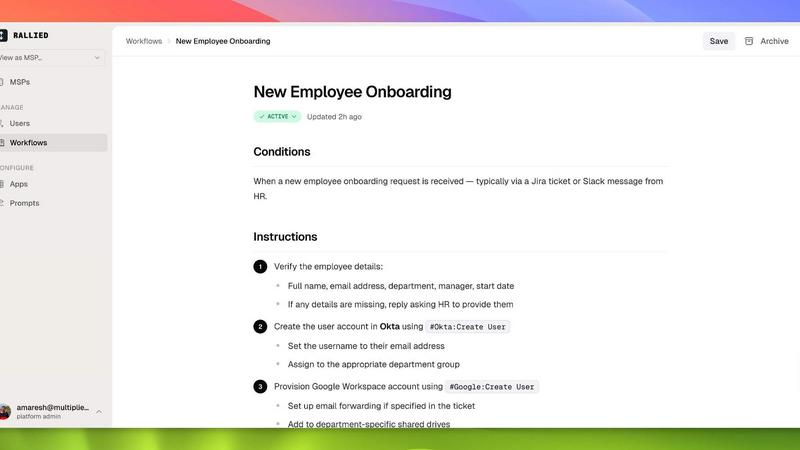
Visual Comparison
Rallied AI
StreamVox - AI Live Translator

Feature Comparison
Rallied AI
Autonomous Ticket Resolution
Rallied AI autonomously resolves L1 and L2 tickets, executing necessary actions like password resets and account unlocks without human intervention. This functionality significantly boosts the speed of service delivery.
Intelligent Triage and Dispatch
The AI technician intelligently asks users the right questions to categorize issues, prioritize tickets, and gather necessary documentation from sources like IT Glue or Hudu, ensuring tickets are routed to the appropriate technician.
Onboarding and Offboarding Automation
Rallied AI simplifies the onboarding and offboarding processes by managing tasks such as M365 license assignments and account revocations. This is achieved from a single message or ticket, streamlining administrative workflows.
Seamless Integration Across Tools
Rallied AI connects with a wide range of platforms including ConnectWise, Autotask, Datto RMM, and Google Workspace, allowing it to operate within your existing tech ecosystem effortlessly.
StreamVox - AI Live Translator
Per-App Audio Capture & Isolation
StreamVox integrates directly with the Windows audio stack to offer granular, per-application audio capture. This allows you to isolate audio from specific programs like Zoom, Discord, or Chrome individually, while ignoring all other system and background noise. This technical feature ensures translation accuracy is maximized by processing only the relevant audio feed, making it ideal for multitasking environments where multiple sound sources are active simultaneously.
Customizable Transparent Overlay Engine
The application features a robust overlay engine that renders translated subtitles in a persistent window on top of all other applications. Users have full control over the display parameters, including adjustable font size (12-72px), text color, and window opacity. This overlay is designed for zero interference, functioning like a teleprompter that integrates with your gaming, streaming, or video playback environment without obstructing critical UI elements.
Bidirectional Audio Translation Modes
StreamVox supports multiple audio input modes for comprehensive translation scenarios. You can choose to translate System Audio (for movies or streams), Microphone input (for translating your speech to others), or both simultaneously for full-duplex conversation translation. This bidirectional capability, combined with per-app capture, creates a flexible translation pipeline for both inbound and outbound communication.
Microsoft Ecosystem Integration
Built for the Windows ecosystem, StreamVox offers native integration with key Microsoft services. It is fully compatible with the Microsoft Phone Link app, enabling live translation of mobile phone calls directly on your PC screen. Furthermore, it is distributed and updated via the Microsoft Store, ensuring secure installation and seamless compatibility with Windows 10 and 11 (64-bit) systems.
Use Cases
Rallied AI
Streamlining IT Support
Rallied AI enhances IT support efficiency by automatically resolving common issues such as VPN access failures, ensuring that employees can quickly regain access without waiting for human assistance.
Reducing Labor Costs
By handling routine L1 and L2 support tickets, Rallied AI effectively reduces labor costs associated with hiring additional staff. This allows MSPs to allocate resources to more complex projects that drive business growth.
Improving Response Times
With Rallied AI's real-time ticket resolution capabilities, response times to user queries are dramatically improved, leading to higher user satisfaction and a more productive work environment.
Simplifying Workforce Management
Rallied AI automates the labor-intensive processes of onboarding and offboarding employees, ensuring that licenses are assigned or revoked efficiently, thereby reducing the chance of security vulnerabilities.
StreamVox - AI Live Translator
International Business & Remote Meetings
Integrate StreamVox directly into your conferencing stack (Zoom, Microsoft Teams, Google Meet) to receive real-time subtitles for participants speaking in foreign languages. This use case is critical for global teams, allowing for immediate comprehension during live discussions, presentations, and negotiations without the delay of human interpreters, thus streamlining cross-border collaboration.
Gaming & Live Streaming Communication
Gamers and streamers can use StreamVox to translate in-game voice chat or commentary from international live streams on platforms like Twitch. The low-latency AI and line-by-line display mode are engineered for fast-paced environments, allowing players to understand teammates and engage with a global audience without pausing gameplay or switching applications.
Multilingual Media Consumption
Watch foreign-language films on Netflix, follow YouTube creators, or view tutorials without relying on official subtitles. By capturing system audio, StreamVox provides instant translation overlaid on top of any video player or browser window. This transforms your PC into a universal media hub, granting access to a vast library of content previously hindered by language.
Mobile Call Translation via Desktop
Leverage the integration with Microsoft's Phone Link to bridge mobile and desktop communication. When receiving a call on your linked iPhone or Android device, StreamVox can translate the conversation in real-time, displaying subtitles on your larger PC monitor. This is ideal for important personal or business calls where clear understanding is paramount.
Overview
About Rallied AI
Rallied AI is an advanced AI technician designed specifically for Managed Service Providers (MSPs). It seamlessly integrates with your entire tech stack to autonomously resolve Level 1 (L1) and Level 2 (L2) tickets, freeing your human resources to focus on more strategic initiatives. By connecting to platforms like Slack, Microsoft Teams, and various Professional Services Automation (PSA) tools, Rallied AI acts like a real coworker, interacting directly with users to address their IT issues. This not only streamlines ticket resolution but also ensures that your top engineers are not bogged down with routine tasks like password resets and account unlocks. The main value proposition of Rallied AI lies in its ability to reduce operational costs and improve efficiency, allowing MSPs to scale their services without the need for additional headcount.
About StreamVox - AI Live Translator
StreamVox is a real-time AI translation engine for Windows, designed to integrate seamlessly into your digital workflow by providing live subtitles and instant translation for any audio source on your PC. This powerful tool is engineered for professionals, gamers, content consumers, and international communicators who need to overcome language barriers without disrupting their existing application stack. Its core value proposition lies in its deep system-level integration with Windows, offering low-latency, AI-powered translation that works across applications like Zoom, Discord, Chrome, and games. StreamVox processes audio locally with a privacy-first architecture, ensuring data is never stored or transmitted to the cloud. By capturing audio at the application level, it provides precise, noise-isolated translation and displays it via a customizable, always-on-top overlay. This makes it an essential utility for real-time comprehension during international video conferences, foreign-language live streams, in-game voice chat, and multimedia content, effectively turning any Windows PC into a universal translation hub.
Frequently Asked Questions
Rallied AI FAQ
What if it breaks something?
You have control over what Rallied AI can do autonomously. It can be configured to escalate certain tasks to human technicians, ensuring that critical actions get the necessary oversight.
We've tried AI tools before. What makes Rallied different?
Many AI tools require extensive setup and ongoing management. Rallied AI, on the other hand, is designed to operate immediately after deployment, requiring minimal oversight and no extensive training.
How quickly can Rallied AI be deployed?
Rallied AI can be deployed within a week, connecting to your existing stack without the lengthy implementation times typical of other solutions.
How does Rallied AI integrate with my existing tools?
Rallied AI supports a wide range of integrations with popular MSP tools such as ConnectWise, Autotask, and Google Workspace, ensuring that it fits seamlessly into your current workflow.
StreamVox - AI Live Translator FAQ
How does StreamVox handle privacy and data security?
StreamVox is architected with a privacy-first approach. All audio processing for translation is performed locally on your Windows machine using on-device AI models. The audio data is never recorded, stored, or transmitted to external servers or the cloud. This ensures that your confidential conversations, whether from business meetings or personal calls, remain completely private and secure.
What are the system requirements for StreamVox?
StreamVox requires a PC running a 64-bit version of Windows 10 or Windows 11. It leverages modern Windows APIs for audio capture and overlay rendering, so a reasonably up-to-date system is recommended for optimal performance and low-latency translation. The application is downloaded and installed directly from the official Microsoft Store.
Can I use StreamVox to translate my own speech during a call?
Yes, absolutely. Using the bidirectional translation feature, you can set StreamVox to capture your microphone input. It will then translate your spoken words in real-time, and you can read the translation aloud to the other party or use the text for communication. This is perfect for facilitating conversations where you need to speak in a language you are not fluent in.
What happens if I exceed my monthly translation time on a paid plan?
If you consume all your allocated translation hours (e.g., 40 hours on the Pro plan) before your monthly billing cycle renews, the application will revert to the Free Starter tier's functionality. This means you will have access to 20 minutes of translation per day until your plan resets on the next billing date, ensuring you are never completely without service.
Alternatives
Rallied AI Alternatives
Rallied AI is an innovative AI technician designed specifically for managed service providers (MSPs). It autonomously connects to your entire tech stack to efficiently resolve Level 1 and Level 2 support tickets, streamlining operations and enhancing productivity. By integrating seamlessly with platforms like Slack and Teams, Rallied AI functions like a real coworker, allowing for direct communication while also managing tickets through your professional services automation (PSA) tools. Users often seek alternatives to Rallied AI for various reasons, including pricing concerns, specific feature requirements, or compatibility with existing platforms. When looking for an alternative, it’s crucial to evaluate factors such as integration capabilities, ease of use, scalability, and overall value. A thorough comparison will ensure you find a solution that aligns with your operational needs and enhances your service delivery.
StreamVox - AI Live Translator Alternatives
StreamVox - AI Live Translator is a Windows desktop application in the real-time AI translation and subtitle software category. It functions as an audio processing layer, capturing system or application-level audio to generate live, translated subtitles directly on-screen. This makes it a powerful tool for enhancing accessibility and comprehension during international calls, gaming sessions, and media consumption. Users may explore alternatives for several technical and practical reasons. Platform compatibility is a primary driver, as some require macOS, Linux, or mobile OS support. Others might seek different pricing models, such as one-time purchases or free tiers with higher usage caps. Specific workflow integrations, like native support for certain communication APIs or advanced customization of the subtitle overlay, can also prompt a search for other solutions. When evaluating an alternative, key technical considerations include the audio capture method—whether it supports system-wide, per-application, or microphone-only input. The range of supported languages and the translation engine's accuracy are critical. Finally, assess the display integration: look for features like a persistent, low-latency overlay with customizable positioning and formatting to ensure it complements your primary applications without obstruction.