
Mailopoly vs Refbox
Side-by-side comparison to help you choose the right product.

Mailopoly
Mailopoly is your AI email assistant that organizes your inbox, extracts key info, and drafts replies in your voice.
Last updated: February 27, 2026

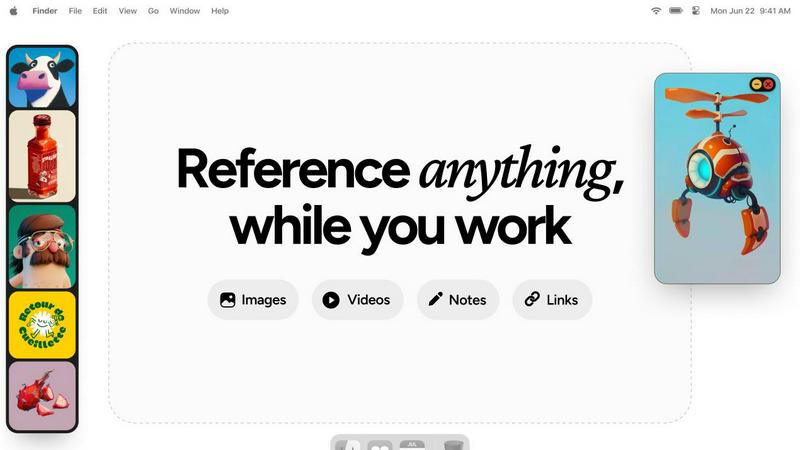
Refbox provides instant access to your images, videos, and notes, streamlining your workflow without distractions.
Last updated: February 28, 2026
Visual Comparison
Mailopoly

Refbox
Feature Comparison
Mailopoly
Intelligent Email Filtering
Mailopoly automatically sorts and prioritizes your emails, ensuring that only the most relevant messages appear in your inbox. This intelligent filtering reduces distractions and helps you focus on critical tasks without the clutter of irrelevant information.
AI-Powered Reply Drafting
With its state-of-the-art AI, Mailopoly drafts replies in your unique voice and style. This feature enables you to respond to emails quickly and effectively, offering multiple suggestions that you can edit or send with just a tap.
Integrated Task Manager
Mailopoly includes a built-in task manager that helps you track deliveries, manage personal finances, and oversee events. It provides a full timeline of updates, ensuring you never miss critical deadlines or important activities.
Instant Unsubscribe Feature
Say goodbye to unwanted emails with Mailopoly's instant unsubscriber. This feature allows you to unsubscribe from unwanted senders effortlessly, helping you maintain a clean and organized inbox without the hassle of manual unsubscriptions.
Refbox
Floating Reference Frames
This feature allows users to keep their references visible while working across various applications. The resizable frames can be adjusted to fit any screen layout, ensuring that users can maintain focus without losing sight of their inspiration.
Masonry Mode
Masonry Mode presents references in a visually appealing grid layout, enabling users to see multiple images or media items at once. This mode is ideal for comparing ideas side by side, fostering creativity and quick decision-making.
Instant Collection Switching
Refbox provides the ability to create and manage multiple collections of references. Users can switch between these collections instantly with a click, allowing for seamless transitions based on different project requirements or creative directions.
Enhanced Note-Taking
With Refbox, users can take structured notes that include text styling options and checklists. This feature is perfect for jotting down ideas or reminders, ensuring that all relevant information is easily accessible alongside visual references.
Use Cases
Mailopoly
Busy Professionals
For professionals juggling multiple responsibilities, Mailopoly streamlines communication by sorting important emails and drafting replies, allowing them to focus on their work without being overwhelmed by distractions.
Students Managing Coursework
Students can benefit from Mailopoly's intelligent filtering and task management features, helping them keep track of assignments, deadlines, and important communications from professors and classmates.
Entrepreneurs and Side-Hustlers
Those running side businesses can utilize Mailopoly to manage client communications effectively. The AI assistant can help draft responses and track important tasks, ensuring nothing falls through the cracks.
Individuals Overwhelmed by Personal Tasks
For anyone feeling overwhelmed by personal and administrative tasks, Mailopoly provides a centralized solution for managing finances, events, and schedules, allowing for a more organized and less stressful daily life.
Refbox
Graphic Design
Graphic designers can use Refbox to pin various design inspirations, color palettes, and typography samples. This allows for quick access to essential references while working in design software, enhancing both creativity and efficiency.
Animation Projects
Animators can benefit from Refbox by keeping reference videos and GIFs in view during the animation process. This feature helps them maintain consistency in movement and style, leading to smoother animations and improved workflow.
UI/UX Design
Refbox serves UI/UX designers by providing a dedicated space for reference images, wireframes, and user feedback notes. This enables a streamlined design process, allowing designers to quickly adapt their work based on ongoing insights and inspirations.
Moodboarding and Concept Development
For artists and creative professionals involved in moodboarding or concept development, Refbox allows for effortless organization of visual references. Users can create moodboards that are always accessible, promoting a more cohesive and inspired creative process.
Overview
About Mailopoly
Mailopoly is a groundbreaking email client that transforms the way you manage your inbox by leveraging advanced AI technology. Designed for busy professionals, students, and anyone overwhelmed by the demands of modern communication, Mailopoly automatically extracts critical information from your emails, allowing you to focus on what truly matters without the hassle of sifting through countless messages. By intelligently filtering notifications and reducing your inbox size by over 50%, Mailopoly ensures you stay organized and productive. But its capabilities extend far beyond email management; it includes an integrated AI chatbot, Poly, that acts as your personal assistant for life admin tasks, financial management, and event planning. With features like automatic reply drafting, task tracking, and instant unsubscription from unwanted emails, Mailopoly turns your inbox from a source of stress into a streamlined command center, enabling you to take control of your life effortlessly.
About Refbox
Refbox is an innovative floating reference application tailored specifically for creative professionals who require constant access to their sources of inspiration. Designed for those engaged in activities such as sketching, designing, animating, and modeling, Refbox enables users to pin images, GIFs, videos, and notes in always-on-top frames that hover above their working applications. This feature eliminates the need for time-consuming window switching, leading to a more efficient and streamlined workflow. The application allows users to pull media from multiple sources, including the web, local storage, or the clipboard, presenting a customizable sidebar that adjusts to individual work styles. With unique features like Masonry Mode and a full-screen Gallery, Refbox caters to diverse display preferences, making it easy to organize and view references effectively. By enabling the creation of multiple collections, users can quickly switch between different sets of references based on their current project needs. Refbox is an invaluable tool for creative individuals looking to enhance productivity and maintain their creative flow, ensuring that inspiration is always at hand without unnecessary distractions.
Frequently Asked Questions
Mailopoly FAQ
How does Mailopoly reduce email clutter?
Mailopoly employs advanced AI to automatically filter and prioritize emails, reducing your inbox size significantly and ensuring you only see the messages that matter most to you.
Can I integrate multiple email accounts?
Yes, Mailopoly supports various email providers, including Gmail, Outlook, Yahoo, and any IMAP provider, allowing you to manage all your accounts in one convenient location without any setup hassle.
What makes Poly different from other AI assistants?
Poly is not just a separate AI tool; it is integrated within Mailopoly, making it a seamless part of your email experience. It understands your preferences and priorities, helping you manage your life effectively.
Is my data secure with Mailopoly?
Absolutely. Mailopoly is SOC 2 certified and designed with privacy in mind, ensuring that your information remains secure while you benefit from its intelligent features.
Refbox FAQ
What operating systems does Refbox support?
Refbox is compatible with both Windows and macOS, ensuring that creative professionals can utilize the tool on their preferred platforms without compatibility issues.
Can I use Refbox with multiple monitors?
Yes, Refbox is designed to work seamlessly across multiple monitors. Users can pin reference frames on any screen, allowing for an expansive workspace that enhances productivity.
Is there a mobile version of Refbox?
Currently, Refbox is optimized for desktop use, focusing on providing a robust experience for creative professionals working on larger screens. A mobile version may be considered in future updates.
How does Refbox handle image and video formats?
Refbox supports a wide range of media formats, including common image formats (JPEG, PNG) and video formats (MP4, GIF). Users can easily add media from various sources, making it versatile for all types of creative work.
Alternatives
Mailopoly Alternatives
Mailopoly is an innovative AI-powered email client that falls under the productivity and management category. It is designed to streamline your email experience by drastically reducing inbox clutter while offering an integrated personal assistant for managing tasks and key information. Users often seek alternatives for various reasons, including concerns about pricing, specific feature sets, or compatibility with their preferred platforms. When choosing an alternative, it's essential to consider the ease of use, the range of features offered, the level of integration with other tools, and the overall compatibility with your existing tech stack. A good alternative should enhance productivity rather than complicate your workflow, ensuring that you can manage your communications seamlessly across all devices.
Refbox Alternatives
Refbox is a cutting-edge floating reference application designed for creative professionals who require immediate access to their sources of inspiration while working. By allowing users to pin images, videos, and notes above their applications, it streamlines the creative process, making it easier to maintain focus without the hassle of constant window switching. Users often seek alternatives to Refbox for various reasons, including pricing limitations, feature sets that may not fully meet their needs, or compatibility with specific platforms. When searching for an alternative, it is essential to consider factors such as user interface, integration capabilities with existing tools, customization options, and overall ease of use to ensure that the new solution complements and enhances your workflow effectively.