
Shrinkpad vs Skene
Side-by-side comparison to help you choose the right product.

Shrinkpad
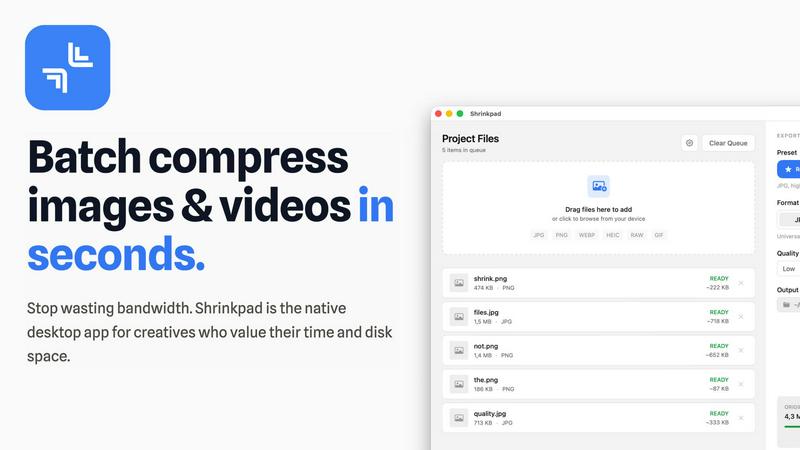
Shrinkpad is a native Mac app that batch compresses images and videos locally for faster, integrated workflows.
Last updated: February 28, 2026

Skene is growth infrastructure you own and prompt directly into your codebase.
Last updated: February 28, 2026
Visual Comparison
Shrinkpad
Skene

Feature Comparison
Shrinkpad
Native macOS & Apple Silicon Optimization
Shrinkpad is built exclusively for macOS, utilizing Apple's Core Graphics, VideoToolbox, and AVFoundation frameworks for maximum performance and system integration. It is fully optimized for Apple Silicon (M1/M2/M3 chips), leveraging multi-threaded processing to compress thousands of images and videos in minutes. This deep integration with the macOS tech stack ensures unparalleled speed and stability compared to cross-platform or web-based tools.
Intelligent, Automated Quality Analysis
The application automatically analyzes the visual complexity of each asset to apply the perfect, format-specific compression ratio. This eliminates the guesswork from manual quality sliders, preventing artifacts while achieving maximum file size reduction. The intelligent algorithm ensures perceptual quality is maintained, making it ideal for batch processing where individual file inspection is impractical.
Comprehensive Format Support
Shrinkpad supports over 30 image formats—including JPG, PNG, WEBP, AVIF, HEIC, and professional RAW files—alongside all major video formats like MP4 and MOV. This extensive compatibility allows users to process mixed-media batches containing photos and videos together in a single operation, with the app automatically applying the optimal compression settings for each file type.
Advanced Folder Mode & Batch Processing
With its advanced Folder Mode, you can drag and drop an entire project directory onto Shrinkpad. It will automatically scan subfolders, detect all supported media files, and ignore non-media assets, readying hundreds or thousands of files for compression in one click. This feature, combined with auto-renaming and metadata stripping options, completely automates the optimization of exported assets from tools like Figma or Photoshop.
Skene
Codebase Signal Analysis
Skene performs deep, automated analysis of your connected GitHub or GitLab repository to extract actionable growth signals. It scans your framework, component structure, and user flow logic to identify onboarding friction points, activation opportunities, and retention risks directly from the source code, providing a foundational context layer for all subsequent AI-driven optimizations.
AI-Prompted Growth Implementation
Growth workflows are managed through natural language prompts within your existing development environment, such as Cursor or a terminal. After analysis, you can instruct Skene to generate and implement specific improvements—like refining an onboarding tour or adjusting a activation checkpoint—turning strategic insights into shipped code without manual intervention.
Self-Optimizing User Flows
The system continuously monitors user interactions against the signals in your codebase. It automatically A/B tests different user journey variations and implements the winning flows. This creates a closed feedback loop where onboarding and activation processes become smarter and more effective over time, with no manual dashboard tuning required.
Integrated Growth Manifest & Context
Skene generates a persistent growth-manifest.json file within your project (e.g., in ./skene-context/). This file acts as a centralized, version-controlled source of truth for all your product's growth logic, analytics definitions, and user journey states, ensuring your AI agents and tools have consistent, up-to-date context.
Use Cases
Shrinkpad
Optimizing Web and Mobile Application Assets
Software developers and web designers use Shrinkpad to drastically reduce the size of image and video assets within app bundles and websites. By batch-compressing icons, screenshots, hero images, and promotional videos locally, they achieve faster load times, improved Largest Contentful Paint (LCP) scores, and smaller download sizes for end-users, directly impacting performance metrics and user experience.
Managing Photographer and Creator Media Libraries
Photographers and content creators dealing with large volumes of high-resolution photos and video footage utilize Shrinkpad to reclaim terabytes of disk space. The tool allows them to create optimized, web-ready versions of their portfolios or social media content from original RAW files and 4K videos in a single, automated batch process, all while keeping master files untouched and private.
Streamlining Design-to-Development Workflows
Design teams exporting assets from UI/UX tools like Figma, Sketch, or Adobe Photoshop can export everything at 2x or 4x resolution and use Shrinkpad as a final optimization step. It handles bulk compression, renaming, and format conversion, delivering production-ready assets to developers without manual, time-consuming export sessions for each screen density or format.
Preparing Assets for Presentations and Documents
Professionals preparing decks, reports, or client presentations containing numerous high-resolution screenshots and embedded videos can use Shrinkpad to compress these files en masse. This ensures the final document file size remains manageable for email distribution and cloud storage without sacrificing on-screen visual fidelity.
Skene
Autonomous Onboarding Optimization
For SaaS products, Skene automatically analyzes where new users drop off during initial setup. It then generates, tests, and deploys refined onboarding tours and tooltips directly within the application's UI, significantly improving time-to-value and activation rates without any engineering overhead.
Continuous Activation Funnel Management
Startups can use Skene to perpetually audit and improve their core activation funnel. The system identifies which features are correlated with long-term retention, detects where users struggle to reach them, and prompts the implementation of guided flows or UI adjustments to boost key feature adoption.
Lifecycle Automation for Customer Success
Teams can automate complex customer lifecycle workflows based on code-level signals. For example, Skene can trigger re-engagement nudges or educational content when it detects a user has not interacted with a newly shipped feature, helping to drive adoption and reduce churn autonomously.
Tech Stack Consolidation for Developers
Development teams frustrated with managing multiple analytics, onboarding, and engagement tools can replace their entire legacy growth stack with Skene. It consolidates these functions into a single, code-native infrastructure that is owned, versioned, and modified within the same workflow used for feature development.
Overview
About Shrinkpad
Shrinkpad is a native macOS application engineered for high-performance, batch compression of images and videos directly on your local machine. It leverages Apple's native frameworks, including Core Graphics, VideoToolbox, and AVFoundation, to process media files without ever requiring an internet connection or cloud upload. This architecture ensures complete data privacy and eliminates server-dependent bottlenecks. The app is built for a tech-savvy audience, including software developers needing to optimize app bundles, web designers reducing page load times, photographers managing large libraries, and content creators handling mixed-media projects. Its core value proposition is delivering a powerful, automated compression workflow that integrates seamlessly into the macOS ecosystem, offering significant storage savings—up to 90%—while maintaining perceptual quality through intelligent, format-specific algorithms. By handling hundreds of files in a single drag-and-drop operation, Shrinkpad replaces tedious, manual export and optimization steps with a streamlined, local-first tool.
About Skene
Skene is an AI-powered Product-Led Growth (PLG) infrastructure designed for modern development teams, particularly indie developers and early-stage startups. It redefines growth tooling by integrating directly with your codebase and IDE, eliminating the need for external, siloed dashboards and brittle third-party scripts. Skene operates as a fully automated iteration engine that autonomously optimizes key growth funnels like onboarding, activation, and retention. By analyzing your repository structure and deriving signals directly from your code, it intelligently identifies friction points and activation drop-offs. It then automatically tests and implements improved user flows, creating a self-optimizing product experience. This "growth as code" philosophy allows developers to own, version, and prompt their growth infrastructure just like their core product, ensuring seamless compatibility with existing tech stacks and AI agents. The core value proposition is clear: replace a fragmented legacy growth stack with a unified, code-native system that ships growth loops instead of managing widgets, all without expanding your team.
Frequently Asked Questions
Shrinkpad FAQ
What file formats does Shrinkpad support?
Shrinkpad supports a wide array of image and video formats. For images, it handles JPG, PNG, WEBP, AVIF, HEIC, SVG, and over 30 formats including professional RAW files from camera manufacturers. For video, it supports major formats like MP4, MOV, and more. This allows for true mixed-media batch processing in a single workflow.
Does Shrinkpad support video compression?
Yes, Shrinkpad fully supports batch video compression. It utilizes macOS's native VideoToolbox and AVFoundation frameworks to efficiently compress video files like MP4 and MOV formats directly on your machine. You can process videos individually or mix them with image files in the same batch queue for a unified optimization workflow.
Are my files uploaded to the cloud?
No. Shrinkpad operates on a strict privacy-first principle. All compression processing is executed locally on your Mac using Apple's native frameworks. Your original files, intermediates, and optimized outputs never leave your device, ensuring complete data privacy and security, which is crucial for handling sensitive or proprietary assets.
Can I use Shrinkpad on multiple devices?
Licensing depends on the plan you purchase. The Personal plan includes a license for use on one device. The Team plan includes licenses for up to 10 devices, making it suitable for small studios or teams where multiple members need to use the application across different Macs.
Skene FAQ
How is Skene different from traditional customer experience software?
Traditional tools rely on manual tour creation, external JavaScript snippets, and brittle UI selectors that break with every deployment. Skene is fundamentally different; it reads your actual codebase to understand your application's structure and automatically generates and maintains all growth components. When you push new code, Skene's flows update themselves, ensuring robustness and deep integration.
How long does it take to set up?
Setup is designed to be completed in less than 60 seconds. You simply grant Skene read-only access to your GitHub or GitLab repository. The system then automatically analyzes your codebase to generate the initial PLG flows and context layer. No initial code changes or API modifications are required to get started.
Is my code secure?
Yes, security is a primary design consideration. Skene only ever requires read-only access to your repository. All code analysis is performed in a secure, isolated environment. Your proprietary code is not stored or used for any purpose other than generating your specific growth infrastructure and signals.
What kind of analytics do you provide?
Skene provides analytics focused on growth outcomes, not just pageviews. The dashboard shows real-time user progress through defined journeys, completion rates, engagement metrics, and bottleneck identification. You can track critical metrics like time-to-value and directly measure the impact of each automated improvement on your activation and retention goals.
Alternatives
Shrinkpad Alternatives
Shrinkpad is a native macOS application for local batch compression of images and videos, falling squarely into the media optimization and productivity software category. Users often seek alternatives for various reasons, including budget constraints, the need for cross-platform compatibility on Windows or Linux, or specific feature requirements not covered by a single tool. When evaluating alternatives, key technical considerations include the processing engine's architecture—whether it's a native app, a cross-platform framework, or a web service—and its impact on performance and privacy. Integration capabilities with your existing tech stack, such as CLI support for CI/CD pipelines or compatibility with specific file formats like AVIF or ProRes, are also critical. The ideal solution should align with your workflow's scale, security requirements, and quality benchmarks. Ultimately, the choice hinges on balancing processing power, platform support, and data sovereignty. A tool that compresses locally using hardware-accelerated frameworks offers a different value proposition than a cloud-based API or a multi-platform utility built on Electron.
Skene Alternatives
Skene is an automated Product-Led Growth (PLG) iteration engine, falling into the productivity and growth management category. It integrates directly with your codebase to autonomously optimize user onboarding, activation, and retention loops, eliminating the need for manual growth teams. Users often explore alternatives for several reasons. These can include budget constraints, a need for different pricing models like subscription-based plans, or specific feature requirements not covered by Skene's automated, outcome-based approach. Platform compatibility, such as needing a solution for a different tech stack or a preference for more manual control via traditional dashboards, also drives the search. When evaluating an alternative, key considerations should be its integration method with your existing infrastructure and whether it supports your framework. Assess if the tool's automation level matches your needs, from fully autonomous optimization to manual A/B testing suites. Finally, scrutinize the pricing structure to ensure it aligns with your growth stage and budget.