
Shrinkpad vs SparkPix
Side-by-side comparison to help you choose the right product.

Shrinkpad
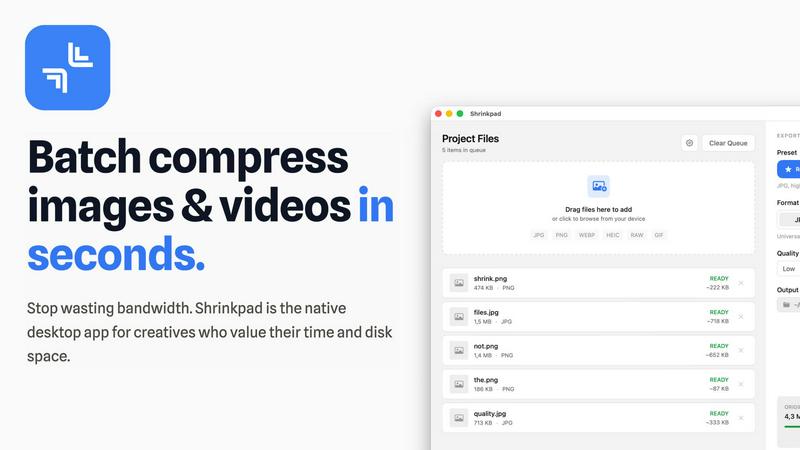
Shrinkpad is a native Mac app that batch compresses images and videos locally for faster, integrated workflows.
Last updated: February 28, 2026

SparkPix
SparkPix is a developer-friendly AI photo editing API that integrates directly into your tech stack for programmatic image transformation.
Last updated: March 11, 2026
Visual Comparison
Shrinkpad
SparkPix

Feature Comparison
Shrinkpad
Native macOS & Apple Silicon Optimization
Shrinkpad is built exclusively for macOS, utilizing Apple's Core Graphics, VideoToolbox, and AVFoundation frameworks for maximum performance and system integration. It is fully optimized for Apple Silicon (M1/M2/M3 chips), leveraging multi-threaded processing to compress thousands of images and videos in minutes. This deep integration with the macOS tech stack ensures unparalleled speed and stability compared to cross-platform or web-based tools.
Intelligent, Automated Quality Analysis
The application automatically analyzes the visual complexity of each asset to apply the perfect, format-specific compression ratio. This eliminates the guesswork from manual quality sliders, preventing artifacts while achieving maximum file size reduction. The intelligent algorithm ensures perceptual quality is maintained, making it ideal for batch processing where individual file inspection is impractical.
Comprehensive Format Support
Shrinkpad supports over 30 image formats—including JPG, PNG, WEBP, AVIF, HEIC, and professional RAW files—alongside all major video formats like MP4 and MOV. This extensive compatibility allows users to process mixed-media batches containing photos and videos together in a single operation, with the app automatically applying the optimal compression settings for each file type.
Advanced Folder Mode & Batch Processing
With its advanced Folder Mode, you can drag and drop an entire project directory onto Shrinkpad. It will automatically scan subfolders, detect all supported media files, and ignore non-media assets, readying hundreds or thousands of files for compression in one click. This feature, combined with auto-renaming and metadata stripping options, completely automates the optimization of exported assets from tools like Figma or Photoshop.
SparkPix
AI-Powered Text-to-Edit Engine
This foundational feature integrates a sophisticated natural language interface with a suite of specialized AI models. Users input descriptive commands (e.g., "remove the tourist in the red shirt," "enhance colors and upscale to 4K"), and the system parses the intent to route the task to the appropriate backend model—such as a segmentation network for object removal or a super-resolution GAN for enhancement. This architecture allows for precise, context-aware edits in under 30 seconds, functioning as a unified API for multiple image processing tasks without manual tool selection.
Advanced Background Removal & Replacement
Built on a state-of-the-art semantic segmentation model, this tool delivers one-click, high-fidelity background extraction for even complex scenes with fine details like hair or transparent objects. It offers seamless integration for e-commerce workflows, automatically generating transparent PNGs or compositing subjects onto new backgrounds specified by text. The underlying model is optimized for batch processing, ensuring consistency for product catalogs and portrait photography, and serves as a direct, watermark-free alternative to standalone services like remove.bg.
Intelligent Photo Restoration & Deblurring
This feature employs a combination of denoising autoencoders and deblurring neural networks (like DeblurGAN variants) to algorithmically repair damaged visual data. It can restore old photos by inpainting scratches and tears, colorizing black-and-white images through historical color palette prediction, and reversing motion blur or lens defocus. The system is trained on diverse datasets of degraded imagery, making it compatible with scanning artifacts, JPEG compression issues, and physical photo damage, ideal for digitizing and preserving archival content.
Multi-Style AI Image Generation & Transfer
Leveraging diffusion models and neural style transfer (NST) algorithms, this capability serves a dual function. It can generate original, high-resolution (up to 4K) images from text prompts, acting as a built-in creative asset generator. Concurrently, it can apply over 15 distinct artistic styles (e.g., anime, oil painting, pencil sketch) to uploaded images. This is powered by a modular system where different style weights and generative adversarial networks (GANs) are deployed based on the selected aesthetic, providing extensive creative flexibility for branding and social media content.
Use Cases
Shrinkpad
Optimizing Web and Mobile Application Assets
Software developers and web designers use Shrinkpad to drastically reduce the size of image and video assets within app bundles and websites. By batch-compressing icons, screenshots, hero images, and promotional videos locally, they achieve faster load times, improved Largest Contentful Paint (LCP) scores, and smaller download sizes for end-users, directly impacting performance metrics and user experience.
Managing Photographer and Creator Media Libraries
Photographers and content creators dealing with large volumes of high-resolution photos and video footage utilize Shrinkpad to reclaim terabytes of disk space. The tool allows them to create optimized, web-ready versions of their portfolios or social media content from original RAW files and 4K videos in a single, automated batch process, all while keeping master files untouched and private.
Streamlining Design-to-Development Workflows
Design teams exporting assets from UI/UX tools like Figma, Sketch, or Adobe Photoshop can export everything at 2x or 4x resolution and use Shrinkpad as a final optimization step. It handles bulk compression, renaming, and format conversion, delivering production-ready assets to developers without manual, time-consuming export sessions for each screen density or format.
Preparing Assets for Presentations and Documents
Professionals preparing decks, reports, or client presentations containing numerous high-resolution screenshots and embedded videos can use Shrinkpad to compress these files en masse. This ensures the final document file size remains manageable for email distribution and cloud storage without sacrificing on-screen visual fidelity.
SparkPix
E-Commerce Product Image Automation
Online retailers and Shopify store owners can integrate SparkPix into their product upload pipeline to automate time-consuming tasks. The platform can batch-process hundreds of product shots to remove backgrounds, create consistent white-background images for marketplaces like Amazon, generate lifestyle mockups by placing products into scenes via text prompts, and enhance overall image quality for better conversion rates, all without manual Photoshop work.
Professional Social Media & Marketing Content Creation
Marketing teams and social media managers utilize SparkPix to rapidly produce high-volume, engaging visual content. They can create branded graphics, apply consistent artistic filters to campaign photos, remove unwanted elements from event pictures, generate custom artwork for posts using AI, and optimize image resolution for different platform specs (Instagram feed, YouTube thumbnails, LinkedIn articles), streamlining the entire content creation workflow in a browser.
Archival Photo Digitization & Restoration
Genealogists, historians, and individuals preserving family history use SparkPix to restore and enhance old physical photographs. The tool can digitally repair tears, eliminate stains and scratches, colorize black-and-white portraits, and sharpen blurred details in scanned images. This provides a powerful, accessible alternative to specialized software or manual restoration services, enabling bulk processing of personal archives.
On-Demand Professional Portrait & Document Editing
Professionals and individuals can instantly create compliant passport and visa photos by generating headshots with specific attire and background colors. Freelancers can also use the object remover to clean up portrait backgrounds or the enhancer to perfect LinkedIn profile pictures. This use case highlights the platform's utility for formal, business, and personal documentation needs with immediate, watermark-free results.
Pricing Comparison
Shrinkpad
Shrinkpad offers a simple, one-time payment pricing model with no subscriptions. The Free Starter tier is available at no cost and includes standard compression for common formats (JPG, PNG), with a limit of 10 files per batch and a 1GB maximum file size. The Personal license, priced at a one-time payment of $14, unlocks unlimited batch processing, support for all formats (including RAW, HEIC, WEBP), mixed image & video compression, and removes all file size limits for a single device. For teams, the Team license is a one-time payment of $35, covering up to 10 device licenses and including priority support.
SparkPix
SparkPix employs a flexible credit-based pricing model designed for users of all scales. It offers a perpetual Free Plan that provides 5 initial credits upon sign-up (no credit card required) plus 1 credit replenished daily, allowing for regular testing and light usage. For professional and high-volume needs, paid plans start at $9.99, which typically provides a bundle of 350 credits. This structure allows users to pay only for the processing power they use, with larger credit packs available at higher tiers for more intensive editing, batch processing, or API consumption. All plans grant access to the full suite of AI tools and deliver watermark-free results.
Overview
About Shrinkpad
Shrinkpad is a native macOS application engineered for high-performance, batch compression of images and videos directly on your local machine. It leverages Apple's native frameworks, including Core Graphics, VideoToolbox, and AVFoundation, to process media files without ever requiring an internet connection or cloud upload. This architecture ensures complete data privacy and eliminates server-dependent bottlenecks. The app is built for a tech-savvy audience, including software developers needing to optimize app bundles, web designers reducing page load times, photographers managing large libraries, and content creators handling mixed-media projects. Its core value proposition is delivering a powerful, automated compression workflow that integrates seamlessly into the macOS ecosystem, offering significant storage savings—up to 90%—while maintaining perceptual quality through intelligent, format-specific algorithms. By handling hundreds of files in a single drag-and-drop operation, Shrinkpad replaces tedious, manual export and optimization steps with a streamlined, local-first tool.
About SparkPix
SparkPix is a cutting-edge, web-based AI photo editing platform engineered to democratize professional-grade image manipulation. It functions as a comprehensive, cloud-native suite of tools that leverages advanced machine learning models to execute complex edits based on simple text prompts. The core value proposition is its seamless integration of natural language processing (NLP) with computer vision, eliminating the steep learning curve associated with traditional software like Adobe Photoshop. Designed for a broad tech stack, it serves developers, e-commerce managers, social media content creators, marketing professionals, and everyday users who require fast, efficient, and high-quality photo edits without installing software. Its API-friendly, browser-agnostic architecture ensures compatibility across desktop (Windows, macOS, Linux) and mobile (iOS, Android) environments, making it a versatile asset for embedding AI-powered imaging into existing workflows, from automating product photo backgrounds for Shopify stores to batch-restoring family archives. By offering a free tier with credits and scalable paid plans, SparkPix provides an accessible entry point into AI-driven visual content creation.
Frequently Asked Questions
Shrinkpad FAQ
What file formats does Shrinkpad support?
Shrinkpad supports a wide array of image and video formats. For images, it handles JPG, PNG, WEBP, AVIF, HEIC, SVG, and over 30 formats including professional RAW files from camera manufacturers. For video, it supports major formats like MP4, MOV, and more. This allows for true mixed-media batch processing in a single workflow.
Does Shrinkpad support video compression?
Yes, Shrinkpad fully supports batch video compression. It utilizes macOS's native VideoToolbox and AVFoundation frameworks to efficiently compress video files like MP4 and MOV formats directly on your machine. You can process videos individually or mix them with image files in the same batch queue for a unified optimization workflow.
Are my files uploaded to the cloud?
No. Shrinkpad operates on a strict privacy-first principle. All compression processing is executed locally on your Mac using Apple's native frameworks. Your original files, intermediates, and optimized outputs never leave your device, ensuring complete data privacy and security, which is crucial for handling sensitive or proprietary assets.
Can I use Shrinkpad on multiple devices?
Licensing depends on the plan you purchase. The Personal plan includes a license for use on one device. The Team plan includes licenses for up to 10 devices, making it suitable for small studios or teams where multiple members need to use the application across different Macs.
SparkPix FAQ
What is the underlying technology stack for SparkPix?
SparkPix is built on a cloud-native microservices architecture, primarily utilizing Python with frameworks like FastAPI for backend services. It leverages multiple pre-trained and proprietary deep learning models, including Transformer-based models for prompt understanding, U-Net and Mask R-CNN architectures for segmentation tasks, GANs (Generative Adversarial Networks) for restoration and style transfer, and Diffusion models for image generation. The frontend is a responsive web application built with modern JavaScript frameworks, ensuring broad browser compatibility.
How does the credit system work and what is the cost per edit?
The platform operates on a credit-based system. Users start with 5 free credits upon sign-up, with no credit card required, and receive 1 additional credit daily. Each AI generation or major edit, such as applying a text prompt for transformation, background removal, or image generation, typically costs 5 credits. Simpler, one-click operations like basic background removal may cost less. Paid plans, starting at $9.99, offer larger credit packs (e.g., 350 credits) for high-volume users, providing a scalable cost structure.
Is there an API available for developers to integrate SparkPix?
Yes, SparkPix offers an API designed for developers to integrate its AI photo editing capabilities directly into their own applications, websites, or automated workflows. The API provides endpoints for all core features—background removal, photo enhancement, object removal, and text-based editing—allowing for server-to-server communication and batch processing. Documentation includes details on authentication (API keys), request/response formats, and rate limits, facilitating seamless integration into existing tech stacks.
Are the edited images free from watermarks and do I retain ownership?
Absolutely. All images processed through SparkPix, including those on the free tier, are delivered without any SparkPix watermark or branding. You retain full ownership of your original uploaded images and the AI-generated or edited results. The platform's terms of service grant you a license to use the output for personal or commercial purposes, making it suitable for professional work, client deliverables, and commercial product listings.
Alternatives
Shrinkpad Alternatives
Shrinkpad is a native macOS application for local batch compression of images and videos, falling squarely into the media optimization and productivity software category. Users often seek alternatives for various reasons, including budget constraints, the need for cross-platform compatibility on Windows or Linux, or specific feature requirements not covered by a single tool. When evaluating alternatives, key technical considerations include the processing engine's architecture—whether it's a native app, a cross-platform framework, or a web service—and its impact on performance and privacy. Integration capabilities with your existing tech stack, such as CLI support for CI/CD pipelines or compatibility with specific file formats like AVIF or ProRes, are also critical. The ideal solution should align with your workflow's scale, security requirements, and quality benchmarks. Ultimately, the choice hinges on balancing processing power, platform support, and data sovereignty. A tool that compresses locally using hardware-accelerated frameworks offers a different value proposition than a cloud-based API or a multi-platform utility built on Electron.
SparkPix Alternatives
SparkPix is a web-based AI photo editor that operates within the browser-based image editing and generation category. It allows users to apply complex edits like background removal, restoration, and style transfer through simple text prompts, eliminating the need for traditional software expertise. Users often seek alternatives for various technical and operational reasons. These can include budget constraints, the need for different pricing structures, or a requirement for specific advanced features not covered. Others may prioritize offline functionality, deeper integration with existing creative software stacks, or platforms with more extensive API access for workflow automation. When evaluating an alternative, consider the core technology stack, such as the underlying AI models and their output quality. Assess compatibility with your existing tools and workflows, including support for necessary file formats and export options. Finally, examine the platform's scalability, API availability for developers, and how its subscription model aligns with your projected usage volume and team size.