
Perkoon vs SupaSidebar
Side-by-side comparison to help you choose the right product.

Perkoon enables free, unlimited peer-to-peer file transfers without signup, keeping your files private and secure.
Last updated: March 4, 2026

SupaSidebar
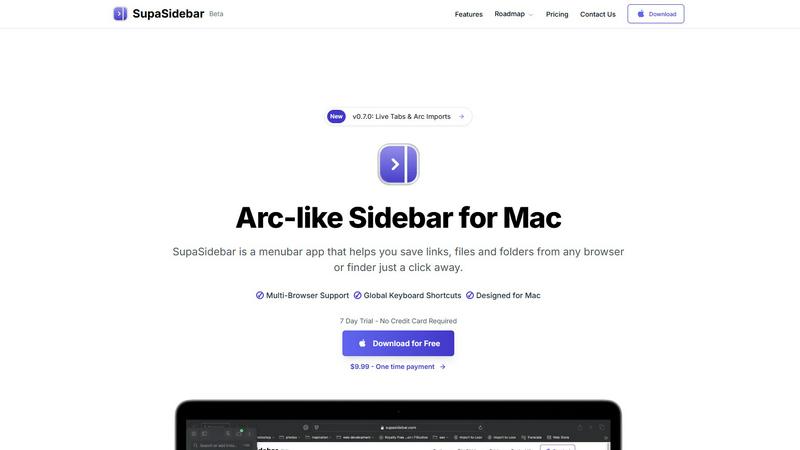
SupaSidebar is a Mac menubar app that streamlines saving and accessing links, files, and folders effortlessly.
Last updated: February 28, 2026
Visual Comparison
Perkoon

SupaSidebar
Feature Comparison
Perkoon
Peer-to-Peer File Transfers
Perkoon utilizes advanced peer-to-peer technology to enable direct file transfers between users' browsers. This eliminates size limits and ensures that files are sent securely without ever passing through central servers, providing a truly private experience.
Encrypted Cloud Storage
For instances when the recipient is offline, Perkoon offers a secure cloud storage option where files are temporarily held. This feature is encrypted to enhance security, and users are only charged for the storage costs, ensuring transparency in pricing.
AI Integration and Automation
Perkoon is designed with the modern user in mind, featuring built-in tools that allow AI agents to interact directly with the service. This eliminates the need for outdated screen-scraping techniques, making file transfers more efficient and user-friendly.
Unique Referral Program
Perkoon has implemented an innovative referral program that rewards users for sharing the service with others. When you refer someone who signs up and makes a transfer, both you and the new user receive bonus storage, fostering a community of users who benefit from each other's participation.
SupaSidebar
Integrated Browser Compatibility
SupaSidebar works with all major browsers, including Safari, Chrome, Firefox, Brave, and Arc. This cross-browser functionality ensures that no matter where you are saving or accessing your resources, they remain at your fingertips, enhancing your productivity without the need for multiple extensions or applications.
Global Keyboard Shortcuts
Designed with efficiency in mind, SupaSidebar offers intuitive global keyboard shortcuts such as ⌘ + ⌃ + S for saving items and ⌘ + ⌃ + C for copying URLs. These shortcuts allow users to perform actions quickly, minimizing the time spent navigating and maximizing focus on actual tasks.
Recent Sites Tracking
SupaSidebar automatically tracks every website you've accessed within the last 48 hours. This feature allows users to find their work instantly without having to remember URLs or sift through browser history, streamlining the research process and enhancing productivity.
Pinned Items for Quick Access
The ability to pin favorite links, files, and folders at the top of your sidebar ensures that your most important resources are readily accessible. This feature reduces the friction of searching through long lists, enabling faster access to frequently used items and keeping your workflow uninterrupted.
Use Cases
Perkoon
Transferring Large Files
Whether you are sending high-resolution videos, large datasets, or extensive presentations, Perkoon allows you to transfer files of any size without hassle. The P2P technology ensures that these files are sent quickly and securely.
Collaborating with Teams
For teams working remotely, Perkoon provides an efficient way to share files among team members. With its easy-to-use interface and direct file transfers, collaboration becomes seamless, enabling teams to focus on their projects rather than on file-sharing complications.
Sending Files to Clients
Freelancers and businesses can use Perkoon to send important documents to clients without worrying about data privacy or size limitations. The service guarantees that files remain confidential and secure during the transfer process.
AI-Assisted File Management
Developers and tech enthusiasts can leverage Perkoon’s AI integration to automate file transfer processes. This allows for smoother workflows and minimizes the need for manual interventions, making it an ideal solution for tech-savvy users.
SupaSidebar
For Researchers
Researchers can benefit significantly from SupaSidebar by easily saving and organizing a plethora of links, documents, and articles. The quick access to recent sites and pinned favorites allows them to streamline their research process, making it faster to compile resources and citations.
For Content Creators
Content creators can utilize SupaSidebar to manage multiple projects simultaneously. By using the sidebar to organize links to inspiration, articles, and media assets, they can enhance their creative workflow and focus on producing quality content without losing track of essential resources.
For Multitaskers
For users who juggle various tasks, SupaSidebar provides a centralized location for quick access to apps, websites, and files. The fast search functionality ensures that they can find what they need in seconds, making it an indispensable tool for anyone with a busy schedule.
For Students
Students can leverage SupaSidebar to keep all their study materials organized. By saving lecture notes, research papers, and important links in one accessible sidebar, they can easily navigate their academic resources, leading to improved efficiency and better study habits.
Overview
About Perkoon
Perkoon is a revolutionary file transfer service designed to simplify the way you send files. It caters to users who are frustrated with traditional file-sharing platforms that impose artificial limits, require mandatory sign-ups, and often treat user data as a product. With Perkoon, you can send files effortlessly from point A to point B, ensuring a hassle-free experience. The service operates on a peer-to-peer (P2P) model for real-time transfers, allowing you to send files directly between browsers without the need for accounts or central servers. This not only ensures privacy but also means that users can send files of any size for free. When recipients are offline, Perkoon offers secure cloud storage as a paid option. Notably, Perkoon integrates seamlessly with AI tools, providing automation capabilities without requiring complex screen-scraping methods. With its straightforward command-line interface (CLI), Perkoon stands out as a powerful solution for both individuals and AI systems, maintaining a strong focus on user privacy and data security.
About SupaSidebar
SupaSidebar is an innovative menubar application designed exclusively for Mac users, revolutionizing how you manage and access your digital resources. This beautifully crafted sidebar enhances productivity by allowing you to save, organize, and retrieve links, files, and folders with unparalleled ease. Drawing inspiration from the user-centric design principles of the Arc browser, SupaSidebar integrates seamlessly with all major browsers, including Safari, Chrome, Firefox, Brave, and Arc itself. Whether you're a researcher, a creator, or a multitasker, SupaSidebar is tailored to meet your needs by keeping your most important resources at your fingertips. Its intuitive keyboard shortcuts streamline your workflow, enabling you to save or copy URLs effortlessly, thus minimizing distractions from navigating through multiple tabs or applications. With features like real-time tab visibility and automatic tracking of recently accessed sites, SupaSidebar transforms your digital workspace into a more efficient and organized environment.
Frequently Asked Questions
Perkoon FAQ
Is Perkoon really free?
Yes, Perkoon offers a free peer-to-peer transfer service that incurs no costs. The only charge applies to the cloud storage feature, which is used when the recipient is offline.
How does P2P transfer work?
P2P transfers allow files to be sent directly from one user's browser to another's. This means files do not go through a central server, ensuring both privacy and speed.
Can I use Perkoon with my AI applications?
Absolutely! Perkoon is designed to integrate with AI applications seamlessly. You can utilize its API for automation without resorting to outdated screen-scraping methods.
What happens if the recipient is offline?
If the recipient is offline, Perkoon will hold the file in encrypted cloud storage until they become available. You can choose to use this feature at a nominal fee, ensuring that your files are safe and accessible later.
SupaSidebar FAQ
Is SupaSidebar a browser extension?
No, SupaSidebar is a menubar application designed for Mac that works independently from browser extensions. It integrates with multiple browsers for seamless access to your resources.
Which browsers does SupaSidebar work with?
SupaSidebar supports all major browsers including Safari, Chrome, Firefox, Brave, and Arc, allowing users to save and access their resources across different platforms effortlessly.
What macOS version do I need?
SupaSidebar requires macOS 13 or later to ensure optimal performance and access to the latest features and updates.
Where is my data stored?
Your data is stored locally on your Mac, ensuring that nothing leaves your device. SupaSidebar prioritizes user privacy and data security, meaning you can trust that your information remains confidential.
Alternatives
Perkoon Alternatives
Perkoon is a peer-to-peer file transfer service designed to streamline the process of sharing files without unnecessary complications. It stands out in the productivity and management category by offering free, unlimited transfers that prioritize user privacy and data security. As users increasingly seek hassle-free solutions, they often explore alternatives that may better suit their specific needs, whether due to pricing concerns, feature sets, or platform compatibility. When searching for a suitable alternative to Perkoon, it's essential to consider various factors such as ease of use, security protocols, and integration capabilities with existing workflows. Users should look for services that maintain a strong focus on privacy, offer powerful functionality, and provide seamless compatibility across different devices and operating systems to ensure a smooth file transfer experience.
SupaSidebar Alternatives
SupaSidebar is a versatile menubar app designed for Mac users, falling under the productivity and management category. It streamlines the process of saving and accessing links, files, and folders across multiple browsers, thereby enhancing user efficiency. As users engage with various digital tasks, they often seek alternatives to SupaSidebar for reasons such as pricing considerations, the need for additional features, or compatibility with different platforms. When searching for an alternative, users should prioritize features that align with their workflow preferences, ensuring that the app simplifies their browsing experience rather than complicates it. Additionally, compatibility with various browsers and a user-friendly interface are essential factors, as they directly impact productivity and overall satisfaction.