
SupaSidebar
SupaSidebar is a Mac menubar app that streamlines saving and accessing links, files, and folders effortlessly.
Visit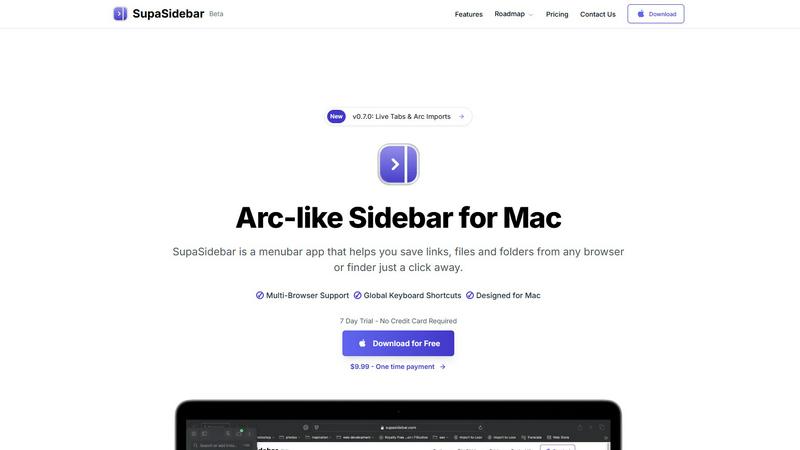
About SupaSidebar
SupaSidebar is an innovative menubar application designed exclusively for Mac users, revolutionizing how you manage and access your digital resources. This beautifully crafted sidebar enhances productivity by allowing you to save, organize, and retrieve links, files, and folders with unparalleled ease. Drawing inspiration from the user-centric design principles of the Arc browser, SupaSidebar integrates seamlessly with all major browsers, including Safari, Chrome, Firefox, Brave, and Arc itself. Whether you're a researcher, a creator, or a multitasker, SupaSidebar is tailored to meet your needs by keeping your most important resources at your fingertips. Its intuitive keyboard shortcuts streamline your workflow, enabling you to save or copy URLs effortlessly, thus minimizing distractions from navigating through multiple tabs or applications. With features like real-time tab visibility and automatic tracking of recently accessed sites, SupaSidebar transforms your digital workspace into a more efficient and organized environment.
Features of SupaSidebar
Integrated Browser Compatibility
SupaSidebar works with all major browsers, including Safari, Chrome, Firefox, Brave, and Arc. This cross-browser functionality ensures that no matter where you are saving or accessing your resources, they remain at your fingertips, enhancing your productivity without the need for multiple extensions or applications.
Global Keyboard Shortcuts
Designed with efficiency in mind, SupaSidebar offers intuitive global keyboard shortcuts such as ⌘ + ⌃ + S for saving items and ⌘ + ⌃ + C for copying URLs. These shortcuts allow users to perform actions quickly, minimizing the time spent navigating and maximizing focus on actual tasks.
Recent Sites Tracking
SupaSidebar automatically tracks every website you've accessed within the last 48 hours. This feature allows users to find their work instantly without having to remember URLs or sift through browser history, streamlining the research process and enhancing productivity.
Pinned Items for Quick Access
The ability to pin favorite links, files, and folders at the top of your sidebar ensures that your most important resources are readily accessible. This feature reduces the friction of searching through long lists, enabling faster access to frequently used items and keeping your workflow uninterrupted.
Use Cases of SupaSidebar
For Researchers
Researchers can benefit significantly from SupaSidebar by easily saving and organizing a plethora of links, documents, and articles. The quick access to recent sites and pinned favorites allows them to streamline their research process, making it faster to compile resources and citations.
For Content Creators
Content creators can utilize SupaSidebar to manage multiple projects simultaneously. By using the sidebar to organize links to inspiration, articles, and media assets, they can enhance their creative workflow and focus on producing quality content without losing track of essential resources.
For Multitaskers
For users who juggle various tasks, SupaSidebar provides a centralized location for quick access to apps, websites, and files. The fast search functionality ensures that they can find what they need in seconds, making it an indispensable tool for anyone with a busy schedule.
For Students
Students can leverage SupaSidebar to keep all their study materials organized. By saving lecture notes, research papers, and important links in one accessible sidebar, they can easily navigate their academic resources, leading to improved efficiency and better study habits.
Frequently Asked Questions
Is SupaSidebar a browser extension?
No, SupaSidebar is a menubar application designed for Mac that works independently from browser extensions. It integrates with multiple browsers for seamless access to your resources.
Which browsers does SupaSidebar work with?
SupaSidebar supports all major browsers including Safari, Chrome, Firefox, Brave, and Arc, allowing users to save and access their resources across different platforms effortlessly.
What macOS version do I need?
SupaSidebar requires macOS 13 or later to ensure optimal performance and access to the latest features and updates.
Where is my data stored?
Your data is stored locally on your Mac, ensuring that nothing leaves your device. SupaSidebar prioritizes user privacy and data security, meaning you can trust that your information remains confidential.
Pricing of SupaSidebar
SupaSidebar offers a free tier that includes essential features and supports all major browsers. For users looking for more advanced capabilities, the Pro subscription is available for $19.99 per month or $13.99 per year with a 30% discount using the code BETA30 during the beta phase. There is also a one-time purchase option for $49.99, giving users lifetime access to all features. Both plans come with a 14-day money-back guarantee, allowing users to try the service risk-free. A student discount of 50% is available to eligible users with valid university email verification.
Explore more in this category:
Similar to SupaSidebar

A free launch checklist for SaaS, apps, AI tools and more. Every step says why it matters and when you can skip it.


PerPageFax lets you send a fax online from any browser for a flat $0.50 per page — no account, no subscription, no fax machine.

Track staff & time. Free trial. Cloud/on-prem.

Your files are processed entirely in your browser. Nothing is sent to a server — the server only handles your account and credits.

AI finds your lost links. Summarizes & tags URLs.

Follow news, blogs, newsletters, and podcasts in a free RSS reader, with AI summaries, top stories, full-text search, saved searches, and a catalog.